
 target/strelka-ui
Strelka Web UI for File Submission and Analysis


[Releases][release] | [Pull Requests][pr] | [Issues][issues]
[![GitHub release][img-version-badge]][repo] [![Build Status][img-actions-badge]][actions-ci] [![Pull Requests][img-pr-badge]][pr] [![Slack][img-slack-badge]][slack] [![License][img-license-badge]][license]
The Strelka Web UI is a browser and API-based file submission frontend for the Strelka Enterprise File Scanner. It allows users to submit files to a Strelka cluster and review historical response results easily. The Strelka Web UI supports LDAP authentication and API access, providing a secure and flexible way to interact with the Strelka scanner. This document provides details on how to set up and use the Strelka Web UI, as well as its features and related projects.
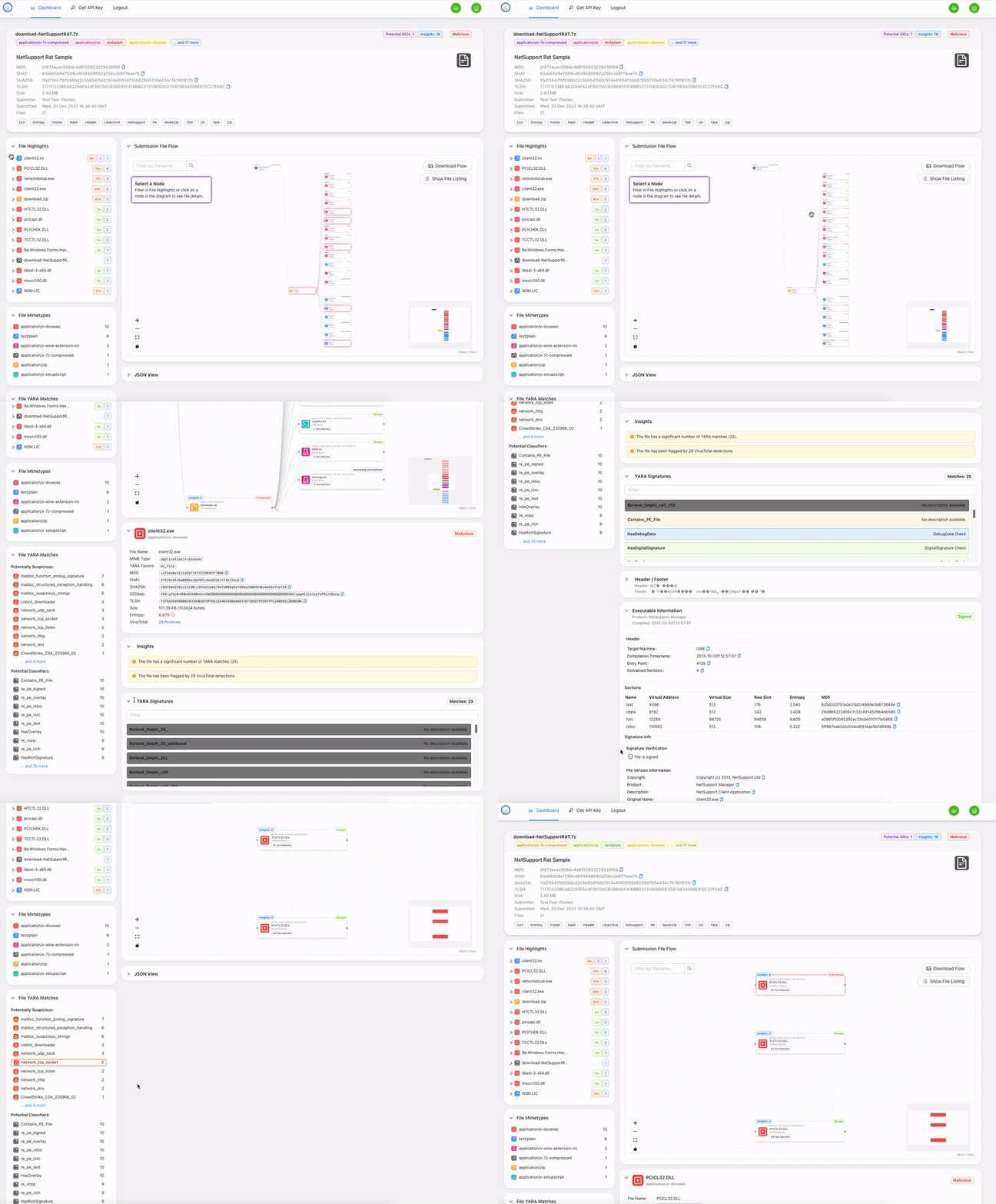
The file submission UI provides the following features:
By default, the Strelka UI is configured to use a minimal "quickstart" deployment that allows users to test the system. This deployment will target a local Strelka instance and start a local database. Users will be able to access this system with whatever username / password they want. For additional information on targeting a remote Strelka instance, database, or using LDAP for authentication, see the Additional Setup section:
Start or ensure Strelka cluster is ready and accessible.
See https://github.com/target/strelka for more information.
# Terminal 1
# From the ./strelka-ui directory
$ docker-compose -f docker-compose.yml up
1) Open A Browser
2) Navigate to 0.0.0.0:8080
3) Login with:
    - Username: strelka
    - Password: strelka
This section provides details on how to target a remote Strelka instance, a remote database for storage, and an LDAP server for authentication for more secure use. To enable these, you can use environment variables to override the defaults.
Backend configuration is provided through environment variables and can be set statically in ./app/config/config.py.
Running locally, the precedence of config is: System environment -> .env -> ./app/config/config.py.
Running in Docker, the precedence of config is: Docker environment -> System environment -> ./app/config/config.py.
Please reference ./app/example.env for environment variable setup.
The following detail the configuration items in ./app/config/config.py.
| Field Name | Value | Required |
|---|---|---|
| STRELKA_HOST | Strelka hostname (e.g., 0.0.0.0) | Yes |
| STRELKA_PORT | Strelka port number (e.g., 57314) | Yes |
| STRELKA_CERT | Path to certificate for Strelka, if needed (e.g., /path/to/cert.pem) | No |
| CA_CERT_PATH | Path to CA certificates for LDAP, if needed (e.g., /path/to/ca_certs) | No |
| VIRUSTOTAL_API_KEY | API Key for VirusTotal Hash Lookup | Yes |
| VIRUSTOTAL_API_LIMIT | Limit how many files should be scanned by VirusTotal (Default: 30) | Yes |
| LDAP_URL | URL to LDAP server (e.g., ldaps://ldap.example.com:636) | No |
| LDAP_SEARCH_BASE | Search base for LDAP queries (e.g., DC=example,DC=com) | No |
| LDAP_USERNAME_ORGANIZATION | Username organization for LDAP queries (e.g., org//) | No |
| LDAP_ATTRIBUTE_ACCOUNT_NAME_FIELD | LDAP attribute for account name (e.g., sAMAccountName) | No |
| LDAP_ATTRIBUTE_FIRST_NAME_FIELD | LDAP attribute for first name (e.g., givenName) | No |
| LDAP_ATTRIBUTE_LAST_NAME_FIELD | LDAP attribute for last name (e.g., sn) | No |
| LDAP_ATTRIBUTE_MEMBER_OF_FIELD | LDAP attribute for member of (e.g., memberOf) | No |
| LDAP_ATTRIBUTE_MEMBER_REQUIREMENT_FIELD | LDAP attribute for member requirement (e.g., AD Attribute) | No |
| STATIC_ASSET_FOLDER | Build folder for UI (e.g., build) | Yes |
| MIGRATION_DIRECTORY | SQLAlchemy migrations directory (e.g., ./migrations) | Yes |
| DATABASE_USERNAME | Database username (e.g., admin) | Yes |
| DATABASE_PASSWORD | Database password (e.g., password123) | Yes |
| DATABASE_HOST | Database hostname (e.g., db.example.com) | Yes |
| DATABASE_PORT | Database port number (e.g., 5432) | Yes |
| DATABASE_DBNAME | Name of the database (e.g., mydb) | Yes |
| API_KEY_EXPIRATION | Duration in days of API key expiration (e.g., 30) | Yes |
You can also set a reference in the UI submission table to allow users to quickly pivot to an external site based on the request.id. By modifying ./ui/src/config.js and following the SEARCH_URL example in the following table, you can provide users with a link to an external site (e.g., SIEM / logger). Ensure your link has the string <REPLACE> in it and the UI will replace that string with the relevant file's request ID.
Supported modification fields in ./ui/src/config.js:
| Field Name | Value | Example |
|---|---|---|
| SEARCH_URL | Search URL for the external application | Ex: https://search.com/?q=request.id= |
| SEARCH_NAME | Search name for the external application | Ex: Splunk |
| DEFAULT_EXCLUDED_SUBMITTERS | Default users to be exluded from Submission table view. Useful for hiding automations by default. | Ex: SearchBot |
If your network environment requires a custom CA bundle (e.g., a corporate TLS inspection proxy), you can supply it at both build time and runtime without committing any certificate files to the repository.
