 synacktiv/dicozorus
A tool to generate and maintain wordlists for Web fuzzing.

Dicozorus is a tool to generate and maintain web wordlists.
It eliminates the overhead of managing multiple wordlists by storing paths enriched with metadata in a local SQLite database.
Just want a great wordlist without the tool? Skip the setup and use lazy.txt.
Standard wordlists often present problems such as missing entries, lack of relevant sorting, inappropriate size or junk entries.
Dicozorus solves these issues by associating entries with enriched metadata. This allows:
$ pipx install git+https://github.com/synacktiv/dicozorus/
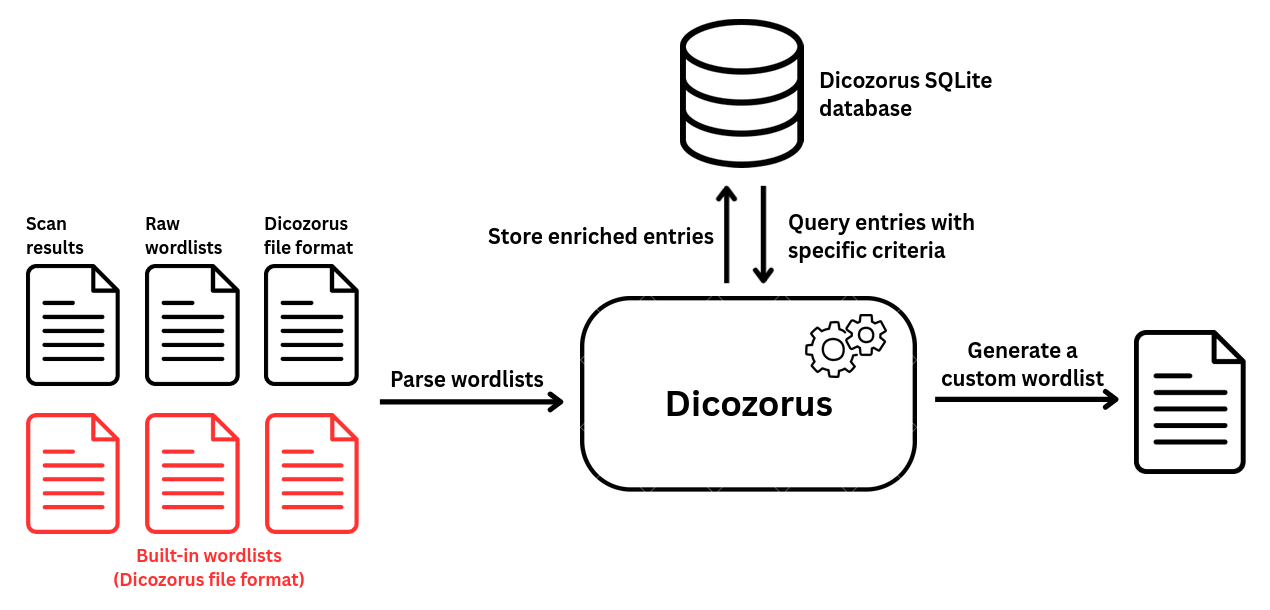
Dicozorus stores data locally in an SQLite database located at $HOME/.dicozorus/db.sqlite. Each entry tracks the following attributes:
| Field | Description |
|---|---|
| path | The endpoint name (e.g., jmx-console/ or app-dev.php). |
| type | Structural classification: FILE, DIRECTORY, or PATH. |
| criticality | Priority tier: CRITICAL, HIGH, MEDIUM, LOW, INFO, UNRANKED. |
| count | How many times this specific URL has been fed into the database. |
| category | Type of vulnerability it is attached (e.g., RCE, ADMIN_INTERFACE or KNOWN_APP) |
| tag | Contextual tags for technology filtering (e.g., PHP, JAVA, LINUX). |
| reference | An optional link to an associated vulnerability, advisory, or known endpoint documentation. |
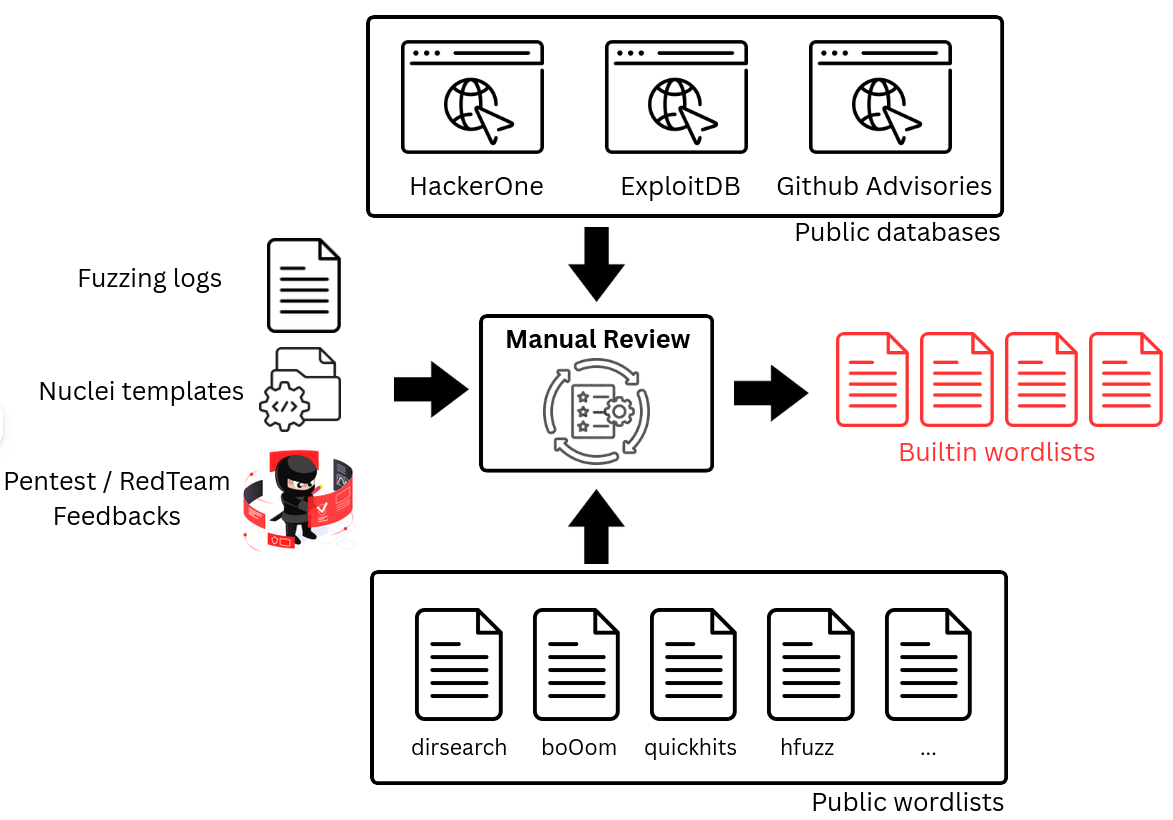
For more convenience, dicozorus is packed with built-in wordlists. The entries present in these wordlists comes from various locations:
dirsearch, bo0om, Seclist, nuclei. etc.)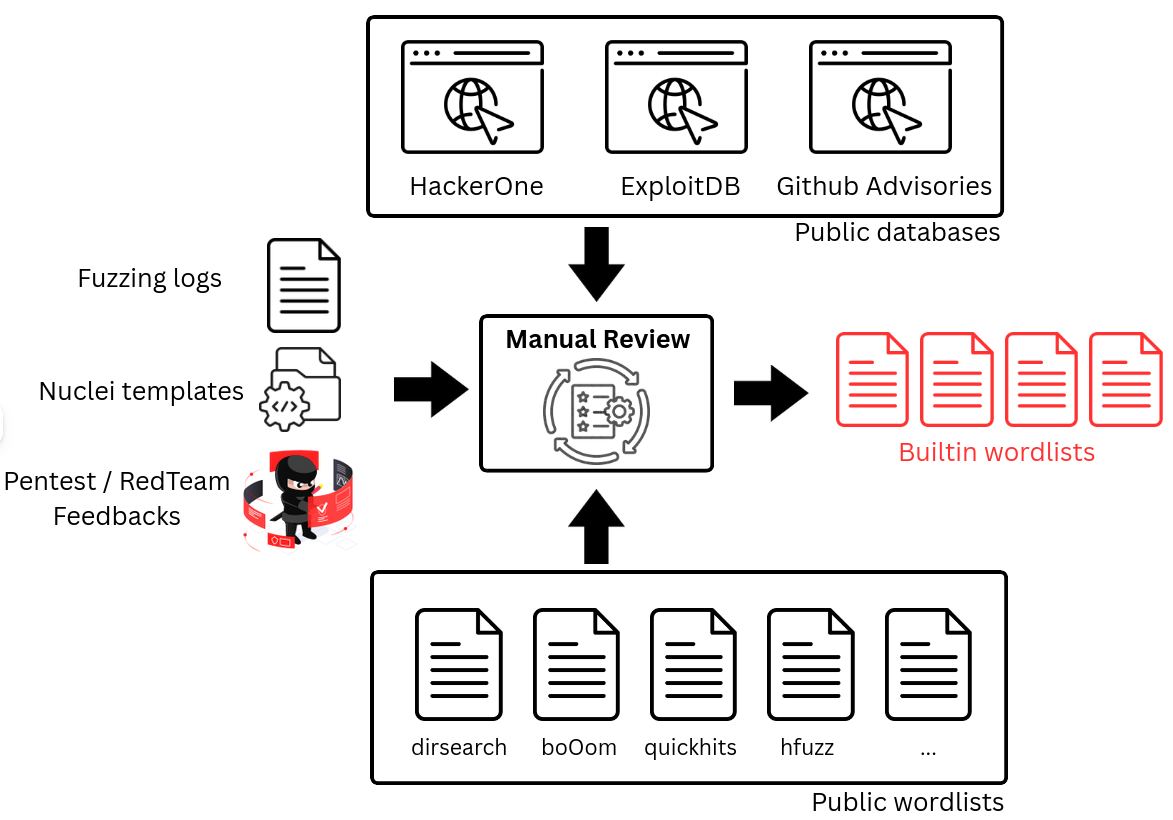
| Name | Description |
|---|---|
| critical.wordlist | CRITICAL entries only |
| high.wordlist | HIGH entries only |
| medium.wordlist | MEDIUM entries only |
| low.wordlist | LOW entries only |
| info.wordlist | INFO entries only |
| unranked.wordlist | Entries with no affected criticality |
| bo0om.wordlist | Entries from BoOoM wordlist with no affected criticality |
| dirsearch.wordlist | Entries from dirsearch wordlist with no affected criticality |
| exploitdb.wordlist | Entries from exploitDB with no affected criticality |
| hackerone.wordlist | Entries from HackerOne public reports with no affected criticality |
| seen.wordlist | Entries that were seen here and there, with no affected criticality |
| dangerous.wordlist | Dangerous entries such as /shutdown or reboot |
Each time a change is made to the built-in wordlists, lazy.txt is generated. It includes all built-in entries except dangerous ones, sorted by criticality and count.
$ dicozorus
usage: dicozorus [-h] [-v] [--version] {feed,gen,init,modify,stats,check} ...

Dicozorus allows to generate custom wordlists. It can be fed with wordlists from your own or initialized using a predefined set of wordlists. Entries are
stored in a sqlite database located in $HOME/.dicozorus/db.sqlite

positional arguments:
  {feed,gen,init,modify,stats,check}
                        Subcommand to run
    feed                Feed dicozorus db with wordlist files or scan results
    gen                 Generate wordlist using the dicozorus db.
    init                Initialize the dicozorus database.
    modify              Modify dicozorus DB directly. Use it to add / remove / update one or multiple entries.
    stats               Show stats about the dicozorus database.
    check               The check command is used to compare entry or wordlists with the dicozorus database

options:
  -h, --help            show this help message and exit
  -v, --verbose         increase verbosity
  --version             show program's version number and exit
$ dicozorus init -F -W wordlists/
[+] Initializing dicozorus database
[+] Creating dicozorus tables
[+] Parsing dicozorus CSV file wordlists/low.wordlist
[+] Parsing dicozorus CSV file wordlists/unranked.wordlist
[+] Parsing dicozorus CSV file wordlists/hackerone.wordlist
[+] Parsing dicozorus CSV file wordlists/medium.wordlist
[+] Parsing dicozorus CSV file wordlists/exploitdb.wordlist
[+] Parsing dicozorus CSV file wordlists/critical.wordlist
[+] Parsing dicozorus CSV file wordlists/high.wordlist
[+] Parsing dicozorus CSV file wordlists/bo0om.wordlist
[+] Parsing dicozorus CSV file wordlists/seen.wordlist
[+] Parsing dicozorus CSV file wordlists/info.wordlist
[+] Parsing dicozorus CSV file wordlists/dirsearch.wordlist
$ dicozorus feed -w fuzz.txt
[+] Parsing wordlist fuzz.txt
$ dicozorus gen -m 5
app_dev.php
actuator/jolokia
jolokia
bitrix/admin/php_command_line.php
jenkins/script
$ dicozorus check -e '_fragment'
_fragment [type: FILE, criticality: CRITICAL, count: 2, category: RCE, taglist: ['PHP', 'Bo0oM'], reference: https://www.ambionics.io/blog/symfony-secret-fragment]
$ dicozorus stats
[+] Total count: 22376
[+] Entry count by criticality:
	Critical: 344
	High: 697
	Medium: 668
	Low: 1168
	Info: 4262
	Unranked: 15237
[+] Entry count by type:
	FILE: 12583
	DIRECTORY: 3449
	PATH: 6344
[+] Entry count by category:
	UNCATEGORIZED: 19499
	KNOWN_APP: 871
	RCE: 335
	INFO_LEAK: 280
[...]
If you want to contribute entries to the core lists or parse custom inputs natively, use the following quoted Comma-Separated Values (CSV) structure:
## path, criticality, count, category, tags, reference
"actions/authenticate.php","CRITICAL","1","RCE","PHP","https://nvd.nist.gov/vuln/detail/CVE-2020-35729"
Here are a few rules when adding entries to the built-in wordlists:
upload.php, admin.aspx, webshell.jsp, administration/