
Skip to content
KitploitKITPLOIT
ToolsExploitsBlog
Log in
Submit
ToolsExploitsBlog
Submit

Hacking, PenTest, and Cybersecurity Tools for Your Security Arsenal!

Kitploit is a directory of hacking, cybersecurity, and pentesting tools. Discover the latest project updates to find vulnerabilities, analyze systems, automate testing, and strengthen your security.

··Feeds·Contact·Privacy·© 2026 Kitploit

Tool Directory

Categories

View all categories
Loading categories
codeql-workshop — Take first steps in CodeQL for Python by writing a query to find CVE-2024-32022 | Kitploit
Tools/GitHubGitHub/sylwia-budzynska/codeql-workshop
Static AnalysisVulnerability AnalysisCode AnalysisLearning & EducationCurated ResourcesLearning Paths & CoursesLabs & Practice
GitHubsylwia-budzynska/codeql-workshop

codeql-workshop

Take first steps in CodeQL for Python by writing a query to find CVE-2024-32022

View Repository
128157 days agoNot yet reviewed

Most Popular

View all →

Discover the most used tools by our community.

Explore all tools

Browse our collection of tools

View all tools →
Share

Finding vulnerabilities with CodeQL

Original workshop by Sylwia Budzynska

Prerequisites • Resources • Workshop

  • Who is this for: Security Engineers, Security Researchers, Developers.
  • What you'll learn: Learn how to use CodeQL for code exploration and for finding security issues.
  • What you'll build: Build a CodeQL query based on a security advisory to find a command injection.

📣 Prerequisites

You can choose between two options to run the workshop exercises:

  • Option A: Local installation (Using VS Code - CodeQL is run locally on your machine)
  • Option B: GitHub Codespace (Using a Browser or VS Code - CodeQL is run remotely on a Linux based GitHub Codespace in the cloud)

Option A: Local installation

Use a local CodeQL installation to work on the workshop exercises.

Prerequisites

  • Visual Studio Code (VS Code) and git installed on your local machine.

Instructions

  1. Install VS Code extension for CodeQL
  2. Run in the terminal:
git clone https://github.com/sylwia-budzynska/codeql-workshop
cd codeql-workshop
git submodule init
git submodule update --recursive  --depth 1

# Download CodeQL databases
curl -L -O "https://github.com/sylwia-budzynska/codeql-workshop/releases/download/v1/test-app-db.zip"
curl -L -O "https://github.com/sylwia-budzynska/codeql-workshop/releases/download/v1/kohya_ss-db.zip"
  1. In VS Code: File -> Open Workspace from File... vscode-codeql-starter.code-workspace
  2. Continue with Selecting a CodeQL Database
  3. Then Test your installation

Option B: GitHub Codespace

Use a remote GitHub Codespace to work on the workshop exercises.

Prerequisites

  • GitHub account (sign up for free)
  • Browser (you can do the whole workshop in a browser - this is the fastest setup) or Visual Studio Code (VS Code) with the GitHub Codespaces extension installed on your local machine.

Note: The first 120 hours per core of Codespace usage are free per month, we use a codespace with 4 cores for this workshop since 4 cores is the current maximum for free accounts. (If you have a Pro account, we recommend switching to an 8-core machine.)
Instructions

  1. Login to your GitHub account
  2. Go to the repo https://github.com/sylwia-budzynska/codeql-workshop
  3. Click on Code -> Codespaces
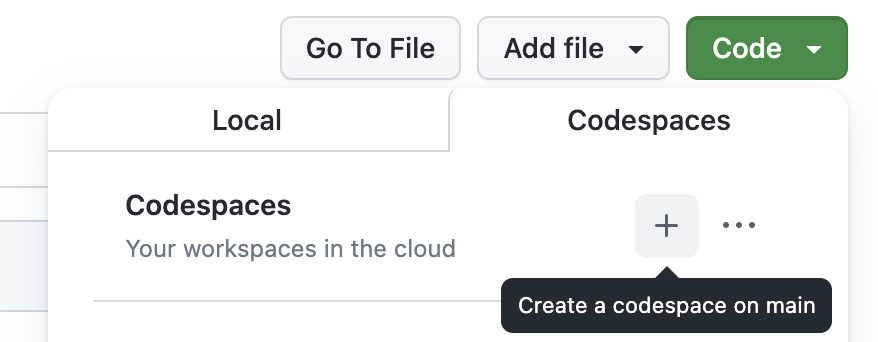
  4. Click on the plus sign (+) to create a new codespace.
Screenshot: Create Codespace, click on plus

VS Code will start in your browser and a remote Codespace will be built. This may take a few minutes. If you are asked to open the workspace vscode-codeql-starter.code-workspace click on "Open Workspace".
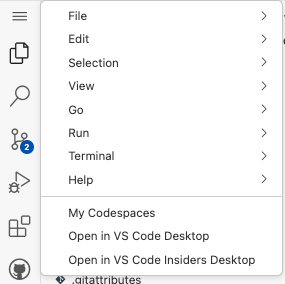
  1. If you want to use VS Code locally, press the three lines button in the top left corner and select "Open VS Code Desktop". The option might take up to a few minutes to appear.
Screenshot: Press the three lines button and Open in VS Code Desktop
  1. Continue with Selecting a CodeQL Database
  2. Then Test your installation

You can see your codespaces on at github.com/codespaces. The codespace will turn off on its own after a few hours of not using it, but to ensure you are not using additional hours of the 120h free ones, remember to go to github.com/codespaces > three dots > "Stop codespace" after the workshop.

Troubleshooting the installation

In case you see errors such as:

  • Failed to run query: Could not resolve library path for [..]
  • Could not resolve module [..]
  • Could not resolve type [..]

It is very likely that you missed cloning the git submodules (namely the ql repo). To fix this run git submodule init && git submodule update --recursive.

Select CodeQL Database

  1. Make sure you have the workspace vscode-codeql-starter.code-workspace open in VS Code.
  2. Click the "QL" icon on the left tab pane to go to the CodeQL view.
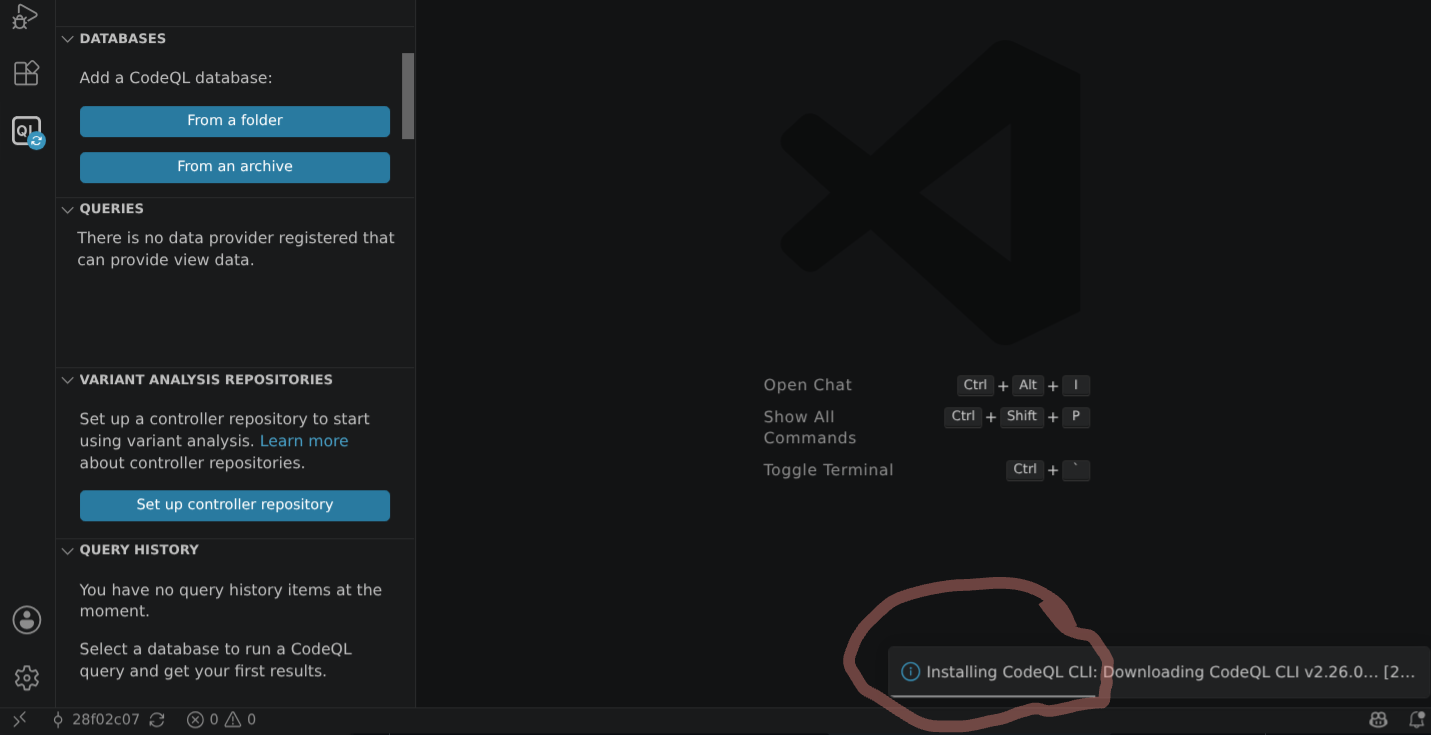
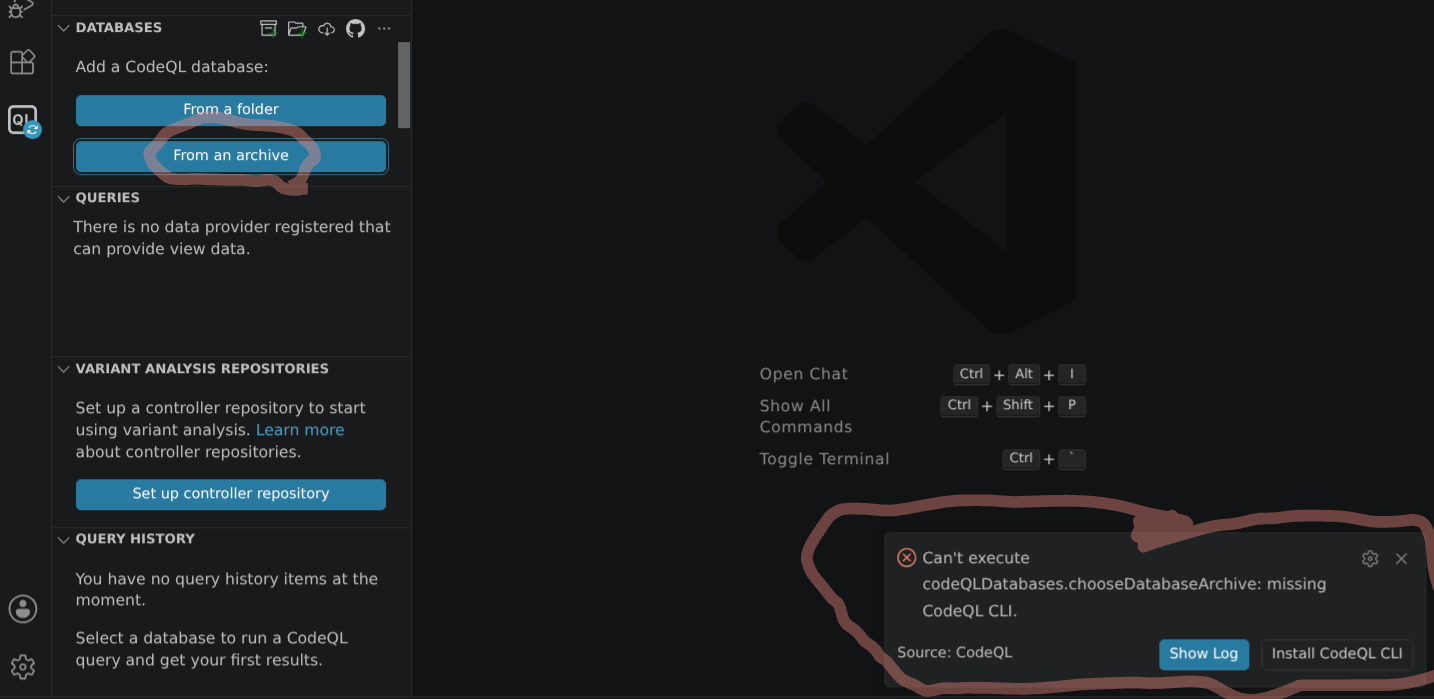
  3. Click on "Choose Database from Archive" and select the test-app-db.zip file in the root of the repository. Note: At this point you may encounter an error in VSCode with a pop-up message asking to install the CodeQL CLI. Accepting this install should fix the issue. After the CLI install finishes, you should be able to then complete the above database selection. Screenshot: VSCode error msg re. CodeQL Screenshot: VSCode installing CodeQL CLI
Test your installation

Prerequisites

Make sure that the previously chosen CodeQL database is selected in the CodeQL view. (Click on "Select" if it's not)

When the database is selected it should look like this (note the checkmark):
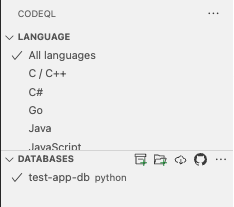
Screenshot: CodeQL Database selected

Instructions

  1. In VS Code: go to the workspace folder: codeql-custom-queries-python
  2. Create a new file test.ql
  3. add the following content: select "Hello World!"
  4. Save file, right click in the file area and choose "CodeQL: Run Query on Selected Database"
  5. You should see a new tab open with the result "Hello World!"

📚 Resources

  • QL tutorials
  • CodeQL for Python language guide
  • CodeQL documentation
  • QL language reference
  • CodeQL library for Python
  • Basic query for Python code
  • QL classes
  • CodeQL zero to hero part 1: the fundamentals of static analysis for vulnerability research
  • CodeQL zero to hero part 2: getting started with CodeQL
  • CodeQL zero to hero part 3: security research
  • CodeQL zero to hero part 4: Gradio case study
  • CodeQL zero to hero part 5: debugging queries

Workshop

Welcome to the workshop "Finding vunlnerabilities with CodeQL"!

Download Tool