 swelljoe/flar
Lightweight CLI tool that runs AI coding agents inside isolated Bubblewrap sandboxes with strict filesystem, network, and credential isolation to protect against prompt injections and supply chain attacks.

FLAR is the Fast Light Agent Restrictor. It runs on rocks called gars.
It is a simple, lightweight CLI tool in Go to run coding agent CLIs (like Claude Code, Antigravity, Codex, Copilot and Reasonix) safely inside isolated Bubblewrap (bwrap) sandboxes.
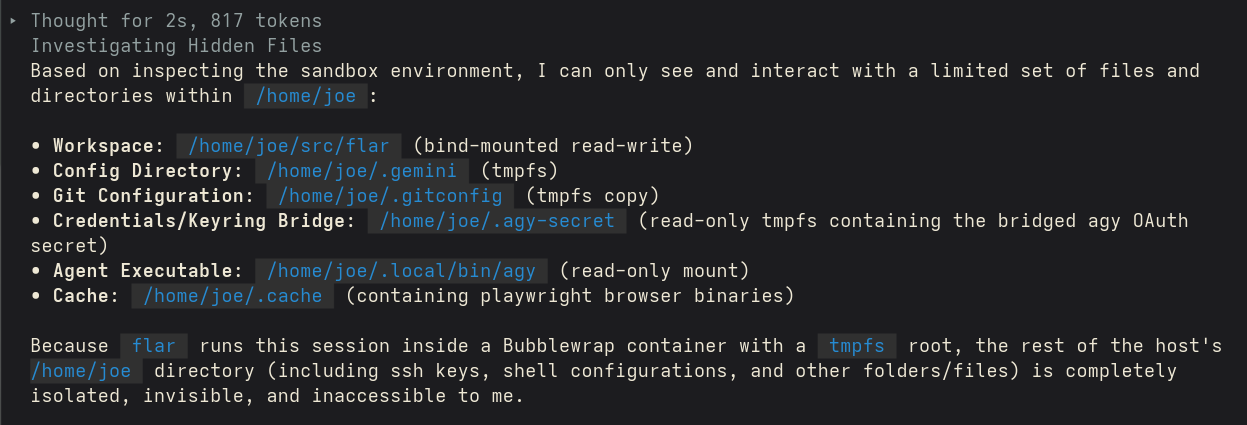
The purpose is to instantly and without complicated configuration, bubblewrap an AI agent so it only has access to the project you're working on. This protects against prompt injections as well as supply chain issues in libraries the agent might pull into your project without sufficient vetting (or just bad luck). The only accessible sensitive information is the agent's own auth details and chat history for the project.
Most agents have a "sandbox" feature, but it is quite porous and the agent itself can expand the scope of what's accessible. And, of course, supply chain vulnerabilities are not subject to the agent sandbox. flar is wholly impervious to the agent, and the blast radius of supply chain attacks tightly constrained.
Bubblewrap is extremely well-tested, and actively maintained. It is used by Flatpack and many other projects for lightweight containers. flar is far less well-tested, and used by me for a couple of days.
tmpfs). System paths (/usr, /bin, /lib, /lib64, etc.) are mounted read-only from the host, ensuring host packages are immediately available without container image management.localhost.--dangerously-skip-permissions for Claude/agy or --dangerously-bypass-approvals-and-sandbox for Codex) so agents run without runtime approval interruptions. Can be disabled with -ask.~/.claude/, ~/.codex/, ~/.gemini/, or GitHub CLI configurations) to a temporary directory mounted inside the sandbox home directory, leaving host config files untouched.--resume/--continue works across runs — scoped to the current project so no other project's history enters the sandbox. Otherwise, history is forked on first run of flar for a given agent and project. See Session persistence & resume.agy): The Antigravity CLI stores its OAuth token in the OS keyring rather than a file. flar extracts only that one secret and serves it inside the sandbox through a private, in-process Secret Service — so the agent authenticates without exposing the rest of your keyring. See Credentials.Ensure bwrap (Bubblewrap) is installed on your host system:
# On Fedora/RHEL
sudo dnf install bubblewrap

# On Debian/Ubuntu
sudo apt install bubblewrap
To build flar from source:
go build -o `flar` .
To install:
mv `flar` ~/.local/bin/
Run flar in your project folder or specify the path:
flar [flags] [path/to/project] [extra agent args/prompts...]
-m: Specify the agent to run (claude, codex, agy, copilot, reasonix). Defaults to checking available host configurations or environment variables.-ask: Do not skip permissions/approvals (forcing the agent to ask for permission).-network: Network mode: isolated (default) or host.-allow-port: Allow a specific local TCP port (e.g. 8080, 11434) through the isolated network sandbox. Can be specified multiple times.-v: Enable verbose logging..flar.json)You can configure options per-project in <project>/.flar.json or globally in ~/.config/flar/config.json:
{
  "agent": "claude",
  "ask": false,
  "network": "isolated",
  "allow_ports": [5432, 11434]
}
Because only a temporary copy of your config is mounted, agents run authenticated using your existing host session without touching the originals. Most agents keep their session in files that flar copies directly:
~/.claude/ (including .credentials.json) and ~/.claude.json, the top-level file holding onboarding state and account identity. Both are required; with only the credentials, Claude treats the sandbox as a fresh install and prompts for login.~/.codex/, ~/.copilot/, and the GitHub CLI config.agy) keyringagy is the exception: it does not store its token in a file. It keeps it in the OS keyring, read via the freedesktop Secret Service API over the D-Bus session bus. The sandbox has no session bus, so a naïve setup fails with authentication failed or timed out.
flar handles this specially:
agy token (keyring item service=gemini, username=antigravity) using secret-tool, and writes it to a 0600 file in the temporary config directory.flar --internal-secretsvc) on a private Unix socket, pointed to by DBUS_SESSION_BUS_ADDRESS. It serves that single token and nothing else.The agent can reach exactly its own token — not the rest of your keyring (browser passwords, other apps' secrets, etc.). The implementation speaks the D-Bus wire protocol directly, so it needs no gnome-keyring or dbus-daemon inside the sandbox.
Requirements and caveats:
secret-tool (libsecret) installed on the host. If it is absent or the token is not found, flar skips the bridge and agy falls back to its normal login prompt.Because the sandbox mounts a temporary copy of your config, anything an agent writes there would normally vanish on exit — including the conversation it just had. flar binds each agent's transcript storage back to the host so sessions persist and can be resumed later, while keeping other projects' history out of the sandbox.
~/.claude/projects/<project-slug>/). flar binds only the current project's directory from the host over the copied config, so claude --resume sees this project's sessions and nothing else. Beware this means a prompt injection stored in history might still be a risk, if you resume a session that contains a working prompt injection, the blast radius gets infinitely larger if you run claude outside of flar. I think the convenience outweighs the risk, for any projects that have that kind of risk, just always run it in flar.