stillbigjosh/adaptix-serverless-c2
Serverless C2 transport plugin for AdaptixC2 v1.2 using AWS Lambda + DynamoDB as the relay infrastructure.

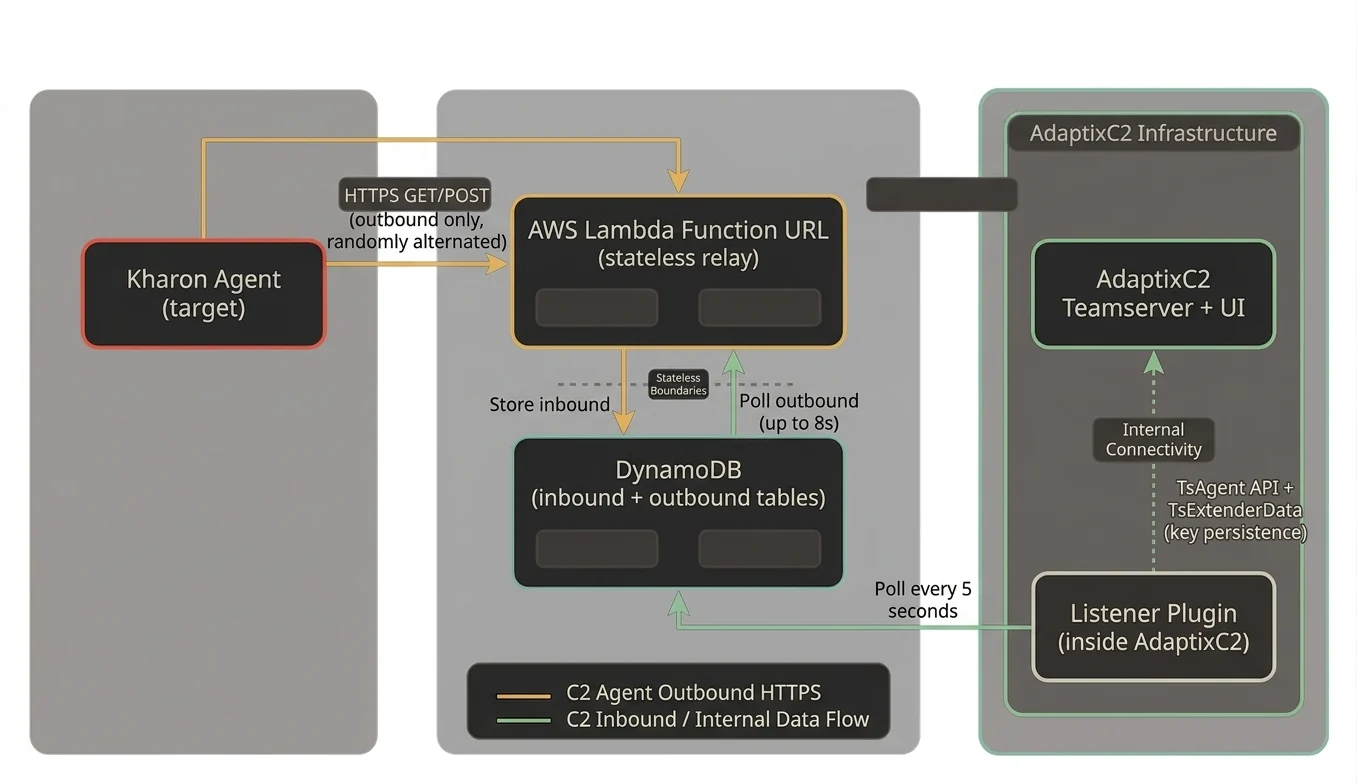
Serverless C2 transport plugin for AdaptixC2 v1.2 using AWS Lambda + DynamoDB as the relay infrastructure. Agent traffic appears as outbound HTTPS to AWS endpoints, requiring no inbound ports or public IPs on the C2 server.
Kharon Agent (target)
    |
    | HTTPS GET/POST (outbound only, randomly alternated)
    v
AWS Lambda Function URL (stateless relay)
    |
    | Store inbound / Poll outbound (up to 8s)
    v
DynamoDB (inbound + outbound tables)
    ^
    | Poll every 5 seconds
    |
Listener Plugin (inside AdaptixC2)
    |
    | TsAgent API + TsExtenderData (key persistence)
    v
AdaptixC2 Teamserver + UI
Data flow:
inbound tableoutbound table for up to 8 seconds (bridges the async gap for registration)inbound table for unprocessed recordsoutbound| Component | Path | Purpose |
|---|---|---|
| Kharon agent | agent/ | Bundled Kharon implant (C++ source) |
| Terraform | deploy/aws/ | Lambda + DynamoDB + IAM + KMS infrastructure |
| Lambda relay | deploy/aws/lambda/ | Stateless HTTP-to-DynamoDB proxy with outbound polling |
| Listener plugin | listener/ | AdaptixC2 plugin, DynamoDB polling, Kharon protocol bridge |
| Kharon configs | kharon/ | AXS command registration and config for agent/listener extenders |
| Patches | patches/ | AdaptixC2 source patches for BeaconServerless support |
| Profiles | profiles/ | Malleable HTTP profile for Lambda URL |
| Scripts | scripts/ | Install, build, deploy, uninstall |
aws configure)apt install clang lldapt install nasmapt install binutils-mingw-w64-x86-64In the AWS Console:
adaptix-deployerAmazonDynamoDBFullAccessAWSLambda_FullAccessIAMFullAccessCloudWatchLogsFullAccess{"Version":"2012-10-17","Statement":[{"Effect":"Allow","Action":"kms:*","Resource":"*"}]}KMSFullAccessaws configure
# AWS Access Key ID: <paste access key>
# AWS Secret Access Key: <paste secret key>
# Default region: us-east-1
# Default output format: json
Verify:
aws sts get-caller-identity
# Build the Lambda relay binary (cross-compiled for Amazon Linux)
./scripts/build_relay.sh

# Deploy Lambda + DynamoDB + IAM with Terraform
./scripts/deploy_infra.sh

# Note the Lambda Function URL from the output, e.g.:
# lambda_function_url = "https://xxxxx.lambda-url.us-east-1.on.aws"
./scripts/install.sh /path/to/AdaptixC2
This script will:
dist/ directory (certs, database, profile)GOEXPERIMENT flags from the server binary.so) with matching flagsBeaconServerless listenerrelay_api_key in your terraform.tfvars)profiles/lambda_default.jsonBeaconServerless listenerdeploy/aws/terraform.tfvars)region = "us-east-1"
function_name = "adaptix-relay"
relay_api_key = "your-secret-key-here"
tags = {
Project = "adaptix-serverless"
}
| Field | Description | Default |
|---|---|---|
| AWS Region | Region where infra is deployed | us-east-1 |
| Lambda URL | Function URL from Terraform output | (required) |
| Relay API Key | Must match Terraform's relay_api_key | (optional) |
| Inbound Table | DynamoDB table for agent check-ins | adaptix-inbound |
| Outbound Table | DynamoDB table for server responses | adaptix-outbound |
| Poll Interval | How often to check DynamoDB (seconds) | 5 |
| TTL Hours | DynamoDB record expiry | 24 |
The Kharon agent uses a custom binary protocol over HTTP:
[36-byte UUID][encrypted_checkin_data][16-byte LokyCrypt key][36-byte UUID][encrypted_payload] (no trailing key)TotalLen-16 overlaps into the UUID area. For a 44-byte packet, key starts at offset 28, stomping UUID bytes 28-35 and all encrypted data.The listener detects all three formats and handles them correctly.
The async nature of Lambda + DynamoDB means the listener hasn't processed the inbound record when Lambda first checks for a response. The Lambda polls the outbound table for up to 8 seconds after storing an inbound record, giving the listener time to process and queue the response. This is critical for registration (the Checkin response must arrive during the Checkin phase, not a later GetTask).
Agent encryption keys are persisted via TsExtenderDataSave/TsExtenderDataLoad (SQLite-backed). This survives service restarts. On restart, the listener recovers keys from the persistent store when it encounters a known agent ID.
Kharon randomly alternates between GET and POST requests (HTTP_METHOD_USE_BOTH). GET requests put data in the id query parameter (base64-encoded per the profile). POST requests put raw binary in the HTTP body. The Lambda handles both transparently.