Stevo's AI Blocklist
A filter list for uBlock Origin and AdGuard that hides specific website features which use Generative AI and content labeled as AI-generated.
Available for PC/Linux (Firefox, Edge, Chrome, Brave), macOS (Firefox, Edge, Chrome, Safari), Android (Firefox), and iOS/iPadOS (Safari, Brave).
Examples of filtered content
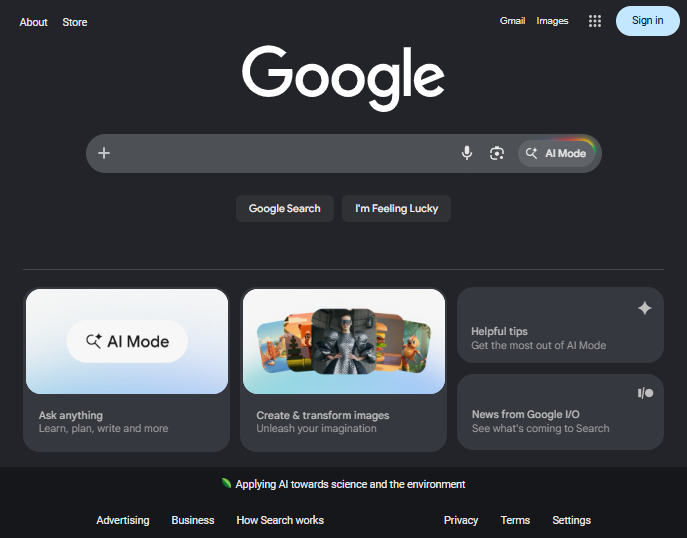
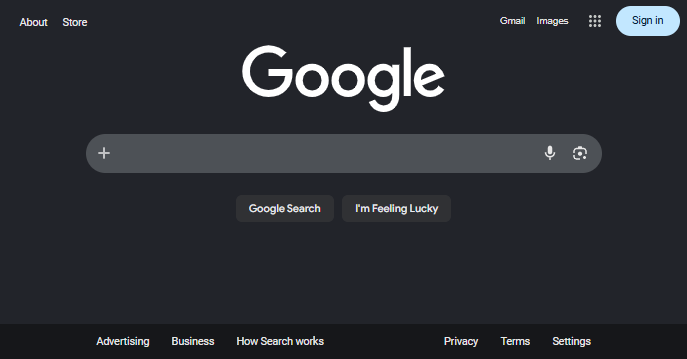
- Google's AI Overviews & AI Mode
- YouTube's Ask button, video summaries, auto-dubbing, and 'Super Resolution' upscaling
- Copilot buttons on GitHub, Bing, Microsoft 365, and Azure Portal
- Pixiv and DeviantArt images labeled as AI-generated
- Amazon Rufus and review summaries
- Reddit Answers and recommended posts from AI subreddits
- Facebook's AI chat & posts with AI info label
- TikTok videos tagged as AI-generated
- X/Twitter's Grok buttons, posts from Grok, and posts with "made with AI" label
Image comparison
Before:
After:
Installation
Firefox (Desktop)
- Install uBlock Origin.
- Left-click this link.
- Press "Subscribe" to import the filter list.
If the above instructions didn't work, (possibly due to multiple adblockers being installed), you can try importing manually:
- Install uBlock Origin.
- Click the uBlock button in the toolbar and open Dashboard Settings (gear icon)
- Select the "Filter lists" tab
- Open the "Import..." section and paste the following link:
https://raw.githubusercontent.com/Stevoisiak/Stevos-AI-Blocklist/refs/heads/main/GenAI-Blocklist.txt
- Click "Apply Changes"
Google Chrome (Desktop)
- Install AdGuard AdBlocker from the Chrome Web Store.
- Click the extensions button (puzzle piece icon) in the toolbar
- Click the green AdGuard icon then click the gear icon.
- Open the Filters tab, go to "Custom", and click the "extension settings" link.
- Enable "Allow User Scripts".
- Return to this page and left-click this link.
- Under "Add custom filter", hit "Next".
- (Recommended) Check the "Trusted" box.
- Click "Add".
Microsoft Edge (Desktop)
- Install AdGuard AdBlocker from the Chrome Web Store.
- Click the extensions button (puzzle piece icon) in the toolbar
- Click the green AdGuard icon then click the gear icon.
- Open the Filters tab, go to "Custom", and click the "extension settings" link.
- Return to this page and left-click this link.
- Under "Add custom filter", hit "Next".
- (Recommended) Check the "Trusted" box.
- Click "Add".
Safari (macOS)
- Install AdGuard Mini. (Instructions)
- Open AdGuard Mini, accept the EULA, then click Continue.
- Click "Open Settings" to open Safari settings.
- Enable the checkboxes for all seven AdGuard extensions.
- (Optional) Enable "Allow in Private Browsing"
- Click the "AdGuard for Safari" extension, and click "Always Allow on Every Website..."
- In the notification that appears, click "Always Allow on Every Website..." again.
- Open the AdGuard Mini app and go to Settings → Filters → Custom filters
- Paste the following link:
https://raw.githubusercontent.com/Stevoisiak/Stevos-AI-Blocklist/refs/heads/main/GenAI-Blocklist.txt
- Click Next
- (Recommended) Check the "Trusted" box.
- Change the toggle for custom filters from "Disabled" to "Enabled"
Brave (Desktop)
- Open Settings → Extensions → Manifest V2 extensions.
- Toggle "Enable uBlock Origin" to On.
- Left-click this link.
- Press "Subscribe" to import the filter list.
Firefox (Android)
- Open Firefox
- Tap the action menu (⋮) and select "Extensions"
- Click the plus (+) next to uBlock Origin and install it
- Close and reopen the Extensions menu
- Tap uBlock Origin and select Settings
- Open the "Filter lists" tab
- Scroll to the bottom and tap "Import..."
- Paste in the following link:
https://raw.githubusercontent.com/Stevoisiak/Stevos-AI-Blocklist/refs/heads/main/GenAI-Blocklist.txt
- Tap "Apply Changes"
Safari (iOS/iPadOS)
- Install AdGuard Ad Blocker for Safari
- From your home screen, open Settings → Apps → Safari → Extensions
- Tap each "AdGuard" extension and enable Allow Extension.
- (Optional) Enable "Allow in Private Browsing"
- Tap the first "Adguard" extension, scroll down and change "All websites" to "Allow".
- Open the AdGuard app and go through initial setup
- Tap the shield icon to open the Protection screen
- Tap Safari Protection → Filters → Annoyances (Tap the text itself, not the on-off icon)
- Scroll down and enable "Stevo's AI Blocklist"
- Change the toggle for the Annoyances category from "Disabled" to "Enabled".
Brave Browser (iOS/iPadOS)
- Install Brave Browser.
- Open Brave and tap ... → Shields and Privacy → Content Filtering → Add Filter by URL...
- Paste in the following link:
https://raw.githubusercontent.com/Stevoisiak/Stevos-AI-Blocklist/refs/heads/main/GenAI-Blocklist.txt
- Press Add.
There is an additional optional filter list GenAI-Blocklist-Extra.txt with additional filters that are more subjective or experimental. They may be more prone to accidentally blocking non-AI content or breaking site functionality. These include:
- AI category in headers on news sites.
- Customer support chatbots that must be used before you can contact human customer support.
- YouTube: Trusted filter to remove autodubbing when loading a video directly via URL, but causes visible page refresh even on videos without autodubbing.
- Zoom: Highlights and automatic chapters on recorded meetings.
- Early versions of filters that require testing
 stevoisiak/stevos-ai-blocklist
