 spyboy-productions/ciphergist
End-to-End Encrypted Messaging via GitHub Gists






CipherGist is a lightweight, secure, and open-source encrypted messenger that enables private communication using GitHub Gists as the backend. It leverages NaCl (libsodium) for state-of-the-art encryption, ensuring that only the intended recipient can decrypt your messages. No centralized servers, no metadata tracking—just pure encrypted messaging.
✅ End-to-End Encryption – Uses Ed25519 (signing) and X25519 (encryption) for secure communication.
✅ No Central Server – Messages are stored and exchanged via GitHub Gists.
✅ Self-Destructing Keys – Private keys are never shared or stored remotely.
✅ Lightweight & Fast – Runs in a terminal, with minimal dependencies.
✅ Cross-Platform – Works on Windows, Android(Termux), macOS, and Linux.
✅ Fully Open-Source – Code transparency ensures security.
🔹 Unlike traditional messengers (WhatsApp, Signal), CipherGist does not use a central server.
🔹 No phone number, email, or identity required—just a GitHub account.
🔹 Messages are not stored permanently—once deleted from Gist, they are gone forever.
🔹 No third-party tracking—GitHub itself can't read your encrypted messages.
| Feature | CipherGist 🛡️ | Signal 🔵 | Telegram ✈️ | WhatsApp ✅ | Email (PGP) 📧 |
|---|---|---|---|---|---|
| End-to-End Encryption | ✅ Yes (NaCl - X25519) | ✅ Yes (Signal Protocol) | ⚠️ Secret Chats Only | ✅ Yes | ✅ Yes (PGP) |
| Requires Phone Number | ❌ No | ✅ Yes | ✅ Yes | ✅ Yes | ❌ No |
| Server Storage | ❌ None (Uses GitHub Gist) | ✅ Yes (Signal servers) | ✅ Yes (Cloud-based) | ✅ Yes (Meta servers) | ❌ No |
| Metadata Collection | ❌ No (Only encrypted text in Gist) | ⚠️ Some (Stores who you contact) | ⚠️ High (Cloud sync) | 🚨 Very High (Metadata & backups) | ❌ No |
| Self-Hosted Option | ✅ Yes (Your own Gist) | ❌ No | ❌ No | ❌ No | ✅ Yes (Own mail server) |
| Message Deletion | ✅ Fully Controllable (Delete Gist) | ✅ Yes (Disappearing messages) | ✅ Yes | ✅ Yes | ✅ Yes |
| Group Chat Support | ❌ Not yet | ✅ Yes | ✅ Yes | ✅ Yes | ❌ No |
| Multi-Device Support | ✅ Yes (Cross-platform) | ✅ Yes | ✅ Yes | ✅ Yes | ✅ Yes |
| Third-Party Tracking | ❌ None | ❌ No | ✅ Yes (Cloud storage) | ✅ Yes (Meta tracking) | ❌ No |
| Dependencies | 🔹 Python, GitHub Gist | 🔹 Signal App | 🔹 Telegram App | 🔹 WhatsApp App | 🔹 PGP Tools |
| Message Delivery | 🔄 Polls Gist every 3 sec | 📩 Push Notifications | 📩 Push Notifications | 📩 Push Notifications | |
| Open-Source | ✅ Yes | ✅ Yes | ⚠️ Partially | ❌ No | ✅ Yes |
| Data Ownership | ✅ You own your messages | ❌ No | ❌ No | ❌ No | ✅ Yes |
| Best Use Case | 🔐 Anonymous Secure Chat | 🔵 Private Messaging | 🔹 Casual & Cloud Backup | ✅ Friends & Family | 📧 Email Security |
🚀 Conclusion:
CipherGist is the most private and self-hosted option, ideal for those who want no central servers, no phone numbers, and full control over encryption keys. However, it's not as user-friendly as mainstream messengers and currently lacks group chat features.
git clone https://github.com/spyboy-productions/CipherGist.git
cd CipherGist
pip install -r requirements.txt
Go to GitHub and create an account if you don’t have one.

python CipherGist.py
If it’s your first time running, it will ask for:
🔹 GitHub Token
🔹 Gist ID
These will be stored in config.txt for future use.
⚠️ IMPORTANT:
**Both you and your friend must use the same config.txt ** for the conversation to work!
You can manually share config.txt with your friends or You can share it using the following method...
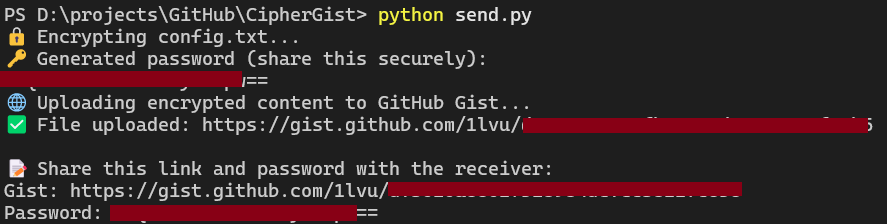
python send.py
- 🔐 Note: It encrypts config.txt, uploads it to a Gist, and automatically deletes it after your friend downloads and decrypts it.
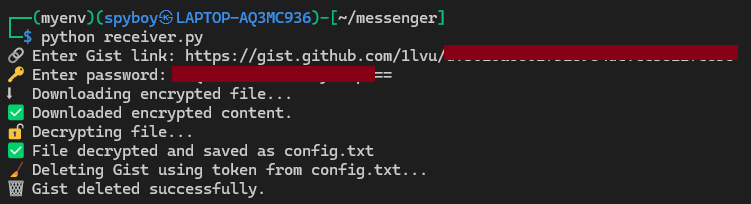
python receiver.py
it will download, decrypt and save config.txt in original format and then delete the gist.
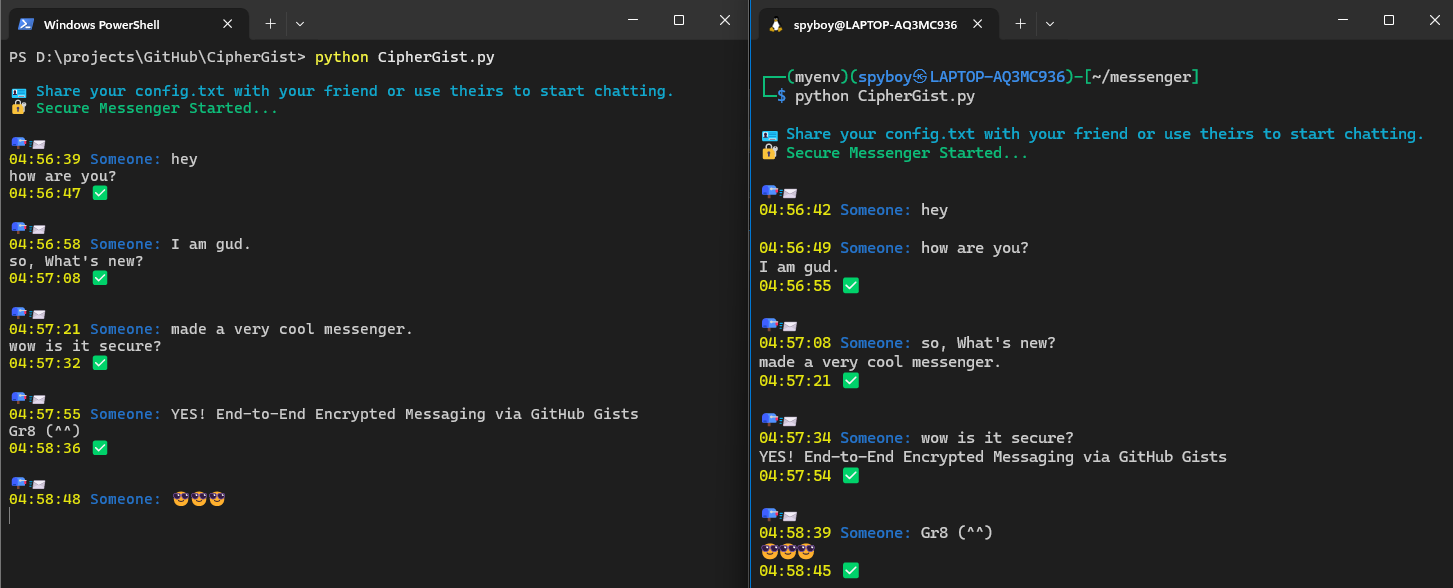
python CipherGist.py
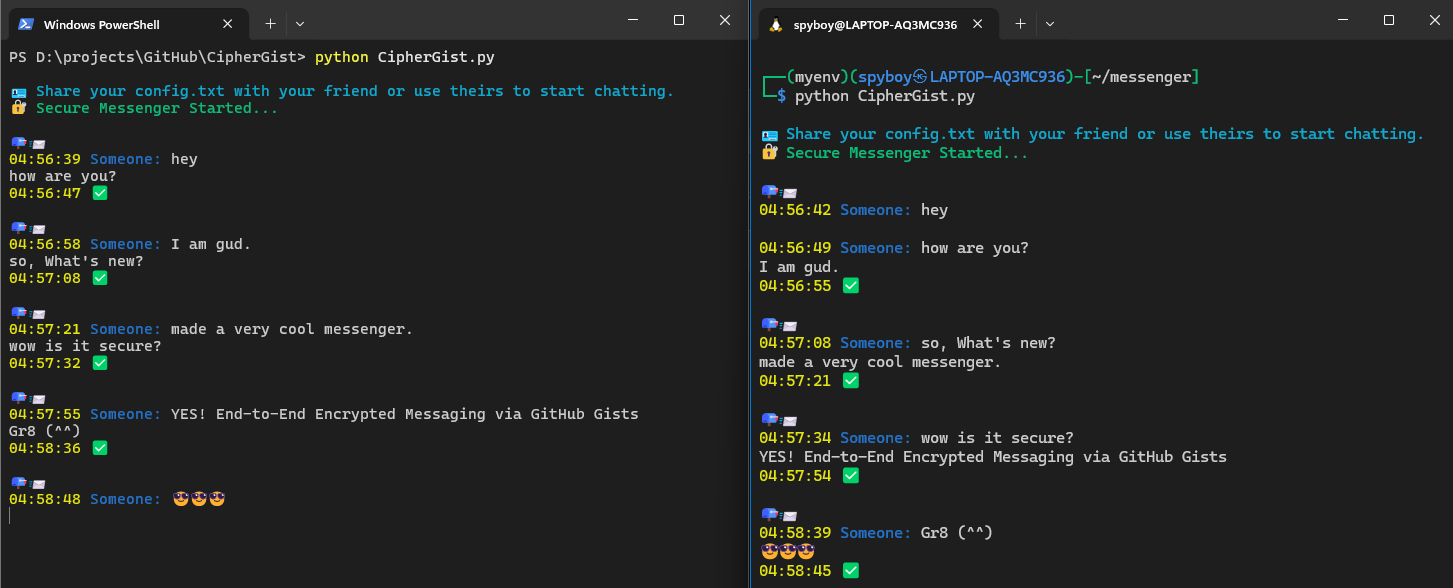
📤 Sending a Message:
📥 Receiving Messages:
✔ Uses NaCl cryptography (Ed25519 & X25519) – trusted by security experts.
✔ No passwords stored – keys are generated per session.
✔ No central server – GitHub can't read your encrypted messages.
✔ No metadata leaks – only encrypted text is uploaded to Gists.
✔ Self-hosted & auditable – you control the encryption keys.
🚀 Mobile App – A mobile version for Android/iOS.
🔒 Multi-User Chat Support – Secure group conversations.
Forget about centralized messengers. Take control of your privacy with CipherGist.
