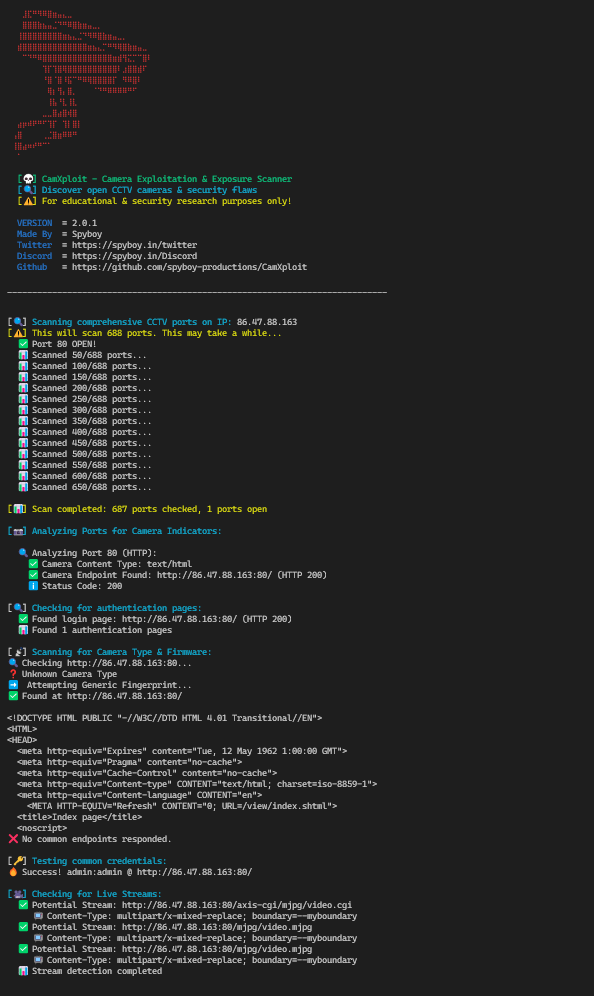
 spyboy-productions/camxploit
Security reconnaissance and assessment tool for identifying potentially exposed IP cameras by analyzing open ports, service configurations, and common misconfigurations.






CamXploit is a security reconnaissance tool designed to help researchers and defenders assess whether an IP address is hosting a potentially exposed IP camera or CCTV service.
The tool performs non-intrusive checks such as scanning commonly used camera ports, identifying accessible web interfaces, and highlighting common configuration weaknesses (e.g., default setups or publicly accessible services). It also provides contextual search links to assist further manual investigation and verification.
CamXploit is intended for security research, awareness, and authorized testing, helping organizations and individuals identify misconfigurations and reduce the risk of unauthorized access to camera infrastructure.
[!IMPORTANT] CamXploit performs reconnaissance and configuration analysis only and must be used strictly on systems you own or have explicit authorization to test.

[OPEN] 8080/tcp HTTP-Alt (Web Interface))192.168.1.1:85) to scan specific ports or ensure custom ports are checked✔️ Scans all common CCTV ports
✔️ Detects exposed camera login pages
✔️ Checks if the device is a camera stream
✔️ Identifies camera brands & known vulnerabilities
✔️ Tests for default credentials on login pages
✔️ Provides manual search links (Shodan, Censys, Zoomeye, Google Dorking)
✔️ Google Dorking suggestions for deeper recon
✔️ Enhanced Camera Detection with detailed port analysis and brand identification
✔️ Live Stream Detection for RTSP, RTMP, HTTP, and MMS protocols
✔️ Comprehensive IP & Location Information with Google Maps/Earth links
✔️ Multi-threaded Port Scanning for faster results
✔️ Enhanced Error Handling and SSL support
✔️ Detailed Camera Brand Detection (Hikvision, Dahua, Axis, Sony, Bosch, Samsung, Panasonic, Vivotek, CP Plus)
✔️ ONVIF Protocol Support for standardized camera communication
✔️ Smart Brute-force Protection with rate limiting
✔️ Detailed Port Analysis showing server information and authentication types
✔️ RTSP Detection on Any Port - Actively probes ports for RTSP, not just standard port 554
✔️ Service Name Identification - Shows what service is running on each open port
✔️ RTSP Credential Testing - Tests RTSP Basic Auth (most important for CCTV cameras!)
✔️ Smart RTSP Suggestions - Automatically suggests RTSP URLs for detected camera brands
✔️ Priority Credential Testing - Tests most common credentials first (admin:admin, admin:1234, etc.)
✔️ Expanded Credential Database - 100+ default credentials across all major CCTV brands
✔️ VLC Integration Guide - Clear instructions for viewing RTSP streams in VLC Media Player
✔️ Multipart Stream Detection - Detects MJPEG streams (multipart/x-mixed-replace)
✔️ IP:PORT Format Support - Accept IP:PORT input to scan specific ports or ensure custom ports are checked
git clone https://github.com/spyboy-productions/CamXploit.git
cd CamXploit
pip install -r requirements.txt
python CamXploit.py
Enter the public IP address (or IP:PORT format) of the target device when prompted.
Input Formats:
192.168.1.1 - Scans all common CCTV ports192.168.1.1:85 - Scans all ports + ensures port 85 is checked (useful for custom ports)192.168.1.1:9000 - Scans all ports + ensures port 9000 is checked1️⃣ Scans open ports (Common CCTV ports) with service name identification
2️⃣ Checks if a camera is present
3️⃣ If a camera is found, it:
192.168.1.1:85) - ensures that port is scanned even if not in common ports list