
Content-blind reverse proxy for exposure-protected security scanning

A local reverse proxy for content-blind security scanning.
Go · Local HTTPS · HTTP & WebSocket · Tor / SOCKS5
The reasoning / How it works / Quick start / Certificates / Tor / CAPTCHA / Evidence / Development
Security testing is a behavioral discipline. What an application does -- how it handles input, what controls it enforces, what it reflects back, how it fails -- is what matters. Identity should be irrelevant to that analysis.
AI-assisted security tools don't work that way. They see the target -- its domain, its brand, its organization -- and they form opinions. They soften findings for well-known services. They refuse to probe based on who the target is. They decline to test paths they associate with a particular vendor. The AI is making decisions that belong to the operator, and it's making them based on context rather than behavior.
This is the wrong axis. The operator authorizes the scope. The tool evaluates behavior. Those are different responsibilities and they shouldn't collapse into one. But today, every AI-assisted tool has the target's full identity wired into every decision it makes -- what to test, how hard to push, whether to report.
Blinder is a starting point: a practical tool, but also a position that testing should be separated from context. This is an early attempt to get the idea out there. If the approach resonates, we'd welcome better implementations, contributions, or just the conversation about where the line should be.
Stripping identity doesn't mean stripping content. That's where most naive approaches break. Vulnerabilities are observable as changes in response content -- error messages, reflected input, data the session shouldn't reach, computed results that reveal server-side evaluation. If a proxy stripped this content, it would hide the evidence the tester is looking for.
The requirement is surgical: remove identity while preserving behavioral signals. A page that belongs to no one but behaves exactly as the original does -- including when it behaves badly.
Blinder is a local HTTPS reverse proxy that sits between the AI scanner (or browser) and the target. It rewrites identity -- domains, brands, organization names, emails, IP addresses -- while preserving the application's functional behavior: its errors, its reflections, its security controls, its status codes, its content structure.
To the downstream AI, the target is an anonymous locally hosted application at https://127.0.0.1:8099. No brand to recognize. No domain to form an opinion about. The AI tests what the application does, not who it is.
This is content-blind scanning: the operator controls who the target is; the AI focuses on what it does.
Replacement content is part of correctness: neutral filler for display, reversible values for application data, and preserved diagnostics and control behavior. Generated removal notices don't belong in pages.
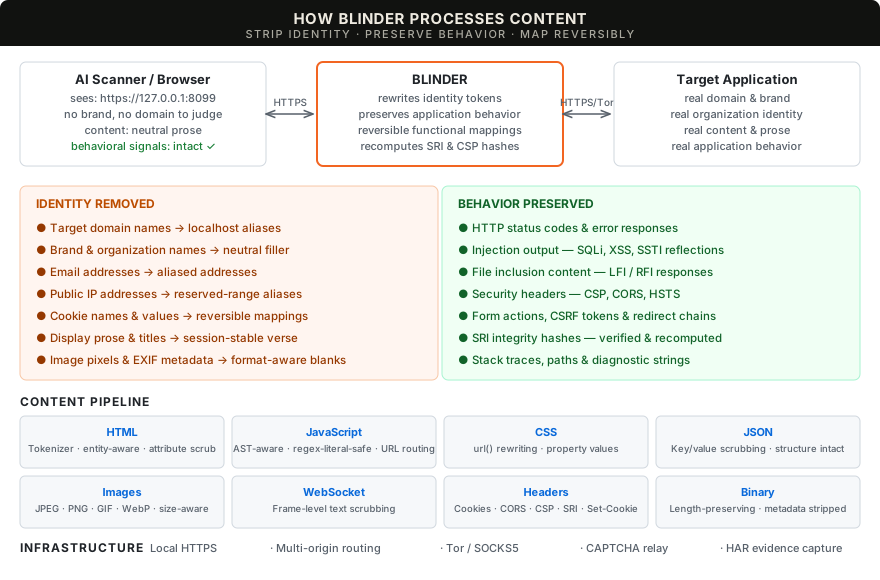
| Content scrubbing | Display text replaced with neutral prose filler; interactive elements (buttons, labels, form controls) and diagnostic content (error messages, stack traces, reflected markup) preserved. Identity tokens, domain references and cookie values rewritten across HTTP bodies, headers and WebSocket text. --preserve-content keeps original display text for identity-only scrubbing. |
| Resource integrity | Original SRI verified per reference and recomputed for rewritten resources, with corresponding CSP hashes translated. Versioned references bind the served bytes; external resource integrity is preserved. |
| Response cache | Separate upstream/downstream cache validators. 304 revalidation merges security-policy headers. Vary-aware eviction. |
| Session handling | Reversible cookie names with per-value scrubbing. Multi-origin routing via --extra-origin with deterministic alias hostnames, Host-header routing and CORS origin translation. |
| CAPTCHA relay | Operator-facing challenge queue and separate provider origins. Tor-routed resources keep provider cookies, CSP and CORS separate from the target and operator. |
| Private routing | Upstream HTTP and WebSocket through Tor SOCKS5 with remote hostname resolution. Tor failures are hard errors, never silent fallbacks. |
| Local HTTPS | Local CA with 90-day lifetime and automatic renewal; session leaf certificates are signed on the fly. Trust the CA once -- adding origins or changing aliases never requires re-trusting. Ephemeral mode available. |
| Evidence | Pre-scrub HAR with journal-based persistence, request manifest with per-request scrub/leak counts, domain mappings and scrub report. Paired response comparisons check byte-size fidelity and whether content/status changes survive masking. Signal-preservation checks record verified behavior and remaining defects. |
See supported behavior and delivery gates for implementation status and known limitations.
Build with Go 1.26+. The binary has no external runtime dependency.
git clone https://github.com/Splinters-io/blinder.git
cd blinder
make build
./blinder --preflight
Follow the OS-specific certificate advice, then start a session:
capture_dir=$(mktemp -d)
./blinder --target https://your-authorized-target.example \
  --identity YourOrganisation \
  --har "$capture_dir/session.har" \
  --output "$capture_dir/output"
Point your browser or scanner at https://127.0.0.1:8099. Add multiple identity tokens with repeated --identity flags. Stop with Ctrl-C to save the session evidence.
Use --config (-c) to load defaults from a YAML file. CLI flags override the file.
# blinder.yaml
listen: "127.0.0.1:9443"
target: "https://example.com"
alias: "target-001.local"
identity:
  - "ExampleCorp"
  - "example.com"
output: "/tmp/blinder-output"
captcha_config: "captcha.yaml"
no_verify_tls: true
tor:
  enabled: false
  addr: "127.0.0.1:9050"
har:
  path: "/tmp/session.har"
  max_body: 10485760
./blinder -c blinder.yaml
# override the listen port from the file:
./blinder -c blinder.yaml --listen 127.0.0.1:7777
Blinder generates a local CA (Certificate Authority) on first run and uses it to sign session-specific leaf certificates. Trust the CA once; all current and future endpoints -- including extra origins added later -- are automatically trusted without re-running setup.
| Platform | Setup |
|---|---|
| macOS | Run the printed --trust-cert command, review the CA fingerprint and approve user Keychain trust. One-time setup. |
| Ubuntu / Linux | Use the printed curl --cacert command or install the CA certificate in your browser/scanner's trust store. |

