 spiralbl0ck/browser-pwning-
A proper well structured documentation for getting started with chrome pwning & v8 pwning

A proper well structured documentation for getting started with chrome pwning & v8 pwning
How this doc is organised
Browsers are one of today’s most used pieces of technology. On every off the shelf computer, if we just plug and play we will see a browser installed. That’s why from an attacker’s perspective and a threat model perspective it’s very rewaradable if the attacker is able to compromise the browser through a malicious page. Given the upper arguments I choose to study Google’s Javascript Engine, particularly v8.
Given the gigantic nature of v8’s project,I choose as a starting point the interpreter, namely d8.Although extensive research has been done already on d8, we hope to at least find one bug and if not be able to move forward with research on browser exploitation since v8 provides entry ground for the basic exploit development strategies used on browser exploitation .
Another reason why I choose v8 as a target is that it’s used across multiple browsers.
If we look under the hood we can see that the engine is used in MicrosoftEdge too, so there is a multiple bug bounty award chance. For the underlying operating system the researcher will be using a mix of windows and linux since there’s no restriction in terms of obtaining a shell since v8 bugs allow code execution through wasm pages and it’s not bound to any platform specific.
Unfortunately, while an exploited bug in v8 would result in code execution, we won’t be able to execute any code due to the sandbox, and as such we would get code execution in the context of the renderer,which would not allow us to execute code on the machine. For that we would need another exploit for the sandbox,thus we would need a full chain in order to exploit the system.
And such we define the following goals in order to be able to get started with browser hacking
At the first stage of the project it's necessary to gather as much knowledge regarding Chrome Architecture and how each componenet interact with each other. In order to better understand this we need to the Chromium Project into multiple subcomponenets such that we are able to isolate everything and analyse it properly. More precisely in how many subcomponents each of the following components breaks
Now the most logical step for a first step is understanding chromium architecture. So ok we want to exploit the browser, but what happends when we first start the browser? Well after clicking the chromium executable , the executable starts some processes.
The order and their name is as follows:
First one is called content process. What does this process do ?
Now that we briefly know what it does it is time to go more indepth on it:
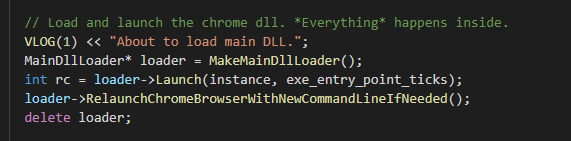 .
.chrome_exe_main_win.cc and if u are currious to read the whole code it's located at chromium/src/chrome/app . Ok, going down with the execution we can see it calls MakeMainDllLoader() to call the dll loaded class after that it launches the "loader" aka it loads the chrome.dll and if it is necessary restarts it with the necessary command lines. To further analyse the Loader we need to understand it's code, which in the same directory, in the file mail_dll_loader_win.cc.Scrolling all the way down of the file we can see the call to MakeMainDllLoader which in terms calls based on the verion you have ChromeDllLoader or ChromiumDllLoader.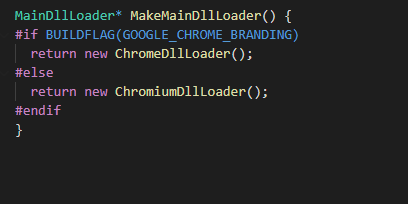
ChromiumDllLoader is a class which inherites from MainDllLoader. We can see from the definition that the class simply does is to load the dll based on the arguments passed to cmdline and process type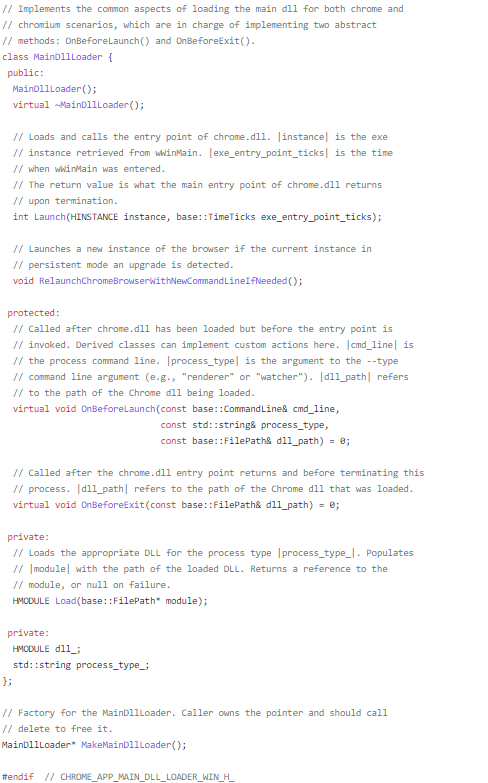 .
.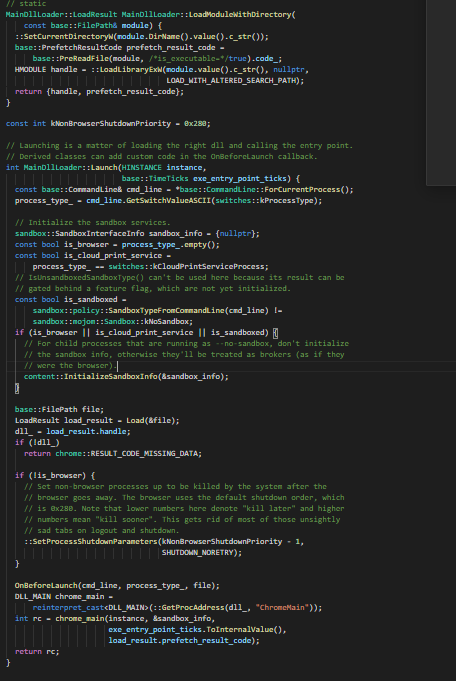 .
.--no-sandbox was passed to the binary,which basically tells to the binary not to run in a sandbox. it checks if wether any of these were set and if either is true it calls the sanbox with the respective options. than in the end we get to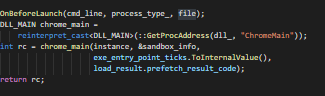
chrome_main.