 specterops/githound
BloodHound OpenGraph collector for GitHub that maps organization structure, permissions, and cross-cloud attack paths into a navigable graph for security audits and incident response.

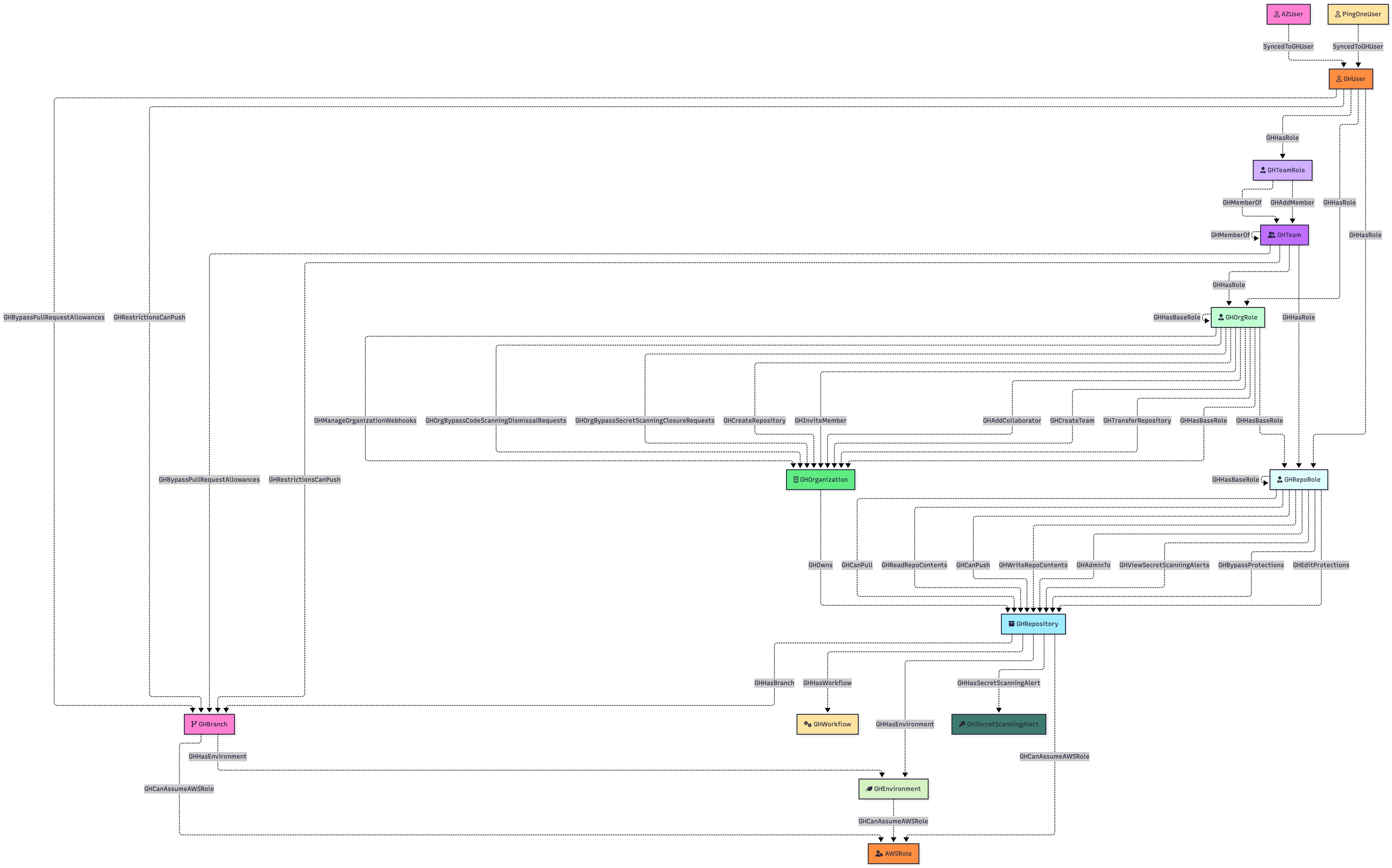
GitHound is a BloodHound OpenGraph collector for GitHub, designed to map your organization’s structure and permissions into a navigable attack‑path graph. It:
Models Key GitHub Entities
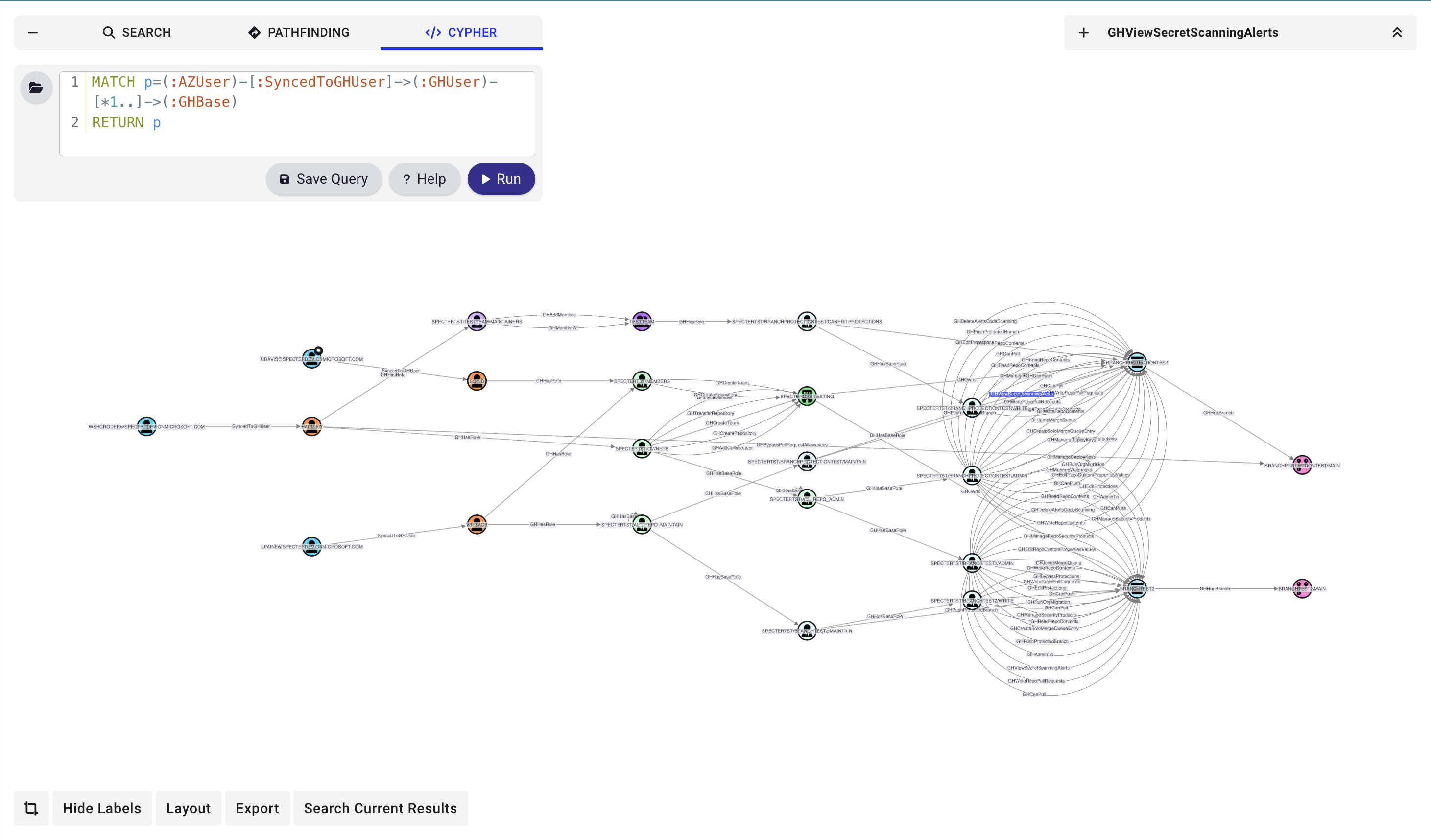
Visualize & Analyze in BloodHound
With GitHound, you get a clear, interactive graph of your GitHub permissions landscape—perfect for security reviews, compliance audits, and rapid incident investigations.
For detailed documentation, see BloodHound Docs - GitHound.
# 1. Load the collector
. ./githound.ps1

# 2. Create a session with your Personal Access Token
$session = New-GitHubSession -OrganizationName "YourOrgName" -Token (Get-Clipboard)

# 3. Run the collection
Invoke-GitHound -Session $session

# 4. Upload the resulting githound_<orgId>.json file to BloodHound
If collection is interrupted, resume from where you left off:
Invoke-GitHound -Session $session -Resume
GitHound supports both Personal Access Token sessions and GitHub App installation sessions. The existing organization-scoped GitHub App workflow is unchanged:
. ./githound.ps1

$session = New-GitHubJwtSession `
  -OrganizationName "YourOrgName" `
  -ClientId $clientId `
  -PrivateKeyPath $privateKeyPath `
  -InstallationId $installationId

Invoke-GitHound -Session $session -CollectAll
The same function can also create enterprise-capable sessions:
. ./githound.ps1

$session = New-GitHubJwtSession `
  -EnterpriseName "YourEnterpriseSlug" `
  -ClientId $clientId `
  -PrivateKeyPath $privateKeyPath `
  -InstallationId $installationId `
  -PersonalAccessToken $pat
Enterprise-capable sessions retain multiple auth contexts on the returned GitHound.Session:
Headers: the GitHub App installation token headers used for normal collectionJwtHeaders: GitHub App JWT headers used for app-level endpoints such as installation enumerationPatHeaders: optional Personal Access Token headers for collection paths that require user-token authTo enumerate the installations that belong to the authenticated GitHub App:
Get-GitHubAppInstallation -Session $session |
  Select-Object TargetType, InstallationId, Login, Name, SuspendedAt
Workflow parsing is now built into Invoke-GitHound when you use -CollectAll. The collector
will:
GH_Workflow nodes and workflow contentsGH_WorkflowJob and GH_WorkflowStepGH_CanPwnRequest and GH_CanDispatchTogithound_<orgId>.json outputFor resume/debugging purposes, the intermediate workflow-analysis checkpoint is written as
githound_WorkflowAnalysis_<orgId>.json.
GitHound now includes a minimal enterprise collection foundation through Git-HoundEnterprise.
That collector currently creates:
GH_EnterpriseGH_Organization stub nodes for member organizationsGH_Contains edges from the enterprise to its organizationsEnterprise user collection through Git-HoundEnterpriseUser adds:
GH_UserGH_HasMember edges from the enterprise to those usersEnterprise SAML collection through Git-HoundEnterpriseSamlProvider adds:
GH_SamlIdentityProviderGH_ExternalIdentityGH_HasSamlIdentityProvider from the enterprise to the providerThis path requires a PAT-backed session because GitHub exposes enterprise SAML through
enterprise.ownerInfo.
Enterprise team collection through Git-HoundEnterpriseTeam adds:
GH_EnterpriseTeamGH_AssignedTo edges from enterprise teams to assigned organizationsGH_MemberOf edges from enterprise teams to org-visible ent: GH_Team nodes using property matchingmembers roles and GH_HasRole edges from users to those rolesEnterprise role collection through Git-HoundEnterpriseRole adds:
GH_EnterpriseRoleGH_Contains edges from the enterprise to those rolesGH_HasRole edges from directly assigned users and enterprise teamsowners role populated from enterprise.ownerInfo.admins when PAT-backed enterprise admin data is availableFor now, raw enterprise permission strings are preserved on the GH_EnterpriseRole node in its permissions property rather than being expanded into dedicated permission edges.
Enterprise SCIM collection currently adds:
SCIM_UserSCIM_GroupSCIM_Provisioned from SCIM_User to GH_ExternalIdentitySCIM_Provisioned from SCIM_Group to GH_EnterpriseTeam when GitHub exposes the enterprise team group_idSCIM_MemberOf from SCIM_User to SCIM_GroupThis gives GitHound a provider-agnostic bridge from the shared SCIM schema into GitHub's native enterprise identity and team model.
When a collected GH_SamlIdentityProvider identifies the upstream IdP, GitHound can also add provider-aware SCIM correlation edges inside the SCIM sidecar output:
Okta_User -> SCIM_User
Okta_User.id = SCIM_User.externalIdOkta_Group -> SCIM_Group
Okta_Group.name = SCIM_Group.externalIdOkta_Group.oktaDomain = GH_SamlIdentityProvider.foreign_environmentidGitHound keeps the SCIM layer in its own sidecar output so these mappings remain visible without mixing SCIM-native nodes into the main GitHub-native enterprise graph:
githound_<entId>.json contains enterprise GitHub-native datagithound_scim_<entId>.json contains SCIM-native nodes and SCIM bridge edgesgithound_saml_<entId>.json contains SAML and external identity datagithound_hybrid_<entId>.json contains cross-model edges such as SAML_Implements, SAML_HasAccount, and GH_SyncedTogithound_saml_<entId>.json also contains the normalized SAML topology for the GitHub service provider, including SAML_TrustsIssuer and SAML_HasAssertionConsumerServiceThe native GitHub identity-provider model remains intact in the GitHub/SAML-native outputs:
GH_ExternalIdentityGH_HasExternalIdentityGH_MapsToUserThe normalized SAML layer in githound_hybrid_<entId>.json now lands SAML_HasAccount directly on GH_User, while deriving match_values from the linked GH_ExternalIdentity SAML-facing properties such as saml_identity_name_id and saml_identity_username.
The GH_Organization stubs emitted by enterprise collection are intentionally marked
collected = false. They represent structural discovery from the enterprise context and are
meant to be enriched later by normal organization collection.
For enterprise-first orchestration, Invoke-GitHoundEnterprise will collect the supported
enterprise-scoped data, enumerate related organization installations, and then run the
existing Invoke-GitHound workflow for each organization in its own subdirectory under the
chosen checkpoint path.
Example:
