 spdx/tools-python
A Python library to parse, validate and create SPDX documents.

CI status (Linux, macOS and Windows): 
Please be aware that the upcoming 0.8 release has undergone a significant refactoring in preparation for the upcoming SPDX v3.0 release, leading to breaking changes in the API. Please refer to the migration guide to update your existing code.
The main features of v0.8 are:
Note that v0.8 only supports writing, not reading SPDX 3.0 documents. See #760 for details.
This library implements SPDX parsers, convertors, validators and handlers in Python.
Important updates regarding this library are shared via the SPDX tech mailing list: https://lists.spdx.org/g/Spdx-tech.
AGraph.
Note: This is an optional feature and requires
additional installation of optional dependenciesSee Quickstart to SPDX 3.0 below. The implementation is based on the descriptive Markdown files in the repository https://github.com/spdx/spdx-3-model (commit: a5372a3c145dbdfc1381fc1f791c68889aafc7ff). The latest SPDX 3.0 model is available at https://spdx.github.io/spdx-spec/v3.0/serializations/.
As always you should work in a virtualenv (venv). You can install a local clone
of this repo with yourenv/bin/pip install . or install it from PyPI
(check for the newest release and install it like
yourenv/bin/pip install spdx-tools==0.8.3). Note that on Windows it would be Scripts
instead of bin.
PARSING/VALIDATING (for parsing any format):
Use pyspdxtools -i <filename> where <filename> is the location of the file. The input format is inferred automatically from the file ending.
If you are using a source distribution, try running:
pyspdxtools -i tests/spdx/data/SPDXJSONExample-v2.3.spdx.json
CONVERTING (for converting one format to another):
Use pyspdxtools -i <input_file> -o <output_file> where <input_file> is the location of the file to be converted
and <output_file> is the location of the output file. The input and output formats are inferred automatically from the file endings.
If you are using a source distribution, try running:
pyspdxtools -i tests/spdx/data/SPDXJSONExample-v2.3.spdx.json -o output.tag
If you want to skip the validation process, provide the --novalidation flag, like so:
pyspdxtools -i tests/spdx/data/SPDXJSONExample-v2.3.spdx.json -o output.tag --novalidation
(use this with caution: note that undetected invalid documents may lead to unexpected behavior of the tool)
For help use pyspdxtools --help
GRAPH GENERATION (optional feature)
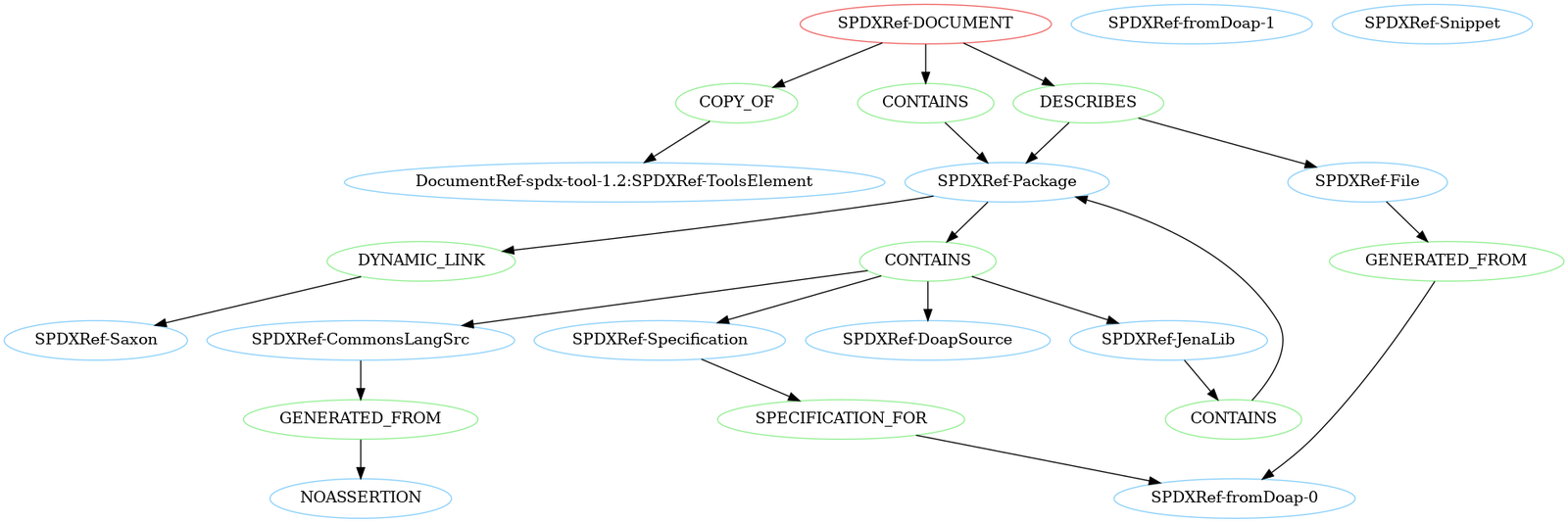
This feature generates a graph representing all elements in the SPDX document and their connections based on the provided
relationships. The graph can be rendered to a picture. Below is an example for the file tests/spdx/data/SPDXJSONExample-v2.3.spdx.json:
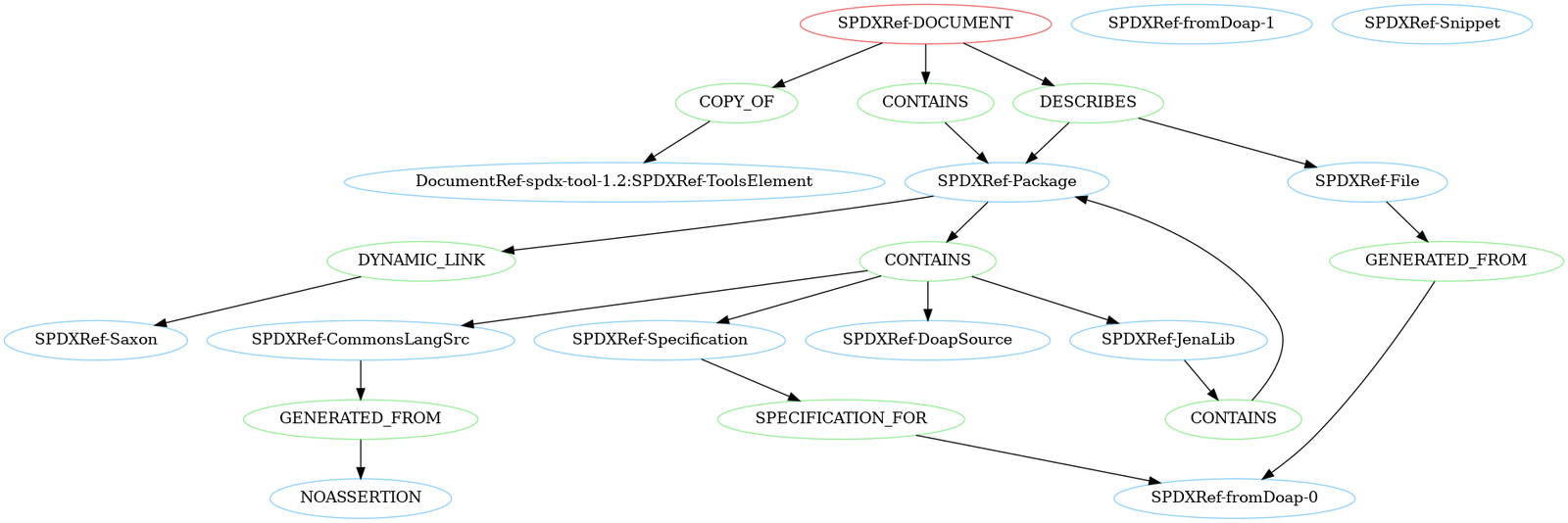
Make sure you install the optional dependencies networkx and pygraphviz. To do so run pip install ".[graph_generation]".
Use pyspdxtools -i <input_file> --graph -o <output_file> where <output_file> is an output file name with valid format for pygraphviz (check
the documentation here).
If you are using a source distribution, try running
pyspdxtools -i tests/spdx/data/SPDXJSONExample-v2.3.spdx.json --graph -o SPDXJSONExample-v2.3.spdx.png to generate
a png with an overview of the structure of the example file.
DATA MODEL
spdx_tools.spdx.model package constitutes the internal SPDX v2.3 data model (v2.2 is simply a subset of this). All relevant classes for SPDX document creation are exposed in the __init__.py found here.@dataclass_with_properties, a custom extension of @dataclass.ConstructorTypeError or TypeError, respectively). This makes it easy to catch invalid properties early and only construct valid documents.list.append(item) will circumvent the type checking (a TypeError will still be raised when reading list again). We recommend using list = list + [item] instead.Document class from the document.py module, which links to all other classes.documentDescribes and hasFiles: These fields will be converted to relationships in the internal data model. As they are deprecated, these fields will not be written in the output.PARSING
parse_file(file_name) from the parse_anything.py module to parse an arbitrary file with one of the supported file endings.Document instance. Unsuccessful parsing will raise SPDXParsingError with a list of all encountered problems.VALIDATING
validate_full_spdx_document(document) to validate an instance of the Document class.ValidationMessage objects, each consisting of a String describing the invalidity and a ValidationContext to pinpoint the source of the validation error.SPDX-2.2 and SPDX-2.3 are supported by this tool.WRITING
