 soxoj/telegram-bot-dumper
🔪 Dumper & ripper for Telegram bots by token. Forensic CLI tool with web interface

Easy dumping of all Telegram bot stuff.
Input: only bot token.
Output: bot name & info, all chats text history & media, bot's users info & photos.
This is a Python implementation.
🚀 Fast Golang version by ScBoln.
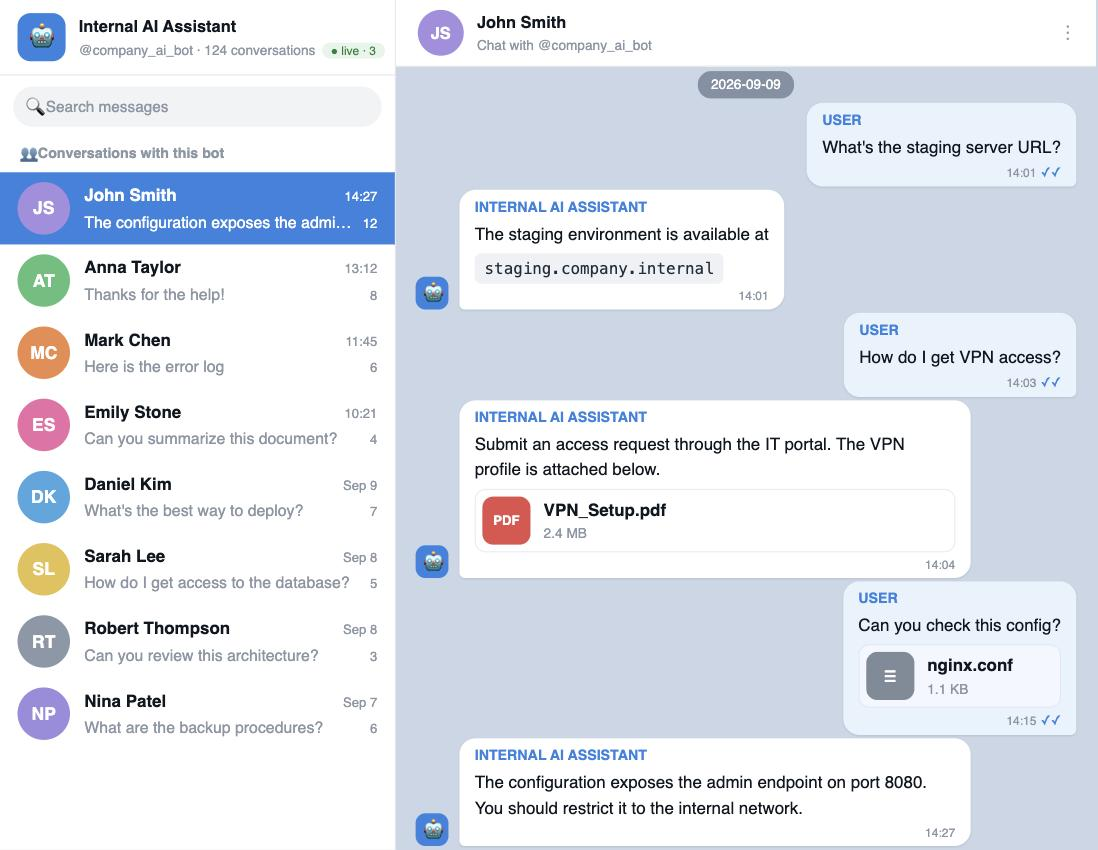
A Telegram-Web-like browser UI for a dump: chat list, full message history with inline media, user profiles with a photo carousel, and global search across every conversation at once. Live mode supported: it runs the dumper in the background and streams new messages to the browser in real time.
Use case — pentesting a leaked bot token. Telegram bot tokens turn up constantly on an engagement — hard-coded in a mobile/desktop app, committed to a repo, or sitting in a CI log, config file, or client-side bundle. On its own a token looks like a low-severity finding; loading it here shows the real blast radius. For an internal bot (support desk, IT/DevOps helper, AI assistant) that is every employee conversation with it — internal hostnames, VPN profiles, credentials, and infrastructure details — browsable and searchable, so you can scope the impact and evidence the finding in your report.
docker run --rm -p 8010:8010 -v "$PWD:/data" soxoj/telegram-bot-dumper-web
docker compose up --build # builds and serves on http://127.0.0.1:8010
pip install -r requirements.txt
python webapp/server.py        # serves the current directory's dumps on :8010
Open http://127.0.0.1:8010 and paste a bot token to pick its dump folder. Read-only viewing is auth-free, local, and needs no API credentials. Live mode additionally needs API_ID/API_HASH from my.telegram.org, passed via the environment — never baked into the image:
# one-off container
docker run --rm -p 8010:8010 -v "$PWD:/data" \
  -e API_ID=123456 -e API_HASH=abc... soxoj/telegram-bot-dumper-web

# or with docker compose: put them in a local .env (see .env.example)
cp .env.example .env && $EDITOR .env && docker compose up
PORT and HOST env vars override the defaults (8010, 127.0.0.1).
--down / --start-from-id).--listen-only): receive new messages in real time and offer to dump history downwards from the first observed id.[from:USER][group:CHAT]. Outgoing bot DMs are tagged with [to:USER].--listen-only will dump them in real time. With privacy mode enabled (the default) the bot only sees commands, mentions, and replies.requirements.txt for the pinned version)API_ID and API_HASHpip install -r requirements.txt
# Telegram API credentials from https://my.telegram.org (read from the environment)
export API_ID=123456
export API_HASH=abc...
Walks ids 1..∞ upwards in batches of 200, downloading every message, all media, and all user profile photos. By default, the dumper keeps listening for new incoming messages after the dump finishes. To exit immediately after history dumping (ideal for scripts and cron jobs), pass --no-listen.
./dumper.py --token 12345678:ABCe2rPVteUWZ7wLeCqCb3CH3ilUY_fLabc
For an active bot the upward walk hits a long stretch of pruned (deleted/expired) old ids and gives up. Walking down from the most recent id is much more productive. --down auto-probes the upper bound (powers of 10 up to 10⁹) and starts from the highest non-empty id it finds:
./dumper.py --token TOKEN --down
Note. Telegram does not retain bot message history forever. Empirically, only the last few hundred thousand messages remain accessible — in our tests a busy bot exposed roughly the last 500K messages before
messages.getMessagesstarted returning onlyMessageEmptyfor older ids. If your bot has historically processed more traffic than that, the older history is simply gone server-side and no flag will recover it.
If you already know a recent message id (e.g. one you saw in real time), you can skip the probe and start exactly from it:
./dumper.py --token TOKEN --start-from-id 11922524
Don't dump anything; just watch what arrives. On the first incoming message the script will offer to start a downward dump from that id:
./dumper.py --token TOKEN --listen-only
Useful when you only need a roster of who has talked to the bot — no zips, no jpegs, no per-chat *_history.txt.
./dumper.py --token TOKEN --down --users-csv --no-photos --no-media --no-history
Output: <bot_id>/users.csv with columns id, username, first_name, last_name, phone, lang_code, bot, premium, verified, scam, fake.
The downward walk prints Requesting message ids X..Y ... for every batch. If the run is interrupted, restart from the last printed lower bound:
./dumper.py --token TOKEN --start-from-id <Y>
Smaller batches → faster feedback in the log and shorter recovery window after a FloodWait. Larger batches → fewer round-trips when scanning sparse / pruned id ranges. Values up to 1000 work fine in practice.
./dumper.py --token TOKEN --down --batch-size 50
./dumper.py --token TOKEN --down --batch-size 500
./dumper.py --token TOKEN --down --batch-size 1000
| Flag | Effect |
|---|---|
--lookahead N | After an all-empty batch, keep scanning N more batches before giving up. Useful when ids are sparse. |
--no-photos | Skip downloading user profile photos (avatars). |
--no-media | Skip downloading photos and documents inside messages; metadata is still written to text history. |
--no-history | Don't write per-chat <chat_id>_history.txt. Combine with --users-csv for the lightest possible run. |
--users-csv | Write users to a single <bot_id>/users.csv instead of <user_id>/<user_id>.json directories. |
--tor | Route through a local Tor SOCKS5 proxy on 127.0.0.1:9050 (Telegram blocking bypass). |
Run ./dumper.py --help for the full list.
--lookahead to keep scanning past empty stretches:
# check additionally 5*200 = 1000 ids
./dumper.py --token TOKEN --lookahead 5
--down, which is much less affected by gaps in old ids.