 somethingtotallyrandom/wallet-transaction-monitor
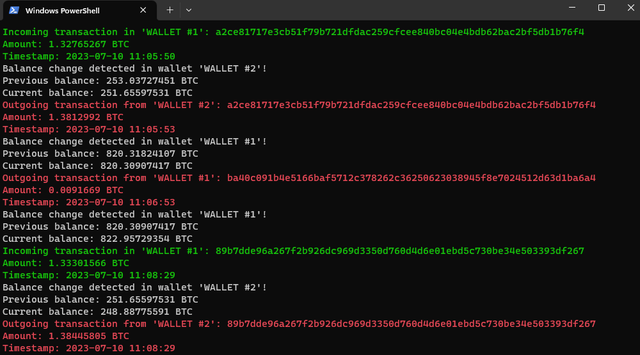
This script monitors a Bitcoin wallet address and notifies the user when there are changes in the balance or new transactions.

This script monitors a Bitcoin wallet address and notifies the user when there are changes in the balance or new transactions. It provides real-time updates on incoming and outgoing transactions, along with the corresponding amounts and timestamps. Additionally, it can play a sound notification on Windows when a new transaction occurs.
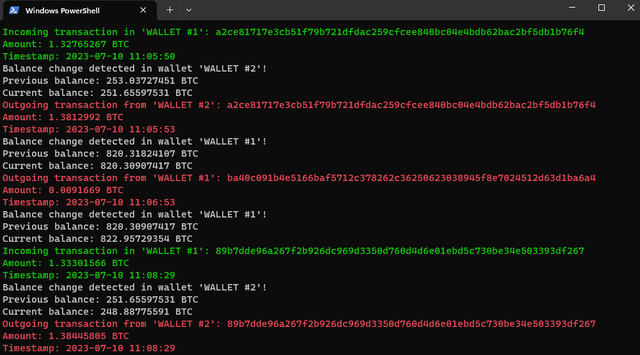
Changelog - 2023-07-10
- Added the ability to monitor multiple Bitcoin wallets with custom names
- Added option to save the information to a text file
- More features will come within a couple of weeks
Python 3.x requests library: You can install it by running pip install requests. winsound module: This module is available by default on Windows.
python wallet_transaction_monitor.py
The script will start monitoring the wallet and display updates whenever there are changes in the balance or new transactions. It will also play the specified sound notification on Windows.
This script is designed to work on Windows due to the use of the winsound module for sound notifications. If you are using a different operating system, you may need to modify the sound-related code or use an alternative method for audio notifications. The script uses the Blockchain.info API to fetch wallet data. Please ensure you have a stable internet connection for the script to work correctly. It's recommended to run the script in the background or keep the terminal window open while monitoring the wallet.
