
Skip to content
KitploitKITPLOIT
ToolsBlog
Submit
ToolsBlog
Submit

Hacking, PenTest, and Cybersecurity Tools for Your Security Arsenal!

Kitploit is a directory of hacking, cybersecurity, and pentesting tools. Discover the latest project updates to find vulnerabilities, analyze systems, automate testing, and strengthen your security.

··Feeds·Contact·Privacy·© 2026 Kitploit

Tool Directory

Categories

View all categories
Loading categories
Agentic-CLIP-Benchmark — An automated, high-precision zero-shot evaluation pipeline for OpenAI's CLIP model on CIFAR-10. Features 88.80% accuracy, Safetensors security mitigation (CVE-2025-32434), and AI Native (Trae) workflow. | Kitploit
Tools/GitHubGitHub/soildworks/agentic-clip-benchmark
Vulnerability AnalysisCryptographyMachine LearningLearning & EducationAI Security
GitHubsoildworks/agentic-clip-benchmark

Agentic-CLIP-Benchmark

An automated, high-precision zero-shot evaluation pipeline for OpenAI's CLIP model on CIFAR-10. Features 88.80% accuracy, Safetensors security mitigation (CVE-2025-32434), and AI Native (Trae) workflow.

View Repository
36 months agoNot yet reviewed

Most Popular

View all →

Discover the most used tools by our community.

Explore all tools

Browse our collection of tools

View all tools →
Share

Agentic-CLIP-Benchmark: Zero-Shot Evaluation on CIFAR-10

Python PyTorch AI-Native

This project implements a robust, automated pipeline for evaluating OpenAI's CLIP (ViT-B/32) model on the full CIFAR-10 test set (10,000 images). Developed using an AI Native workflow (Trae IDE), it achieves a high-precision zero-shot accuracy of 88.80%.

📊 Performance Summary

  • Top-1 Accuracy: 88.80% (Zero-Shot)
  • Model: openai/clip-vit-base-patch32 (using Safetensors)
  • Inference Hardware: NVIDIA RTX 2060
  • Time Complexity: Optimized via Batch Inference (Batch Size: 32)

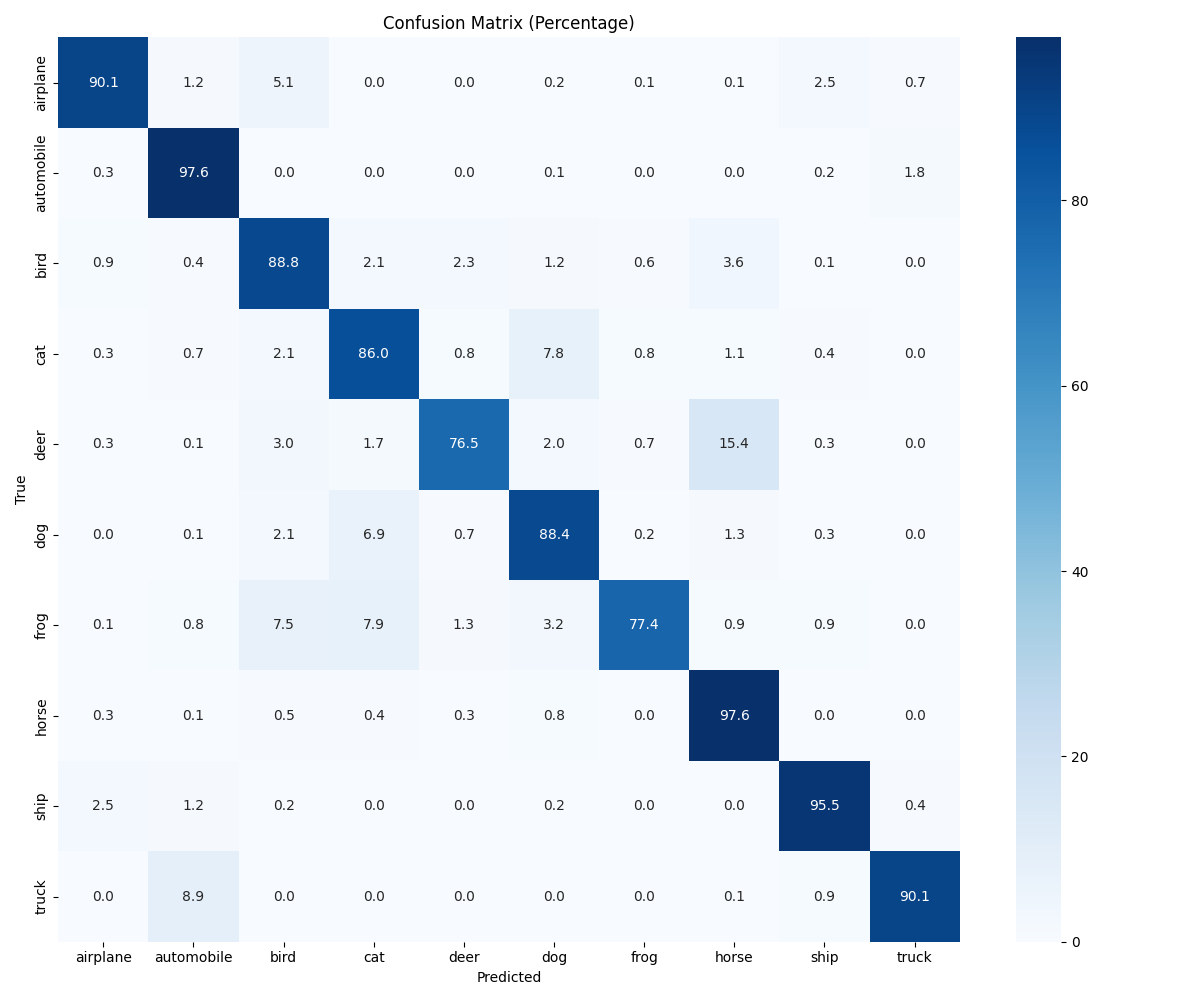
Confusion Matrix (Statistical Insights)

Confusion Matrix

Analysis: The model shows strong diagonal dominance. Statistical bias is observed between 'Deer' and 'Horse' (15.4% overlap), likely due to similar skeletal contours in the ultra-low 32x32 resolution of CIFAR-10. Automobile and Horse categories achieved the highest precision (97.6%).


🛠️ Key Features & Methodology

  • Automated Data Pipeline: Developed a custom CIFAR10Dataset to handle raw binary pickle data, converting 1D byte-arrays into 3D RGB tensors efficiently.
  • Batch Reasoning: Integrated torch.utils.data.DataLoader with tqdm to manage 10,000 samples without VRAM overflow.
  • Prompt Engineering: Utilized a descriptive template: "a photo of a {label}" to optimize the semantic alignment between text and image embeddings.
  • Precision Metrics: Integrated scikit-learn to compute the confusion matrix, providing a granular look at semantic classification errors.

🛡️ Battle-Hardened Engineering (Problem Solving)

This project documents the resolution of several production-level challenges encountered during development:

  1. Security (CVE-2025-32434):
    • Issue: PyTorch 2.6+ security protocols block insecure .bin (Pickle) files.
    • Solution: Enforced Safetensors format via use_safetensors=True for zero-copy, secure model loading.
  2. Environment Robustness (WinError 14007):
    • Issue: Windows non-admin accounts lack Symlink permissions for Hugging Face cache.
    • Solution: Implemented HF_HUB_DISABLE_SYMLINKS=1 and established a manual cache cleanup protocol to ensure cross-platform compatibility.
  3. Preprocessing Alignment:
    • Issue: Identified a 0.06 Accuracy Failure caused by redundant image rescaling (uint8 vs float normalization).
    • Solution: Re-engineered the CLIPProcessor pipeline to handle raw uint8 inputs correctly, successfully restoring accuracy to 88.8%.
  4. Network Optimization:
    • Issue: Restricted access to Hugging Face Hub under local network constraints.
    • Solution: Configured HF_ENDPOINT mirror and local_files_only=True for high-speed, offline-capable deployment.

🚀 Getting Started

1. Installation

root@kitploit:~
pip install torch transformers pillow numpy tqdm scikit-learn seaborn matplotlib

2. Dataset Setup

Download the CIFAR-10 Python version and place the cifar-10-batches-py folder in the project root.

3. Run Evaluation

root@kitploit:~
# On Windows, simply run the pre-configured batch file:
.\run.bat

# Or manually via Python:
python full_cifar_clip_eval.py

📁 Project Structure

root@kitploit:~
clip_eval_project/
├── full_cifar_clip_eval.py  # Core evaluation script
├── run.bat                  # One-click run entry
├── confusion_matrix.png     # Confusion matrix result
├── cifar-10-batches-py/     # CIFAR-10 raw data
│   └── test_batch          # Test set data
└── README.md               # Project documentation

📄 License

This project is licensed under the MIT License. See the LICENSE file for details.

🙏 Acknowledgments

  • OpenAI for developing the CLIP model
  • The CIFAR-10 dataset creators
  • Hugging Face for the Transformers library
  • PyTorch team for the deep learning framework
Download Tool