
 soheilkhodayari/jaw
JAW: A Graph-based Security Analysis Framework for Client-side JavaScript


J A W
Website | Docs | Setup | Crawler | Quick Start Docker (Example)




An open-source, prototype implementation of property graphs for JavaScript based on the esprima parser, and the EsTree SpiderMonkey Spec. JAW can be used for analyzing the client-side of web applications and JavaScript-based programs.
This project is licensed under GNU AFFERO GENERAL PUBLIC LICENSE V3.0. See here for more information.
JAW has a Github pages website available at https://soheilkhodayari.github.io/JAW/.
Release Notes:
JAW-V2 branch.JAW-V1 branch.The architecture of the JAW is shown below.
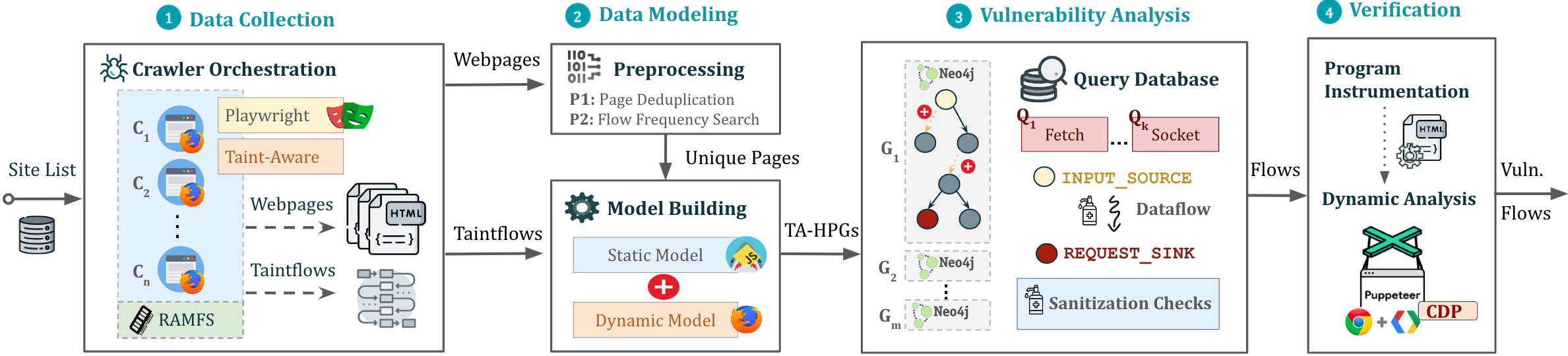
JAW can be used in two distinct ways:
Arbitrary JavaScript Analysis: Utilize JAW for modeling and analyzing any JavaScript program by specifying the program's file system path.
Web Application Analysis: Analyze a web application by providing a single seed URL.
Use the collected web resources to create a Hybrid Program Graph (HPG), which will be imported into a Neo4j database.
Optionally, supply the HPG construction module with a mapping of semantic types to custom JavaScript language tokens, facilitating the categorization of JavaScript functions based on their purpose (e.g., HTTP request functions).
Query the constructed Neo4j graph database for various analyses. JAW offers utility traversals for data flow analysis, control flow analysis, reachability analysis, and pattern matching. These traversals can be used to develop custom security analyses.
JAW also includes built-in traversals for detecting client-side CSRF, DOM Clobbering and request hijacking vulnerabilities.
The outputs will be stored in the same folder as that of input.
The installation script relies on the following prerequisites:
npm package manager (node js)python 3.xpip package managerAfterwards, install the necessary dependencies via:
$ ./install.sh
For detailed installation instructions, please see here.
You can run an instance of the pipeline in a background screen via:
$ python3 -m run_pipeline --conf=config.yaml
The CLI provides the following options:
$ python3 -m run_pipeline -h

usage: run_pipeline.py [-h] [--conf FILE] [--site SITE] [--list LIST] [--from FROM] [--to TO]

This script runs the tool pipeline.

optional arguments:
  -h, --help            show this help message and exit
  --conf FILE, -C FILE  pipeline configuration file. (default: config.yaml)
  --site SITE, -S SITE  website to test; overrides config file (default: None)
  --list LIST, -L LIST  site list to test; overrides config file (default: None)
  --from FROM, -F FROM  the first entry to consider when a site list is provided; overrides config file (default: -1)
  --to TO, -T TO        the last entry to consider when a site list is provided; overrides config file (default: -1)
Input Config: JAW expects a .yaml config file as input. See config.yaml for an example.
Hint. The config file specifies different passes (e.g., crawling, static analysis, etc) which can be enabled or disabled for each vulnerability class. This allows running the tool building blocks individually, or in a different order (e.g., crawl all webapps first, then conduct security analysis).
For running a quick example demonstrating how to build a property graph and run Cypher queries over it, do:
$ python3 -m analyses.example.example_analysis --input=$(pwd)/data/test_program/test.js
This module collects the data (i.e., JavaScript code and state values of web pages) needed for testing. If you want to test a specific JavaScipt file that you already have on your file system, you can skip this step.
