
 skylot/jadx
Command-line and GUI tool for decompiling Android Dex and APK files into readable Java source code, with resource decoding, deobfuscation, and Smali debugging capabilities.
<img src="https://assets.kitploit.com/production/public/readmes/1311/0213b161fc92052b308f40d34d89590236aec9309953cb228fd4dc654452e11b.png" width="64" align="left" alt="jadx logo" />
## JADX





[](https://central.sonatype.com/namespace/io.github.skylot)

[](https://www.apache.org/licenses/LICENSE-2.0.html)
**jadx** - Dex to Java decompiler
Command-line and GUI tools for producing Java source code from Android Dex and APK files
> [!WARNING]
> Please note that in most cases **jadx** can't decompile 100% of the code, so errors will occur.<br />
> Check the [Troubleshooting guide](https://github.com/skylot/jadx/wiki/Troubleshooting-Q&A#decompilation-issues) for workarounds.
**Main features:**
- decompile Dalvik bytecode to Java code from APK, dex, aab, apks, apkm, xapk and zip files
- also decompile Java bytecode (jar, class, aar) and smali files
- decode `AndroidManifest.xml` and other resources from `resources.arsc`
- deobfuscator included
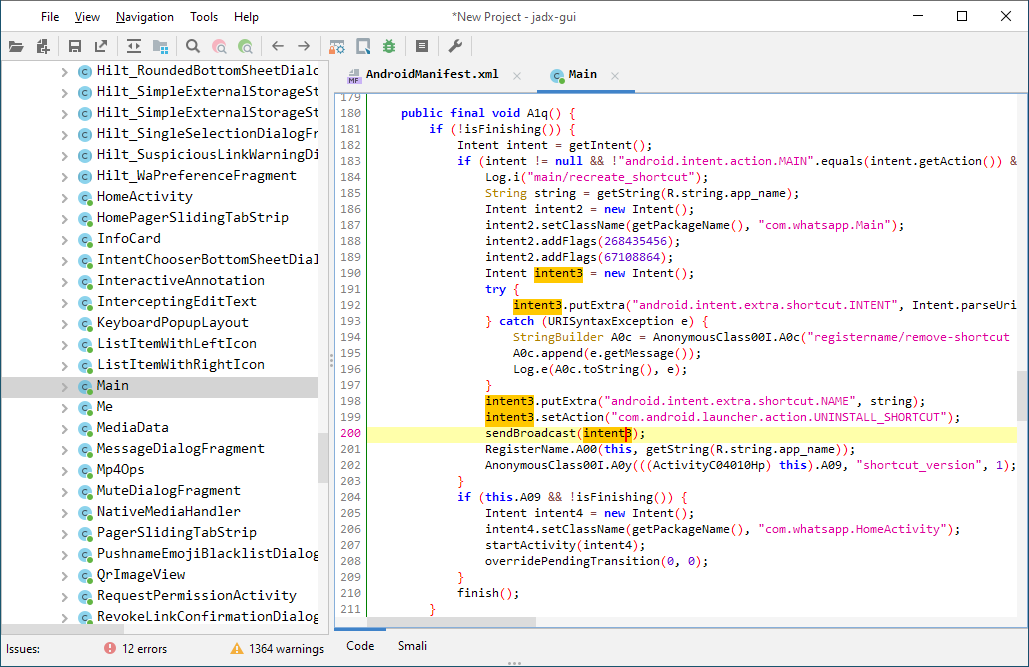
**jadx-gui features:**
- view decompiled code with syntax highlighting
- jump to declaration
- find usage
- full-text search
- smali debugger, see the [wiki page](https://github.com/skylot/jadx/wiki/Smali-debugger) for setup and usage
Key bindings for jadx-gui can be found [here](https://github.com/skylot/jadx/wiki/JADX-GUI-Key-bindings)
See these features in action here: [jadx-gui features overview](https://github.com/skylot/jadx/wiki/jadx-gui-features-overview)
<img src="https://assets.kitploit.com/production/public/readmes/1311/dd1c87c65c75e6dcbb1d6840bf420f1b8a7cbde33ed1e79ee4105f12b271d392.png" width="700" alt="jadx-gui screenshot"/>
### Download
- release
from [GitHub: ](https://github.com/skylot/jadx/releases/latest)
- latest [unstable build ](https://nightly.link/skylot/jadx/workflows/build-artifacts/master)
For `jadx-<version>.zip`, unpack it, go to the `bin` directory and run:
- `jadx` - command-line version
- `jadx-gui` - GUI version
On Windows, run the `.bat` files with a double-click.
For the Windows bundles, unpack and run `jadx-gui-<version>.exe`.
**Note:** make sure you have 64-bit Java 11 or later installed (not needed for the `with-jre` bundle).
For Windows, you can download it from [oracle.com](https://www.oracle.com/java/technologies/downloads/#jdk25-windows) (select the x64 Installer).
### Install
- Arch Linux
[](https://archlinux.org/packages/extra/any/jadx/)
[](https://aur.archlinux.org/packages/jadx-git)
```bash
sudo pacman -S jadx
```
- macOS
[](https://formulae.brew.sh/formula/jadx)
```bash
brew install jadx
```
- Flathub
[](https://flathub.org/apps/com.github.skylot.jadx)
```bash
flatpak install flathub com.github.skylot.jadx
```
### Usage
```
jadx[-gui] [command] [options] <input files> (.apk, .dex, .jar, .class, .smali, .zip, .aar, .arsc, .aab, .xapk, .apkm, .apks, .jadx.kts)
commands (use '<command> --help' for command options):
plugins - manage jadx plugins
options:
-d, --output-dir - output directory
-ds, --output-dir-src - output directory for sources
-dr, --output-dir-res - output directory for resources
-r, --no-res - do not decode resources
-s, --no-src - do not decompile source code
-j, --threads-count - processing threads count, default: half of CPU threads
--single-class - decompile a single class, full name, raw or alias
--single-class-output - file or dir for write if decompile a single class
--output-format - can be 'java' or 'json', default: java
-e, --export-gradle - save as gradle project (set '--export-gradle-type' to 'auto')
--export-gradle-type - Gradle project template for export:
'auto' - detect automatically
'android-app' - Android Application (apk)
'android-library' - Android Library (aar)
'simple-java' - simple Java
-m, --decompilation-mode - code output mode:
'auto' - trying best options (default)
'restructure' - restore code structure (normal java code)
'simple' - simplified instructions (linear, with goto's)
'fallback' - raw instructions without modifications
--show-bad-code - show inconsistent code (incorrectly decompiled)
--no-xml-pretty-print - do not prettify XML
--no-imports - disable use of imports, always write entire package name
--no-debug-info - disable debug info parsing and processing
--add-debug-lines - add comments with debug line numbers if available
--no-inline-anonymous - disable anonymous classes inline
--no-inline-methods - disable methods inline
--no-move-inner-classes - disable move inner classes into parent
--no-inline-kotlin-lambda - disable inline for Kotlin lambdas
--no-finally - don't extract finally block
--no-restore-switch-over-string - don't restore switch over string
--no-replace-consts - don't replace constant value with matching constant field
--escape-unicode - escape non latin characters in strings (with \u)
--respect-bytecode-access-modifiers - don't change original access modifiers
--mappings-path - deobfuscation mappings file or directory. Allowed formats: Tiny and Tiny v2 (both '.tiny'), Enigma (.mapping) or Enigma directory
--mappings-mode - set mode for handling the deobfuscation mapping file:
'read' - just read, user can always save manually (default)
'read-and-autosave-every-change' - read and autosave after every change
'read-and-autosave-before-closing' - read and autosave before exiting the app or closing the project
'ignore' - don't read or save (can be used to skip loading mapping files referenced in the project file)
--deobf - activate deobfuscation
--deobf-min - min length of name, renamed if shorter, default: 3
--deobf-max - max length of name, renamed if longer, default: 64
--deobf-whitelist - space separated list of classes (full name) and packages (ends with '.*') to exclude from deobfuscation, default: android.support.v4.* android.support.v7.* android.support.v4.os.* android.support.annotation.Px androidx.core.os.* androidx.annotation.Px
--deobf-cfg-file - deobfuscation mappings file used for JADX auto-generated names (in the JOBF file format), default: same dir and name as input file with '.jobf' extension
--deobf-cfg-file-mode - set mode for handling the JADX auto-generated names' deobfuscation map file:
'read' - read if found, don't save (default)
'read-or-save' - read if found, save otherwise (don't overwrite)
'overwrite' - don't read, always save
'ignore' - don't read and don't save
--deobf-res-name-source - better name source for resources:
'auto' - automatically select best name (default)
'resources' - use resources names
'code' - use R class fields names
--use-source-name-as-class-name-alias - use source name as class name alias:
'always' - always use source name if it's available
'if-better' - use source name if it seems better than the current one
'never' - never use source name, even if it's available
--source-name-repeat-limit - allow using source name if it appears less than a limit number, default: 10
--use-kotlin-methods-for-var-names - use kotlin intrinsic methods to rename variables, values: disable, apply, apply-and-hide, default: apply
--use-headers-for-detect-resource-extensions - Use headers for detect resource extensions if resource obfuscated
--rename-flags - fix options (comma-separated list of):
'case' - fix case sensitivity issues (according to --fs-case-sensitive option),
'valid' - rename java identifiers to make them valid,
'printable' - remove non-printable chars from identifiers,
or single 'none' - to disable all renames
or single 'all' - to enable all (default)
--integer-format - how integers are displayed:
'auto' - automatically select (default)
'decimal' - use decimal
'hexadecimal' - use hexadecimal
--type-update-limit - type update limit count (per one instruction), default: 10
--fs-case-sensitive - treat filesystem as case sensitive, false by default
--cfg - save methods control flow graph to dot file
--raw-cfg - save methods control flow graph (use raw instructions)
--call-graph - save app call graph in format: 'dot' or 'json', default: none
-f, --fallback - set '--decompilation-mode' to 'fallback' (deprecated)
--use-dx - use dx/d8 to convert java bytecode
--comments-level - set code comments level, values: error, warn, info, debug, user-only, none, default: info
--log-level - set log level, values: quiet, progress, error, warn, info, debug, default: progress
-v, --verbose - verbose output (set --log-level to DEBUG)
-q, --quiet - turn off output (set --log-level to QUIET)
--disable-plugins - comma separated list of plugin ids to disable
--config <config-ref> - load configuration from file, <config-ref> can be:
path to '.json' file
short name - uses file with this name from config directory
'none' - to disable config loading
--save-config <config-ref> - save current options into configuration file and exit, <config-ref> can be:
empty - for default config
path to '.json' file
short name - file will be saved in config directory
--print-files - print files and directories used by jadx (config, cache, temp)
--version - print jadx version
-h, --help - print this help
Plugin options (-P<name>=<value>):
dex-input: Load .dex and .apk files
- dex-input.verify-checksum - verify dex file checksum before load, values: [yes, no], default: yes
java-convert: Convert .class, .jar and .aar files to dex
- java-convert.mode - convert mode, values: [dx, d8, both], default: both
- java-convert.d8-desugar - use desugar in d8, values: [yes, no], default: no
kotlin-metadata: Use kotlin.Metadata annotation for code generation
- kotlin-metadata.class-alias - rename class alias, values: [yes, no], default: yes
- kotlin-metadata.method-args - rename function arguments, values: [yes, no], default: yes
- kotlin-metadata.fields - rename fields, values: [yes, no], default: yes
- kotlin-metadata.companion - rename companion object, values: [yes, no], default: yes
- kotlin-metadata.data-class - add data class modifier, values: [yes, no], default: yes
- kotlin-metadata.to-string - rename fields using toString, values: [yes, no], default: yes
- kotlin-metadata.getters - rename simple getters to field names, values: [yes, no], default: yes
kotlin-smap: Use kotlin.SourceDebugExtension annotation for rename class alias
- kotlin-smap.class-alias-source-dbg - rename class alias from SourceDebugExtension, values: [yes, no], default: no
rename-mappings: various mappings support
- rename-mappings.format - mapping format, values: [AUTO, TINY_FILE, TINY_2_FILE, ENIGMA_FILE, ENIGMA_DIR, PROGUARD_FILE, SRG_FILE, XSRG_FILE, JAM_FILE, CSRG_FILE, TSRG_FILE, TSRG_2_FILE, INTELLIJ_MIGRATION_MAP_FILE, RECAF_SIMPLE_FILE, JOBF_FILE], default: AUTO
- rename-mappings.invert - invert mapping on load, values: [yes, no], default: no
smali-input: Load .smali files
- smali-input.api-level - Android API level, default: 27
Environment variables:
JADX_DISABLE_XML_SECURITY - set to 'true' to disable all security checks for XML files
JADX_DISABLE_ZIP_SECURITY - set to 'true' to disable all security checks for zip files
JADX_DISABLE_ALL_SECURITY_FLAGS - set to 'true' to disable all security flags (xml, string, app package)
JADX_ZIP_MAX_ENTRIES_COUNT - maximum allowed number of entries in zip files (default: 100 000)
JADX_ZIP_BOMB_MIN_UNCOMPRESSED_SIZE - min size of zip entry to check compression ratio, in bytes (default: 25 MB)
JADX_ZIP_BOMB_DETECTION_FACTOR - maximum allowed compression ratio of zip entry (default: 100)
JADX_CONFIG_DIR - custom config directory, using system by default
JADX_CACHE_DIR - custom cache directory, using system by default
JADX_TMP_DIR - custom temp directory, using system by default
Examples:
jadx -d out classes.dex
jadx --rename-flags "none" classes.dex
jadx --rename-flags "valid, printable" classes.dex
jadx --log-level ERROR app.apk
jadx -Pdex-input.verify-checksum=no app.apk
```
These options also work in jadx-gui when it is run from the command line, and they override the options from the preferences dialog
Usage for the `plugins` command
```
usage: plugins [options]
options:
-i, --install <locationId> - install plugin with locationId
-j, --install-jar <path-to.jar> - install plugin from jar file
-l, --list - list installed plugins
-a, --available - list available plugins from jadx-plugins-list (aka marketplace)
-u, --update - update installed plugins
--uninstall <pluginId> - uninstall plugin with pluginId
--disable <pluginId> - disable plugin with pluginId
--enable <pluginId> - enable plugin with pluginId
--list-all - list all plugins including bundled and dropins
--list-versions <locationId> - fetch latest versions of plugin from locationId (will download all artefacts, limited to 10)
-h, --help - print this help
```
### Use jadx as a library
You can use jadx in your Java projects, see the details on the [wiki page](https://github.com/skylot/jadx/wiki/Use-jadx-as-a-library)
### Build from source
JDK 17 or higher must be installed:
```
git clone https://github.com/skylot/jadx.git
cd jadx
./gradlew dist
```
(on Windows, use `gradlew.bat` instead of `./gradlew`)
Scripts to run jadx will be placed in `build/jadx/bin`
and also packed into `build/jadx-<version>.zip`
### Troubleshooting
Please check the wiki page [Troubleshooting Q&A](https://github.com/skylot/jadx/wiki/Troubleshooting-Q&A)
### Contributing
To support this project, you can:
- Post thoughts about new features/optimizations that are important to you
- Submit decompilation issues (please read [how to open an issue](https://github.com/skylot/jadx/blob/master/CONTRIBUTING.md#Open-Issue) first)
- Open pull requests (please follow the [pull request rules](https://github.com/skylot/jadx/blob/master/CONTRIBUTING.md#Pull-Request-Process))
---------------------------------------
*Licensed under the Apache 2.0 License*