
Skip to content
KitploitKITPLOIT
ToolsBlog
Submit
ToolsBlog
Submit

Hacking, PenTest, and Cybersecurity Tools for Your Security Arsenal!

Kitploit is a directory of hacking, cybersecurity, and pentesting tools. Discover the latest project updates to find vulnerabilities, analyze systems, automate testing, and strengthen your security.

··Feeds·Contact·Privacy·© 2026 Kitploit

Tool Directory

Categories

View all categories
Loading categories
WhoCord — Scans Discord links across mutual guilds to extract profiles, cross‑references 700+ sites, searches usernames with 30+ tools, and generates an AI‑powered report. | Kitploit
Tools/GitHubGitHub/siv-nick/whocord
OSINT (Open Source Intelligence)Phishing ToolsReconnaissancePassword AttacksDNS & Subdomain EnumerationInformation GatheringSocial EngineeringThreat IntelligenceEmail HarvestingLearning & EducationCurated Resources
83883 months agoReviewed by Kitploit

Most Popular

View all →

Discover the most used tools by our community.

Explore all tools

Browse our collection of tools

View all tools →
Share
GitHub
siv-nick/whocord

WhoCord

Scans Discord links across mutual guilds to extract profiles, cross‑references 700+ sites, searches usernames with 30+ tools, and generates an AI‑powered report.

View Repository

GitHub release License: MIT GitHub stars Portable Python 3.10+

WhoCord

🕵️‍♂️ WhoCord v1.1

Turn any username, email, domain, phone number, image, URL, or probe string into a full identity profile.

WhoCord is a modular OSINT investigation platform that runs dozens of open‑source tools, builds a knowledge graph, detects correlations, and generates an AI‑enhanced dark‑themed HTML report – all streamed live to a modern React dashboard.


⚡ Features

  • 8 investigation modules – Username / Manual, Discord, Email, Domain, Phone, Image, URL, Data Probe (auto‑detect).
  • Discord‑native link resolution – extracts and resolves Instagram, TikTok, Facebook, and Twitter tracking links shared by a target user.
  • Full identity pipeline – names, emails, locations, breach data, GitHub history, avatar metadata, and Google account info (GHunt).
  • Email intelligence – Holehe (site registrations), h8mail, HIBP, EmailRep, GHunt, Blackbird email search, MOSINT (social account flags).
  • Domain investigation – WHOIS, DNS records, SSL certificate, IP geolocation, subdomain enumeration, theHarvester.
  • Phone investigation – number validation, carrier lookup, PhoneInfoga OSINT.
  • Image analysis – EXIF metadata, perceptual hash, reverse image search, OCR text extraction.
  • URL analysis – HTTP metadata, redirect trace, page metadata, Open Graph tags, Safe Browsing check, Wayback snapshot.
  • Data Probe – paste anything (email, domain, phone, URL, username) and WhoCord auto‑detects the type.
  • Knowledge graph & correlations – 5 detectors (avatar reuse, email‑platform cluster, username variants, name‑email link, location consistency).
  • AI‑generated reports – LLaMA 3.3 (via Groq) produces structured narrative and persona summary.
  • Dark‑themed HTML report – collapsible platform cards, avatar display, breach tags, pivot sub‑reports, technical data.
  • Live SSE streaming – watch investigations in real time with stage list, finding cards, and console logs.
  • Pivot system – recursive investigation of discovered emails/usernames with user confirmation modal.
  • Secure token storage – API keys stored in your OS keyring, never in plain text.
  • Web dashboard – run investigations from your browser, toggle tools, manage tokens, view history.

🚀 Quick Start (recommended)

  1. Download the portable zip from the Releases page (Linux 64‑bit, ~500 MB).
  2. Extract the archive anywhere:
    root@kitploit:~
    unzip WhoCord.zip -d WhoCord
    
  3. Run the web dashboard:
    root@kitploit:~
    cd WhoCord
    ./run.sh
    
    (opens your browser automatically)

No Python, pip, or tool installation is required – everything is bundled inside.


📦 Installation (from source – for developers)

1. Clone the repository

root@kitploit:~
git clone https://github.com/Siv-nick/WhoCord.git
cd WhoCord

2. Create a Python virtual environment

root@kitploit:~
python3 -m venv venv
source venv/bin/activate   # Linux / macOS

3. Install WhoCord and its Python dependencies

root@kitploit:~
pip install -e .

4. Install external command‑line tools (most via pip)

All required tools can be installed with a single pip install command:

root@kitploit:~
# Username search tools
pip install sherlock-project maigret naminter linkook

# Email intelligence tools
pip install holehe h8mail theHarvester

# GitHub & Google tools
pip install gitfive ghunt

# Phone & image analysis
pip install phoneinfoga pillow imagehash pytesseract

# Domain investigation
pip install dnspython

5. Install Blackbird (email & username search on 600+ sites)

root@kitploit:~
git clone https://github.com/p1ngul1n0/blackbird
cd blackbird
pip install -r requirements.txt
cd ..

The required data file (wmn-data.json) is auto‑downloaded on first use. If that fails, download it manually from WhatsMyName and place it in blackbird/data/.

6. Install system WHOIS (required for domain investigations)

root@kitploit:~
sudo apt install whois          # Debian/Ubuntu
# brew install whois            # macOS

7. (Optional) Authenticate GHunt for Google account intelligence

root@kitploit:~
ghunt login

Follow the instructions to authenticate with your Google account.

8. Build the frontend (required for source installations)

The web dashboard requires a compiled React frontend. Make sure you have Node.js 18+ and npm installed, then run:

root@kitploit:~
cd frontend
npm install
npm run build
cd ..

This creates the frontend/dist/ folder that Flask serves automatically.

9. Launch the web dashboard

root@kitploit:~
python web_app.py

Then open http://127.0.0.1:5000.
Or use the one‑click launcher: ./run.sh.
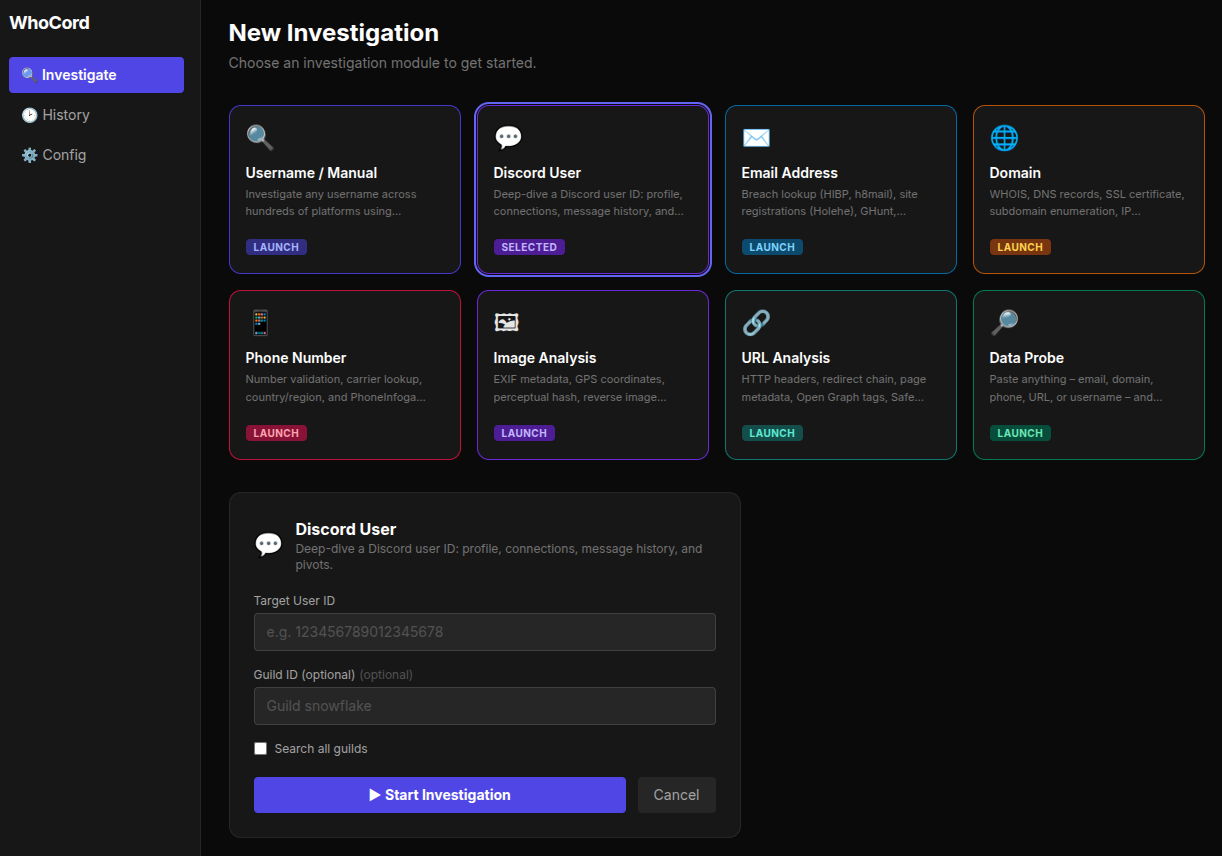
WhoCord Dashboard


🚀 Usage

Web Dashboard (primary interface)

The dashboard offers eight investigation modules:

Live investigation page shows:

  • Stage list with real‑time status
  • Finding cards (emails, names, breaches, correlations)
  • Console logs (raw tool output)
  • Pivot confirmation modal (when enabled)

History page – list all past investigations with links to reports and JSON intel.

Config page – manage API tokens, toggle tools, set pivot options, upgrade tools.

Interactive menu (legacy CLI)

root@kitploit:~
discord-osint

Then use the numbered menu to toggle tools, set tokens, and start investigations.

Command‑line mode (limited to manual/discord)

root@kitploit:~
discord-osint --mode manual --target someusername --output html --debug

📁 Output files

All results are saved in investigation_cache/:

HTML report sections

  • Identity (Discord handle, name clues, location, language, confidence scores)
  • Persona Summary (AI)
  • Social Profiles (collapsible platform cards with avatars, bios, extra fields)
  • Email Intelligence (breach tags, MOSINT flags)
  • Intelligence Analysis (graph stats, narrative, correlations)
  • Pivot Sub‑Investigations
  • Technical Data (WHOIS, DNS, SSL, IP geolocation, subdomains, theHarvester, phone, URL analysis, GHunt)

🛠️ Tools & technologies

WhoCord integrates these open‑source OSINT projects:


🔄 Updates

Check CHANGELOG.md for version history.


🔒 Security & privacy

  • Tokens are never stored in plain text – kept in your OS keyring.
  • config.json only contains non‑sensitive toggles.
  • All investigation data stays on your machine inside investigation_cache/.

⚠️ Disclaimer

WhoCord is intended for educational purposes and authorised security testing only.
Do not use it to stalk, harass, or violate anyone’s privacy.
The author assumes no liability for misuse.


📄 License

MIT License

Download Tool
ModuleInputTools run
Username / Manualusername (optional email)Sherlock, Maigret, Blackbird, Naminter, Linkook, Sociopath, scraping, analysis, intelligence, email tools
Discord Useruser ID + guild IDDiscord profile fetch, message crawling, tracking‑link resolution
Email AddressemailHolehe, h8mail, HIBP, EmailRep, GHunt, SMTP, Gravatar, Scylla, Blackbird email, MOSINT
DomaindomainWHOIS, DNS, SSL, IP geolocation, subdomain enumeration, theHarvester
Phone Numberphonephonenumbers library, carrier lookup, PhoneInfoga
Image Analysisimage URLEXIF, perceptual hash, reverse search, OCR
URL AnalysisURLHTTP meta, redirects, page metadata, Open Graph, Safe Browsing, Wayback
Data Probeany stringauto‑detects type and runs the appropriate module
FileDescription
intel_*.jsonComplete intelligence snapshot (structured JSON)
report_*.mdAI‑generated markdown report (if Groq enabled)
report_*.htmlInteractive dark‑themed HTML report
blackbird_output/Raw Blackbird JSON results
socialscan_output/Socialscan results
debug_*.logDetailed debug logs (when debug mode is on)
CategoryTools
Username searchSherlock, Maigret, Blackbird, Naminter, Linkook, Sociopath, Social Analyzer, Toutatis
Email intelligenceHolehe, h8mail, HIBP, EmailRep, GHunt, MOSINT, Scylla, Gravatar, SMTP verification
Domain & DNSWHOIS (system), dnspython, theHarvester, sublist3r (fallback wordlist)
Phonephonenumbers, PhoneInfoga, AbstractAPI (free)
ImagePillow, imagehash, exifread, SauceNAO (reverse image), Tesseract OCR
URLrequests, BeautifulSoup, Google Safe Browsing, Wayback Machine
Intelligencenetworkx, socid‑extractor, Groq (LLaMA 3.3)
Web dashboardFlask, React, TypeScript, Tailwind CSS, SSE