Global Match & Replace (GMR) (Burp Suite Extension)
Global Match & Replace (GMR) extends Burp Suite with match/replace rules to apply globally or across multiple tools of your choice (Repeater, Intruder, Proxy, etc.). It provides per-request and response diffs so you can see exactly what changed.
This extension uses the Burp Montoya API.
Features
- Global match/replace across Burp tools (not just Proxy)
- Rule-based engine with per-rule targeting (request/response + tool selection)
- Two rule types: Simple (with wildcards) and RegEx
- Per-rule multiline support For matching across line breaks
- Rule testing pane with highlighted matches and replacements
- GMR Diff view in request/response editors showing original vs modified content
- Session persistence for rules and GMR diffs (with configurable cache size)
Installation
From a GitHub Release
- Download the latest
burp-global-match-replace-*.jar from the Releases page.
- In Burp Suite: Extensions → Installed → Add
- Select Java as the extension type and choose the JAR.
Build from Source
./gradlew clean jar
The JAR will be in build/libs/.
Note: This project targets Java 21 bytecode for Burp compatibility. Use Java 21+ to run the build (set JAVA_HOME accordingly).
Rules Overview
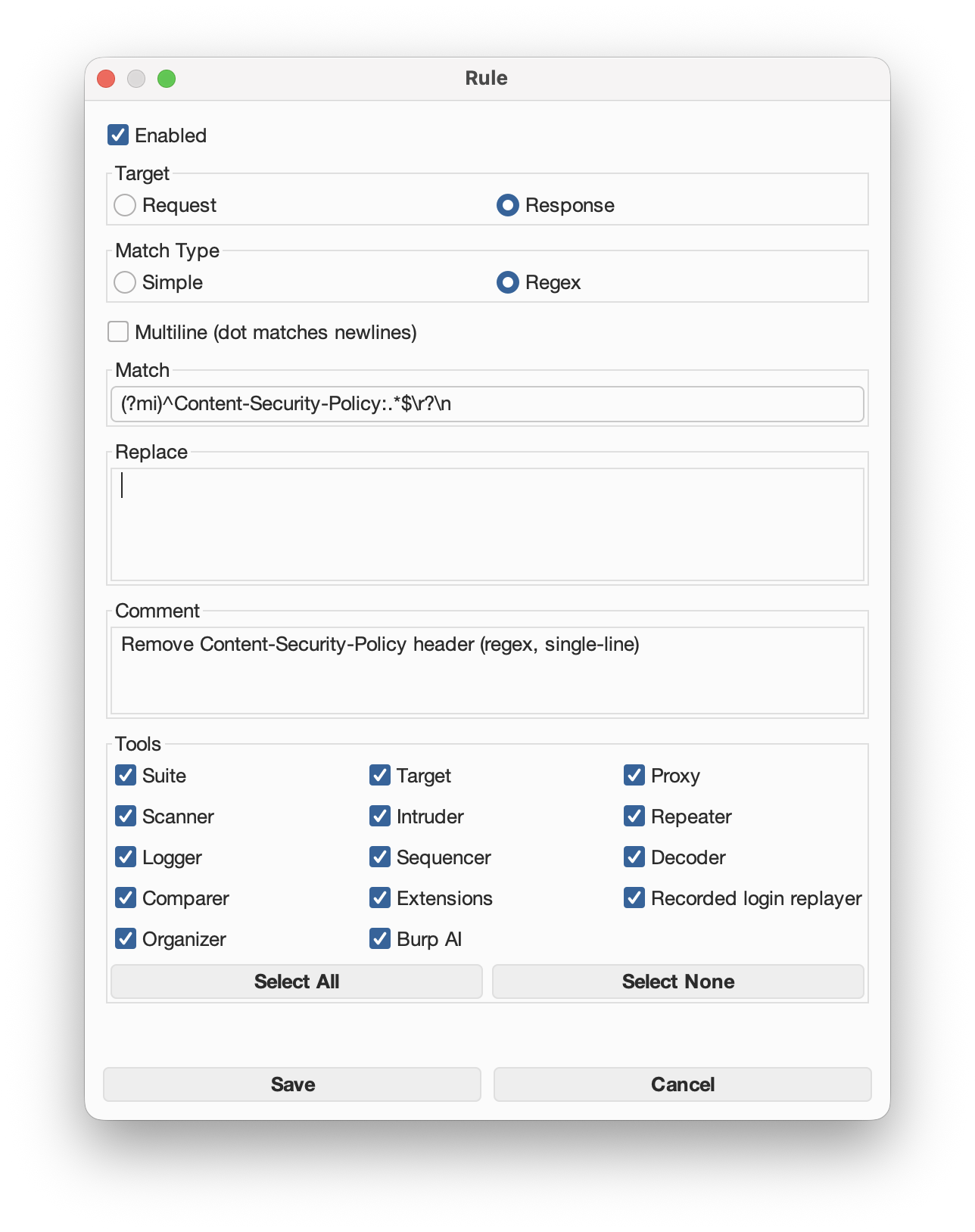
Each rule has the following properties:
- Enabled: Whether the rule is active.
- Target: Whether the rule applies to Requests or Responses.
- Match Type:
- Simple: Literal text matching with wildcard support.
- RegEx: Full regular expression support.
- Multiline:
- Off:
. does not match newlines.
- On:
. does match newlines (DOTALL).
^ and $ always work per line (MULTILINE enabled).
- Tools: Which Burp tools the rule applies to.
- Match / Replace: The match pattern and replacement text.
- Comment: Free‑form rule note.
Note: if no tools are selected, the rule will not run.
Simple Match (with wildcards)
Simple rules match literal text with optional wildcards:
* → any number of characters? → exactly one character
By default (multiline is off), wildcards do not cross line breaks. If multiline is on, * and ? can span newlines.
To match a literal * or ?, escape it with a backslash:
\\* → literal *\\? → literal ?\\\\ → literal backslash
Example (single-line):
Change user agent.
Match:   User-Agent: *
Replace: User-Agent: Mozilla/5.0 (...) Chrome/123
RegEx Match
Regex rules are standard Java regex. The engine always uses MULTILINE, and only uses DOTALL if Multiline is enabled. This means:
^ and $ match line boundaries by default. does not match newlines unless multiline is enabled
Example (single-line):
Remove a header.
Match:   ^X-Test:.*$\r?\n
Replace:
Note: the $\r?\n at the end removes the header line and its line ending. Using just $ would leave the line break in place.
Example (multiline):
Remove HTML comments.
Match:   <!--.*?-->
Replace:
Multiline: ON
Rules Pane (Suite Tab)
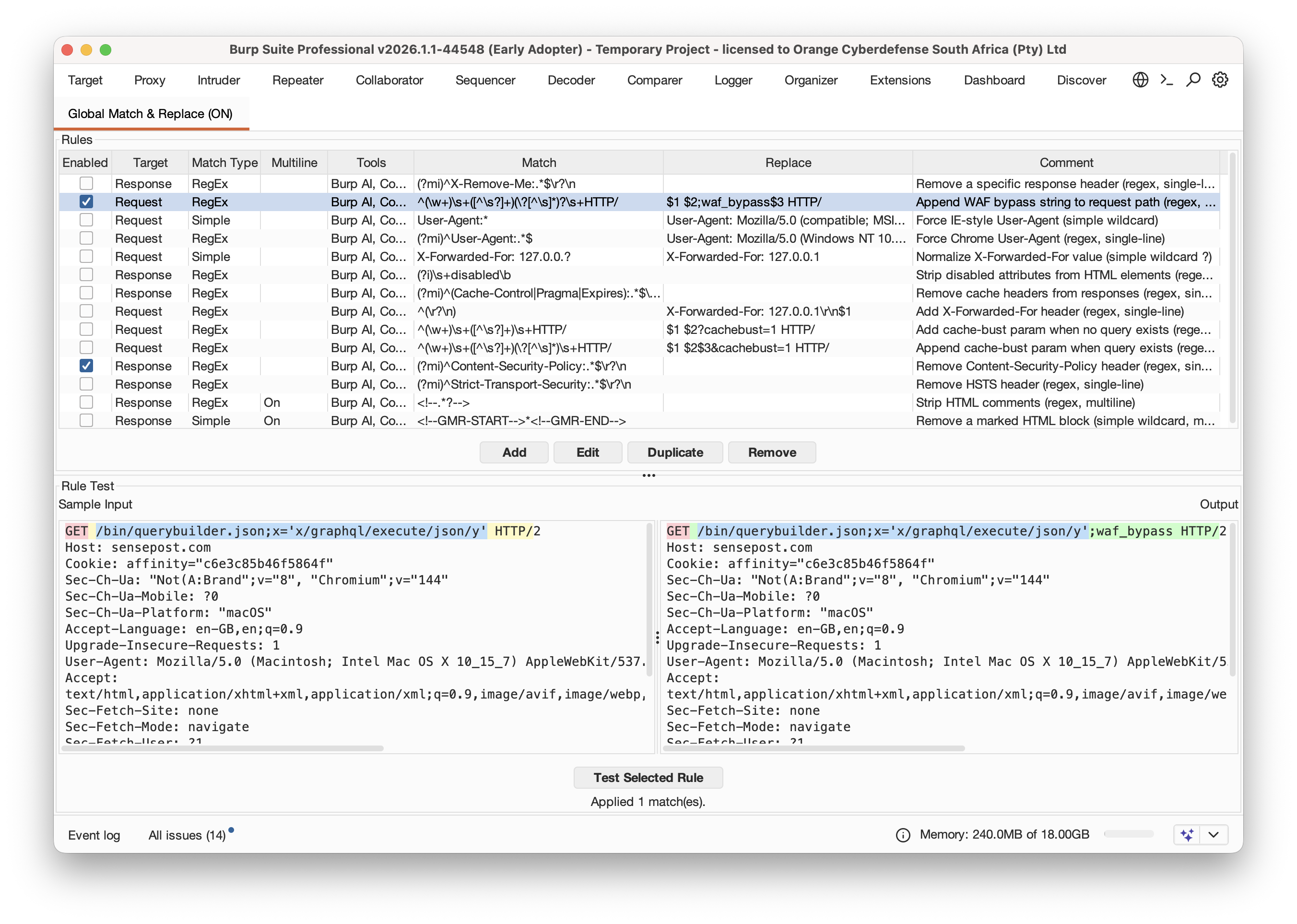
The suite tab provides full rule management and testing:
Rule List
Columns:
- Enabled: toggle rule on/off
- Target: Request / Response
- Match Type: Simple / RegEx
- Multiline: “On” when enabled
- Tools: list of tools selected
- Match / Replace / Comment
- Add: create a new rule
- Edit: modify selected rule
- Duplicate: clone selected rule (created disabled so you can adjust safely)
- Remove: delete selected rule
Rule Test Pane
- Paste a sample request/response into Sample Input
- Select a rule
- Click Test Selected Rule
The test output highlights:
- Matched text in the input
- Replacement text in the output
- Regex capture groups (different colors)
GMR Diff View
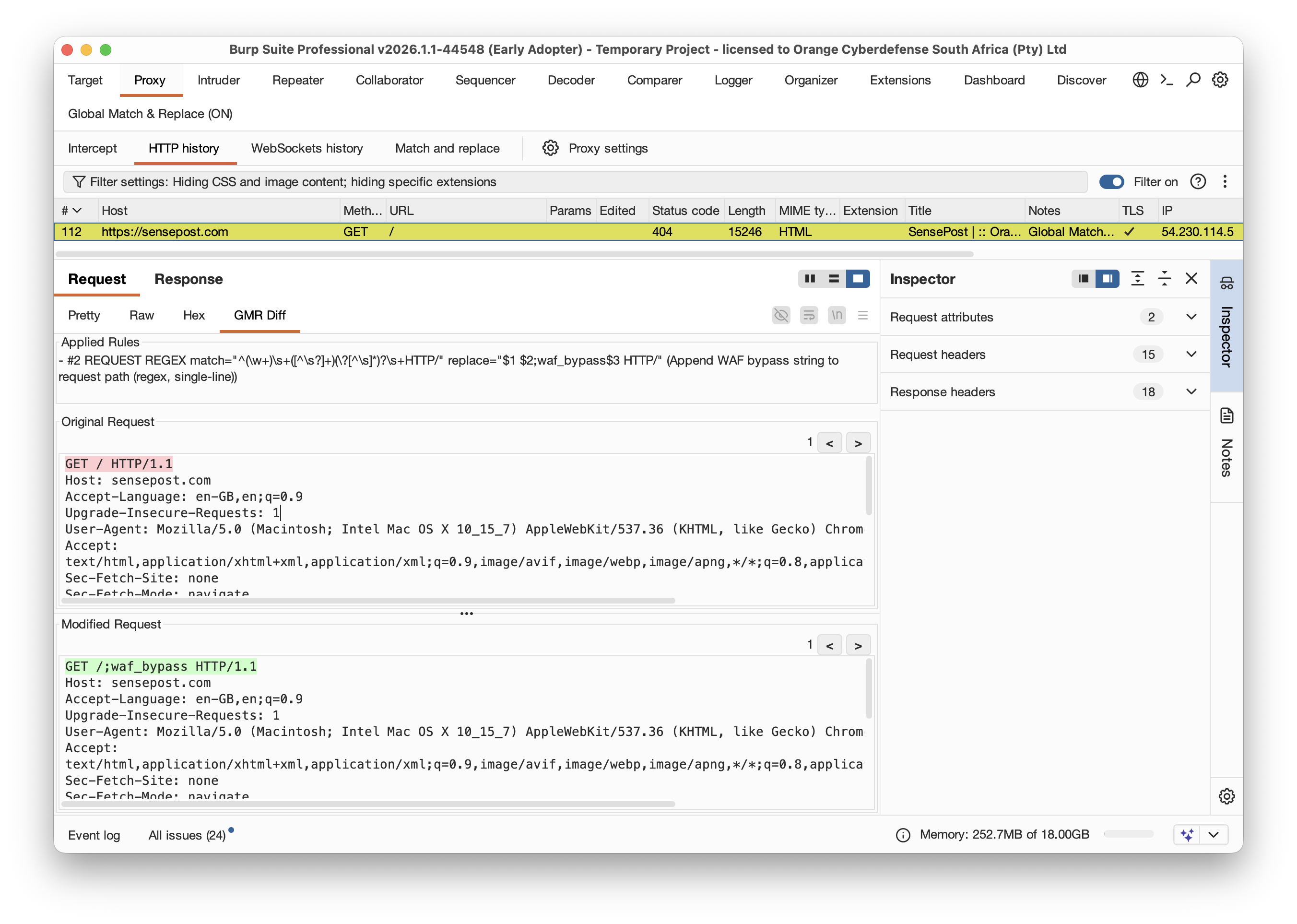
When a rule modifies a request or response, a “GMR Diff” tab appears inside the request/response editor (in tools like Proxy, Repeater, Intruder, etc.).
Modified requests/responses will be highlighted in yellow, and the note is set to “Global Match & Replace”.
What it shows
- A summary of all rules that applied
- Original vs Modified panes
- Highlighted differences
- Next/Previous buttons to jump between changes
When the tab appears
The GMR Diff tab is shown only if a rule actually modified the message. If no changes were applied, the tab won’t appear. This can sometimes be confusing if for e.g. there is a GMR Diff on just the request or just the response.
Highlighting
- Both panes show diff highlights for the changed regions
- Navigation buttons (
< and >) cycle through changes
- The count shows how many changes were detected and the current position
Persistence and Settings
What is persisted in the session
- Rules (including multiline setting, comments, etc.)
- GMR diffs (original/modified content + applied rule summaries)
Settings panel
The extension settings page includes:
- A GMR diff cache cap (MB)
- Controls how much diff history is stored in the session
- The cache stores original/modified content plus applied rule summaries
- Uses an LRU eviction policy: oldest diffs are discarded first when the cap is exceeded
- Larger values keep diffs for more historical requests
Notes / Behavior Details
- Simple rules do not interpret
$1 or backreferences in replacements.
- Regex rules support
$1, $2, etc. in replacements.
- Multiline toggle affects only how patterns match, not how replacements behave.
- GMR Diff history is cached and persisted in the session (subject to the size cap).
License
GPL v3
 singe/burp_global_match_replace
