
Note: This is the Community Edition. Commercial and Professional Editions with advanced features are available separately.
🌟 Overview
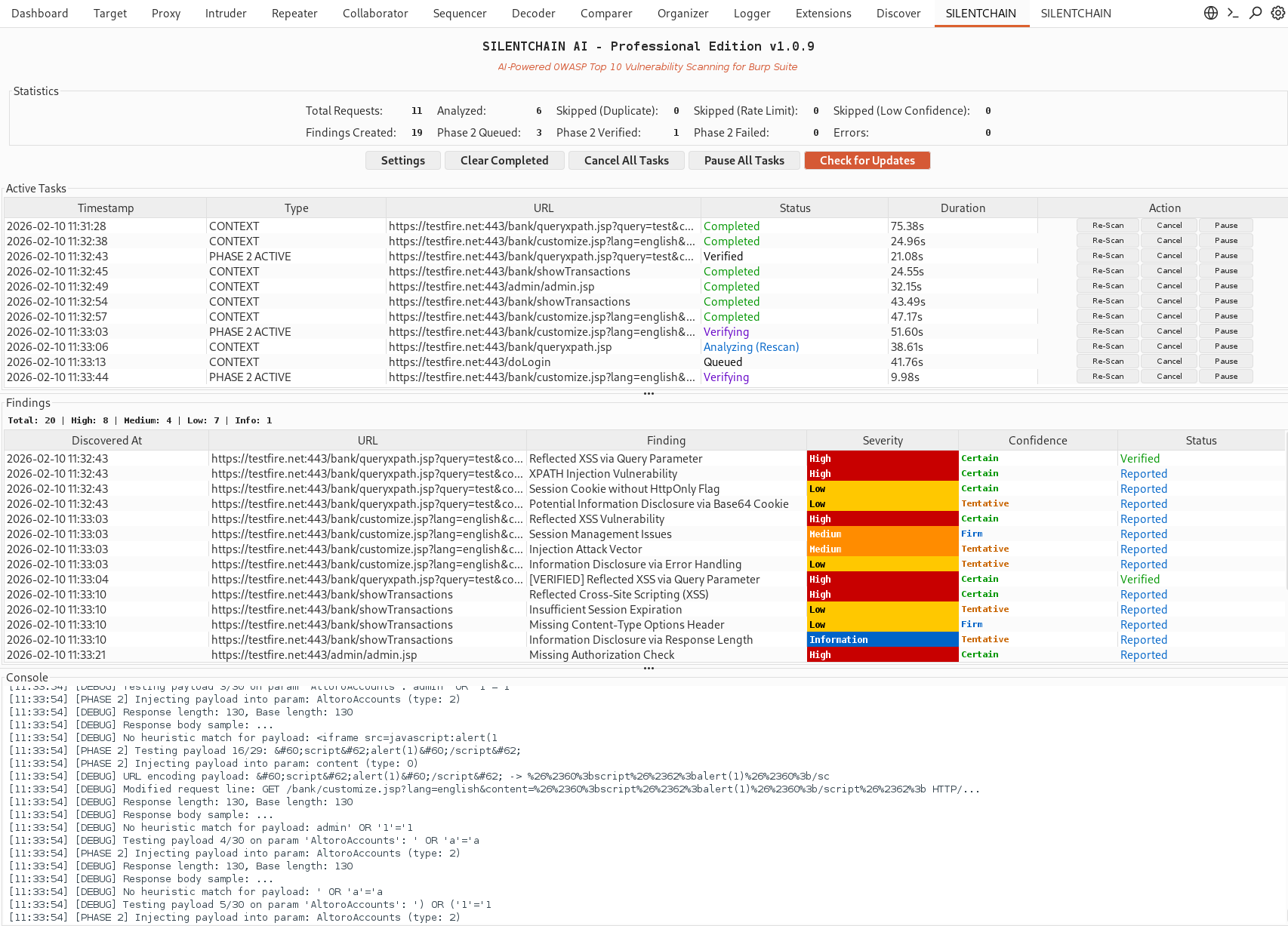
SILENTCHAIN AI™ - Community Edition is a Burp Suite extension that brings the power of artificial intelligence to web application security testing. Using advanced AI models, SILENTCHAIN performs intelligent passive analysis of HTTP traffic to identify OWASP Top 10 vulnerabilities, security misconfigurations, and potential attack vectors.
Why SILENTCHAIN?
Traditional security scanners rely on predefined signatures and patterns. SILENTCHAIN AI™ goes beyond with:
- 🧠 AI-Powered Analysis: Leverages state-of-the-art language models (Burp AI, Ollama, OpenAI, Claude, Gemini, Azure) for intelligent vulnerability detection
- 🎯 Context-Aware Detection: Understands application logic and business context, not just pattern matching
- ⚡ Real-Time Scanning: Analyzes traffic as it flows through Burp's proxy
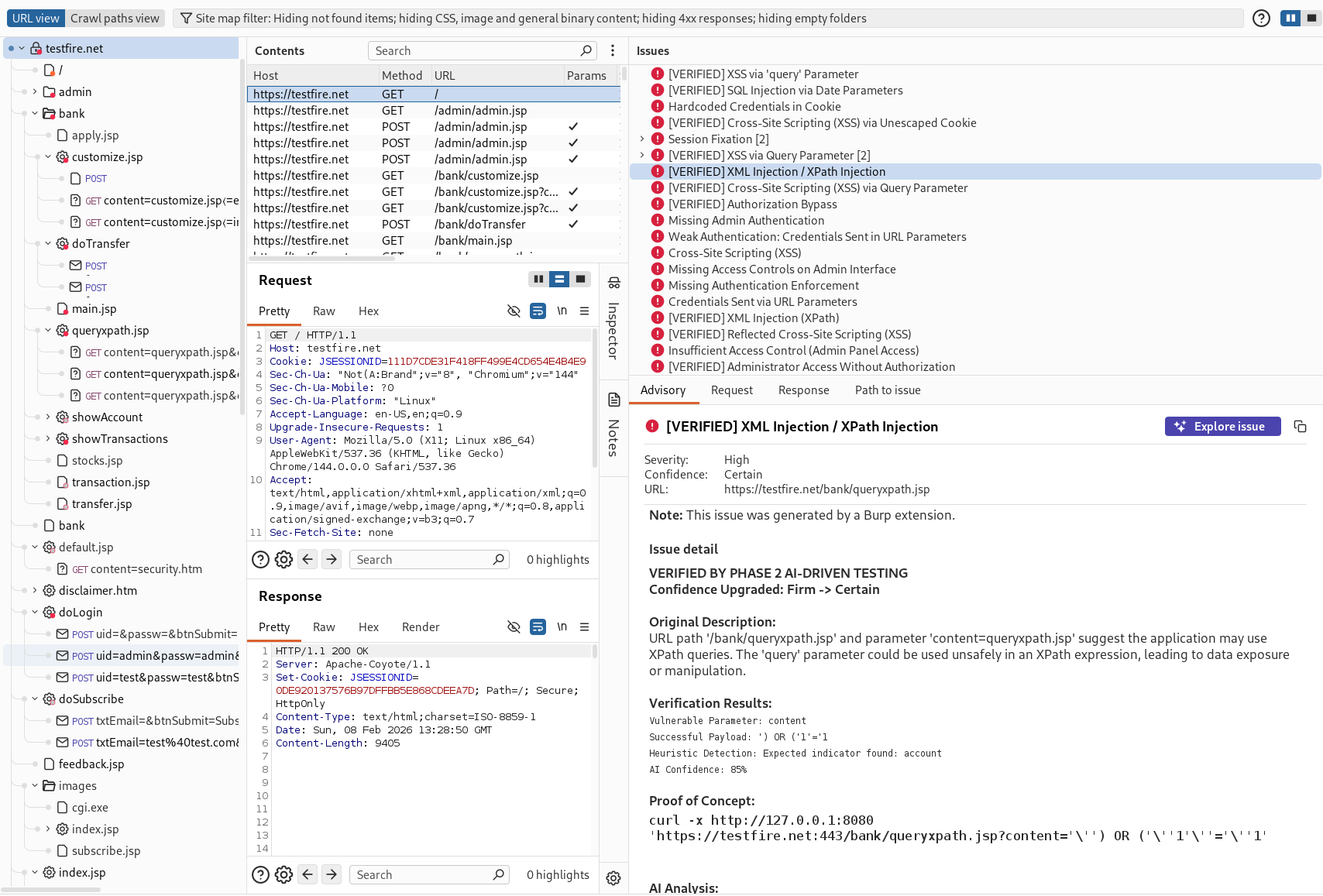
- 📊 Professional Reporting: Generates detailed findings with CWE, OWASP mappings, and remediation guidance
- 🔄 Zero False Positives: AI validation reduces noise and focuses on real vulnerabilities
- 🆓 Community Edition: Free passive analysis capabilities
✨ Features
Core Capabilities
🔍 Passive AI Analysis
- Real-time traffic analysis through Burp Proxy
- OWASP Top 10 vulnerability detection
- CWE-mapped security findings
- Intelligent confidence scoring
🎨 Professional UI
- Modern, intuitive dashboard
- Live findings panel with severity color-coding
- Task tracking and management
- Integrated console logging
🤖 Multi-AI Support
- Burp AI (default; in-process, zero-config; Burp Suite Professional)
- Ollama (local, free, privacy-focused)
- OpenAI (GPT-4 / GPT-4o)
- Claude (Anthropic)
- Gemini (Google)
- Azure OpenAI / Foundry
📋 Smart Reporting
- Detailed vulnerability descriptions
- Affected parameters identification
- CWE and OWASP mappings
- Remediation recommendations
- Direct links to security resources
🛡️ Data Privacy (DataSanitizer)
- Enabled by default — automatically protects sensitive data before it leaves your machine
- Bidirectional redaction: sensitive values are replaced with
[REDACTED_*] placeholders before sending to cloud AI providers, then restored in the response
- Detects and redacts:
- API keys — OpenAI (
sk-), GitHub (ghp_), AWS (AKIA), GitLab (glpat-), Slack (xoxb-)
- Authorization headers — Bearer tokens, Basic auth
- Credentials — password/secret/token fields,
user:pass@host URIs
- Session cookies — session IDs, CSRF tokens, JWTs, auth tokens
- Email addresses
- IP addresses & hostnames — target infrastructure details
- Skipped entirely for Ollama (local-only, no data leaves your machine)
- Can be toggled off in Settings for advanced users
Vulnerability Detection
SILENTCHAIN AI™ detects a wide range of security issues including:
| Category | Vulnerabilities |
|---|
| Injection | SQL Injection, NoSQL Injection, Command Injection, LDAP Injection, XPath Injection |
| Cross-Site Scripting | Reflected XSS, Stored XSS, DOM-based XSS |
| Authentication | Broken Authentication, Session Management Issues, Credential Exposure |
| Access Control | IDOR, Broken Authorization, Privilege Escalation |
| Cryptography | Weak Encryption, Insecure SSL/TLS, Sensitive Data Exposure |
| Configuration | Security Misconfigurations, Default Credentials, Debug Enabled |
| XXE | XML External Entity Attacks |
| Deserialization | Insecure Deserialization |
| Components | Vulnerable Dependencies, Outdated Libraries |
🚀 Quick Start
Prerequisites
- Burp Suite Professional 2025.2+ (recommended — required for the default Burp AI provider) or Burp Suite Community (works with external providers such as Ollama)
- Java 21 runtime (bundled with current Burp releases)
- An AI provider (one of the following):
- Burp AI (default; zero-config; requires Burp Suite Professional + an active Burp AI subscription)
- Ollama (free, local, privacy-focused)
- OpenAI API key
- Claude (Anthropic) API key
- Gemini (Google) API key
- Azure OpenAI / Foundry
Installation
-
Download the extension
-
Load it in Burp Suite
- Go to Extensions → Installed → Add
- Set Extension type: Java
- Select the downloaded
.jar and click Next
-
Configure your AI provider
- Open the SILENTCHAIN Community tab → ⚙ Settings
- Pick a provider — Burp AI works with no configuration. For an external provider, set the API URL / key / model, click Test Connection, then Save.
-
Start scanning
- Set your target scope in Burp (Target → Scope)
- Enable passive analysis in the SILENTCHAIN Community tab (it is OFF by default), then browse the target through Burp's proxy — or right-click any request → Analyze (SILENTCHAIN) for on-demand analysis
- Findings appear in the SILENTCHAIN Community tab and as native Burp Scanner issues
Requirements
- Cross-platform: Windows, macOS, Linux
- Burp Suite Community or Professional (Professional + AI subscription for the Burp AI provider)
- Java 21 (bundled with current Burp releases)
🔧 Configuration
AI Provider Setup
Option 1: Burp AI (Default — zero configuration)
Requires Burp Suite Professional + an active Burp AI subscription. No API URL or key
needed — analysis runs in-process through PortSwigger's Burp AI service and consumes Burp AI
Credits from your account.
- Provider:
Burp AI
- API URL / Key / Model: (not required)
Option 2: Ollama (Recommended for local / private use)
Free, local, no API keys required
- Install Ollama:
# macOS/Linux
curl -fsSL https://ollama.ai/install.sh | sh

# Windows
# Download from https://ollama.ai/download
 silentchainai/silentchain