

Multi-source subdomain enumeration tool with 50+ collection modules, DNS brute-force, passive DNS analysis, certificate transparency, search engine scraping, and subdomain takeover detection for reconnaissance.
👊OneForAll is a powerful subdomain integration tool 📝中文文档

📢 Please read this document to help you start quickly!
OneForAll is developed and tested based on Python 3.6.0, OneForAll needs to be higher than Python 3.6.0 to run. For more information on installing the Python environment, please read Python 3 Installation Guide.
After installation python, run the following command to check the Python and pip3 versions:
python -V
pip3 -V
If you see the following output, there is no problem with the Python environment:
Python 3.6.0
pip 19.2.2 from C:\Users\shmilylty\AppData\Roaming\Python\Python36\site-packages\pip (python 3.6)
Because OneForAll is under development yet, it is recommended that use git clone to clone the latest code repository. Downloading from Releases is not recommended.
If you are in China, it is recommended that you choose Gitee for cloning:
git clone https://gitee.com/shmilylty/OneForAll.git
or:
git clone https://github.com/shmilylty/OneForAll.git
You can use pip3 install requirements, the following is an example of using pip3 to install dependencies under Windows: (Note: If your Python3 is installed in the system Program Files In the directory, such as: C:\Program Files\Python36, please run the following as an administrator!)
cd OneForAll/
python3 -m pip install -U pip setuptools wheel
pip3 install -r requirements.txt
python3 oneforall.py --help
For other system platforms, please read dependency installation. If you compile failed during the installation, you can find solution in Q&A documentation. If still not resolved, welcome issues.
docker pull shmilylty/oneforall
docker run -it --rm -v ~/results:/OneForAll/results oneforall
Result will be saved in ~/results.
If you are use pip3, run the following command:
python3 oneforall.py --target example.com run
python3 oneforall.py --targets ./example.txt run
Let's take the command python3 oneforall.py --target example.com run as an example. When command finished in the default configuration, OneForAll will generate results in the results directory:
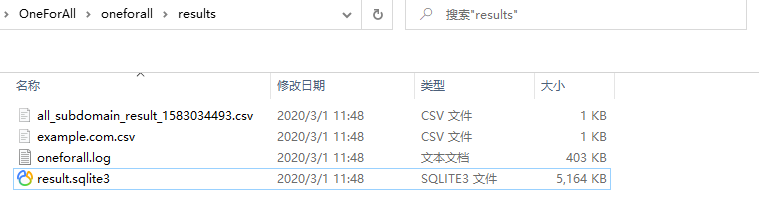
example.com.csv is the result for each domain.
all_subdomain_result_1583034493.csv is the result for all domains when your target have multiple domains.
result.sqlite3 is the SQLite3 database that stores all the subdomains collected by OneForAll. The database structure is shown below:

example_com_origin_result table stores the origin subdomain results of each module.
example_com_resolve_result table stores the results of resolving subdomains.
example_com_last_result table stores the results of subdomain collection last time.
example_com_now_result table stores the collection results of the current subdomains. Usually using this table is enough.
For more information, please see .
The CLI only provide some common parameters. For more configuration, please read setting.py. IF you have any suggestions, welcome feedback. Some modules need access API (most of which are freely available after registered accounts). If you need , please go to api.py to configure the API. If not used, just ignore the error message. (For module detailes, please read collection module description)
The OneForAll command line interface is based on Fire. For more advanced usage of Fire, please refer to using the Fire CLI, if you have any doubts during the use, please feel free to give me feedback.
oneforall.py is the program main entrence, and oneforall.py can call brute.py, takerover.py, dbexport.py and other modules. But you can also use these modules separately, if you want, please refer to the usage help.
❗ Note: When you encounter some problems or doubts during use, please search answers on issues first. You can also read Q&A.
OneForAll help summary
The following help information may not be up to date. You can use python oneforall.py --help to get the latest help information.
python oneforall.py --help
Project address : https://github.com/shmilylty/OneForAll
Problems with other tools
Not powerful enough, few api, cannot automate, cannot valid subdomain, etc.
Not friendly enough, do not have a good user interface.
Not quickly enough, do not use multi-process, multi-threading, coroutine, etc.
Lack of maintenance, lots of issues and bugs, and no one fixed it.
In order to solve the above problems, OneForAll born! As its name, OneForAll is committed to becoming the only one subdomain integration tool you need. We hope that one day OneForAll can be called "probably the best subdomain tool"
At present, OneForAll is under development, there must be a lot of problems and areas for improvement. Welcome to submit Issues or PR, If you like, star please✨. You can contact me through QQ group 824414244 or twitter tweet to me: 👨👨👦👦.
censys_api, certspotter, crtsh, entrust, google, spyse_api.axfr, cross-domain policy file cdx, HTTPS certificate cert, content security policy csp, robots file robots, and sitemap file sitemap, NSEC record nsec. NSEC3 record and other modules will be added later.archirawl, commoncrawl, which is still being debugged and needs to be added and improved).txt, csv, json.If you have any other good ideas, please let me know!😎
For more information, please see Directory structure description.
Some help and instructions are also provided in the docs directory of this project, such as dictionary Source description, wildcard judgment process.
Thanks to these great Python libraries!
The project uses SemVer for version management, and you can view the available version in Releases, You can refer to the change record instructions for historical changes.
For more details, read todo.md.
Very warmly welcome all people to make OneForAll better together!
You can view all contributors and their contributions in the contributor documentation and thank them for making OneForAll more powerful and useful.
The project has signed a GPL-3.0 license, for more information, please read LICENSE.
Thanks to the various subdomain collection projects of online open source!
Thanks ace of A-Team for their enthusiastic and unselfish answers!
Developed with drive and PyCharm!
This tool can only be used in the safety construction of enterprises with sufficient legal authorization. During the use of this tool, you should ensure that all your actions comply with local laws and regulations. If you have any illegal behavior in the process of using this tool, you will bear all the consequences yourself, and all developers and all contributors of this tool will not bear any legal and joint liability.
Run the following command to update project ( maintain your updates to /config/setting.pyand/config/api.py):
git stash # Stash local Git changes
git fetch --all # Fetch updates
git pull # Pull updates
git stash pop # Apply the local Git changes stash
NAME
oneforall.py - OneForAll help summary page
SYNOPSIS
oneforall.py COMMAND | --target=TARGET <flags>
DESCRIPTION
OneForAll is a powerful subdomain integration tool
Example:
python3 oneforall.py version
python3 oneforall.py --target example.com run
python3 oneforall.py --targets ./domains.txt run
python3 oneforall.py --target example.com --alive False run
python3 oneforall.py --target example.com --brute True run
python3 oneforall.py --target example.com --port medium run
python3 oneforall.py --target example.com --fmt csv run
python3 oneforall.py --target example.com --dns False run
python3 oneforall.py --target example.com --req False run
python3 oneforall.py --target example.com --takeover False run
python3 oneforall.py --target example.com --show True run
Note:
--alive True/False Only export alive subdomains or not (default False)
--port default/small/large See details in ./config/setting.py(default port 80)
--fmt csv/json (result format)
--path Result directory (default directory is ./results)
ARGUMENTS
TARGET
One domain (required)
TARGETS
File path of one domain per line (required)
FLAGS
--brute=BRUTE
Use brute module (default True)
--dns=DNS
Use DNS resolution (default True)
--req=REQ
HTTP request subdomains (default True)
--port=PORT
The port range request to the subdomains (default port 80)
--alive=ALIVE
Only export alive subdomains (default False)
--fmt=FMT
Result format (default csv)
--path=PATH
Result directory (default None)
--takeover=TAKEOVER
Scan subdomain takeover (default False)
COMMANDS
COMMAND is one of the following:
version
bevigil, binaryedge_api, bufferover, cebaidu, chinaz, chinaz_api, circl_api, cloudflare, dnsdb_api, dnsdumpster, hackertarget, ip138, ipv4info_api, netcraft, passivedns_api, ptrarchive, qianxun, rapiddns, riddler, robtex, securitytrails_api, sitedossier, threatcrowd, wzpc, ximcx.srv and collect from MX, NS, SOA, TXT, SPF.alienvault, riskiq_ api, threatbook_ api, threatkeeper , virustotal, virustotal_ api, which need to be added and improved.ask, baidu, bing, bing_api, fofa_api, gitee, github_api, google, google_api, shodan_api, so, sogou, yahoo, yandex, zoomeye_api, except for special search engines. General search engines support automatic exclusion of search, full search and recursive search.

