 shellkraft/anvil
Anvil is a runtime-first attack surface assessment tool for Windows thick client applications, built for penetration testers and security researchers conducting targeted application security assessments. It covers multiple attack classes in a single targeted run.





Runtime-first privilege escalation and attack surface assessment for Windows thick clients.
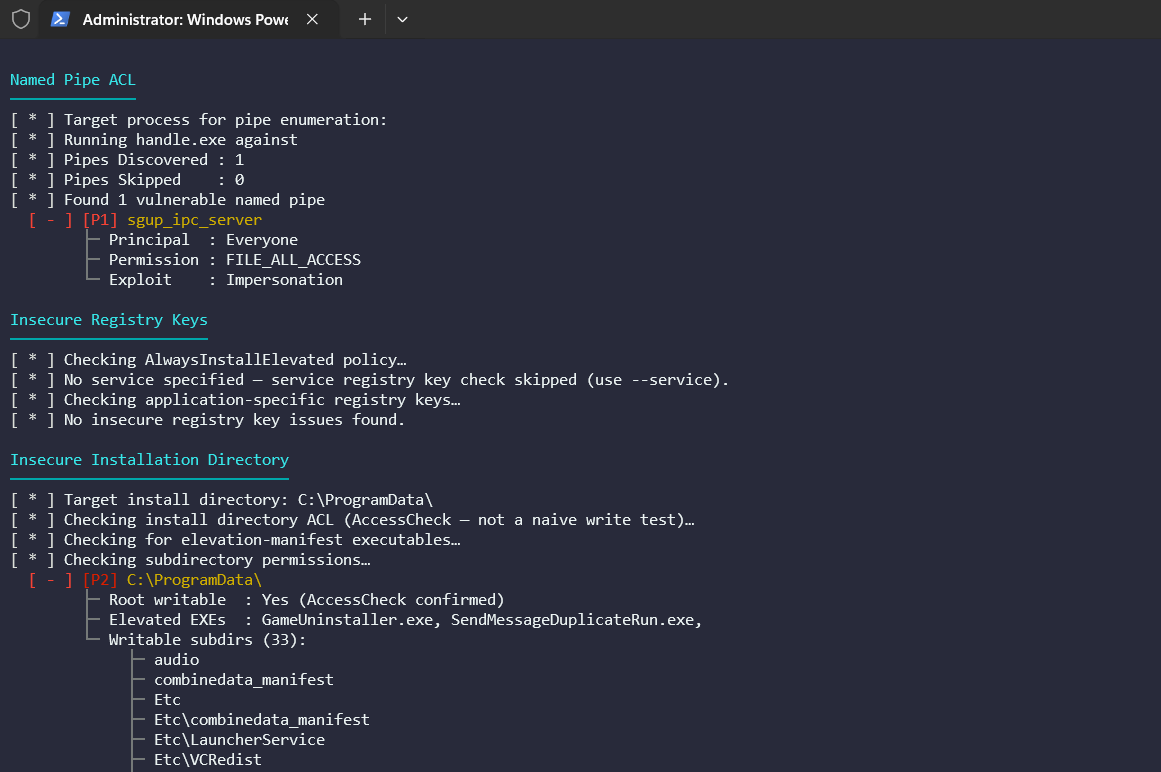
Anvil is a runtime-first privilege escalation and attack surface assessment tool for Windows thick client applications. Rather than scanning the filesystem blindly, it pairs Procmon capture with Windows AccessCheck to report only paths that are both observed at runtime and confirmed writable by standard users, eliminating the false positive noise that plagues generic enumeration tools.
Most thick client assessment tools cover one or two attack classes. Anvil is built around the idea that runtime observation, ACL-verified exploitability, and a wide attack surface should all live in the same targeted run — with a gated pipeline that keeps the output actionable.
Every candidate passes four sequential gates before it is reported.
Hard Gates
AccessCheck APIModule Logic Gates
Supersede, OverwriteIf, etc.) + cross-user writability guard.sys paths excludedTarget Resolution
The tool resolves the target to an executable path (from --exe, --service, or --pid). If it is a service, ServiceInfo is retrieved with current PID and state.
Procmon Capture
Process integrity level is read immediately after launch (while the process is alive) and stored in the context.
Per‑Module Filtered Analysis
Each module requests a filtered CSV export from Procmon using its own .pmc filter (stored in filters/). The CSV is parsed, and a series of gates are applied:
Static Correlation
The com module performs an additional static pass — scanning the target binary for embedded CLSIDs and checking each against HKLM and HKCU — to surface hijack opportunities not exercised during the capture window. These are flagged with a [Static Correlation] tag.
Reporting
Findings are printed to the terminal (with colour coding) and optionally written to JSON or a standalone HTML report.
flowchart TB
    %% Phase 1
    subgraph Phase1["Phase 1: Target & Runtime Discovery"]
        TR["Target Resolver<br/>--exe / --service / --pid"] -->
        IL["Integrity Gate<br/>Medium-IL launch / Service restart"] -->
        PM["Procmon Engine<br/>Runtime FS / Reg / Pipe events"]
    end

    %% Phase 2
    subgraph Phase2["Phase 2: Signal Reduction"]
        direction LR
        PF["Per-Module PMC Filters<br/>High-signal traces only"] -->
        CSV["Filtered CSV Export"]
    end

    %% Phase 3
    subgraph Phase3["Phase 3: Exploitability Gates"]
        HG["Hard Gates<br/>High-Integrity target<br/>Not protected path"] -->
        ACL["AccessChk Validation<br/>Writable by standard user"] -->
        LG["Logic Gates<br/>Module-specific rules"]
    end

    %% Phase 4
    subgraph Phase4["Phase 4: Correlation"]
        RT["Runtime Findings"]
        ST["Static Correlation<br/>COM: CLSID binary scan / registry"]
    end

    %% Phase 5
    subgraph Phase5["Phase 5: Reporting"]
        SV["Severity Engine<br/>P1–P5"] --> OUT["Console Output"]
        SV --> JSON["JSON Report"]
        SV --> HTML["HTML Report"]
    end

    %% Cross-phase flow
    PM --> PF
    CSV --> HG
    LG --> RT
    ST -.-> RT
    RT --> SV

    %% Styling
    classDef p1 fill:#0f2a44,stroke:#4cc9f0,color:#e6f1ff
    classDef p2 fill:#2b193d,stroke:#f72585,color:#fde8f3
    classDef p3 fill:#1f2d1c,stroke:#7ae582,color:#eaf7ea
    classDef p4 fill:#3a1f1f,stroke:#ffb703,color:#fff3d6
    classDef p5 fill:#0b2e2a,stroke:#00f5d4,color:#e6fffb

    class Phase1 p1
    class Phase2 p2
    class Phase3 p3
    class Phase4 p4
    class Phase5 p5
    linkStyle default stroke:#9aa4b2,stroke-width:2px
