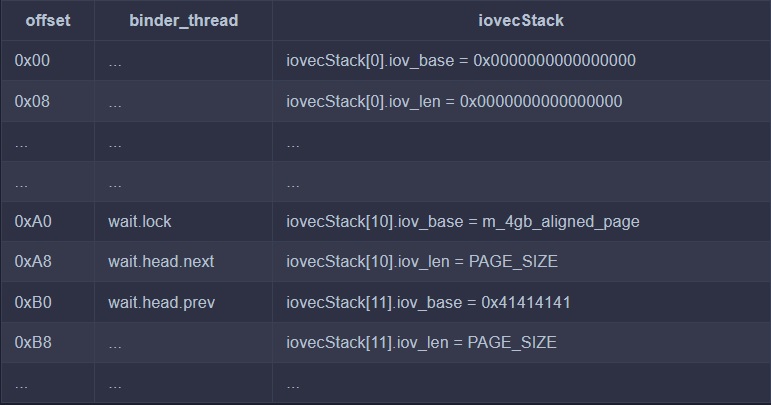

Triggering and Analyzing Android Kernel Vulnerability CVE-2019-2215

In November 2017 a use-after-free bug to linux kernel was detected by syzkaller system. In February 2018 this was patched in some linux kernels and android versions.
This fix was never included in Android monthly security bulletins, so it was not patched in many newly released devices such as Pixel and Pixel2.
In September 2019 android was informed of the security implications of this bug by Project Zero. Then android assigned CVE-2019-2215 to this vulnerability to make it more formal and known.
CVE-2019-2215 is a use-after-free in binder.c that allows evaluation of privilege (getting root access) from an android application. There is no need to user’s interaction, to exploit this vulnerability. It only requires the installation of a malicious local application.
Here we are going to introduce this android kernel vulnerability in more details and use this vulnerability to get root access (privilege escalation) of the whole android device.
We will use this Proof of Concept (PoC):
https://github.com/cloudfuzz/android-kernel-exploitation
We will first show you a way to trigger this vulnerability on an android emulator and make a kernel crash. Then to see how it would be dangerous, we continue using PoC to get root access in the simulated android device. Then we will analyze the kernel code to see what is the reason (static and dynamic analysis).
After analysis, we will see how we got the root access. At last we see how this vulnerability is mitigated using patches.
To make a kernel crash by triggering this vulnerability we use this steps:
Watch the following video:
[video]
In This (and next) section we are going to understand why the crash happens by using static and dynamic analysis.
Here we will analyze kernel code (static analysis) to understand the problem. In crash_report.txt there is the report from KASan which says this is a use-after-free bug. It means an object is allocated in heap (and we have a reference to it), then we freed the object from the heap and then we erroneously called it by a reference. In this report the stack trace of these three stages is printed.
If you remember from above, we used 'trigger.cpp' in the PoC.
Here is main code of trigger.cpp:
int main() {
	//1
	int fd, epfd;
	//2
	struct epoll_event event = {.events = EPOLLIN};
	//3
	fd = open("/dev/binder", O_RDONLY);
	//4
	epfd = epoll_create(1000);
	//5
	epoll_ctl(epfd, EPOLL_CTL_ADD, fd, &event);
	//6
	ioctl(fd, BINDER_THREAD_EXIT, NULL);
}
Let's see what 'trigger.cpp' is doing.
In Android (like other Unix-based operating systems) we have some processes. Every program that we run creates one (or more) processes and these processes are handled by OS. OS may switch between them (multi-tasking) or terminate a process, etc. For security reasons, processes are isolated from each other by default.
In some cases, one process may need to exchange data with another process. It is called Interprocess Communication (IPC). There are several ways for processes to communicate in linux. Android introduced a specific IPC mechanism called 'Binder'. Binder is a kernel driver to facilitate inter-process communication.
In android, IPC can be done by directly calling some kernel methods (most of them are in drivers/binder.c) or using high-level implementations (for example in java).
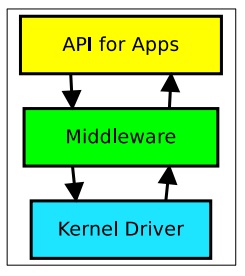
For using binder, we should open the kernel binder module. It is done using line 3 of trigger.cpp. Then we have a file descriptor pointer, By using this fd kernel initiator and recipients of the IPC can be identified.
All interactions with the driver will happen through a small set of 'ioctl' commands (BINDER_THREAD_EXIT, BINDER_WRITE_READ, ...).
More about binder: link1, link2
In linux, we have a concept called 'event polling'. 'epoll' API is used when we want to monitor multiple file descriptors (file descriptors are what we have when opening a driver or working with IO, etc).
epoll is a kernel struct which has two important field.
Inorder to use event polling, we first create an epoll (line 4), then add or delete (EPOLL_CTL_ADD) an event (&event) associated with a file descriptor (fd) to our created epoll (epfd) by calling epoll_ctl method of kernel.
=> epoll_event event is an event, triggered when the associated file (fd) is available for read operation.
Now we understand what trigger.cpp is doing (no need to go deep!). It opens the binder module, creates an epoll to listen to it when it is ready. Then at line 6, we exit from the binder that we started in line 3.
By calling open(), we actually call open_binder() ( open() implementation in binder.c ), in open_binder(), a new 'binder_proc' struct will be created and:
fd->pricate_data = binder_proc
By calling epoll_create(), a new epoll struct will be created and added to a queue structure.
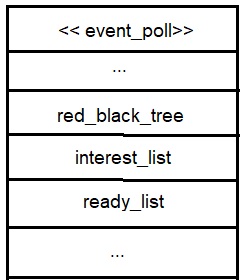
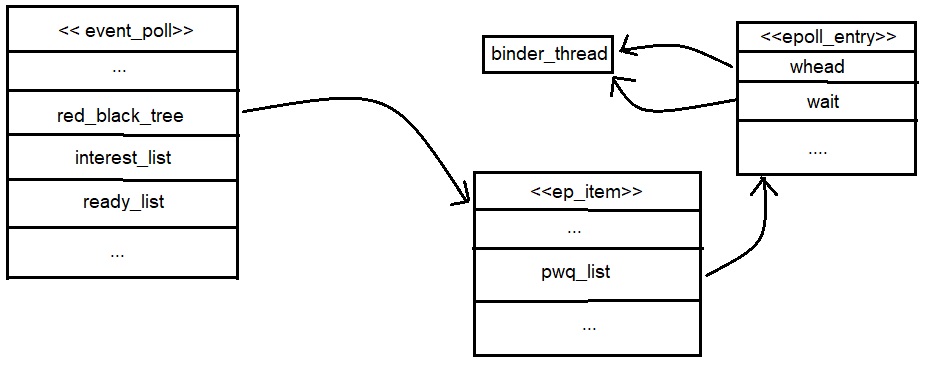
By calling epoll_ctrl(epdf, ADD, fd, event), a new ep_item is created, associate fd (file descriptor to listen) to this ep_item, and it is inserted to event_poll's red black tree ( a data structure in ep to save ep_items ). It also calls ep_item_poll(), this method handles the call back function association to ep_item.
It creates new binder_thread struct (allocation happens here), links it to the binder_proc (created above), then an epoll_entry struct is created, it has two lists, epoll_entry->wait and epoll_entry->whead, both of these lists have a pointer to binder_thread created before.
Then epoll_entry is linked to ep_item (ep_item->pwqlist is a list that contains this epoll_entry).
By calling ioctl(fd, ...), binder_proc is accessed through fd->private_data, then the binder_thread struct will be freed from the memory.
When our current process exits, epoll_ctl(epfd, DEL, fd, event) will be called.
