 session-replay-tools/tcpcopy
An online request replication and TCP stream replay tool, ideal for real testing, performance testing, stability testing, stress testing, load testing, smoke testing, and more.

TCPCopy is a TCP stream replay tool for realistic testing of Internet server applications.
An Overview of TCPCopy for Beginners
A General Overview of TCPCopy Architecture
Although real live traffic is crucial for testing Internet server applications, accurately simulating it is challenging due to the complexity of online environments. To enable more realistic testing, TCPCopy was developed as a live flow reproduction tool that generates test workloads closely resembling production workloads. TCPCopy is widely used by companies in China.
TCPCopy minimally impacts the production system, consuming only additional CPU, memory, and bandwidth. The reproduced workload mirrors the production environment in terms of request diversity, network latency, and resource usage.
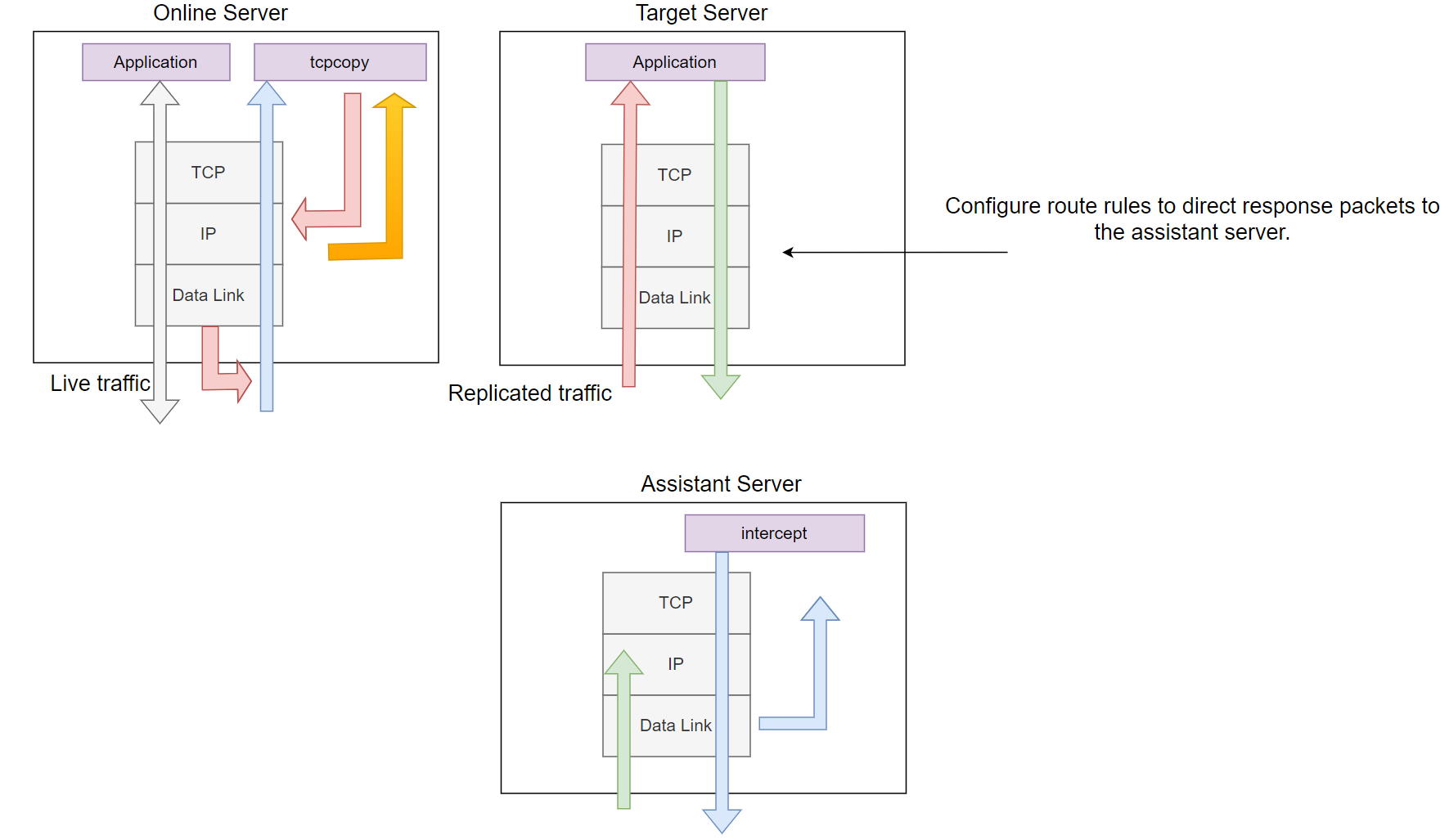
Figure 1. Overview of the TCPCopy Architecture.
As shown in Figure 1, TCPCopy is composed of two components: tcpcopy and intercept. The tcpcopy component runs on the online server, capturing live requests, while intercept operates on the assistant server, performing tasks such as passing response information to tcpcopy. The test application itself runs on the target server.
By default, tcpcopy uses raw sockets to capture packets at the network layer (depicted by the orange arrows in the figure). It handles processes such as TCP interaction simulation, network latency control, and upper-layer interaction simulation. It then sends packets to the target server using raw sockets for output (shown by the light red arrows in the figure).
The only required task on the target server is configuring route rules to direct response packets (shown by light green arrows in the figure) to the assistant server.
The intercept component's role is to forward the response header (by default) to tcpcopy. It captures the response packets, extracts the response header information, and sends this information to tcpcopy via a dedicated channel (represented by light blue arrows in the figure). Upon receiving the response header, tcpcopy uses the information to modify the attributes of online packets and proceeds to send subsequent packets.
It is important to note that responses from the target server are routed to the assistant server, which functions as a black hole.
For intercept, you have two options:
git clone git://github.com/session-replay-tools/intercept.git.For tcpcopy, you also have two options
git clone git://github.com/session-replay-tools/tcpcopy.git.intercept directory:cd intercept./configure makeintercept tool:make installintercept--single
Run intercept in non-distributed mode.
--with-pfring=PATH
Specify the path to the PF_RING library sources.
--with-debug
Compile intercept with debug support, with logs saved to a file.
tcpcopy on the Online Servertcpcopy directory: cd tcpcopy./configure maketcpcopy tool: make installtcpcopy--offline
Replay TCP streams from a pcap file.
--pcap-capture
Capture packets at the data link layer.
--pcap-send
Send packets at the data link layer instead of the IP layer.
--with-pfring=PATH
Specify the path to the PF_RING library sources.
--set-protocol-module=PATH
Set tcpcopy to work with an external protocol module.
--single
If both intercept and tcpcopy are configured with the --single option, only one tcpcopy instance will work with intercept, leading to better performance.
--with-tcmalloc
Use tcmalloc instead of malloc.
--with-debug
Compile tcpcopy with debug support, with logs saved to a file.
Assume that both tcpcopy and intercept are configured using ./configure.
On the Target Server Running Server Applications:
Configure the route rules to direct response packets to the assistant server. For example, if 61.135.233.161 is the IP address of the assistant server, use the following route command to direct all responses from clients in the 62.135.200.x range to the assistant server:
route add -net 62.135.200.0 netmask 255.255.255.0 gw 61.135.233.161
On the Assistant Server Running intercept (Root Privilege or CAP_NET_RAW Capability Required):
./intercept -F <filter> -i <device>
Note that the filter format is the same as the pcap filter. For example:
./intercept -i eth0 -F 'tcp and src port 8080' -d
In this example, intercept will capture response packets from a TCP-based application listening on port 8080, using the eth0 network device.
Please note that ip_forward is not enabled on the assistant server.
On the Online Source Server (Root Privilege or CAP_NET_RAW Capability Required):
./tcpcopy -x localServerPort-targetServerIP:targetServerPort -s <intercept server> [-c <ip range>]
For example (assuming 61.135.233.160 is the IP address of the target server):
./tcpcopy -x 80-61.135.233.160:8080 -s 61.135.233.161 -c 62.135.200.x
In this example, tcpcopy captures packets on port 80 from the current server, changes the client IP address to one from the 62.135.200.x range, and sends these packets to port 8080 on the target server (61.135.233.160). It also connects to 61.135.233.161 to request intercept to forward response packets. While the -c parameter is optional, it is used here to simplify route rules.
CAP_NET_RAW capability (e.g., setcap CAP_NET_RAW=ep tcpcopy).