
Skip to content
KitploitKITPLOIT
ToolsBlog
Submit
ToolsBlog
Submit

Hacking, PenTest, and Cybersecurity Tools for Your Security Arsenal!

Kitploit is a directory of hacking, cybersecurity, and pentesting tools. Discover the latest project updates to find vulnerabilities, analyze systems, automate testing, and strengthen your security.

··Feeds·Contact·Privacy·© 2026 Kitploit

Tool Directory

Categories

View all categories
Loading categories
Sudomy — Sudomy is a subdomain enumeration tool to collect subdomains and analyzing domains performing automated reconnaissance (recon) for bug hunting / pentesting | Kitploit
Tools/GitHubGitHub/screetsec/sudomy
OSINT (Open Source Intelligence)ReconnaissanceVulnerability AnalysisInformation GatheringWeb SecurityPenetration TestingSubdomain EnumerationDNS Analysis
GitHubscreetsec/sudomy

Sudomy

Sudomy is a subdomain enumeration tool to collect subdomains and analyzing domains performing automated reconnaissance (recon) for bug hunting / pentesting

View Repository
2.4k4142 years agoReviewed by Kitploit

Most Popular

View all →

Discover the most used tools by our community.

Explore all tools

Browse our collection of tools

View all tools →
Share
Website

Sudomy

License Build Status Version Build Build Contributions Welcome Donate

Subdomain Enumeration & Analysis

sudomy

Sudomy is a subdomain enumeration tool to collect subdomains and analyzing domains performing advanced automated reconnaissance (framework). This tool can also be used for OSINT (Open-source intelligence) activities.

Features !

For recent time, Sudomy has these 20 features:
  • Easy, light, fast and powerful. Bash script (controller) is available by default in almost all Linux distributions. By using bash script multiprocessing feature, all processors will be utilized optimally.
  • Subdomain enumeration process can be achieved by using active method or passive method
    • Active Method

      • Sudomy utilize Gobuster tools because of its highspeed performance in carrying out DNS Subdomain Bruteforce attack (wildcard support). The wordlist that is used comes from combined SecList (Discover/DNS) lists which contains around 3 million entries
    • Passive Method

      • By evaluating and selecting the good third-party sites/resources, the enumeration process can be optimized. More results will be obtained with less time required. Sudomy can collect data from these well-curated 22 third-party sites:

        root@kitploit:~
          https://censys.io
          https://developer.shodan.io
          https://dns.bufferover.run
          https://index.commoncrawl.org 
          https://riddler.io 
          https://api.certspotter.com
          https://api.hackertarget.com 
          https://api.threatminer.org
          https://community.riskiq.com
          https://crt.sh
          https://dnsdumpster.com
          https://docs.binaryedge.io
          https://securitytrails.com
          https://graph.facebook.com
          https://otx.alienvault.com
          https://rapiddns.io
          https://spyse.com
          https://urlscan.io
          https://www.dnsdb.info
          https://www.virustotal.com
          https://threatcrowd.org
          https://web.archive.org
        
  • Test the list of collected subdomains and probe for working http or https servers. This feature uses a third-party tool, httprobe.
  • Subdomain availability test based on Ping Sweep and/or by getting HTTP status code.
  • The ability to detect virtualhost (several subdomains which resolve to single IP Address). Sudomy will resolve the collected subdomains to IP addresses, then classify them if several subdomains resolve to single IP address. This feature will be very useful for the next penetration testing/bug bounty process. For instance, in port scanning, single IP address won’t be scanned repeatedly

How Sudomy Works

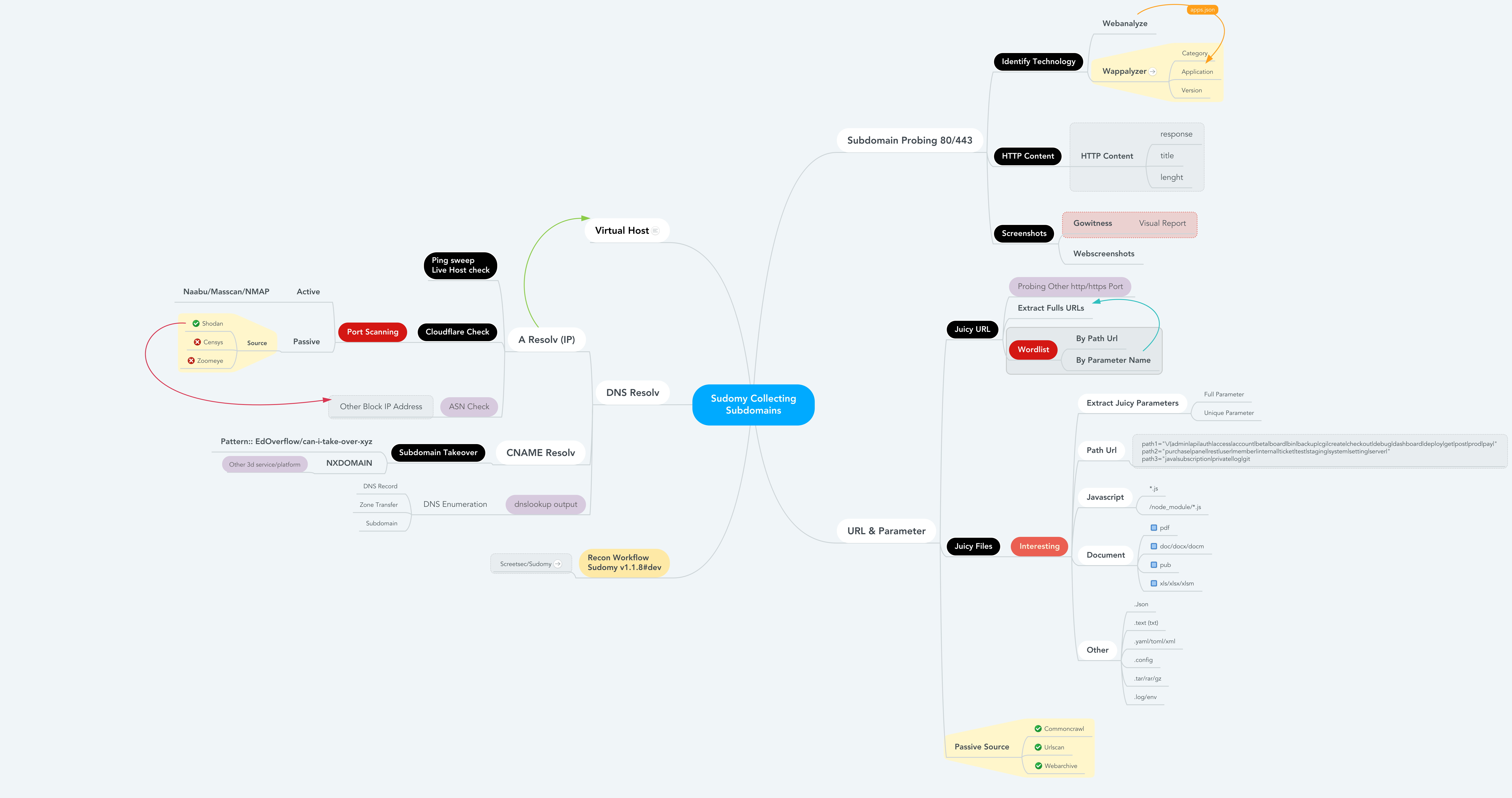
How sudomy works or recon flow, when you run the best arguments to collect subdomains and analyze by doing automatic recon.

root@kitploit:~
root@maland: ./sudomy -d bugcrowd.com -dP -eP -rS -cF -pS -tO -gW --httpx --dnsprobe  -aI webanalyze -sS

Recon Worfklow

This Recon Workflow Sudomy v1.1.8#dev

Recon Workflow

Detail information

Detail information File Reconnaissance & Juicy Data

root@kitploit:~
------------------------------------------------------------------------------------------------------

- subdomain.txt             -- Subdomain list             < $DOMAIN (Target)
- httprobe_subdomain.txt    -- Validate Subdomain	  < subdomain.txt
- webanalyzes.txt           -- Identify technology scan   < httprobe_subdomain.txt
- httpx_status_title.txt    -- title+statuscode+lenght    < httprobe_subdomain.txt
- dnsprobe_subdomain.txt    -- Subdomain resolv		  < subdomain.txt
- Subdomain_Resolver.txt    -- Subdomain resolv (alt)     < subdomain.txt
- cf-ipresolv.txt           -- Cloudflare scan        	  < ip_resolver.txt 
- Live_hosts_pingsweep.txt  -- Live Host check		  < ip_resolver.txt	 
- ip_resolver.txt           -- IP resolv list          	  < Subdomain_Resolver::dnsprobe
- ip_dbasn.txt		    -- ASN Number Check		  < ip_resolver.txt
- vHost_subdomain.txt       -- Virtual Host (Group by ip) < Subdomain_Resolver.txt
- nmap_top_ports.txt        -- Active port scanning       < cf-ipresolv.txt
- ip_dbport.txt		    -- Passive port scanning	  < cf-ipresolv.txt

------------------------------------------------------------------------------------------------------
- Passive_Collect_URL_Full.txt 		-- Full All Url Crawl (WebArchive, CommonCrawl, UrlScanIO)
------------------------------------------------------------------------------------------------------

- ./screenshots/report-0.html   	-- Screenshoting report    	< httprobe_subdomain.txt
- ./screenshots/gowitness/gowitness.sqlite3   		-- Database screenshot    	< httprobe_subdomain.txt

------------------------------------------------------------------------------------------------------

- ./interest/interesturi-allpath.out	-- Interest path(/api,/git,etc) < Passive_Collect_URL_Full.txt
- ./interest/interesturi-doc.out	-- Interest doc (doc,pdf,xls)   < Passive_Collect_URL_Full.txt
- ./interest/interesturi-otherfile.out	-- Other files (.json,.env,etc) < Passive_Collect_URL_Full.txt
- ./interest/interesturi-js.out		-- All Javascript files(*.js)  	< Passive_Collect_URL_Full.txt
- ./interest/interesturi-nodemodule.out	-- Files from /node_modules/    < Passive_Collect_URL_Full.txt
- ./interest/interesturi-param-full.out	-- Full parameter list 		< Passive_Collect_URL_Full.txt
- ./interest/interesturi-paramsuniq.out -- Full Uniq parameter list 	< Passive_Collect_URL_Full.txt

-  Notes : You can validate juicy/interest urls/param using urlprobe or httpx to avoid false positives
------------------------------------------------------------------------------------------------------

- ./takeover/CNAME-resolv.txt		-- CNAME Resolver 		< subdomain.txt
- ./takeover/TakeOver-Lookup.txt	-- DNSLookup 			< CNAME-resolv.txt
- ./takeover/TakeOver-nxdomain.txt	-- Other 3d service platform	< TakeOver-Lookup.txt
- ./takeover/TakeOver.txt		-- Checking Vulnerabilty	< CNAME-resolv.txt

------------------------------------------------------------------------------------------------------

- ./wordlist/wordlist-parameter.lst     -- Generate params wordlist     < Passive_Collect_URL_Full.txt
- ./wordlist/wordlist-pathurl.lst       -- Generate List paths wordlis  < Passive_Collect_URL_Full.txt

-  Notes : This Wordlist based on domain & subdomain information (path,file,query strings & parameter)
------------------------------------------------------------------------------------------------------

Publication

  • Sudomy: Information Gathering Tools for Subdomain Enumeration and Analysis - IOP Conference Series: Materials Science and Engineering, Volume 771, 2nd International Conference on Engineering and Applied Sciences (2nd InCEAS) 16 November 2019, Yogyakarta, Indonesia

User Guide

  • Offline User Guide : Sudomy - Subdomain Enumeration and Analysis User Guide v1.0
  • Online User Guide : Subdomain Enumeration and Analysis User Guide - Up to date

Comparison

Sudomy minimize more resources when use resources (Third-Party Sites) By evaluating and selecting the good third-party sites/resources, so the enumeration process can be optimized. The domain that is used in this comparison is tiket.com.

The following are the results of passive enumeration DNS testing of Sublist3r v1.1.0, Subfinder v2.4.5, and Sudomy v1.2.0.

Untitled

In here subfinder is still classified as very fast for collecting subdomains by utilizing quite a lot of resources. Especially if the resources used have been optimized (?).

For compilation results and videos, you can check here:

  • Sudomy
  • Subfinder
  • Sublist3r

When I have free time. Maybe In the future, sudomy will use golang too. If you want to contributes it's open to pull requests.

But it's shit! And your implementation sucks!

  • Yes, you're probably correct. Feel free to "Not use it" and there is a pull button to "Make it better".

Installation

Sudomy is currently extended with the following tools. Instructions on how to install & use the application are linked below.

To Download Sudomy From Github

root@kitploit:~
# Clone this repository
git clone --recursive https://github.com/screetsec/Sudomy.git

Dependencies

root@kitploit:~
$ python3 -m pip install -r requirements.txt

Sudomy requires jq and GNU grep to run and parse. Information on how to download and install jq can be accessed here

root@kitploit:~
# Linux
apt-get update
apt-get install jq nmap phantomjs npm chromium parallel
npm i -g wappalyzer wscat

# Mac
brew cask install phantomjs 
brew install jq nmap npm parallel grep
npm i -g wappalyzer wscat


# Note
All you would need is an installation of the latest Google Chrome or Chromium 
Set the PATH in rc file for GNU grep changes

Running in a Docker Container

root@kitploit:~
# Pull an image from DockerHub
docker pull screetsec/sudomy:v1.2.1-dev

# Create output directory
mkdir output

# Run an image, you can run the image on custom directory but you must copy/download config sudomy.api on current directory
docker run -v "${PWD}/output:/usr/lib/sudomy/output" -v "${PWD}/sudomy.api:/usr/lib/sudomy/sudomy.api" -t --rm screetsec/sudomy:v1.1.9-dev [argument]

# or define API variable when executed an image.

docker run -v "${PWD}/output:/usr/lib/sudomy/output" -e "SHODAN_API=xxxx" -e "VIRUSTOTAL=xxxx" -t --rm screetsec/sudomy:v1.1.9-dev [argument]

Post Installation

API Key is needed before querying on third-party sites, such as Shodan, Censys, SecurityTrails, Virustotal, and BinaryEdge.

  • The API key setting can be done in sudomy.api file.
root@kitploit:~
# Shodan
# URL :  http://developer.shodan.io
# Example :
#      - SHODAN_API="VGhpc1M0bXBsZWwKVGhmcGxlbAo"

SHODAN_API=""

# Censys
# URL : https://search.censys.io/register

CENSYS_API=""
CENSYS_SECRET=""

# Virustotal
# URL : https://www.virustotal.com/gui/
VIRUSTOTAL=""


# Binaryedge
# URL : https://app.binaryedge.io/login
BINARYEDGE=""


# SecurityTrails
# URL : https://securitytrails.com/
SECURITY_TRAILS=""

YOUR_WEBHOOK_URL is needed before using the slack notifications

  • The URL setting can be done in slack.conf file.
root@kitploit:~
# Configuration Slack Alert
# For configuration/tutorial to get webhook url following to this site
#     - https://api.slack.com/messaging/webhooks
# Example: 
#     - YOUR_WEBHOOK_URL="https://hooks.slack.com/services/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"

YOUR_WEBHOOK_URL="https://hooks.slack.com/services/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"

Usage

root@kitploit:~
 ___         _ _  _           
/ __|_  _ __| (_)(_)_ __ _  _ 
\__ \ || / _  / __ \  ' \ || |
|___/\_,_\__,_\____/_|_|_\_, |
                          |__/ v{1.2.1#dev} by @screetsec 
Sud⍥my - Fast Subdmain Enumeration and Analyzer      
         http://github.com/screetsec/sudomy

Usage: sud⍥my.sh [-h [--help]] [-s[--source]][-d[--domain=]] 

Example: sud⍥my.sh -d example.com   
         sud⍥my.sh -s Shodan,VirusTotal -d example.com

Best Argument:
  sudomy -d domain.com -dP -eP -rS -cF -pS -tO -gW --httpx --dnsprobe  -aI webanalyze --slack -sS


Optional Arguments:
  -a,  --all             Running all Enumeration, no nmap & gobuster 
  -b,  --bruteforce      Bruteforce Subdomain Using Gobuster (Wordlist: ALL Top SecList DNS) 
  -d,  --domain          domain of the website to scan
  -h,  --help            show this help message
  -o,  --outfile         specify an output file when completed 
  -s,  --source          Use source for Enumerate Subdomain
  -aI, --apps-identifier Identify technologies on website (ex: -aI webanalyze)
  -dP, --db-port         Collecting port from 3rd Party default=shodan
  -eP, --extract-params  Collecting URL Parameter from Engine
  -tO, --takeover        Subdomain TakeOver Vulnerabilty Scanner
  -wS, --websocket       WebSocket Connection Check
  -cF, --cloudfare       Check an IP is Owned by Cloudflare
  -pS, --ping-sweep      Check live host using methode Ping Sweep
  -rS, --resolver        Convert domain lists to resolved IP lists without duplicates
  -sC, --status-code     Get status codes, response from domain list
  -nT, --nmap-top        Port scanning with top-ports using nmap from domain list
  -sS, --screenshot      Screenshots a list of website (default: gowitness)
  -nP, --no-passive      Do not perform passive subdomain enumeration 
  -gW, --gwordlist       Generate wordlist based on collecting url resources (Passive) 
       --httpx           Perform httpx multiple probers using retryablehttp 
       --dnsprobe        Perform multiple dns queries (dnsprobe) 
       --no-probe        Do not perform httprobe 
       --html            Make report output into HTML 
       --graph           Network Graph Visualization

To use all 22 Sources and Probe for working http or https servers (Validations):

root@kitploit:~
$ sudomy -d hackerone.com

To use one or more source:

root@kitploit:~
$ sudomy -s shodan,dnsdumpster,webarchive -d hackerone.com

To use all Sources Without Validations:

root@kitploit:~
$ sudomy -d hackerone.com --no-probe

To use one or more plugins:

root@kitploit:~
$ sudomy -pS -sC -sS -d hackerone.com

To use all plugins: testing host status, http/https status code, subdomain takeover and screenshots.

Nmap,Gobuster,wappalyzer and wscat Not Included.

root@kitploit:~
$ sudomy -d hackerone.com --all 

To create report in HTML Format

root@kitploit:~
$ sudomy -d hackerone.com --html --all

HTML Report Sample:

DashboardReports
Indexf

To gnereate network graph visualization subdomain & virtualhosts

root@kitploit:~
$ sudomy -d hackerone.com -rS --graph

Graph Visualization Sample:

nGraph
nGraph

To use best arguments to collect subdomains, analyze by doing automatic recon and sending notifications to slack

root@kitploit:~
./sudomy -d ngesec.id -dP -eP -rS -cF -pS -tO -gW --httpx --dnsprobe --graph  -aI webanalyze --slack -sS

Slack Notification Sample:

Slack
Slacks

Tools Overview

  • Youtube Videos : Click here

Translations

  • Indonesia
  • English
  • Portuguese - Brazil

Changelog

All notable changes to this project will be documented in this file.

Alternative Best Tool - Subdomain Enumeration

  • Subfinder - Projectdiscovery
  • Sublist3r - aboul3la
  • Findomain - Edu4rdSHL
  • Amass - OWASP

Credits & Thanks

  • Tom Hudson - Tomonomnom
  • OJ Reeves - Gobuster
  • ProjectDiscovery - Security Through Intelligent Automation
  • Thomas D Maaaaz - Webscreenshot
  • Dwi Siswanto - cf-checker
  • Robin Verton - webanalyze
  • christophetd - Censys
  • Daniel Miessler - SecList
  • EdOverflow - can-i-take-over-xyz
  • jerukitumanis - Docker Maintainer
  • NgeSEC - Community
  • Zerobyte - Community
  • Gauli(dot)Net - Lab Hacking Indonesia
  • missme3f - Raditya Rahma
  • Bugcrowd & Hackerone
  • darknetdiaries - Awesome Art
Download Tool
  • Performed port scanning from collected subdomains/virtualhosts IP Addresses
  • Testing Subdomain TakeOver attack (CNAME Resolver, DNSLookup, Detect NXDomain, Check Vuln)
  • Taking Screenshots of subdomains default using gowitness or you can choice another screenshot tools, like (-ss webscreeenshot)
  • Identify technologies on websites (category,application,version)
  • Detection urls, ports, title, content-length, status-code, response-body probbing.
  • Smart auto fallback from https to http as default.
  • Data Collecting/Scraping open port from 3rd party (Default::Shodan), For right now just using Shodan [Future::Censys,Zoomeye]. More efficient and effective to collecting port from list ip on target [[ Subdomain > IP Resolver > Crawling > ASN & Open Port ]]
  • Collecting Juicy URL & Extract URL Parameter ( Resource Default::WebArchive, CommonCrawl, UrlScanIO)
  • Collect interesting path (api|.git|admin|etc), document (doc|pdf), javascript (js|node) and parameter
  • Define path for outputfile (specify an output file when completed)
  • Check an IP is Owned by Cloudflare
  • Generate & make wordlist based on collecting url resources (wayback,urlscan,commoncrawl. To make that, we Extract All the paramater and path from our domain recon
  • Generate Network Graph Visualization Subdomain & Virtualhosts
  • Report output in HTML & CSV format
  • Sending notifications to a slack channel