 sbaresearch/amlsec
Automated Security Risk Identification Using AutomationML-based Engineering Data

This prototype implements the methods presented in the following two publications:
In essence, it identifies security risk sources (i.e., threats and vulnerabilities) and types of attack consequences based on AutomationML (AML) artifacts. The results of the risk identification process can be used to generate cyber-physical attack graphs, which model multistage cyber-attacks that potentially lead to physical damage. Moreover, cascading effects and consequences of attacks affecting product quality are identified.
This prototype depends on a forked version of the implementation of the bidirectional translation between AML and OWL for the ETFA 2019 paper "Interpreting OWL Complex Classes in AutomationML based on Bidirectional Translation" by Hua and Hein.
Clone the repository, compile the projects, and assemble an application bundle of aml_owl:
$ cd aml_models
$ mvn clean compile install
$ cd ../aml_io
$ mvn clean compile install
$ cd ../aml_owl
$ mvn clean compile install assembly:single
Clone this repository, create the application base directory (usually located in the user's home directory), and place the files located in amlsec-base-dir and the assembled AML2OWL JAR (located in aml_owl/target/) there.
The AMLsec base directory and the path to the AML2OWL JAR must be set in the configuration file using the keys baseDir and amlToOwlProgram, respectively.
Install and start Apache Jena Fuseki:
$ java -jar <path_to_apache-jena-fuseki-X.Y.Z>/fuseki-server.jar --update
If you want to run QualSec, you need to install LoLA - A Low Level Petri Net Analyzer.
Finally, build and start the app by using sbt.
$ sbt "runMain org.sba_research.worker.Main -q"
Use the flags -s and -q to run AMLsec and QualSec, respectively.
The implemented methods utilize a semantic information mapping mechanism realized by means of AML libraries. These AML security extension libraries and AML quality extension libraries can be easily reused in engineering projects by importing them into AML files.
Again, if you want to execute the prototype of the method presented in the IEEE TDSC paper, use the -s flag.
The -q flag, on the other hand, corresponds to the method presented in the IEEE TII paper.
The capabilities of this prototype are demonstrated in case studies (AMLsec, QualSec). Running this prototype as is will yield the knowledge base (can be accessed via Fuseki), which also includes the results of the risk identification process, and the results of the case study.
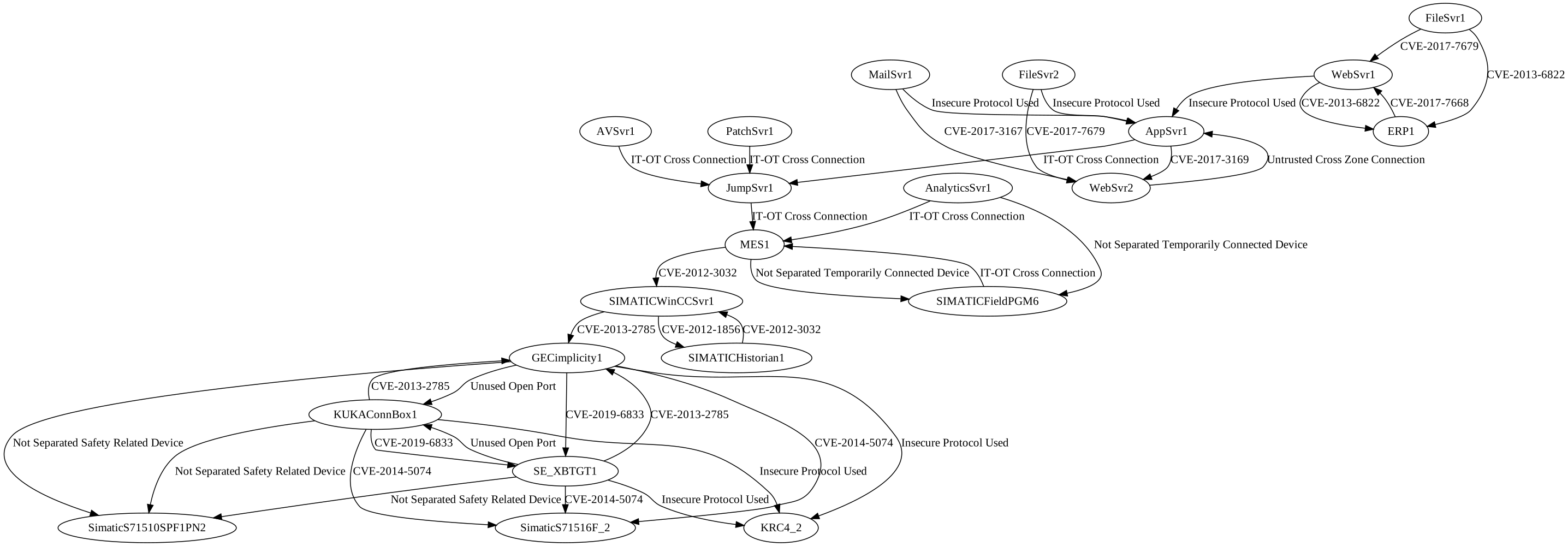
Furthermore, if you run the prototype with the default case study) and -s flag, the following pruned cyber-physical attack graph will be created:
The prototype utilizes the Akka framework and is able to distribute the risk identification workload among multiple nodes. The Akka distributed workers sample was used as a template.
To run the cluster with multiple nodes (examples with -q flag):
$ sbt "runMain org.sba_research.worker.Main cassandra -q"
$ sbt "runMain org.sba_research.worker.Main 2551 -q"
$ sbt "runMain org.sba_research.worker.Main 3001 -q"
$ sbt "runMain org.sba_research.worker.Main 5001 3 -q"
If you run the nodes on separate machines, you will have to adapt the Akka settings in the configuration file.
The measurements and log files obtained during the performance assessment are available upon request.
If you use this prototype in your research, please consider citing our IEEE TDSC 2020 or IEEE TII 2022 publication. Feel free to use the papers' BibTeX entries (TDSC, TII).
The authors would like to thank Yameng An for providing the initial version of OntoPLC.
