
 sashs/ropper
Display information about files in different file formats and find gadgets to build rop chains for different architectures (x86/x86_64, ARM/ARM64, MIPS, PowerPC, SPARC64). For disassembly ropper uses the awesome Capstone Framework.

You can use ropper to display information about binary files in different file formats and you can search for gadgets to build rop chains for different architectures (x86/X86_64, ARM/ARM64, MIPS/MIPS64, PowerPC/PowerPC64, SPARC64). For disassembly ropper uses the awesome Capstone Framework.
Install Capstone with PyPi:
$ sudo pip install capstone
Install filebytes with PyPi:
$ sudo pip install filebytes
Optional (not needed to run ropper just to look for gadgets):
Install Keystone:
$ sudo pip install keystone-engine
Install and execute Ropper
$ python setup.py install
$ ropper
You can also install Ropper with pip
$ pip install ropper
If you want, you can use Ropper without installation
$ ./Ropper.py
If you don't want to install filebytes, filebytes is a submodule of the ropper repository. This means you don't need to install filebytes and ropper.
$ git clone https://github.com/sashs/ropper.git
$ cd ropper
$ git submodule init
$ git submodule update
$ ./Ropper.py
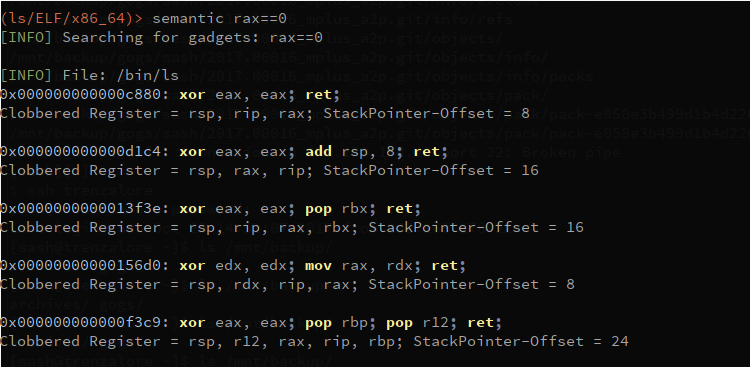
THIS FEATURE IS STILL UNDER DEVELOPEMENT! Ropper has a semantic search command, which offers the possiblity to search for gadgets.
$ ropper --file <afile> --semantic "<any constraint>"
The following optional dependencies are needed to use semantic search:
Install pyvex
$ sudo pip install pyvex
Install z3py
$ python scripts/mk_make.py
$ cd build
$ make
$ sudo make install
reg == reg     -  assign register to another
reg == number  -  assign number to register
reg == [reg]   -  assign memory to register
reg += number/reg/[reg]
reg -= number/reg/[reg]
reg *= number/reg/[reg]
reg /= number/reg/[reg]
eax==1 !ebx - set eax to 1 and look for gadgets which does not clobber ebx
usage: Ropper.py [-h] [--help-examples] [-v] [--console]
             [-f <file> [<file> ...]] [-r] [-a <arch>]
             [--section <section>] [--string [<string>]] [--hex]
             [--asm [<asm> [H|S|R] ...]] [--disasm <opcode>]
             [--disassemble-address <address:length>] [-i] [-e]
             [--imagebase] [-c] [-s] [-S] [--imports] [--symbols]
             [--set <option>] [--unset <option>] [-I <imagebase>] [-p]
             [-j <reg>] [--stack-pivot] [--inst-count <n bytes>]
             [--search <regex>] [--quality <quality>] [--opcode <opcode>]
             [--instructions <instructions>] [--type <type>] [--detailed]
             [--all] [--cfg-only] [--chain <generator>] [-b <badbytes>]
             [--nocolor] [--clear-cache] [--no-load] [--analyse <quality>]
             [--semantic constraint]
             [--count-of-findings <count of gadgets>] [--single]

You can use ropper to display information about binary files in different file formats
    and you can search for gadgets to build rop chains for different architectures

supported filetypes:
  ELF
  PE
  Mach-O
  Raw

supported architectures:
  x86 [x86]
  x86_64 [x86_64]
  MIPS [MIPS, MIPS64]
  ARM/Thumb [ARM, ARMTHUMB]
  ARM64 [ARM64]
  PowerPC [PPC, PPC64]
  SPARC [SPARC64]

available rop chain generators:
  execve (execve[=<cmd>], default /bin/sh) [Linux x86, x86_64]
  mprotect  (mprotect=<address>:<size>) [Linux x86, x86_64]
  virtualprotect (virtualprotect=<address iat vp>:<size>) [Windows x86]
