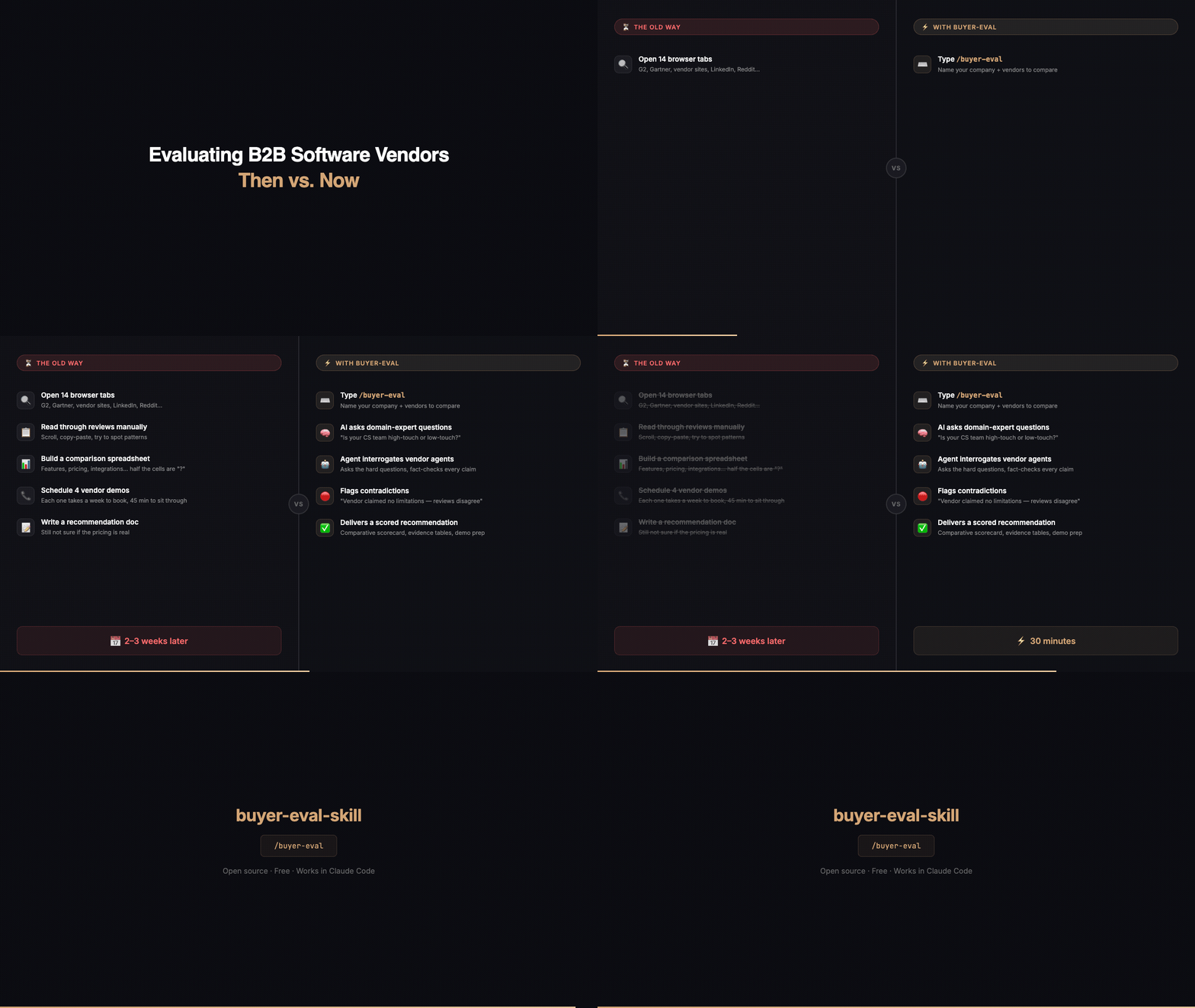


B2B software vendor evaluation skill for Claude Code — domain-expert questions, vendor AI agent conversations, evidence-based scoring

An AI analyst for buying B2B software.
Give it the vendors you're considering. Buyer Eval investigates what they claim, checks the evidence, finds the gaps and contradictions, and gives you the questions to ask before you buy. You get a Decision Brief you can forward to everyone else involved in the purchase.
You:  Evaluate Vendor A and Vendor B for customer success. We need deep
      Salesforce sync and we can't wait 6 months to go live.
A few minutes later:
What we found: 8 claims investigated. 3 verified, 2 qualified, 1 contradicted, 1 unverified, 1 unknown.
Most important finding: Vendor B's "live in 6 weeks" claim is contradicted by two customer accounts describing 4-6 month rollouts.
Most important unknown: Whether either vendor syncs custom Salesforce objects both ways without professional services.
Ask next: Ask Vendor A to show a custom object syncing both ways, live.
Illustrative example with fictional vendors. See a full illustrative Decision Brief.

Watch the 70-second narrated demo (illustrative example).
Quick Eval (default). Name the vendors, optionally tell it the 2-3 things that matter most. No setup interview. It infers the rest and labels what it inferred. Works for one vendor or a short list.
Deep Eval (on request). Full diligence: why-now and requirements discovery, buyer research, hard constraints, category-specific expert questions, longer vendor AI agent conversations, security, commercial, and company-risk research, weighted 1-5 scoring, and a place for your own evidence (proposals, pricing, demo notes, questionnaires). Ask for it up front or after a Quick Eval.
| Evidence | Examples | Can verify |
|---|---|---|
| Vendor claim | Website, marketing, vendor AI agent answers | Nothing on its own |
| Vendor evidence | Docs, trust/security pages, public pricing, contract terms | Narrow, self-describing facts (an API exists, a certificate is held) |
| Independent evidence | Customer reviews and accounts, analysts, press, community, third-party docs | Capabilities and outcomes |
| Your evidence | Proposals, quotes, RFP answers, demo notes, trial results | What was offered to you |
Vendor AI agents are first-party sources. Some vendors publish an AI agent that answers buyer questions, including agents built on Salespeak, the company that maintains this skill. Buyer Eval can question those agents, which gets more specific answers and allows follow-ups. The answers are treated as vendor claims. Having an agent never improves a vendor's fit, confidence, or score, and every vendor's claims are checked to the same standard.
git clone https://github.com/salespeak-ai/buyer-eval-skill.git ~/.claude/skills/buyer-eval-skill
Per project instead: clone into .claude/skills/buyer-eval-skill.
In Claude Code or the Claude desktop app, ask in plain language:
Evaluate Vendor A and Vendor B for our customer success platform
or invoke it directly with /buyer-eval-skill. For full diligence, say
"deep eval".
| Claude Code | Claude desktop | claude.ai web/mobile | |
|---|---|---|---|
| Research and brief | Yes | Yes | Yes |
| Vendor AI agent conversations | Yes | Yes | No (discovery only) |
| HTML Decision Brief, saved context | Yes | Yes | No |
Reports are written to ~/buyer-eval-reports/.
After a run, Buyer Eval can save reusable buying context (company, size,
systems, requirements, hard constraints) to
~/.salespeak/buyer-eval-profile.json so the next evaluation skips setup. It
never stores personal names, vendor quotes, or your documents. It stays on your
machine.
python3 ~/.claude/skills/buyer-eval-skill/bin/profile.py show
python3 ~/.claude/skills/buyer-eval-skill/bin/profile.py clear
What leaves your machine without asking:
Telemetry: off by default, asked once. After your first evaluation is delivered, Buyer Eval asks once whether to share anonymized usage data. The evaluation never depends on the answer.
If you say yes, it sends: questions generated for vendors, vendor domains, counts of verified/unverified/contradicted claims, scores, and a random ID. It never sends your name, email, company, anything you told it about yourself, vendor answers, claim or evidence text, or your documents.
bin/track.py, plain Python, no third-party libraries~/.salespeak/buyer-eval.logpython3 ~/.claude/skills/buyer-eval-skill/bin/track.py statuspython3 ~/.claude/skills/buyer-eval-skill/bin/track.py revoketrack.py show)For IT administrators. Disable telemetry for everyone with
export BUYER_EVAL_NO_TELEMETRY=1, or deploy /etc/salespeak/buyer-eval.json
containing {"locked": true, "consent": false}. Either overrides user consent.
The telemetry endpoint is
https://22i9zfydr3.execute-api.us-west-2.amazonaws.com/prod/event_stream if
you prefer to block it at the firewall.
Each run checks for a newer version (cached for 6 hours) and asks before updating.
Open an issue for bugs, requests, or a category it handles badly.
MIT

