 salesforce/policy_sentry
Generates least-privilege AWS IAM policies based on resource ARNs and access levels, automating secure policy creation for cloud infrastructure.

IAM Least Privilege Policy Generator.





For walkthroughs and full documentation, please visit the project on ReadTheDocs.
See the Salesforce Engineering Blog post on Policy Sentry.
Writing security-conscious IAM Policies by hand can be very tedious and inefficient. Many Infrastructure as Code developers have experienced something like this:
Such a process is not ideal for security or for Infrastructure as Code developers. We need to make it easier to write IAM Policies securely and abstract the complexity of writing least-privilege IAM policies. That's why I made this tool.
Policy Sentry allows users to create least-privilege IAM policies in a matter of seconds, rather than tediously writing IAM policies by hand. These policies are scoped down according to access levels and resources. In the case of a breach, this helps to limit the blast radius of compromised credentials by only giving IAM principals access to what they need.
Before this tool, it could take hours to craft an IAM Policy with resource ARN constraints — but now it can take a matter of seconds. This way, developers only have to determine the resources that they need to access, and Policy Sentry abstracts the complexity of IAM policies away from their development processes.
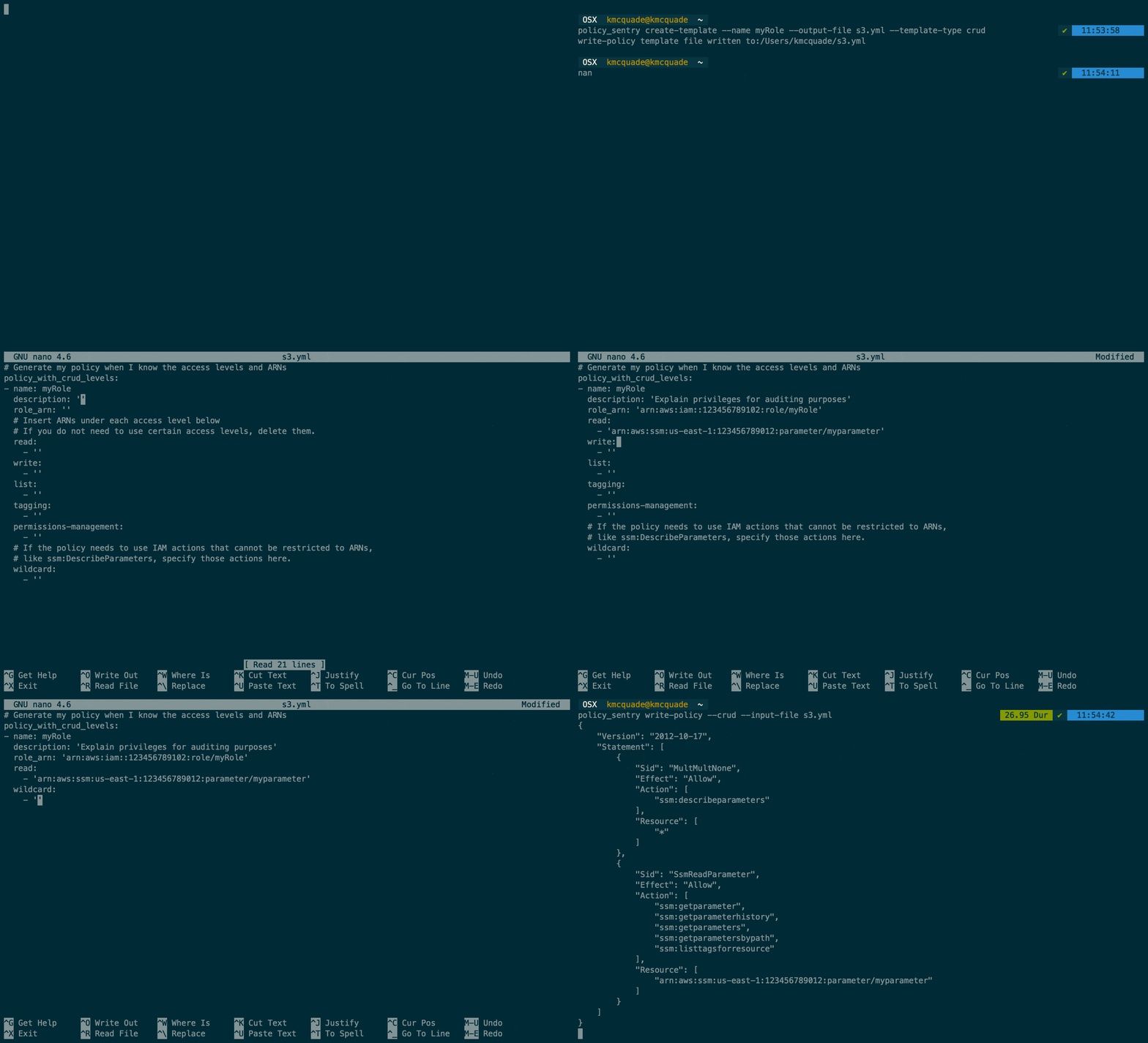
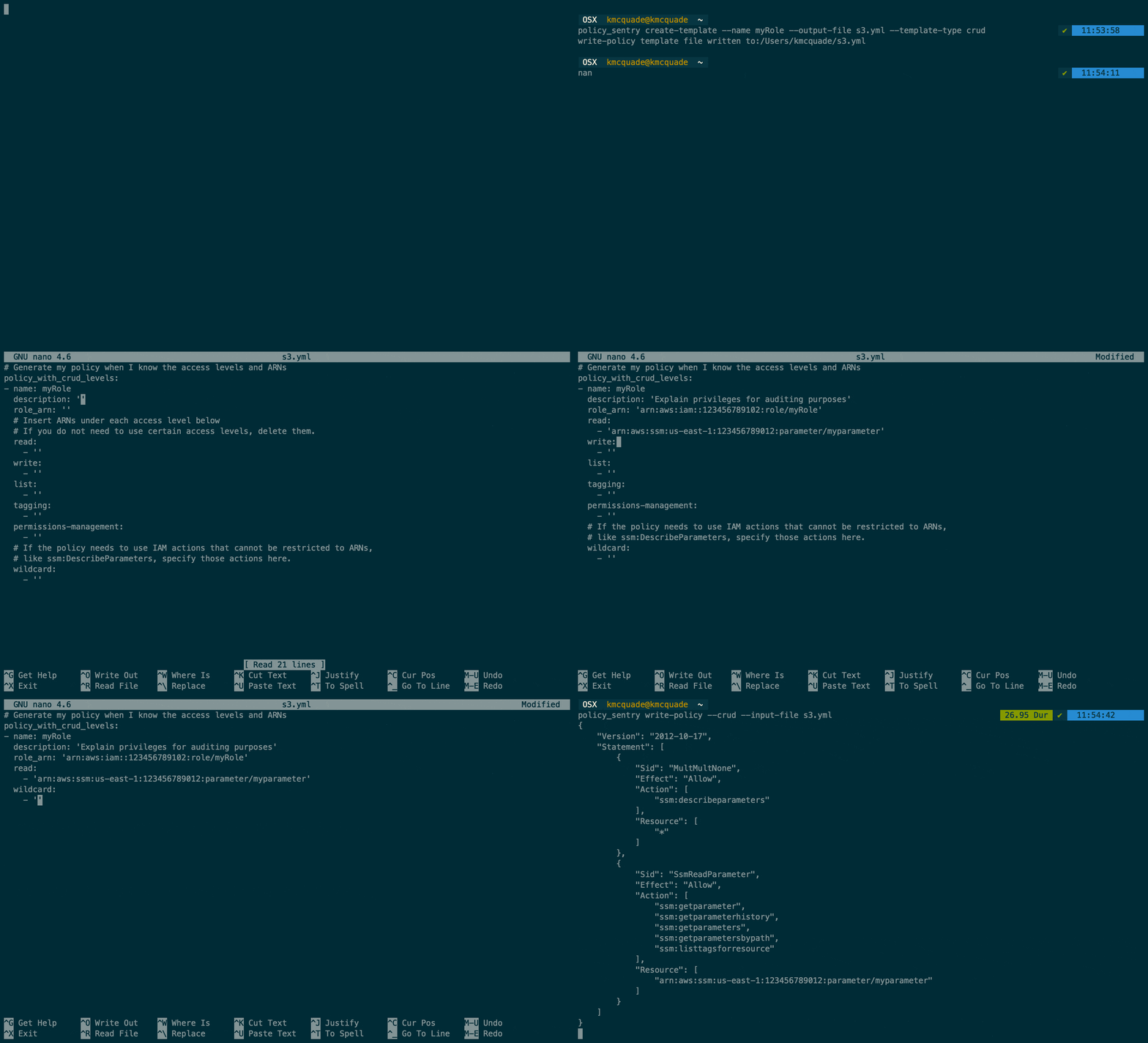
Policy Sentry's flagship feature is that it can create IAM policies based on resource ARNs and access levels. Our CRUD functionality takes the opinionated approach that IAC developers shouldn't have to understand the complexities of AWS IAM - we should abstract the complexity for them. In fact, developers should just be able to say...
arn:aws:s3:::example-org-sbx-vmimport"arn:aws:secretsmanager:us-east-1:123456789012:secret:mysecret"arn:aws:ssm:us-east-1:123456789012:parameter/test"...and our automation should create policies that correspond to those access levels.
How do we accomplish this? Well, Policy Sentry leverages the AWS documentation on [Actions, Resources, and Condition Keys][1] documentation to look up the actions, access levels, and resource types, and generates policies according to the ARNs and access levels. Consider the table snippet below:
| Actions | Access Level | Resource Types |
|---|---|---|
| ssm:GetParameter | Read | parameter |
| ssm:DescribeParameters | List | parameter |
| ssm:PutParameter | Write | parameter |
| secretsmanager:PutResourcePolicy | Permissions management | secret |
| secretsmanager:TagResource | Tagging | secret |
Policy Sentry aggregates all of that documentation into a single database and uses that database to generate policies according to actions, resources, and access levels.
brew tap salesforce/policy_sentry https://github.com/salesforce/policy_sentry
brew install policy_sentry
pip3 install --user policy_sentry
To enable Bash completion, put this in your .bashrc:
eval "$(_POLICY_SENTRY_COMPLETE=bash_source policy_sentry)"
To enable ZSH completion, put this in your .zshrc:
eval "$(_POLICY_SENTRY_COMPLETE=zsh_source policy_sentry)"
policy_sentry create-template --output-file crud.yml --template-type crud

