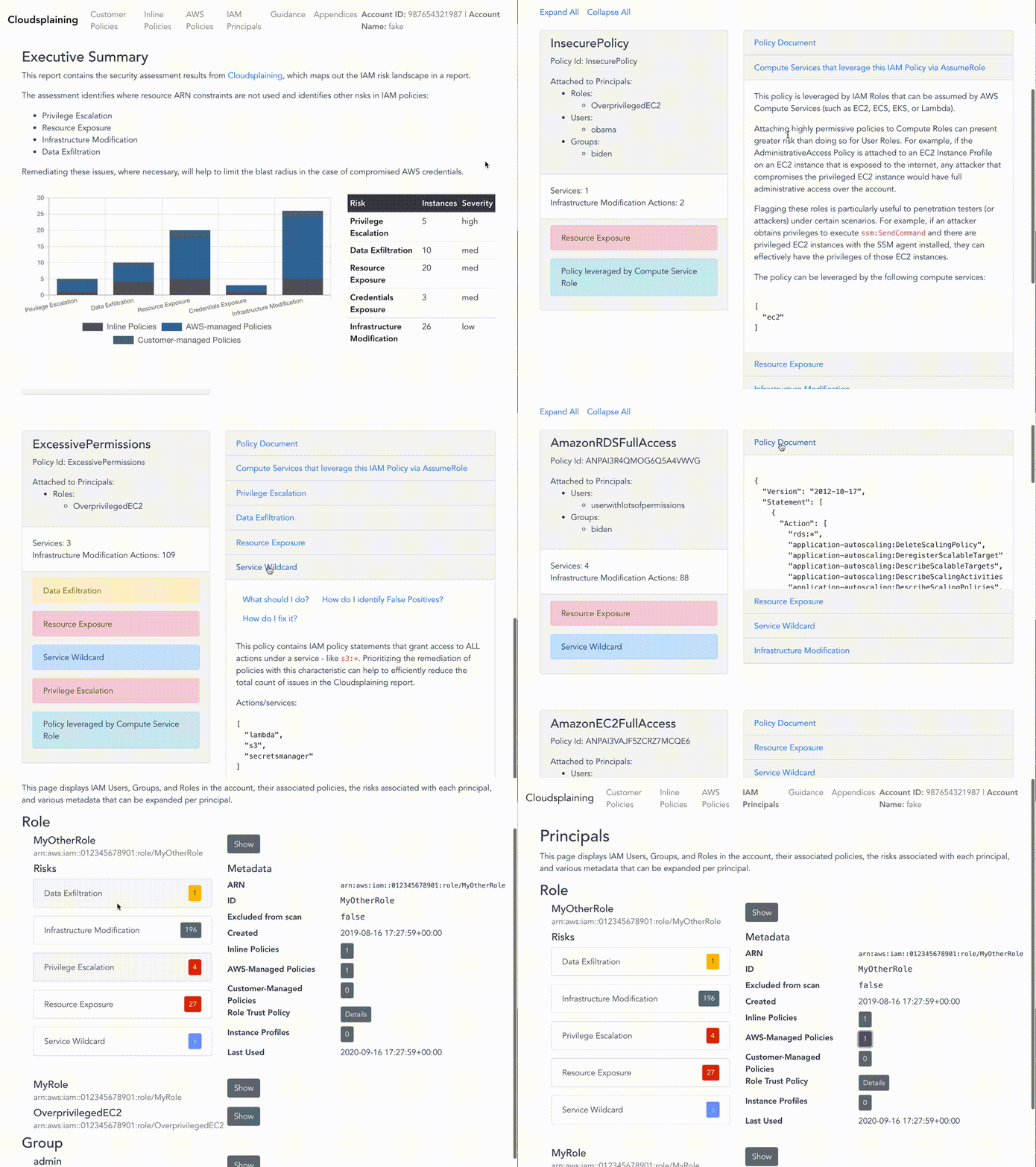


Cloudsplaining is an AWS IAM Security Assessment tool that identifies violations of least privilege and generates a risk-prioritized report.
Cloudsplaining is an AWS IAM Security Assessment tool that identifies violations of least privilege and generates a risk-prioritized HTML report.





For full documentation, please visit the project on ReadTheDocs.
Cloudsplaining identifies violations of least privilege in AWS IAM policies and generates a pretty HTML report. It can scan all the policies in your AWS account, across multiple AWS accounts, or it can scan a single policy file.
It helps to identify IAM actions that do not leverage resource constraints. It also helps prioritize the remediation process by flagging IAM policies that present the following risks to the AWS account in question without restriction:
s3:GetObject, ssm:GetParameter, secretsmanager:GetSecretValue)Cloudsplaining also identifies IAM Roles that can be assumed by AWS Compute Services (such as EC2, ECS, EKS, or Lambda), as they can present greater risk than user-defined roles - especially if the AWS Compute service is on an instance that is directly or indirectly exposed to the internet. Flagging these roles is particularly useful to penetration testers (or attackers) under certain scenarios. For example, if an attacker obtains privileges to execute ssm:SendCommand and there are privileged EC2 instances with the SSM agent installed, they can effectively have the privileges of those EC2 instances. Remote Code Execution via AWS Systems Manager Agent was already a known escalation/exploitation path, but Cloudsplaining can make the process of identifying theses cases easier. See the sample report for some examples.
You can also specify a custom exclusions file to filter out results that are False Positives for various reasons. For example, User Policies are permissive by design, whereas System roles are generally more restrictive. You might also have exclusions that are specific to your organization's multi-account strategy or AWS application architecture.
Policy Sentry revealed to us that it is possible to finally write IAM policies according to least privilege in a scalable manner. Before Policy Sentry was released, it was too easy to find IAM policy documents that lacked resource constraints. Consider the policy below, which allows the IAM principal (a role or user) to run s3:PutObject on any S3 bucket in the AWS account:
{
  "Version": "2012-10-17",
  "Statement": [
    {
      "Effect": "Allow",
      "Action": [
        "s3:PutObject"
      ],
      "Resource": "*"
    }
  ]
}
This is bad. Ideally, access should be restricted according to resource ARNs, like so:
{
  "Version": "2012-10-17",
  "Statement": [
    {
      "Effect": "Allow",
      "Action": [
        "s3:GetObject"
      ],
      "Resource": "arn:aws:s3:::my-bucket/*"
    }
  ]
}
Policy Sentry makes it really easy to do this. Once Infrastructure as Code developers or AWS Administrators gain familiarity with the tool (which is quite easy to use), we've found that adoption starts very quickly. However, if you've been using AWS, there is probably a very large backlog of IAM policies that could use an uplift. If you have hundreds of AWS accounts with dozens of policies in each, how can we lock down those AWS accounts by programmatically identifying the policies that should be fixed?
That's why we wrote Cloudsplaining.
Cloudsplaining identifies violations of least privilege in AWS IAM policies and generates a pretty HTML report. It can scan all the policies in your AWS account, across multiple AWS accounts, or it can scan a single policy file.
brew tap salesforce/cloudsplaining https://github.com/salesforce/cloudsplaining
brew install cloudsplaining
pip3 install --user cloudsplaining
cloudsplaining from command line by running cloudsplaining --help.To enable Bash completion, put this in your .bashrc:
eval "$(_CLOUDSPLAINING_COMPLETE=bash_source cloudsplaining)"
To enable ZSH completion, put this in your .zshrc:
eval "$(_CLOUDSPLAINING_COMPLETE=zsh_source cloudsplaining)"
You can also scan a single policy file to identify risks instead of an entire account.
cloudsplaining scan-policy-file --input-file examples/policies/explicit-actions.json
The output will include a finding description and a list of the IAM actions that do not leverage resource constraints.
The output will resemble the following:
Issue found: Data Exfiltration
Actions: s3:GetObject

Issue found: Resource Exposure
Actions: ecr:DeleteRepositoryPolicy, ecr:SetRepositoryPolicy, s3:BypassGovernanceRetention, s3:DeleteAccessPointPolicy, s3:DeleteBucketPolicy, s3:ObjectOwnerOverrideToBucketOwner, s3:PutAccessPointPolicy, s3:PutAccountPublicAccessBlock, s3:PutBucketAcl, s3:PutBucketPolicy, s3:PutBucketPublicAccessBlock, s3:PutObjectAcl, s3:PutObjectVersionAcl