 s0md3v/wappalyzer-next
detect technologies with wappalyzer alternative

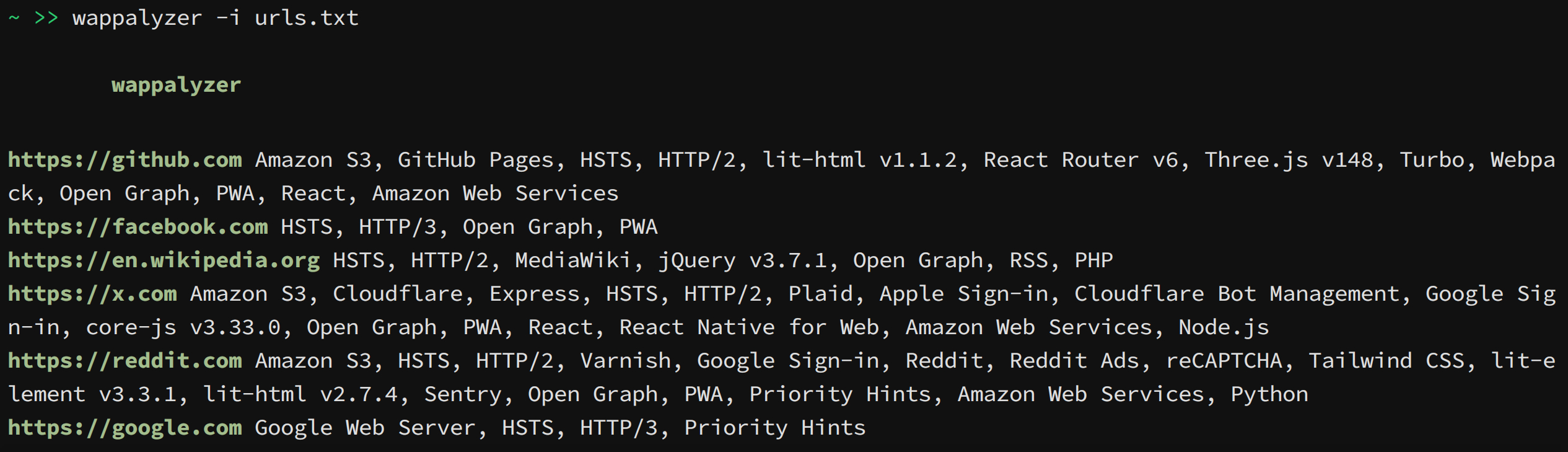
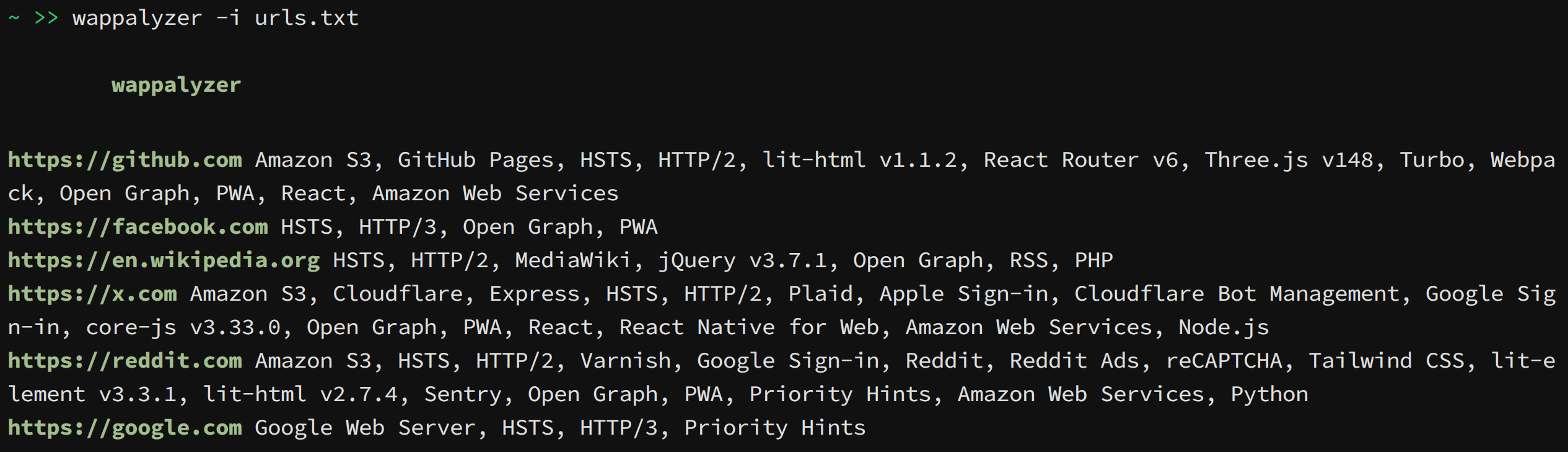
This project is a command line tool and python library that uses the Wappalyzer browser extension and its fingerprints to detect technologies. Other projects that emerged after the discontinuation of the official open-source project are using outdated fingerprints and lack accuracy on dynamic web apps. This project bypasses those limitations by running the extension in Chromium through Playwright.
After installing the Python package, install Playwright's Chromium browser:
python -m playwright install chromium
In minimal Linux containers, install Chromium's system dependencies as well:
python -m playwright install-deps chromium
pipx install wappalyzer
pipx run --spec playwright playwright install chromium
To use it as a library, install it with pip inside an isolated container e.g. venv or docker. You may also --break-system-packages to do a 'regular' install but it is not recommended.
pip install wappalyzer
python -m playwright install chromium
git clone https://github.com/s0md3v/wappalyzer-next.git
cd wappalyzer-next
docker compose build
docker compose run --rm wappalyzer -i https://example.com
docker compose run --rm wappalyzer -i urls.txt -w 3 -oJ output.json
Some common usage examples are given below, refer to list of all options for more information.
wappalyzer -i https://example.comwappalyzer -i urls.txt -w 3wappalyzer -i urls.txt -t 15wappalyzer -i https://example.com -c "sessionid=abc123; token=xyz789"wappalyzer -i https://example.com -oJ results.jsonwappalyzer -i https://example.com -oJWhen an output flag is used without a file, the report is written to stdout. Status lines, banner text, and errors are written to stderr.
Note: For accuracy use 'full' scan type (default). 'fast' and 'balanced' do not use browser emulation.
-i: Input URL or file containing URLs (one per line)--scan-type: Scan type (default: 'full')
fast: Quick HTTP-based scan (sends 1 request)balanced: HTTP-based scan with more requestsfull: Complete scan using wappalyzer extension-w, --workers: Number of concurrent workers (default: 5; full scans are capped at 3)-t, --timeout: Maximum seconds to wait for a page load in full scans (default: 30)-oJ [file]: JSON output file path, or stdout when the file is omitted or set to --oC [file]: CSV output file path, or stdout when the file is omitted or set to --oH [file]: HTML output file path, or stdout when the file is omitted or set to --c, --cookie: Cookie header string for authenticated scansThe python library is available on pypi as wappalyzer and can be imported with the same name.
Use Wappalyzer when scanning more than one URL. The browser is started once, reused, and closed when the with block exits.
from wappalyzer import Wappalyzer

with Wappalyzer(workers=3, timeout=30) as scanner:
    results = scanner.analyze_many([
        'https://example.com',
        'https://github.com',
        'https://python.org',
    ])

for url, technologies in results.items():
    print(url)
    for name, data in technologies.items():
        version = f" {data['version']}" if data['version'] else ""
        print(f"  {name}{version}")
The same scanner can also scan one URL at a time without reopening Chromium:
from wappalyzer import Wappalyzer

with Wappalyzer(workers=3, timeout=30) as scanner:
    github = scanner.analyze('https://github.com')
    python = scanner.analyze('https://python.org')
For a single URL, analyze() is shorter. It creates its own scanner, runs one scan, and closes it.
from wappalyzer import analyze

results = analyze(
    url='https://example.com',
    scan_type='full',  # 'fast', 'balanced', or 'full'
    cookie='sessionid=abc123',
    timeout=30
)
Do not call the top-level analyze() function in a loop for large jobs. Use Wappalyzer.analyze_many() or Wappalyzer.analyze() on a reused scanner so Chromium and the Wappalyzer extension are not reloaded for every URL.
url (str): The URL to analyzescan_type (str, optional): Type of scan to perform
'fast': Quick HTTP-based scan'balanced': HTTP-based scan with more requests'full': Complete scan including JavaScript execution (default)workers (int, optional): Number of browser workers to create for full scans (default: 1)cookie (str, optional): Cookie header string for authenticated scanstimeout (int, optional): Maximum seconds to wait for a page load in full scans (default: 30)Returns a dictionary with the URL as key and detected technologies as value:
{
  "https://github.com": {
    "Amazon S3": {
      "version": "",
      "confidence": 100,
      "categories": ["CDN"],
      "groups": ["Servers"]
    },
    "React Router": {
      "version": "6",
      "confidence": 100,
      "categories": ["JavaScript frameworks"],
      "groups": ["Web development"]
    }
  },
  "https://example.com": {}
}
The full scanner runs the Wappalyzer extension in Chromium through Playwright. Chromium extension support in Playwright is direct and does not require geckodriver or Selenium.
