
Skip to content
KitploitKITPLOIT
ToolsBlog
Submit
ToolsBlog
Submit

Hacking, PenTest, and Cybersecurity Tools for Your Security Arsenal!

Kitploit is a directory of hacking, cybersecurity, and pentesting tools. Discover the latest project updates to find vulnerabilities, analyze systems, automate testing, and strengthen your security.

··Feeds·Contact·Privacy·© 2026 Kitploit

Tool Directory

Categories

View all categories
Loading categories
uro — declutters url lists for crawling/pentesting | Kitploit
Tools/GitHubGitHub/s0md3v/uro
Information GatheringWeb SecurityUtilities & FrameworksCrawler
GitHubs0md3v/uro

uro

declutters url lists for crawling/pentesting

View Repository
1.6k17311 year agoReviewed by Kitploit

Most Popular

View all →

Discover the most used tools by our community.

Explore all tools

Browse our collection of tools

View all tools →
Share

uro

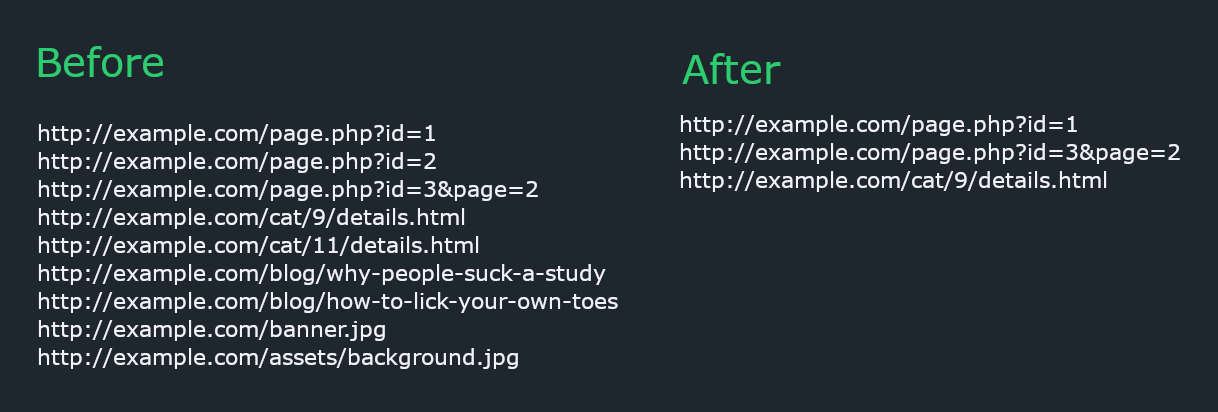
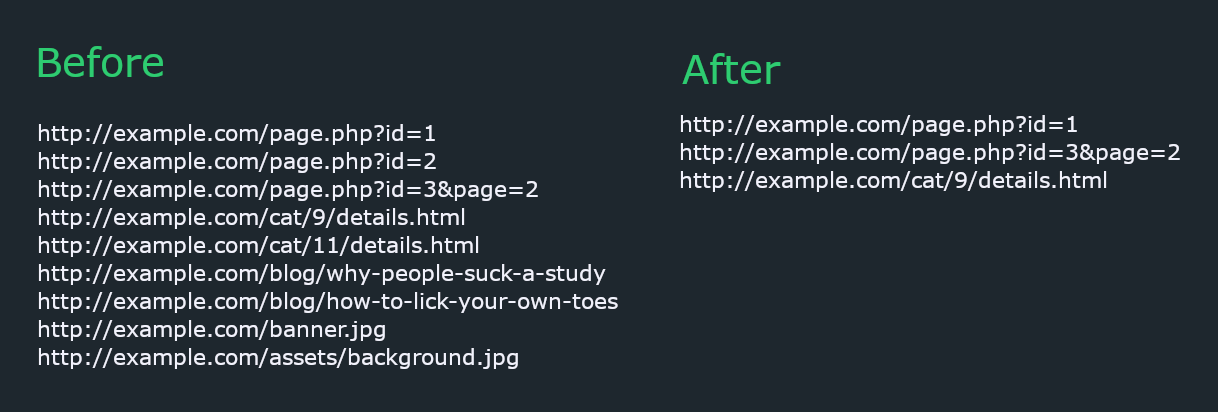
Using a URL list for security testing can be painful as there are a lot of URLs that have uninteresting/duplicate content; uro aims to solve that.

It doesn't make any http requests to the URLs and removes:

  • incremental urls e.g. /page/1/ and /page/2/
  • blog posts and similar human written content e.g. /posts/a-brief-history-of-time
  • urls with same path but parameter value difference e.g. /page.php?id=1 and /page.php?id=2
  • images, js, css and other "useless" files

uro-demo

Installation

The recommended way to install uro is as follows:

root@kitploit:~
pipx install uro

Note: If you are using an older version of python, use pip instead of pipx

Basic Usage

The quickest way to include uro in your workflow is to feed it data through stdin and print it to your terminal.

root@kitploit:~
cat urls.txt | uro

Advanced usage

Reading urls from a file (-i/--input)

uro -i input.txt

Writing urls to a file (-o/--output)

If the file already exists, uro will not overwrite the contents. Otherwise, it will create a new file.

uro -i input.txt -o output.txt

Whitelist (-w/--whitelist)

uro will ignore all other extensions except the ones provided.

uro -w php asp html

Note: Extensionless pages e.g. /books/1 will still be included. To remove them too, use --filter hasext.

Blacklist (-b/--blacklist)

uro will ignore the given extensions.

uro -b jpg png js pdf

Note: uro has a list of "useless" extensions which it removes by default; that list will be overridden by whatever extensions you provide through blacklist option. Extensionless pages e.g. /books/1 will still be included. To remove them too, use --filter hasext.

Filters (-f/--filters)

For granular control, uro supports the following filters:

  1. hasparams: only output urls that have query parameters e.g. http://example.com/page.php?id=
  2. noparams: only output urls that have no query parameters e.g. http://example.com/page.php
  3. hasext: only output urls that have extensions e.g. http://example.com/page.php
  4. noext: only output urls that have no extensions e.g. http://example.com/page
  5. allexts: don't remove any page based on extension e.g. keep .jpg which would be removed otherwise
  6. keepcontent: keep human written content e.g. blogs.
  7. keepslash: don't remove trailing slash from urls e.g. http://example.com/page/
  8. vuln: only output urls with parameters that are know to be vulnerable. More info.

Example: uro --filters hasexts hasparams

Download Tool