 rwxstoned/ldrshuffle
Code execution/injection technique using DLL PEB module structure manipulation

Stealthy code execution via modification of the EntryPoint of loaded modules at runtime.
Windows processses have various modules loaded at runtime. Each of theses modules has a DllMain() function defined, which will be invoked on process or thread creation/destruction (four possible scenarios).
In order to properly call those functions during the lifetime of the process, the Windows Loader functions (ntdll!Ldrp*) will refer to a list of entries containing key parameters (including the EntryPoint field) for each module.
By overwriting this EntryPoint for a DLL, we ensure that code execution will be redirected to a place of our choosing.
This can be used both as a code execution primitive, and for API proxying, ie. in order to run certain APIs with a non-suspicious callstack since they will be invoked by legitimate Windows functions.
This can also be used to trigger execution in a remote process, provided the attacker has the ability to read and write memory on this target process. Similarly to the Threadless Injection, this provides the ability to execute code in a process without invoking classic APIs related to execution (CreateRemoteThread, QueueUserAPC)
The modules loading/unloading within a Windows process is a complex subject which presents a lot of challenges, potential for instability, race conditions, and crashes. A well-known hurdle related to running code as part of a DllMain() function for instance, lies in the fact that a Loader Lock is in place and that we are running in a thread which has not been completely setup, or which is in the process of being terminated.
Therefore, I have tried to document properly what is possible and what is not. For instance, while most of the usual API calls can be performed, running a full-fledged beacon comes with certain requirements to be in a separate process, in order to avoid deadlocks caused by the functions used in wininet.dll or winhttp.dll.
Each process maintains a list of _LDR_DATA_TABLE_ENTRY structures at runtime. Those structures contain many details relevant to the DLL, such as its EntryPoint (which we will overwrite), its name, certain hashes, timestamps, various flags, etc. Some of these structures are documented and some are not.
These can be visualized through this WinDbg command:
dt nt!_LDR_DATA_TABLE_ENTRY 0xdeadbeef
0:006> dt nt!_LDR_DATA_TABLE_ENTRY 0x18d1c4838c0
ntdll!_LDR_DATA_TABLE_ENTRY
   +0x000 InLoadOrderLinks : _LIST_ENTRY [ 0x0000018d`1c485de0 - 0x0000018d`1c4832b0 ]
   +0x010 InMemoryOrderLinks : _LIST_ENTRY [ 0x0000018d`1c485df0 - 0x0000018d`1c4832c0 ]
   +0x020 InInitializationOrderLinks : _LIST_ENTRY [ 0x0000018d`1c4832d0 - 0x0000018d`1c482c80 ]
   +0x030 DllBase          : 0x00007ffe`e87e0000 Void
   +0x038 EntryPoint       : 0x00007ffe`e8838d00 Void
   +0x040 SizeOfImage      : 0x2fe000
   +0x048 FullDllName      : _UNICODE_STRING "C:\WINDOWS\System32\KERNELBASE.dll"
   +0x058 BaseDllName      : _UNICODE_STRING "KERNELBASE.dll"
   +0x068 FlagGroup        : [4]  "???"
   +0x068 Flags            : 0x8a2cc
   +0x068 PackagedBinary   : 0y0
   +0x068 MarkedForRemoval : 0y0
   +0x068 ImageDll         : 0y1
(...)
   +0x0e0 MappingInfoIndexNode : _RTL_BALANCED_NODE
   +0x0f8 OriginalBase     : 0x00007ffe`e87e0000
   +0x100 LoadTime         : _LARGE_INTEGER 0x01db5f86`2fa735fc
   +0x108 BaseNameHashValue : 0x235bec4
   +0x10c LoadReason       : 0 ( LoadReasonStaticDependency )
   +0x110 ImplicitPathOptions : 0x4000
   +0x114 ReferenceCount   : 1
   +0x118 DependentLoadFlags : 0x800
   +0x11c SigningLevel     : 0 ''
The address of the structure can be obtained by walking a doubly-link structure referenced in the process PEB in a PEB_LDR_DATA structure.
dt nt!_PEB_LDR_DATA 0xb4b4c3c3
Note the DontCallForThreads flag. As the name indicates, if that flag is set, the OS will NOT call the DllMain() of that module for thread events (ie. DLL_THREAD_ATTACH or DLL_THREAD_DETACH).
When creating a DLL, the following template has to be followed in order to work hand in hand with the OS Loader functions:
BOOL WINAPI DllMain(
    HINSTANCE hinstDLL,  // handle to DLL module
    DWORD fdwReason,     // reason for calling function
    LPVOID lpvReserved )  // reserved
{
    // Perform actions based on the reason for calling.
    switch( fdwReason )
    {
        case DLL_PROCESS_ATTACH:
         // Initialize once for each new process.
         // Return FALSE to fail DLL load.
            break;

        case DLL_THREAD_ATTACH:
         // Do thread-specific initialization.
            break;

        case DLL_THREAD_DETACH:
         // Do thread-specific cleanup.
            break;

        case DLL_PROCESS_DETACH:

            if (lpvReserved != nullptr)
            {
                break; // do not do cleanup if process termination scenario
            }

         // Perform any necessary cleanup.
            break;
    }
    return TRUE;  // Successful DLL_PROCESS_ATTACH.
}
As outlined above, the technique temporary overwrite the EntryPoint of a DLL in order to redirect execution. Since we have no control over anything more than the redirection of the execution, some arrangements have to be made on the side to handle what we want to run, with what arguments, and how to get the return value back.
This is done by defining a DATA_T structure on the heap, in such a way that it will remain accessible throughout the various steps.
That structure is defined as follows:
typedef struct _DATA_T {
    // LDR structures manipulation
    ULONG_PTR   runner;             // malicious entry point to execute
    ULONG_PTR   bakOriginalBase;    // backup of overwritten OriginalBase
    ULONG_PTR   bakEntryPoint;      // backup of overwritten EntryPoint
    HANDLE      event;              // event signalling that the Runner has executed
    // function call
    ULONG_PTR   ret;                // return value
    DWORD       createThread;       // run this API call in a new thread (required for wininet/winhttp)
    ULONG_PTR   function;           // Windows API to call
    DWORD       dwArgs;             // number of args
    ULONG_PTR   args[MAX_ARGS];     // array of args
} DATA_T, * PDATA_T;
To setup an API execution, these fields have to be prepared. the ret value is the one which will collect the return value after execution. The event is used for synchronization, to signal that the execution has been completed. All the other fields are inputs defining what API to call (function), with which arugments (dwArgs and args[]), the address of the Runner() function where execution is redirected, and backups of the overwritten original DLL entries (bakOriginalBase and bakEntryPoint).
The createThread field needs to be set to 1 for those complex API functions which won't run well in a DllMain() setup (this includes many wininet and winhttp libraries).
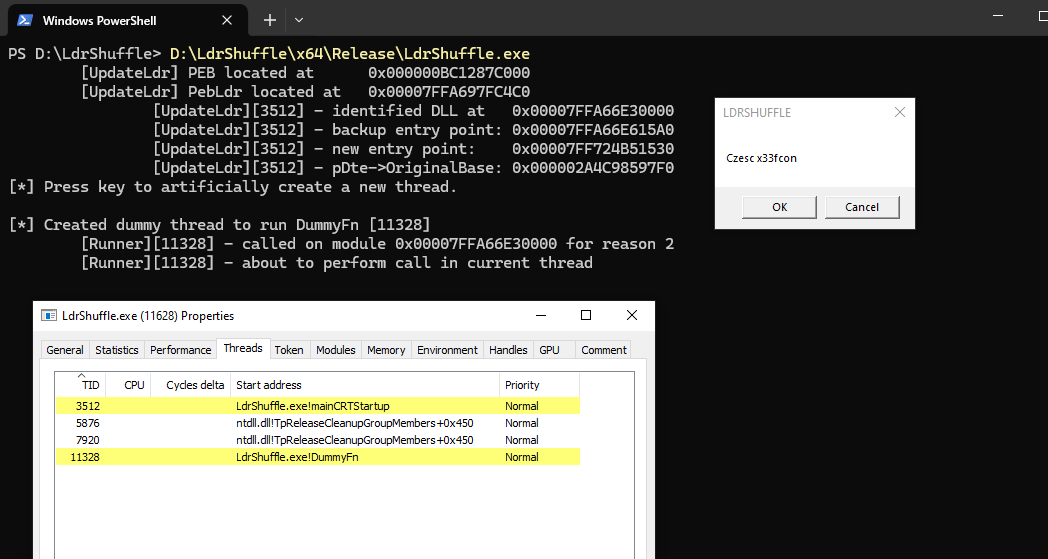
Here is an example setting up a call to MessageBoxA() as visible in the PoC:
 pDataT->dwArgs = 4;
 pDataT->runner = (ULONG_PTR)Runner;
 pDataT->function = (ULONG_PTR)MessageBoxA;
 pDataT->args[0] = (ULONG_PTR)0;
 pDataT->args[1] = (ULONG_PTR)"Hello";
 pDataT->args[2] = (ULONG_PTR)"LDRSHUFFLE";
 pDataT->args[3] = (ULONG_PTR)MB_OKCANCEL;
 pDataT->event = CreateEventA(NULL, FALSE, FALSE, "ExecEvt");
The UpdateLdr() function is responsible for performing the right modification in the target module's _LDR_DATA_TABLE_ENTRY.
RestoreLdr() will restore those changes at a later stage (invoked by Runner()).
