 rully2212/cve-2026-97286
Technical advisory and proof of concept for CVE-2026-97286, an authenticated stored XSS in the WordPress Strong Testimonials plugin, with attack chain, PoC and patch analysis.

An authenticated Contributor can store attacker-controlled platform photo metadata in the WordPress Strong Testimonials plugin. Before version 3.3.12, the plugin rendered the stored value inside an image src attribute without contextual escaping. After an administrator publishes the crafted testimonial and a post that displays it, the payload executes for visitors who open that post, including unauthenticated visitors.
This research was performed in an authorized local lab and disclosed through Patchstack before public release.
| Field | Value |
|---|---|
| CVE | CVE-2026-97286 |
| Product | Strong Testimonials |
| Vendor | WP Chill |
| Plugin slug | strong-testimonials |
| Vulnerability | Authenticated stored cross-site scripting |
| Affected versions | <= 3.3.11 |
| Patched version | 3.3.12 |
| Required privilege | Contributor or higher |
| CWE | CWE-79: Improper Neutralization of Input During Web Page Generation |
| CVSS v3.1 | 6.5 Medium — CVSS:3.1/AV:N/AC:L/PR:L/UI:R/S:C/C:L/I:L/A:L |
| Researcher | Rully Miftahur Rozaq |
| Reported | September 16, 2026 |
| Public disclosure | September 30, 2026 |
Patchstack classifies the advisory as low priority even though the assigned CVSS v3.1 base severity is Medium.
The testimonial editor accepts a custom request array and persists every submitted key as post metadata. Keys not present in the configured custom-field definition fall through to sanitize_text_field(). This allows a Contributor to submit plugin-reserved metadata such as platform and platform_user_photo while editing a testimonial they own.
For supported social platforms, the plugin retrieves platform_user_photo, verifies that the URL returns an HTTP 200 response, and then interpolates the original stored string into an <img src="https://raw.githubusercontent.com/rully2212/cve-2026-97286/main/..."> attribute. HTTP status validation does not make a string safe for an HTML attribute. A quotation mark in the URL fragment can terminate src and introduce an event handler.
The verified attack chain is:
The injection is authenticated. The visitor who triggers the already-published payload does not need to be authenticated.
Successful exploitation provides persistent JavaScript execution in the affected WordPress origin on pages that render the crafted testimonial through the vulnerable thumbnail path. Code executes with the browser privileges and WordPress session of the visitor, if any.
The reproduced path requires administrator publication, which accounts for the CVSS UI:R metric. This research did not demonstrate unauthenticated injection, automatic execution across every site page, privilege escalation, cookie theft, or full site compromise.
The proof of concept was reproduced with the following configuration:
| Component | Configuration |
|---|---|
| WordPress | 7.1 |
| Strong Testimonials | 3.3.7, free edition |
| Theme | Twenty Twenty-Five |
| Display template | default-theme |
| Thumbnail | Enabled |
| PHP / Apache | PHP 8.3.33 / Apache 2.4.68 |
| Database | MariaDB 11.4 |
| Attacker role | Contributor |
| Attacker capabilities | edit_posts=true, publish_posts=false, unfiltered_html=false |
Version 3.3.7 was the exact version used in the lab. The public CVE record identifies all versions through 3.3.11 as affected and version 3.3.12 as fixed.
In admin/class-strong-testimonials-post-editor.php, save_details() iterates over every entry in the submitted custom array. An unrecognized key reaches the generic sanitization branch and is then stored with update_post_meta():
$custom = $_POST['custom'];

foreach ( $custom as $key => $value ) {
    // ...
    $sanitized_value = sanitize_text_field( $value );
    update_post_meta( $post_id, $key, $sanitized_value );
}
The real handler performs nonce checks and field-specific sanitization. The finding does not rely on bypassing those checks or editing another user's testimonial. The Contributor legitimately edits their own testimonial but supplies the reserved keys platform and platform_user_photo.
In vulnerable versions, includes/functions-image.php reads platform_user_photo, performs an HTTP status check through wpmtst_is_valid_image_url(), and inserts the original string into an HTML attribute:
$platform_user_photo = get_post_meta( $post_id, 'platform_user_photo', true );
if ( ! $platform_user_photo || ! wpmtst_is_valid_image_url( $platform_user_photo ) ) {
    return $img;
}

return sprintf(
    '<img src="https://raw.githubusercontent.com/rully2212/cve-2026-97286/main/%25s" %s %s/>',
    $platform_user_photo,
    $width ? "width='{$width}'" : '',
    $height ? "height='{$height}'" : ''
);
The fragment portion of a URL is not sent to the HTTP server, but it remains in the string later rendered by PHP. The server can therefore see a harmless URL returning HTTP 200 while the browser receives a value containing an attribute-breakout sequence.
The default-theme template calls wpmtst_get_thumbnail() and directly emits the returned image markup:
<figure class="wp-block-image wpmtst-testimonial-avatar">
    <?php echo $wpmtst_avatar_html; ?>
</figure>
The template assumes the helper has already produced safe HTML. In affected versions, the platform photo helper did not escape the URL for its src context.
Only reproduce this issue on a system you own or are explicitly authorized to test.
<= 3.3.11 on an authorized WordPress test site.default-theme with thumbnails enabled.Sign in as the Contributor and create a new testimonial draft.
Capture the legitimate POST /wp-admin/post.php save request using an intercepting proxy. Keep its complete form body, session cookie, fresh WordPress nonce, plugin nonce, and the ID of the Contributor-owned testimonial.
Append these parameters to the form body:
custom[platform]=facebook
custom[platform_user_photo]=http://wordpress/index.php?rest_route=/#" onerror="alert(1)" x="
URL-encoded form fragment:
&custom%5Bplatform%5D=facebook&custom%5Bplatform_user_photo%5D=http%3A%2F%2Fwordpress%2Findex.php%3Frest_route%3D%2F%23%22%20onerror%3D%22alert%281%29%22%20x%3D%22
The wordpress hostname is the Docker service name used in the local lab. In another authorized environment, replace it with a researcher-controlled test endpoint that is reachable by WordPress and returns HTTP 200. Do not target third-party or sensitive internal services.
Send the modified save request and submit the testimonial for review.
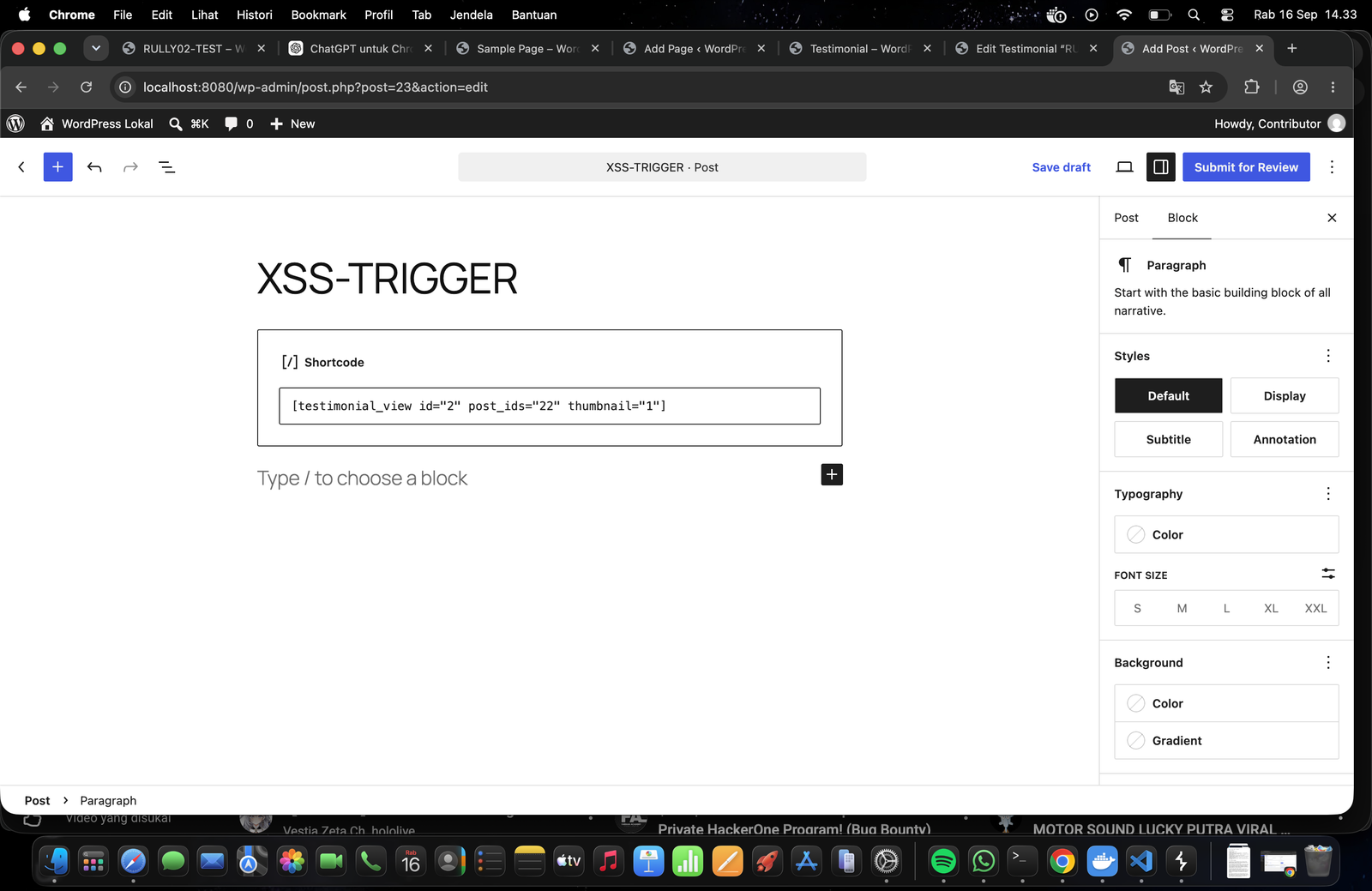
Create a normal WordPress post containing a Shortcode block. Replace the example IDs with the Display view ID and crafted testimonial ID from the test installation:
[testimonial_view id="2" post_ids="22" thumbnail="1"]
