 rovellipaolo/ninjadroid
Ninja Reverse Engineering on Android APK packages

NinjaDroid is a simple tool to reverse engineering Android APK packages.
Published at: https://snapcraft.io/ninjadroid
$ snap install ninjadroid --channel=beta



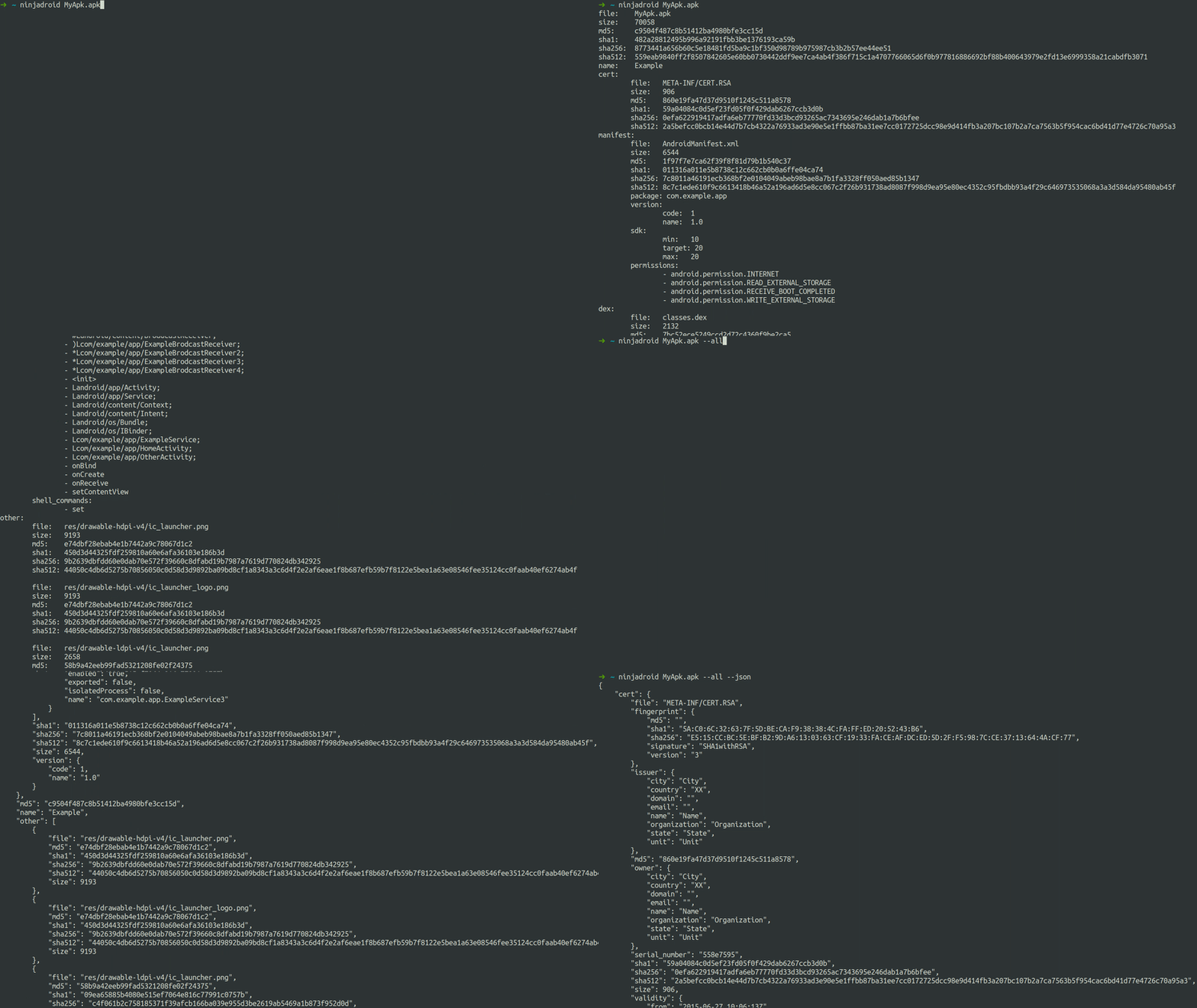
NinjaDroid uses AXMLParser together with a series of Python scripts based on aapt, keytool, string and such to extract a series of information from a given APK package, such as:
AndroidManifest.xml info: app name, package name, version, sdks, permissions, activities, services, broadcast-receivers, ...CERT.RSA/DSA digital certificate info: serial number, validity, fingerprint, issuer and ownerclasses.dex filesFurthermore, NinjaDroid uses apktool and dex2jar to extract and store:
AndroidManifest.xml file (thanks to apktool)CERT.RSA/DSA digital certificate fileclasses.dex filesdex2jar)apktool)assets/ and res/ folders together with their content (thanks to apktool)The first step is cloning the NinjaDroid repository, or downloading its source code.
$ git clone https://github.com/rovellipaolo/NinjaDroid
$ cd NinjaDroid
NinjaDroid has several ways to be executed: natively in your local environment, in Docker, as a Flatpak (experimental) and as a Snap (experimental).
To execute NinjaDroid in your local machine, you need to install Python 3.5 or higher, Java 8 or higher and binutils.
Optionally, if you have the Android SDK installed locally, you can use the SDK version of aapt instead of the included one. In order to do so, you need to change the aapt location in ninjadroid/aapt/Aapt.py (i.e. __AAPT_EXEC_PATH = "ninjadroid/aapt/aapt").
Just launch the following commands, which will install all the Python dependencies (making sure that aapt, apktool and dex2jar have executable permissions) and add a ninjadroid symlink to /usr/local/bin/.
$ make build-linux
$ make install
$ ninjadroid --help
Just launch the following commands, which will install all the needed Python dependencies (making sure that aapt, apktool and dex2jar have executable permissions) and add a ninjadroid symlink to /usr/local/bin/.
$ make build-macos
$ make install
$ ninjadroid --help
To execute NinjaDroid in Docker, you need Docker installed.
To build the Docker image, launch the following commands:
$ make build-docker
$ docker run --name ninjadroid ninjadroid:latest ninjadroid --help
Note that you need to bind the directory containing the target APK package to the Docker image:
$ mkdir apks
$ cp /path/to/your/package.apk apks/package.apk
$ docker run --name ninjadroid -it --rm -v $(pwd)/apks:/apks ninjadroid:latest ninjadroid /apks/package.apk -aj
And the same applies also to the output directory when using the -e/--extract option, to which you also need to grant permissions:
$ mkdir output
$ chmod 777
$ docker run --name ninjadroid --rm -v $(pwd)/apks:/apks -v $(pwd)/output:/output ninjadroid:latest ninjadroid /apks/package.apk -ae /output
To execute NinjaDroid as a Flatpak, you need Flatpak and flatpak-builder installed.
Just launch the following commands, which will install all the needed Flatpak dependencies:
$ make build-flatpak
$ flatpak-builder --run flatpak/build flatpak/com.github.rovellipaolo.NinjaDroid.yaml ninjadroid --help
NOTE: The -e/--extract option does not work correctly at present (see: https://github.com/rovellipaolo/NinjaDroid/issues/21).
To execute NinjaDroid as a Snap, you need Snap and snapcraft installed.
Just launch the following commands, which will install all the needed Snap dependencies:
$ make build-snap
$ make install-snap
$ ninjadroid --help
NOTE: The -e/--extract option does not work correctly when the snap is installed without using the --devmode option (see: https://github.com/rovellipaolo/NinjaDroid/issues/20).
Once you've configured it (see the "Installation" section), you can also run the tests and checkstyle as follows.
To run them in your local machine, launch the following commands:
$ make test
$ make regression
$ make checkstyle
You can also run the tests with coverage by launching the following command:
$ make test-coverage
And/or configure the checkstyle to run automatically at every git commit by launching the following command:
$ make install-githooks
To run them in Docker, launch the following commands:
$ make test-docker
$ make regression-docker
$ make checkstyle-docker
To run the regression tests in Flatpak, launch the following command:
$ make regression-flatpak
To run the regression tests in Snap, launch the following command:
$ make regression-snap
The following are examples of running NinjaDroid against the sample APK package.
