
Skip to content
KitploitKITPLOIT
ToolsExploitsBlog
Log in
Submit
ToolsExploitsBlog
Submit

Hacking, PenTest, and Cybersecurity Tools for Your Security Arsenal!

Kitploit is a directory of hacking, cybersecurity, and pentesting tools. Discover the latest project updates to find vulnerabilities, analyze systems, automate testing, and strengthen your security.

··Feeds·Contact·Privacy·© 2026 Kitploit

Tool Directory

Categories

View all categories
Loading categories
webstor — Enumerates all websites across an organization's networks via DNS zone transfers and masscan, stores responses, and enables querying for known vulnerable web technologies and custom regex patterns. | Kitploit
Tools/GitHubGitHub/rossgeerlings/webstor
ReconnaissanceVulnerability ScannersInformation GatheringWeb SecurityDNS Analysis
GitHubrossgeerlings/webstor

webstor

Enumerates all websites across an organization's networks via DNS zone transfers and masscan, stores responses, and enables querying for known vulnerable web technologies and custom regex patterns.

View Repository
15820102 years agoReviewed by Kitploit

Most Popular

View all →

Discover the most used tools by our community.

Explore all tools

Browse our collection of tools

View all tools →
Share


WebStor

Fast Identification of Vulnerable Web Technologies in your Organization

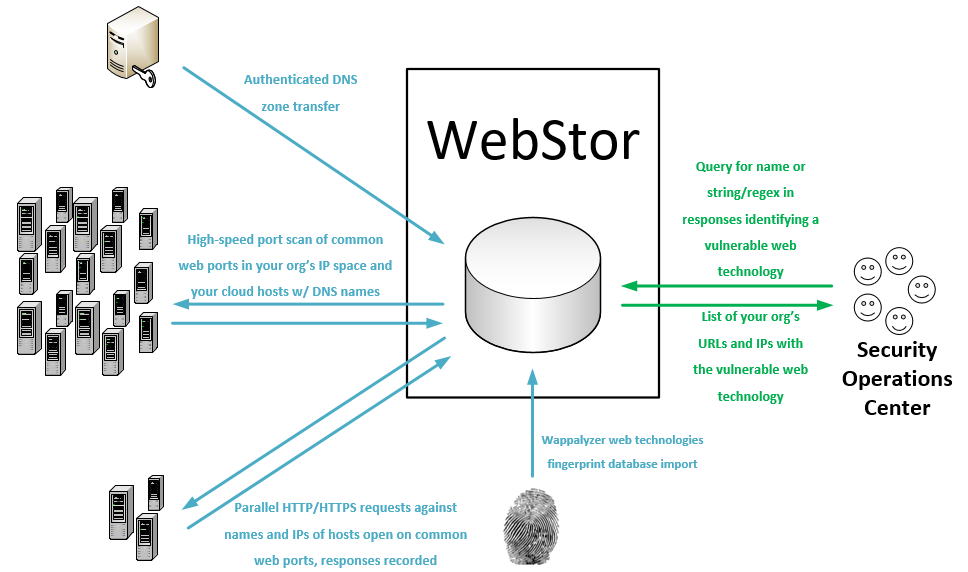
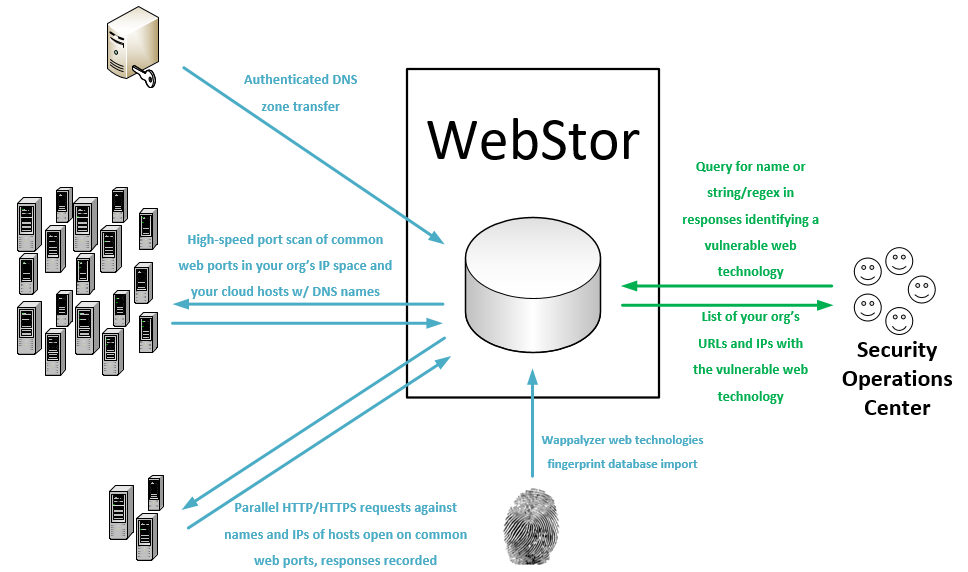
WebStor is a tool implemented in Python under the MIT license for quickly enumerating all websites across all of your organization's networks, storing their responses, and querying for known web technologies and versions, such as those with zero-day vulnerabilities. It is intended, in particular, to solve the unique problem presented in mid to large sized organizations with decentralized administration, wherein it can be almost impossible to track all of the web technologies deployed by various administrators distributed across different units and networks.

WebStor achieves its goal by performing the following actions:

  1. Performs DNS zone transfers to collect an organization's A and CNAME records.
  2. Uses Masscan to scan for open HTTP/HTTPS ports on an organization's net ranges, as well as any IP addresses outside those ranges that were present in the organization's A and CNAME records.
  3. Uses the Python requests library to collect all responses and store in a MariaDB database. All DNS names corresponding to an IP with open HTTP/HTTPS ports will be included in requests in addition to the IP address, so that sites using different headers will not cause a website to be missed.
  4. Downloads Wappalyzer web technologies database and stores in MariaDB database, enabling users to query the location(s) of a common web technology by name.
  5. Allows users to query the location(s) where custom regexes are contained within stored responses.

Supported platforms

WebStor presently will run on Linux systems. As it is written in Python, conversion to support Windows would be trivial and is likely to happen in the future.

Prerequisites

Applications

  • Masscan
    • If you will be using a cron job to update the database (typical), it is critical that you configure sudo nopasswd for any user executing Masscan scanning via WebStor.
  • MariaDB 10.0.5 or later
    • The default credentials tried by WebStor will be root and a blank password. See the "Secure options" section for configuring WebStor to use other usernames and passwords to connect to the database.

Python libraries

  • pip3 install dnspython
  • pip3 install beautifulsoup4
  • pip3 install mysql-connector-python
  • pip3 install js-regex
  • pip3 install gevent
  • pip3 install requests

Availability via PyPI

  • If you are simply looking to run WebStor and not edit it, you may install the prerequisite applications and then use 'sudo pip3 install webstor'.
  • After installing WebStor via PyPI, webstor will be in the path and can be run with at the command line regardless of working directory with 'webstor' instead of 'webstor.py', e.g. 'webstor -g'.

Basic usage

       webstor.py [-h] [--ADD-HTTP-PORT HTTPPORTTOADD] [--CLEAR-HTTP]
                  [--ADD-HTTPS-PORT HTTPSPORTTOADD] [--CLEAR-HTTPS]
                  [--ADD-CUSTOM-FINGERPRINT FINGERPRINT]
                  [--DELETE-CUSTOM-FINGERPRINT FINGERPRINTNAMETODELETE]
                  [--IMPORT-CUSTOM-FINGERPRINT IMPORTFINGERPRINTFILE]
                  [--CLEAR-CUSTOM-FINGERPRINTS] [--SHOW-CONFIG]
                  [--SHOW-CONFIG-FULL] [--RUN-MASSCAN]
                  [--SET-MASSCAN-RANGES SETSCANRANGES]
                  [--ADD-RANGE RANGETOADD] [--DELETE-RANGE RANGETODELETE]
                  [--IMPORT-MASSCAN-RANGES IMPORTSCANRANGES]
                  [--ADD-PATH PATHTOADD] [--DELETE-PATH PATHTODELETE]
                  [--CLEAR-PATHS] [--REFRESH-RESPONSES]
                  [--RESPONSES-ADD-FOR-PATH RESPONSESADDFORPATH]
                  [--SEARCH-PATTERN SEARCHPATTERN]
                  [--SEARCH-CUSTOM-FINGERPRINT SEARCHFINGERPRINT]
                  [--SEARCH-WAPPALYZER SEARCHWAPPALYZER] [--NO-TSIG-KEY]
                  [--TSIG-KEY-IMPORT IMPORTTSIGFILE]
                  [--TSIG-KEY-REPLACE REPLACEMENTTSIGFILE]
                  [--DELETE-TSIG TSIGTODELETE]
                  [--USE-TSIG-FILE-ONLY USETSIGFILEONLY]
                  [--DOWNLOAD-NEW-WAPPALYZER] [--LIST-WAPPALYZER-TECH-NAMES]
                  [--ZONE-XFER] [--ADD-DOMAIN DOMAINDETAILS]
                  [--DELETE-DOMAIN DOMAINTODELETE]
                  [--IMPORT-ZONE-FILE IMPORTZONEFILE] [--CLEAR-DOMAINS]
                  [--LIST-DOMAINS] [--LIST-OUTSIDE] [--SQL-CREDS SQLCREDSFILE]
Download Tool