 rodricios/wxpath
wxpath - declarative web crawling with XPath; a Web Query Language (WQL)


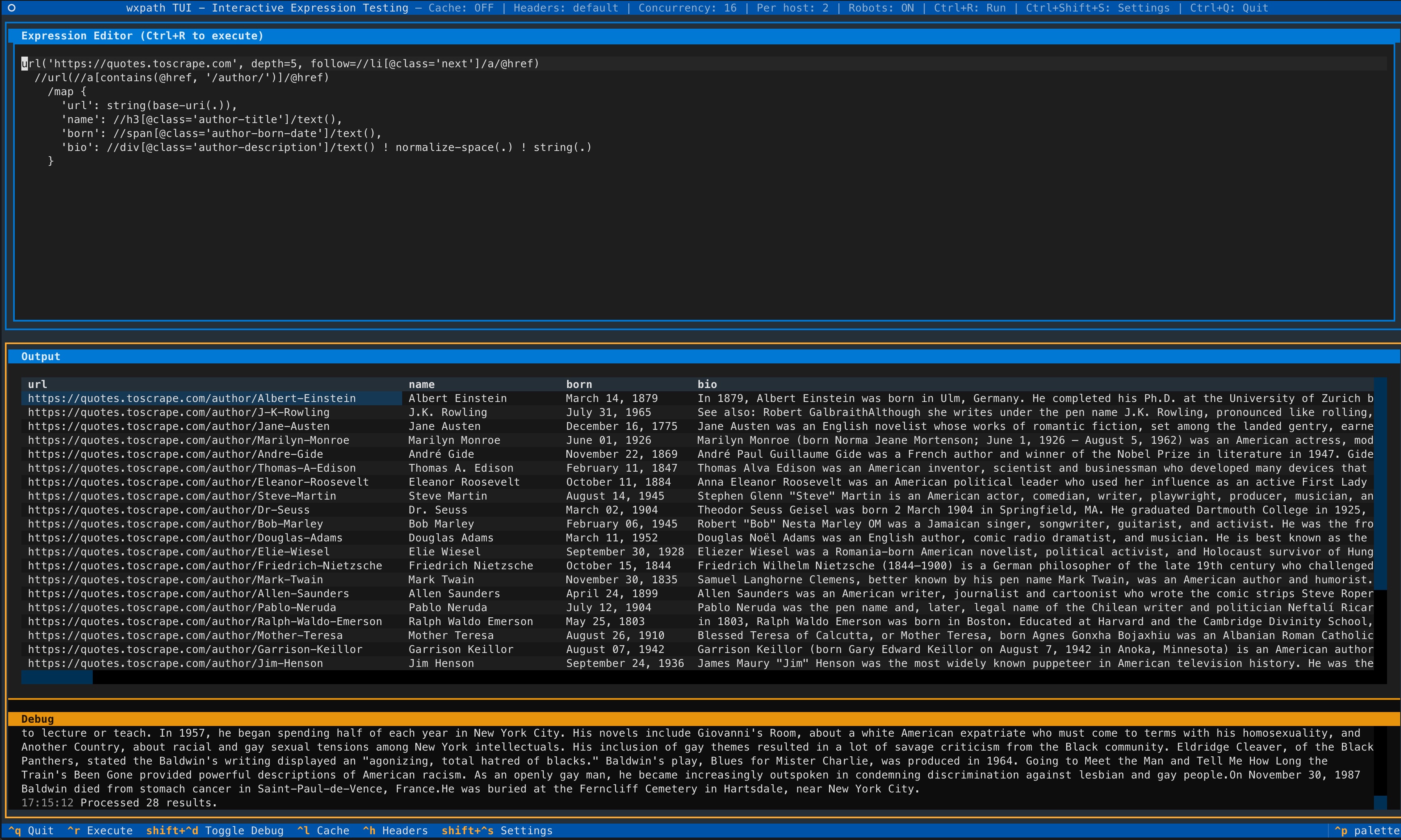
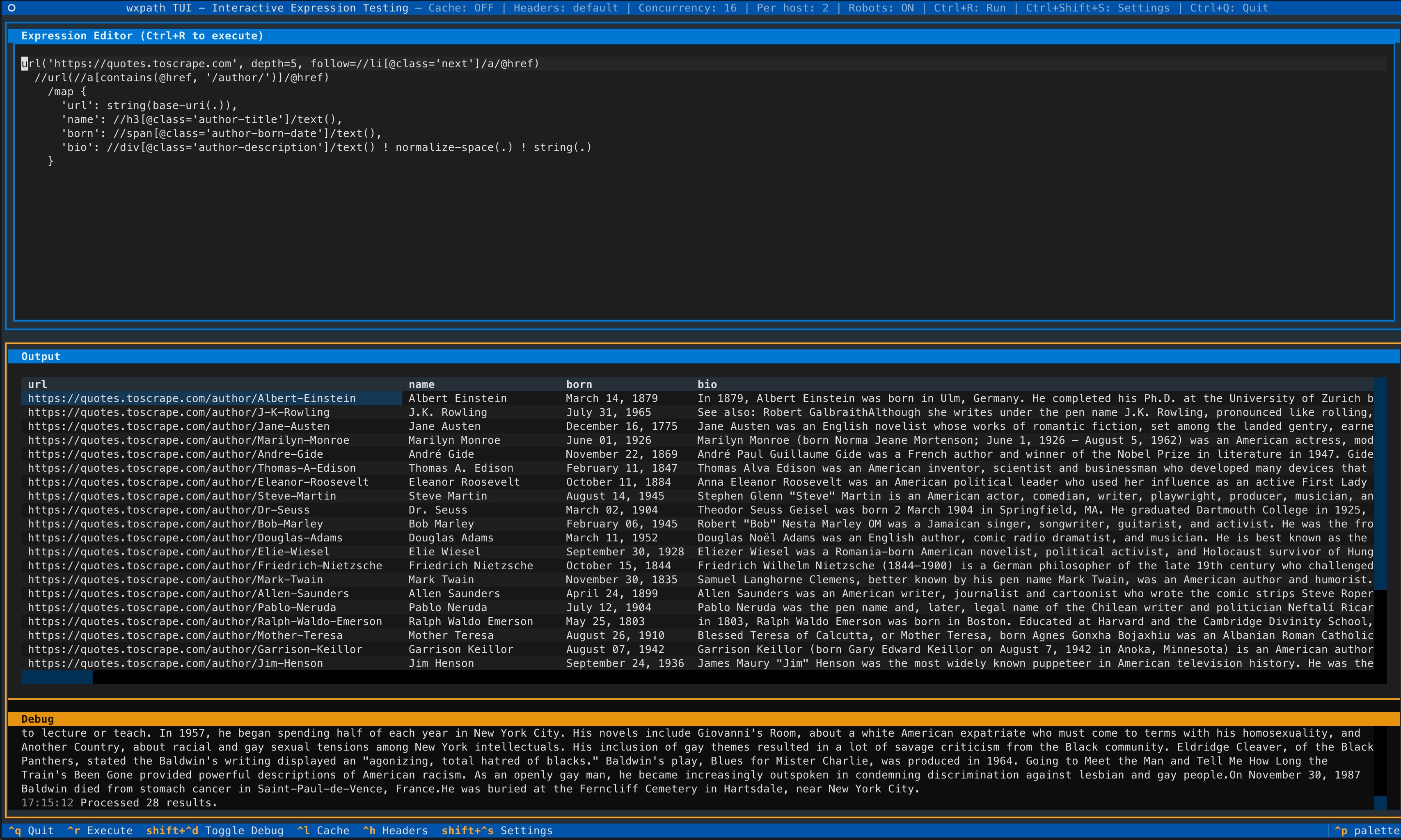
NEW: TUI - Interactive terminal interface (powered by Textual) for testing wxpath expressions and exporting data.
Requires Python 3.10+.
pip install wxpath
# For TUI support:
pip install "wxpath[tui]"
# Immediately launch the TUI via uv:
uvx --from "wxpath[tui]" wxpath-tui
wxpath is a declarative web crawler where traversal is expressed directly in XPath. Instead of writing imperative crawl loops, wxpath lets you describe what to follow and what to extract in a single expression. wxpath executes that expression concurrently, breadth-first-ish, and streams results as they are discovered.
This expression fetches a page, extracts links, and streams them concurrently - no crawl loop required:
import wxpath

expr = "url('https://quotes.toscrape.com')//a/@href"

for link in wxpath.wxpath_async_blocking_iter(expr):
    print(link)
By introducing the url(...) operator and the /// syntax, wxpath's engine is able to perform recursive (or paginated) web crawling and extraction:
import wxpath

path_expr = """
url('https://quotes.toscrape.com')
  ///url(//a/@href)
    //a/@href
"""

for item in wxpath.wxpath_async_blocking_iter(path_expr, max_depth=1):
    print(item)
Most web scrapers force you to write crawl control flow first, and extraction second.
wxpath converges those two steps into one:
Extract clean, structured JSON hierarchies directly from the graph - feed your LLMs signal, not noise. Refer to LangChain Integration for more details.
wxpath is deterministic (read: not powered by LLMs). While we can't guarantee the network is stable, we can guarantee the traversal is.
Documentation is now available here.
url(...) and ///url(...) Explainedimport wxpath
from wxpath.settings import CRAWLER_SETTINGS
# Custom headers for politeness; necessary for some sites (e.g., Wikipedia)
CRAWLER_SETTINGS.headers = {'User-Agent': 'my-app/0.4.0 (contact: [email protected])'}
# Crawl, extract fields, build a knowledge graph
path_expr = """
url('https://en.wikipedia.org/wiki/Expression_language')
///url(
//main//a/@href[
starts-with(., '/wiki/') and not(contains(., ':'))
]
)
/map{
'title': (//span[contains(@class, "mw-page-title-main")]/text())[1] ! string(.),
'url': string(base-uri(.)),
'short_description': //div[contains(@class, 'shortdescription')]/text() ! string(.),
'forward_links': //div[@id="mw-content-text"]//a/@href ! string(.)
}
"""
for item in wxpath.wxpath_async_blocking_iter(path_expr, max_depth=1):
print(item)
Note: Some sites (including Wikipedia) may block requests without proper headers.
See Advanced: Engine & Crawler Configuration to set a custom User-Agent.
The above expression does the following:
https://en.wikipedia.org/wiki/Expression_language.<main> section that start with /wiki/ and do not contain a colon (:).url(...) and ///url(...) Explainedurl(...) is a custom operator that fetches the content of the user-specified or internally generated URL and returns it as an lxml.html.HtmlElement for further XPath processing.///url(...) indicates a deep crawl. It tells the runtime engine to continue following links up to the specified max_depth. Unlike repeated url() hops, it allows a single expression to describe deeper graph exploration. WARNING: Use with caution and constraints (via max_depth or XPath predicates) to avoid traversal explosion.See DESIGN.md for details of the language design. You will see the core concepts and design the language from the ground up.
wxpath evaluates an expression as a list of traversal and extraction steps (internally referred to as Segments).
url(...) creates crawl tasks either statically (via a fixed URL) or dynamically (via a URL derived from the XPath expression). URLs are deduplicated globally, on a best-effort basis - not per-depth.
XPath segments operate on fetched documents (fetched via the immediately preceding url(...) operations).
///url(...) indicates deep crawling - it proceeds breadth-first-ish up to max_depth.
Results are yielded as soon as they are ready.
wxpath is asyncio/aiohttp-first, providing an asynchronous API for crawling and extracting data.
import asyncio
from wxpath import wxpath_async

items = []

async def main():
    path_expr = "url('https://en.wikipedia.org/wiki/Expression_language')///url(//@href[starts-with(., '/wiki/')])//a/@href"
    async for item in wxpath_async(path_expr, max_depth=1):
        items.append(item)

asyncio.run(main())
wxpath also provides an asyncio-in-sync API, allowing you to crawl multiple pages concurrently while maintaining the simplicity of synchronous code. This is particularly useful for crawls in strictly synchronous execution environments (i.e., not inside an asyncio event loop) where performance is a concern.
from wxpath import wxpath_async_blocking_iter

path_expr = "url('https://en.wikipedia.org/wiki/Expression_language')///url(//@href[starts-with(., '/wiki/')])//a/@href"
items = list(wxpath_async_blocking_iter(path_expr, max_depth=1))
wxpath respects robots.txt by default via the WXPathEngine(..., robotstxt=True) constructor.
The wxpath Python API yields structured objects.
Depending on the expression, results may include:
